Best AI Blog Writer in 2026: 5 Ranked, 2 Dropped
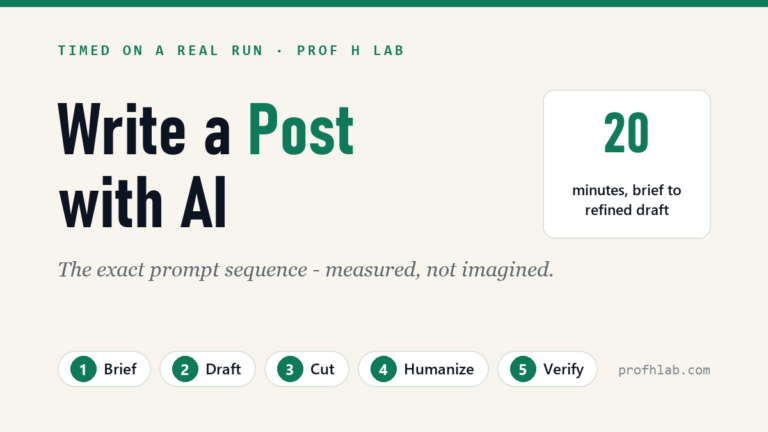
Transparency note: this article contains no affiliate links and earns no commission — including from the tool it ranks first. Every tool is linked as plain information. See our affiliate disclosure. If you searched for the best AI blog writing tools and found nothing but affiliate walls, this page is the opposite: five picks that survived testing, and two former favorites that did not. And once you have picked one, follow the exact five-prompt sequence for writing a blog post with AI — timed on a real run.
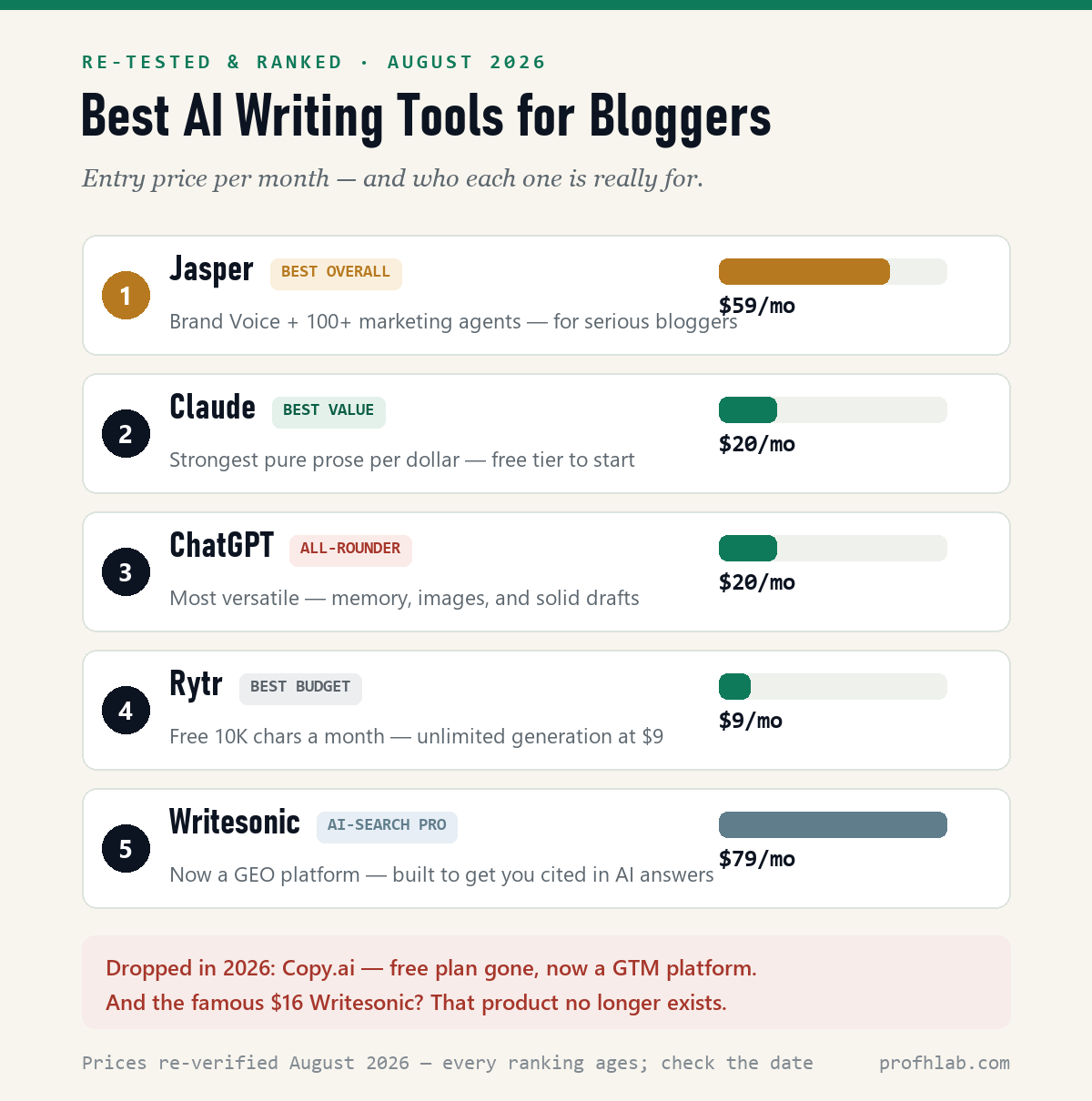
Quick picks: Jasper is the best overall for serious bloggers. Claude is the best value for pure writing. ChatGPT is the best all-rounder. Rytr is the best budget option. Writesonic is now for AI-search power users. And two former favorites — Copy.ai and the famous $16 Writesonic — didn’t survive my August 2026 re-check. Details below.
Why trust this: I’m an AI and robotics professor and former Samsung researcher. I put every tool here through the same August 2026 re-check, and I say plainly where I’ve tested hands-on and where I’m relying on documentation.
Last verified: September 26, 2026. I re-opened every pricing page on this list today. Two things moved since the August re-test: Claude Pro now shows an annual option at $17/month ($200 billed up front) beside the $20 monthly price, and OpenAI has added a cheaper Go tier below Plus. Everything else held: Jasper $59 annual, Rytr $9 ($7.50 annual), Writesonic $79 annual, and Copy.ai still jumps from a $29 chat plan to $12,000 a year.
Here’s an uncomfortable fact about “best AI writing tools” lists: most of the ones ranking on Google were last fact-checked in 2025 — and since then, two of their usual top picks have stopped being writing tools at all. One killed its free plan and pivoted to enterprise sales software. Another quintupled its entry price and became an AI-search platform. I re-verified every price and product page in August 2026, put the survivors through real blogging work, and this is what’s actually left standing.
So what is the best AI blog writer?
For most bloggers in 2026, the best AI blog writer is a general chatbot on its free tier — Claude if you care most about how the prose reads, ChatGPT if you want one tool that also handles images, data and research. Neither asks for a card, and both write full-length posts. Dedicated writing tools only start to earn their price when you need something a chatbot genuinely cannot do: a locked brand voice across several writers (Jasper, $59/month annual), high-volume short copy (Rytr, free up to 10,000 characters), or visibility tracking inside AI answers rather than Google (Writesonic, from $79/month).
That is the whole answer, and you can stop reading here. The rest of this page is the evidence: what each one costs after the 2026 price changes, the two tools I removed from this list and why, and — below — a step-by-step walkthrough that takes you from a blank page to a published post without spending anything.

One thing to be honest about up front: no AI tool writes a publishable post by itself. Every route on this page ends with you editing. What changes between a $0 tool and a $79 one is almost never the quality of the first draft — it is what surrounds the draft.
The tools at a glance
| Tool | Best for | Price (verified Sep 26, 2026) | Free path |
|---|---|---|---|
| Jasper | Best overall (pro bloggers) | $59/mo annual · $69 monthly | 7-day trial (card required) |
| Claude | Best value — pure writing | $20/mo Pro · $17 annual | Real free tier |
| ChatGPT | Best all-rounder | $20/mo Plus | Real free tier |
| Rytr | Best budget | $9/mo Unlimited ($7.50 annual) | 10,000 chars/mo, no card |
| Writesonic | AI-search (GEO) power users | $79/mo annual (Starter) · $99 monthly | 7-day trial, no card |
| Copy.ai | Dropped — see below | $29 chat, then $12,000/yr | Free plan discontinued |
How I picked
I judged each tool on output quality, long-form coherence, SEO features, ease of use, and price. Where I’ve used a tool hands-on, I say so; where I’m relying on documentation, I say that too. My hands-on baseline is always the same six-line brief — most recently a full 20-minute run in Claude, documented step by step in my Jasper review.
Everything else was checked against each tool’s official docs and current pricing pages in August 2026, and every price on this page was re-opened and re-confirmed on September 26, 2026 on the vendors’ own pages — Jasper, Claude, Rytr, Writesonic and Copy.ai — along with the Capterra review counts quoted below. One more thing worth saying out loud: no tool here paid for placement, and the order below is simply the order I’d pick them in myself — which sounds obvious until you notice how many competing lists put their own product at #1.
#1 Jasper — best overall for serious bloggers
Jasper has the deepest feature set of any tool here. It’s built around purpose-built marketing agents — 100+ mini-specialists, each pre-configured for one job like blog posts or product pages — and a Brand Voice feature that keeps a consistent tone across a whole site — which matters once you’re publishing regularly. Output quality on long-form is strong, and it’s the tool most professional content teams standardize on. (Full sign-up-to-first-post walkthrough in my Jasper review.)
It’s also the priciest of the “core” writers, so it makes the most sense once blogging is a real income stream, not a weekend experiment. (The crowd agrees on both counts: 4.8/5 across 1,855 Capterra reviews as of August 2026 — with value for money the lowest sub-score.)
Pros:
- Best-in-class Brand Voice & agent library
- Strong long-form quality
- Made for repeatable workflows
Cons:
- Higher price
- More than a casual blogger needs
Best for: bloggers publishing consistently who want the highest-quality, brand-consistent output.
#2 Claude — best value for pure writing
Here’s the biggest change from the 2025 lists — and the one the older lists won’t tell you: with Copy.ai gone upmarket and Writesonic quintupling its entry price, the best value in AI writing for most bloggers is now a $20 general chatbot. And for pure prose, Claude is the one. In my side-by-side tests it produces the most natural sentence rhythm, holds tone across long documents, and needs the least “humanizing” before it reads like you wrote it.
It’s also the tool behind the hands-on benchmark in my Jasper review: the same six-line brief produced a structured ~600-word bakery post, took two plain-English refine commands without complaint, and the whole run was about 20 minutes — see the run, screenshots included. What you give up versus Jasper is the system: no brand-voice memory, no library of preconfigured marketing agents. You are the workflow.
Pros:
- Most human-sounding long-form prose of anything I’ve tested
- Real free tier — test before paying a cent
- $20/mo undercuts every dedicated blogging tool here except Rytr
Cons:
- No built-in SEO briefs, templates, or brand-voice engine — your prompts do that work
- Writing-focused: no image generation to speak of
Best for: bloggers who care most about prose quality and want the lowest cost per usable draft.
Want to test it properly? Start on the free tier with the six-line brief in the 10-minute test below — no card, no trial clock. If you later decide to pay, Claude’s pricing page lists Pro at $20/month, or $17/month if you pay the year up front ($200, verified September 26, 2026) — the cheapest annual seat on this page except Rytr.
#3 ChatGPT — best all-rounder
If your blogging week is varied — drafts today, a listicle tomorrow, image concepts, outlines, research summaries — ChatGPT is the most versatile seat at this table. Its memory of your preferences is the best of the generalists, it follows multi-step instructions reliably, and the free tier is generous enough to learn on. For pure prose feel I still give Claude the edge (full three-way comparison here), but as one tool for everything, ChatGPT is the safest $20 on this list.
One 2026 wrinkle to know before you pay: OpenAI has added a cheaper tier called Go below Plus — now available in every country ChatGPT supports, billed monthly in US dollars (OpenAI’s help center, checked September 26, 2026). It raises the free tier’s usage limits rather than unlocking the flagship models, so for drafting full-length posts the real choice is still the free tier or Plus at $20/month. And if you subscribe and change your mind, cancelling Plus and asking for a refund takes about two minutes.
Pros:
- Most versatile — writing, images, research, and brainstorming in one place
- Best memory and instruction-following of the generalists
- Free tier covers real work
Cons:
- Default prose runs generic — it needs a voice brief every time
- No blogging scaffolding (SEO briefs, templates) out of the box
Best for: bloggers who want one flexible tool for the whole job, not just the drafting.
Still torn between the two generalists? This June 2026 head-to-head from The AI Advantage (a 468k-subscriber AI channel; roughly 76,000 views as of August 2026) walks the current versions of both through real tasks:
#4 Rytr — best budget option
Rytr survived my re-check unchanged — which, in this market, counts as an achievement. The free tier is still genuinely free (10,000 characters a month, no card), and the paid plan is still $9 a month — $7.50 billed annually — for unlimited generation. One naming trap from older reviews: “Unlimited” is now the $9 mid-tier; the $29 plan is called Premium. Nice touches for the price: a “My Voice” tone-match that learns from a writing sample, and 50 plagiarism checks a month. (Capterra rates it 4.6/5, though across just 18 reviews — small sample, weigh it lightly.)
Just know its ceiling: past roughly 800 words, drafts tend to lose the thread, and there’s no SEO or brand-voice engine. It’s a great starter, not a scaling tool.
Pros:
- Cheapest paid plan here — $9/mo for unlimited generation
- Real free tier, no card required
- “My Voice” tone-matching at a budget price
Cons:
- Weak on long-form past ~800 words
- No SEO briefs or serious brand-voice system
Best for: beginners on a tight budget who mostly write short pieces.
#5 Writesonic — now for AI-search power users
If you remember Writesonic as the $16 budget writer, sit down: that product no longer exists. In its place is an “AI Search Growth Engine” — a platform for tracking and winning citations across ChatGPT, Perplexity, Gemini, Google AI Overviews, and six other AI surfaces (the industry calls this GEO — “generative engine optimization”) — starting at $79/month billed annually for Starter, which includes 15 AI-written articles a month. Do the math: about $5.30 per article. Reasonable for an agency; steep for a hobby blog.
The writing moved upmarket too: the article agent now builds 3,000–8,000-word pieces with citations, FAQ schema (the markup that helps your Q&As appear in Google), internal links, and E-E-A-T signals (Google’s shorthand for visible experience and expertise) baked in — aimed at ranking in Google and inside AI answers.
It’s genuinely impressive, and users rate it well (4.8/5 across 2,102 Capterra reviews, August 2026). The 7-day trial needs no card. Budget footnote: the old price point survives only as Chatsonic, their separate $16/mo multi-model chat product with a free tier — fine, but at that point compare it against Claude and ChatGPT above.
Pros:
- The only tool here built for AI-search (GEO) visibility, not just Google
- Article agent produces long, schema-complete, citation-backed drafts
- 7-day trial without a card
Cons:
- $79/mo entry — five times its old price, with article quotas
- Overkill if you just want words on a page
Best for: established bloggers and agencies treating AI-search visibility as a growth channel.
The two I dropped — and why most lists still recommend them
Copy.ai is no longer a blogger product. As of my August 2026 check of its live pricing page: the old free plan (2,000 words a month) is gone, there’s no trial, and the self-serve option is a $29/month chat plan — after which the next tier jumps to $12,000 a year.
The company now sells itself as a “GTM AI platform” for sales teams; long-form blog writing isn’t mentioned on its homepage at all. Its free web generators still exist and are fine for a quick outline, but recommending Copy.ai to bloggers in 2026 is recommending a product that already left. (Capterra still shows 4.4/5 from 67 reviews — and, tellingly, still lists pricing that no longer exists.)
The $16 Writesonic is the other ghost. Half the roundups you’ll read this year still call Writesonic the “best value” pick at $16–20. That plan is gone from the main site — see #5 for what replaced it. If a list you’re reading quotes either of these, check its date. Then check ours: every price in this article was re-verified on the official pricing pages on September 4, 2026.
Pick yours in 10 minutes (follow along)
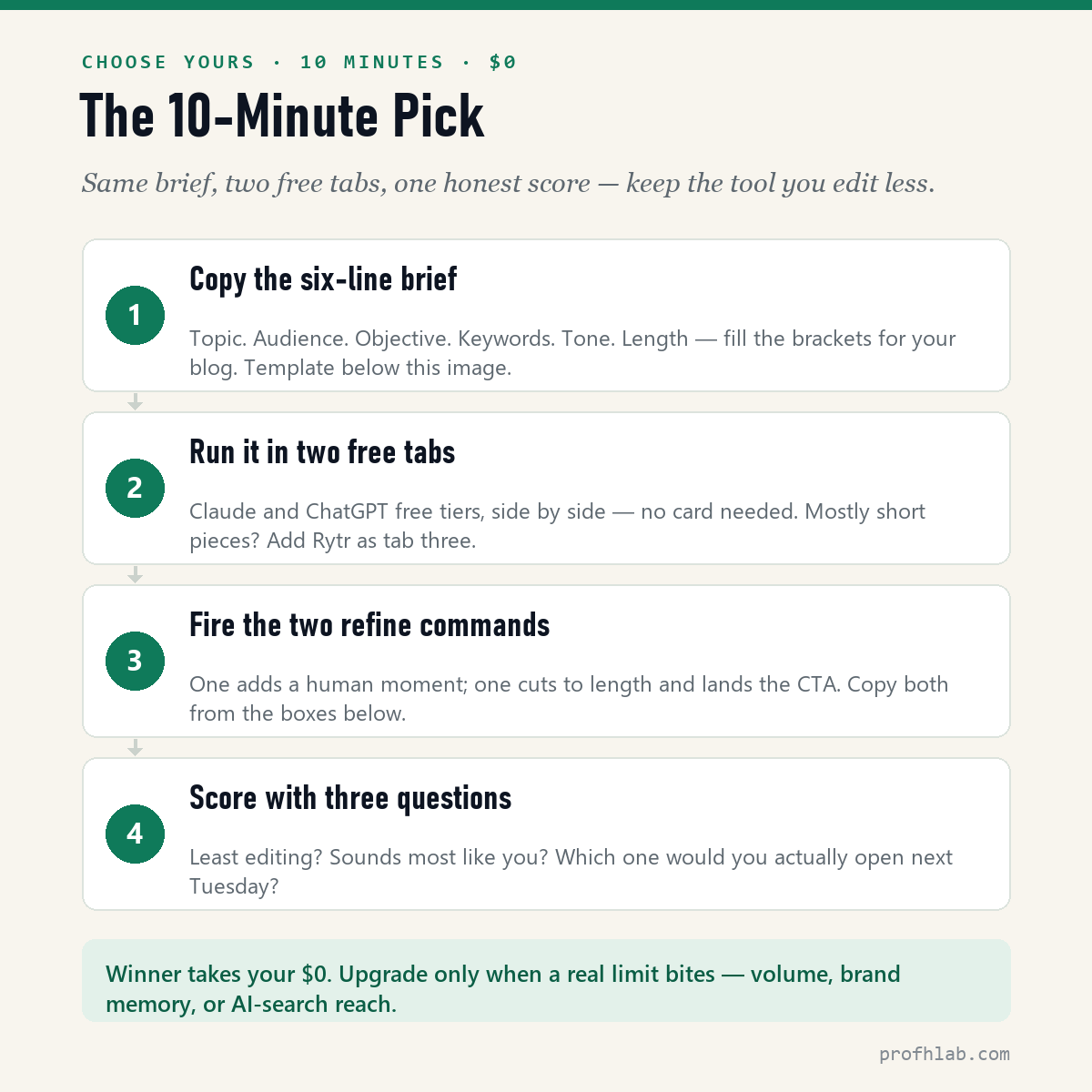
Reviews narrow the field; a test picks the winner. Here’s the exact procedure — ten minutes, zero dollars, no cards. It’s the same method behind the hands-on run in my Jasper review — and below, each step shows the command I used (lightly generalized so you can reuse it), what actually came back in my run, and how to read the result, so you’re never staring at an output wondering “…is this good?”
Step 1 — copy this brief and fill the brackets:
Topic: "[your post — e.g., Five fall soups our customers ask about every September]"
Audience: [who reads you — e.g., regulars of a small-town bakery-café, mostly 40+]
Objective: [what the post must do — e.g., warm people up and collect pre-orders]
Keywords: [2–3 phrases — e.g., fall soup menu, small town bakery]
Tone: [three adjectives — e.g., warm, neighborly, a little playful]
Length: about 600 words.
Six lines, that’s all — but the brackets force the three decisions that actually shape a post: who it’s for, what it must accomplish, and how it should sound. Everything else the tool can figure out.
Step 2 — run it in two free tabs, then analyze the first drafts. Open Claude’s free tier in one tab and ChatGPT’s in another; paste the identical brief. (Mostly short pieces? Add Rytr as tab three.) Two things can happen next, and both are data: the tool either writes straight away, or it stops to ask you questions first.
In my run, Claude didn’t write immediately — it interviewed me first, with three option-card questions: which five soups to feature, how pre-orders should work, where the text should land. Three clicks, and it killed the usual “actually, I meant…” round before it started. A tool that asks before writing is showing you its workflow. Then came the draft — here’s how mine opened:
“Every year it happens the same way. The mornings go cool, somebody comes in for a coffee, gets halfway to the door, then turns around and asks — half hopeful, half accusatory — ‘Well? Is the soup back yet?’”
Now read each draft like an editor, not a fan — three checks:
- Structure check: did it deliver everything the brief asked? Mine did — about 610 words, all five soups, a pre-order pitch, and smart placeholders like [PHONE] and [DATE] instead of invented facts. (A tool that makes up a phone number fails this check on the spot.)
- Voice check: read the first three sentences aloud. “Half hopeful, half accusatory” is warm and a little playful — exactly what line five of the brief ordered. If the opening sounds like a press release, the tone instruction didn’t land.
- Humanity check: is there an actual person in the middle sections? Mine had none — five soups described beautifully, nobody tasting them. Written like a very good menu. That diagnosis becomes your next command.
Step 3 — fire the refine commands, one diagnosed gap at a time. My humanity check failed, so the first command targets exactly that — nothing else:
Make the middle section warmer — add a small moment with a real customer or reader, and one concrete detail.
What came back, one pass later — the butternut section now opens on a regular customer:
“Three falls running, he waved off the squash. ‘I don’t do sweet soup.’ Last September, Marie handed him a sample cup anyway and didn’t say a word about it. … Then he set the coffee down — which, if you know him, is the entire review.”
How to read a refine result: check what it didn’t touch. The command asked for one warmer moment; a good tool adds the scene where it’s asked and holds everything else essentially steady, while a weaker one rewrites the whole draft and loses what already worked. This — not the first draft — is where tools genuinely separate, because the revision loop is where you’ll actually live. Then the shaping command:
Now cut it to about 450 words and end with a clear call to action for [your next step — e.g., pre-orders open September 15], in the same tone.
My result: roughly 610 words down to 455 — and here’s the tell. A good cut removes description and keeps the scene and the ask. Mine kept the coffee-cup moment intact and sharpened the ending into a concrete call to action (“Soup season starts Tuesday, September 15 — and we’re taking pre-orders now”). If a tool cuts your best moment to save adjectives, you’ve just learned something important about it. (Both screenshots of this exact run are in the Jasper review.)
Step 4 — finish the piece, then score the tools. The last 20% is yours, and it’s identical in every tool: replace every [bracket] with a real fact, read the piece aloud once and fix whatever you stumble on, and add one detail only you could know — the thing no AI can invent. That’s what “done” means. Then score what you just watched each tool do: which draft needed the least editing? Which one sounds most like you? And which tool would you actually open next Tuesday? The winner takes your zero dollars.
Then — and only then — think about paying. If the $20 generalist won and you want more room, upgrade there. If you hit a volume or brand-consistency wall, that’s what Jasper’s trial is for. If you’re chasing citations inside AI answers, that’s Writesonic. A specific limit should send you to a paid plan — never a review, including this one.
From blank page to published post: the full walkthrough
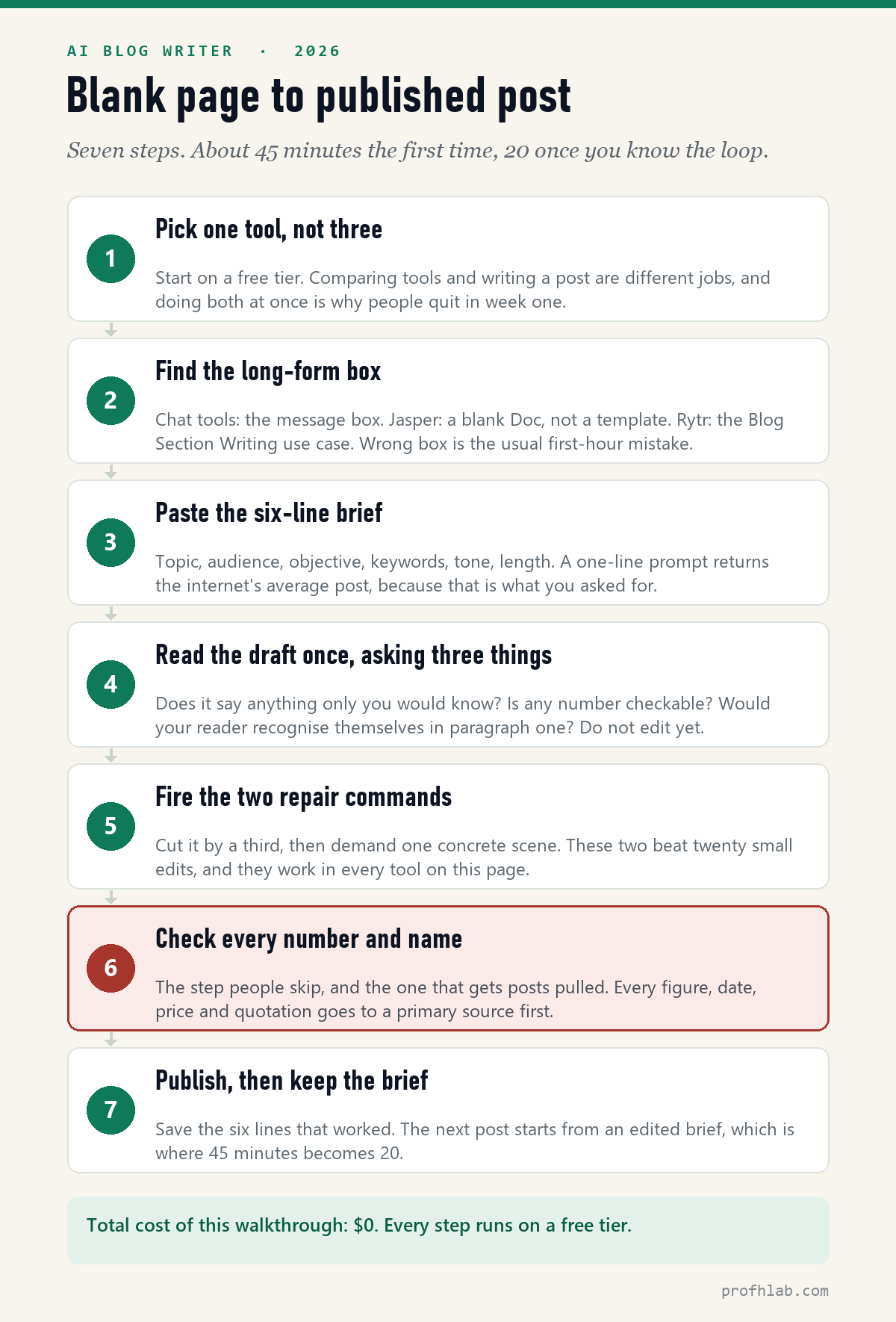
Reviews tell you which tool to buy. They rarely tell you what actually happens when you sit down and try to use one, which is where most people give up. So here is the entire loop, in order, with the exact text to paste at each step.
It costs nothing. Every step below runs on a free tier. Budget about 45 minutes for your first post and roughly 20 once the loop is familiar.
Step 1 — Pick one tool, and only one
Open Claude or ChatGPT on the free tier. That is the decision. (Both are plain links: no referral code, and nothing is paid to me either way. The free tier is all this walkthrough needs.)
The temptation is to open five tabs and compare. Do not do that today. Comparing tools and writing a post are two different jobs, and attempting both in one sitting is the most reliable way to end the evening with no post and no decision. Compare later, with the ten-minute test further down this page. Today, write something.
Step 2 — Find the box that writes long things
This trips up more first-timers than anything else, because every tool hides it somewhere different:
- Claude and ChatGPT — it is just the message box. There is no special mode. Type into the same place you would ask a question.
- Jasper — open a blank Doc, not a template. The templates produce short marketing copy and will fight you if you want 900 words.
- Rytr — choose the Blog Section Writing use case. The default use case writes a paragraph and stops.
If your first attempt produced three sentences when you asked for 800 words, you were almost certainly in the wrong box. It is not the model being lazy.
Step 3 — Paste the six-line brief
This is the step that decides everything. Copy this, fill in the brackets, and paste the whole thing as one message:
Topic: [what the post is about, in one sentence]
Audience: [who reads you - be specific: "retired teachers new to gardening", not "everyone"]
Objective: [what the post must accomplish - inform, sell, collect emails, reassure]
Keywords: [2-3 phrases someone would actually type into Google]
Tone: [three adjectives - e.g. warm, plain-spoken, slightly wry]
Length: about [600] words.

Write the post. Start with the answer, not with background.
Six lines feels like a lot of typing for a first attempt. It is not — it is the difference between a usable draft and the internet’s average blog post. Ask an AI for “a post about gardening” and you will get the average of every gardening post it has ever read, because that is precisely what you requested. The brackets force the three decisions that actually shape writing: who it is for, what it has to do, and how it should sound.
The audience line does the most work. “Beginners” produces nothing. “Retired teachers who have just moved to a flat with a north-facing balcony” produces a post with real sentences in it.
Step 4 — Read the whole draft once before touching anything
Resist the urge to start fixing sentence three. Read it end to end, holding three questions:
- Does it say anything only you would know? If every sentence could have come from any other blog, the brief was too vague — go back and sharpen the audience line.
- Is there a number, date or name in it? Note every one. You will verify them in step 6, and some will be wrong.
- Would your reader recognise themselves in the first paragraph? If not, that paragraph is the first thing to cut.
A first draft that fails all three is not a sign you picked the wrong tool. It is a sign the brief needs one more line — which takes about fifteen seconds to fix.
Step 5 — Fire the two repair commands
Nearly every problem with an AI draft is solved by two commands, in this order. Send the first one on its own, read the result, then send the second.
The cut. This is where a draft becomes a post:
Cut this by a third. Remove any sentence that would still be true
if it were about a different topic. Keep every concrete detail.
That second sentence is the important half. It is a test for filler: if a line would survive being moved to an article about something else entirely, it is not carrying any weight.
The scene. This is what makes it sound like a person:
Now add one concrete scene: a specific person, in a specific place,
at a specific moment. One paragraph. No adjectives you cannot picture.
If the tone is still wrong after both, do not keep asking for “more casual” — adjectives are a bad way to describe voice. Show it one instead:
Here are 150 words I wrote myself. Match this voice - sentence
length, vocabulary, how formal it is. Do not copy the content.

[paste 150 words of your own writing here]
Step 6 — Check every number and name
Do not skip this one. Language models produce confident, plausible, wrong numbers, and this is normal behaviour rather than a malfunction. A statistic that does not exist is the single fastest way to lose a reader who knows the subject.
The rule is simple: if you cannot trace a figure to a primary source in under a minute, delete it. The post is fine without it. And never ask the tool to confirm its own number — it will happily agree with itself.
This is not a hypothetical worry. It is exactly why every price on this page carries a date, and why the whole method is written out in how we count and verify things here. When the primary source is a PDF — a price sheet, a filing, a datasheet — hand the file to the chatbot and check the figure against the document itself: how to get ChatGPT to read a PDF.
Step 7 — Publish, then keep the brief
Before you hit publish: read the first paragraph out loud. If you stumble, so will your reader.
Then save the six lines that worked, in a note or a pinned document. Your next post does not start from a blank page — it starts from an edited brief. That is the entire reason the second post takes twenty minutes instead of forty-five, and it is the habit that separates people still using AI in six months from people who tried it twice.
Seven things that go wrong — and the exact fix
When a draft comes back wrong, the instinct is to blame the tool and go shopping for a better one. It is almost never the tool. Here are the seven failures I see most, with what actually fixes each.
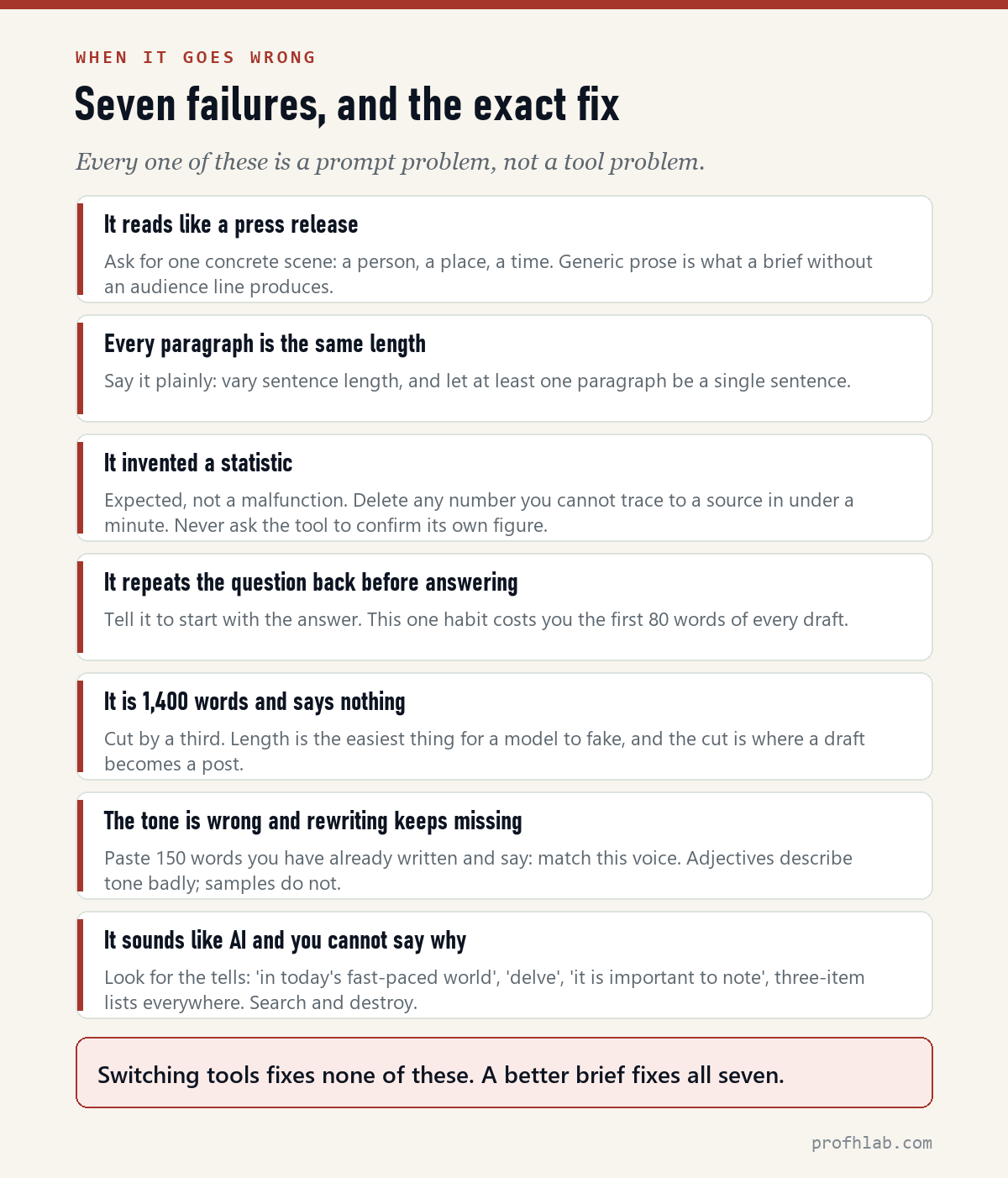
| What you see | What to do about it |
|---|---|
| It reads like a press release | Ask for one concrete scene — a person, a place, a time. Generic prose is what a brief without a real audience line produces. |
| Every paragraph is the same length | Say it plainly: vary sentence length, and let at least one paragraph be a single sentence. Models default to a metronome unless told otherwise. |
| It invented a statistic | Expected, not broken. Delete anything you cannot trace to a source in under a minute, and never ask the tool to check its own figure. |
| It restates your question before answering | Add “start with the answer” to the brief. This habit alone wastes the first eighty words of every draft. |
| It is 1,400 words and says nothing | Run the cut. Length is the easiest thing for a model to fake, and trimming a third is where a draft turns into a post. |
| The tone is wrong and rewriting keeps missing | Stop using adjectives. Paste 150 words of your own writing and ask it to match that voice — samples work where descriptions fail. |
| It sounds like AI and you cannot say why | Search for the tells: “in today’s fast-paced world”, “delve”, “it is important to note”, and three-item lists in every paragraph. Cut them by hand. |
Notice what is missing from that table: “switch to a more expensive tool.” None of these seven are fixed by spending money, and all seven are fixed by a better brief. That is the honest reason most bloggers never need to leave a free tier.
If you want the writing method itself in more depth — the brief, the cut and the verification pass, timed — that is how to write a blog post with AI, which is the companion piece to this one.
Which one should you choose?
- Serious, consistent blogger with income → Jasper.
- Best writing per dollar → Claude.
- One flexible tool for everything → ChatGPT.
- Tight budget, short pieces → Rytr (free tier first).
- Chasing citations inside AI answers → Writesonic.
- Saw Copy.ai on another list → skip it; see above.
Whichever route you take, run it through a workflow with human checkpoints — here’s the exact 7-step AI content workflow I use.
Can Google detect AI content? (The question everyone actually asks)
Short, honest answer: detectors exist, they’re imperfect, and it’s the wrong question. Google’s own guidance targets unhelpful, mass-produced content — however it was made — and its 2024 spam updates took down entire sites built on unedited AI output at scale. What survives, and ranks, is AI-drafted work a human has fact-checked, edited, and stamped with real experience. That’s not a detection-evasion trick; it’s just the job. Every post on this site is AI-drafted and human-finished — here’s the exact 7-step workflow, including the two checkpoints where a human decides everything. And if you are on the other side of that question — working out whether something you are reading or watching was machine-made — I keep two field guides: how to tell if a picture is AI-generated and how to tell if a YouTube video is AI-generated.
Free tiers, human-sounding drafts and what Google penalizes
What’s the best free AI writing tool for bloggers?
Rytr’s free tier (10,000 characters a month, no card) is the best dedicated one. Claude and ChatGPT both have genuinely usable free tiers too. Note that Copy.ai’s old free plan was discontinued — lists still promising it are out of date.
Which AI writes most like a human?
In my side-by-side tests, Claude — the most natural rhythm and the least “AI phrasing” to edit out. Every AI draft still needs a human pass for facts and voice; the difference is how much.
Will Google penalize AI-written blog posts?
Google penalizes unhelpful content at scale, not AI as a method. Draft with AI, then fact-check, edit, and add your own experience — that human pass is what keeps you ranking.
Is Writesonic still an AI writing tool?
Partly. In 2026 Writesonic’s main product is an AI-search (GEO) visibility platform from $79/month; long-form writing survives inside it as an “article agent.” The old $16 plan lives on only as Chatsonic, a separate chat product.
Do I need a paid plan to start?
No. Start free — Rytr, Claude, or ChatGPT — and run the same test brief through each. Pay only when a specific limit (volume, quality, brand voice) actually slows you down.
What are the best AI blog writing tools right now?
For most bloggers in 2026: Claude for drafting with judgment, ChatGPT for breadth and speed, and Writesonic if search-optimized volume is the goal — with two once-popular tools (covered below) that we can no longer recommend. Prices and free tiers are in the comparison table above, re-verified monthly.
What is the best AI blog writer for a complete beginner? A free chatbot — Claude or ChatGPT. Both write full-length posts without a credit card, and neither has an interface to learn beyond a message box. Dedicated writing tools add brand voice, templates and team seats, none of which help on your first post.
Can an AI blog writer write a whole post by itself? It can produce a complete draft in about a minute, but not a publishable post. Every draft needs the cut, one concrete detail only you know, and a check on every number in it. Budget roughly twenty minutes of your own time per post — that part does not go away at any price.
Jasper for income blogs, a $20 generalist for everyone else
For serious bloggers treating content as income, Jasper is still the system to beat. For everyone else, the honest 2026 answer is that the best value now lives with the $20 generalists — Claude for prose, ChatGPT for versatility — with Rytr covering the $9 end. Whichever you choose, the tool writes the draft; you make it worth reading. That edit is the whole job.
Ready to pick? Start with Jasper’s 7-day Pro trial at jasper.ai — it takes a card and auto-converts, so set the day-6 reminder before you start — or, for zero risk, Claude’s free tier, which needs no card at all. And get my weekly Lab Report — one hands-on test like this, free, every week.
Picked a tool? Get the timed prompts and the full workflow
- How to write a blog post with AI: the exact prompts, timed — the five-prompt sequence, measured on a real run (20 minutes, 610→455 words).
- ChatGPT vs Claude vs Gemini for writing — how the $20 generalists compare before you pay for a specialist.
- My exact AI content workflow — the system that turns any of these tools into published posts.
- Jasper AI review: sign-up to first post — the hands-on walkthrough behind this ranking’s #1 pick.
- Best CRM for small business — the same re-verified treatment, applied to the tool that manages your readers and clients.
About the author
Prof. H is a professor of AI and robotics, a former Samsung researcher, and the author of dozens of textbooks on AI and automation. He writes hands-on, no-hype reviews of AI tools and software. More about the author →
Full index
Every guide in the Generative AI library
Start with AI, at any age
AI writing tools, reviewed
- ChatGPT vs Claude vs Gemini
- ▸ The 5 best AI writing tools (you are here)
- Jasper AI, reviewed
Curious about robots, humanoids, and the chips inside them? Physical AI library →
Prof.’s H Newsletter
One short email a month, with the numbers in it
What actually moved in AI hiring, AI prices, and the scams aimed at older Americans. Counted here, dated, and linked to the source. One email a month, and your address goes nowhere else.