How to Get ChatGPT to Read a PDF (and the One Reason It Says It Can’t)
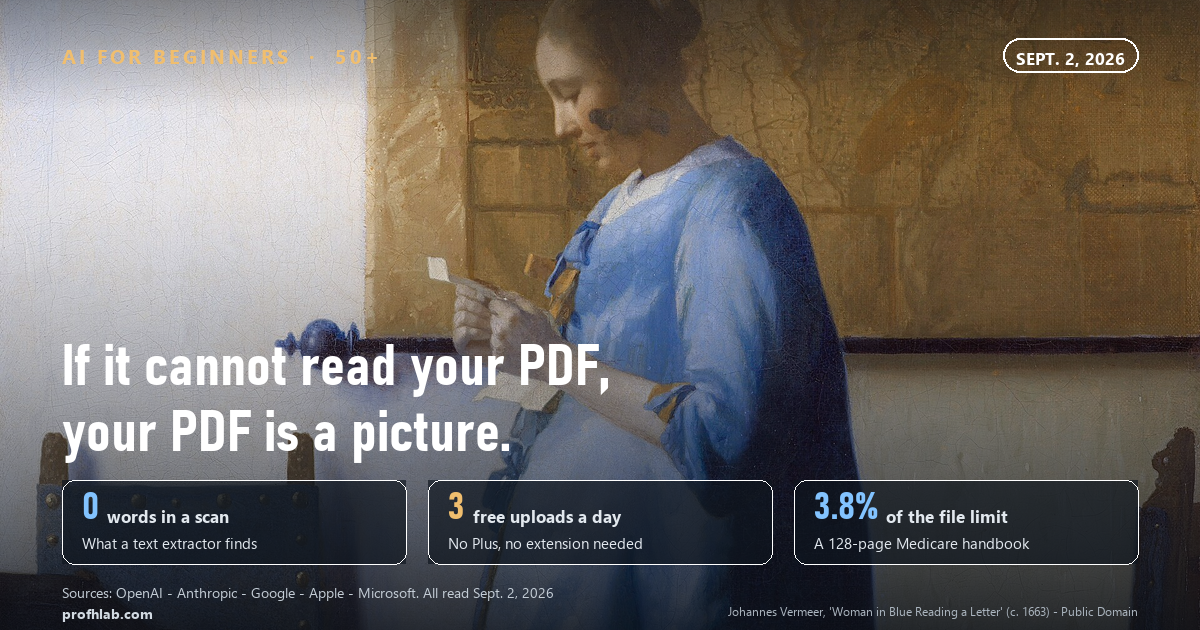
You do not need ChatGPT Plus and you do not need a browser extension. A free account will read a PDF today — three files a day, up to 512 MB each — and the size of your document is almost never what stops it.
On September 2, 2026 we downloaded nine PDFs that an American over 50 is actually handed by a federal agency, 369 pages and 1,018,839 characters in all, and ran every page through the same kind of text extraction ChatGPT uses on an uploaded document. All nine came through intact. The biggest of them, the 128-page Medicare & You 2026 handbook, used 3.8 percent of the limit for a single file.
So when ChatGPT tells you it cannot read your PDF, the file is rarely too big. It is usually a picture.
Here is how this usually arrives. A letter comes about a claim, or a plan, or a bill. It runs eleven pages and the sentence you need is buried on page seven. Somebody has told you the computer can just read it for you. You drag the file in, and ChatGPT answers with something vague, or says it cannot see the document at all, and you assume you did it wrong.
You probably did not. Something specific happened, it has a name, and it takes about ten seconds to check.
The short answer, in five lines.
- Click the paperclip. That is the whole method. Free accounts get three file uploads a day; paid accounts get 80 files every three hours.
- Ask a narrow question. “Find every sentence that mentions a deadline” beats “summarize this.”
- If it fails, your PDF is a photograph of paper. On every plan except Enterprise, OpenAI says ChatGPT extracts the digital text from a document and discards the images.
- The fastest fix is to stop sending a PDF. Send a picture of the page instead — images uploaded on their own do get looked at.
- Reading it out loud is a different job. Your phone and your browser already do that better than ChatGPT does.
How to get ChatGPT to read a PDF, in three steps
The method is shorter than most of the articles written about it.
One. Open a new chat and click the paperclip at the left end of the message box. On a phone it is a plus sign. Choose the file from your computer, your phone, Google Drive or OneDrive.
Two. Wait for the file name to appear as a small tile above the message box. That tile is your confirmation that the upload finished. If it never appears, nothing was sent.
Three. Type your question in the same message, then send. This is the step most people get wrong: they upload the file, send it alone, and get back a polite summary of the wrong thing.
What you ask matters more than which plan you pay for. Compare these two:
- “Summarize this.” — You get eight lines of nothing in particular.
- “This is my plan’s annual notice. List every date, dollar amount and deadline it contains, with the page number for each one, and tell me which ones require me to do something.” — You get a to-do list.
The second version works because you have told it what counts as an answer. The same trick makes every other job easier too, from writing a letter to building a spreadsheet formula. If you have never used ChatGPT at all, start with our walkthrough for beginners over 50 and come back here.
Why can’t ChatGPT read my PDF?
Because a PDF is a container, and two very different things can be inside it.
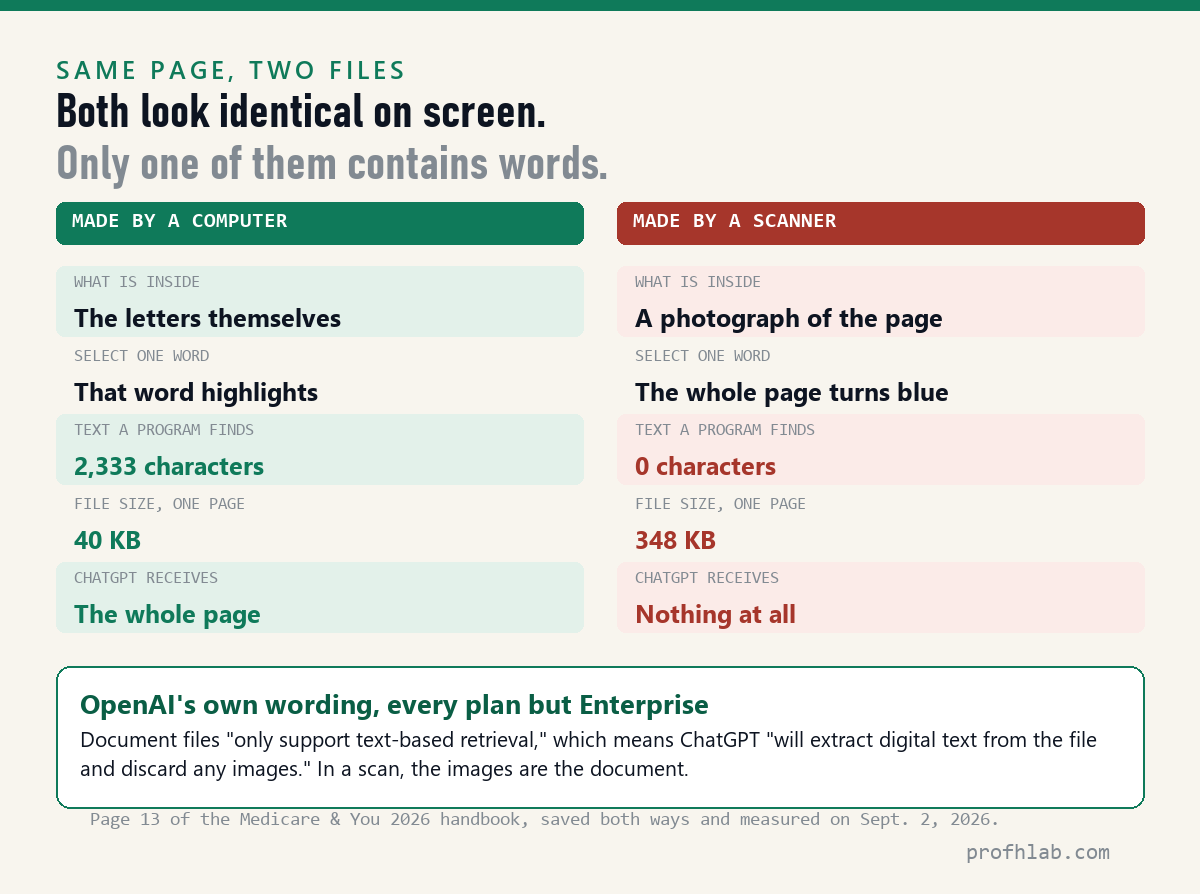
A PDF made by a computer — exported from a word processor, generated by a government website — contains the letters themselves. Software can copy them, search them and hand them to a model.
A PDF made by a scanner, a copier, an office fax or a phone camera contains a photograph of a page. To your eye it looks the same. To a program it is one large image with no words in it at all, like a picture of a book cover.
OpenAI’s own File Uploads FAQ, which we read on September 2, 2026, states the consequence plainly. Visual retrieval for PDFs — the ability to look at images inside a document — is available only to ChatGPT Enterprise. For every other plan, the FAQ says document files “only support text-based retrieval,” meaning ChatGPT “will extract digital text from the file and discard any images.”
Read that sentence twice, because it explains almost every complaint about this. If your PDF is a scan, the images are the whole document. Discard the images and there is nothing left to send. ChatGPT is not refusing your file. It received an empty envelope.
This is also why the answer sometimes seems to come from thin air. Handed nothing, a model will still try to be helpful, and helpfulness without a source is where confident wrong answers come from. When a document matters, check that it actually arrived.
The ten-second test: is your PDF a scan?
Open the file and try all three. Any one of them settles it.
- Try to select a single word. Click just before a word and drag across it. If that one word highlights, there is real text in the file. If the whole page lights up as one blue rectangle, or nothing highlights at all, you are looking at a picture.
- Search for a word you can see. Press Ctrl+F on Windows or Command+F on a Mac and type a word that is plainly on the screen in front of you. No match means no text layer.
- Look at the file size. Text is astonishingly small; pictures are not. A dense page of type stored as text runs a few tens of kilobytes. The same page stored as an image runs hundreds.
That third tell is worth a number, so we produced one.
We made the same page two ways
On September 2, 2026 we took page 13 of the Medicare & You 2026 handbook — a normal page of body text from Medicare’s own PDF — and saved it twice.
The first copy kept the original text. The second we re-rendered at 150 dpi, the resolution a home scanner uses, and rebuilt as an image-only page: exactly what your printer produces when you press Scan. The two files are visually identical. Then we asked a text extractor what it could see in each.
Same page. Same words on screen.
- Original page: 2,333 characters of readable text. File size 40 KB.
- Scanned page: 0 characters. File size 348 KB.
The scan is 8.7 times larger and contains nothing a program can read. That is the trade every scanner makes, and nobody mentions it at the time.
Which means the size test cuts both ways. A big file is not a problem for ChatGPT’s limits — but a surprisingly big file is a strong hint that you are holding pictures.
What nine federal documents told us
We wanted to know whose fault this usually is. So we picked nine PDFs an American over 50 genuinely ends up with — Medicare handbooks, IRS forms and guides, a federal health-benefits election form, a citizenship application, a VA disability claim — downloaded them from the agencies’ own sites on September 2, 2026, and measured every page.
| Document (agency’s own PDF) | Pages | Readable characters | Share of one file’s limit |
|---|---|---|---|
| Medicare & You 2026 handbook | 128 | 301,934 | 3.8% |
| Your Medicare Benefits (10116) | 120 | 218,828 | 2.7% |
| IRS Pub. 554, Tax Guide for Seniors | 37 | 166,027 | 2.1% |
| IRS Pub. 915, Social Security benefits | 33 | 152,014 | 1.9% |
| OPM Form SF 2809 (health plan election) | 18 | 67,888 | 0.8% |
| VA Form 21-526EZ (disability claim) | 15 | 60,824 | 0.8% |
| USCIS Form N-400 | 14 | 35,074 | 0.4% |
| IRS Form 1040 | 2 | 10,496 | 0.1% |
| IRS Form 1040-SR (large print, for seniors) | 2 | 5,754 | 0.1% |
| All nine together | 369 | 1,018,839 | 12.7% |
Nine out of nine had a real text layer. Every one of them would go into ChatGPT whole, and you could put all nine at once into the space allowed for a single file.
That result points a finger. The agencies are not the problem. The failure almost always enters at the moment a person makes their own copy — the office that faxes your record, the clinic that scans a form, the printer in your den, the photo of a letter you took because it was faster than finding the scanner.
A deeper reading: the file did not lose the words, the copy never had them
It is tempting to think of a scan as a damaged version of a document, something that could be repaired. It is more accurate to say the words were never in there.
When a page is exported from a computer, the letters travel as letters, along with instructions for drawing them. When a page is scanned, a sensor measures brightness in a grid and stores the grid. The letters exist only in your head, assembled from light and dark, which is why a scan is at once perfectly legible to you and blank to everything else.
Optical character recognition — OCR — is the act of guessing the letters back out of that grid. It is a guess. Good OCR on clean type is very accurate; OCR on a faint fax, a curled page or handwriting is not, and it fails quietly, turning a 0 into an O and a 1 into an l without telling anyone. That is the real reason to care which kind of file you are holding. A text PDF hands over exactly what the author wrote. A scan hands over somebody’s best reconstruction.
Three fixes for a scanned PDF, in the order we would try them
1. Stop sending a PDF. Send a picture.
This is the fastest fix and almost nobody mentions it, because it does not require buying anything. OpenAI’s explanation of visual retrieval notes that before that feature existed, ChatGPT “could only process images when uploaded separately” and that visuals embedded inside a PDF were overlooked. The workaround is right there in the wording: take the picture out of the PDF and upload it as a picture.
In practice, on a phone: photograph the page in good light, hold the camera square to the paper, and attach the photo to the chat. On a computer: open the PDF, take a screenshot of the page, attach the screenshot. Then ask your question. Images are capped at 20 MB each, which no phone photo approaches.
Do this one page at a time. It is tedious for a fifty-page report and perfect for the two pages that actually matter, which is usually what you needed anyway.
2. For a scanned document under 100 pages, use Claude instead.
This is the one genuine product difference we found, and it is documented rather than rumored. Anthropic’s help article on file uploads, dated July 23, 2026, states that Claude “analyzes both text and visual elements (like images, charts, and graphics) in PDFs of 100 pages or fewer.” From 101 to 1,000 pages it processes text only; above 1,000 pages it refuses the file.
So for a scanned insurance letter, a photographed contract or a chart-heavy report, Claude will often see what ChatGPT discards — on the free tier, with no extension and no purchase. It is a reasonable second window to keep open; we compared the writing of the three big assistants in this side-by-side.
3. Give the file a text layer yourself, free.
If you want the scan itself to become searchable — useful when you will return to it — Google Drive will do the character recognition at no cost. Google’s own instructions: upload the file to Drive, right-click it, choose Open with › Google Docs. Drive converts the page images to text and opens the result as an editable document.
Two limits from that same help page are worth knowing before you try. The file must be 2 MB or smaller, which our single scanned page (348 KB) clears easily but a ten-page scan may not; and lists, tables and columns are unlikely to survive the conversion, even though bold, italics and line breaks usually do. Split a long scan into pieces, convert them one at a time, then paste the text into ChatGPT.
What each service actually allows
These are the numbers the companies publish about themselves, read on September 2, 2026.
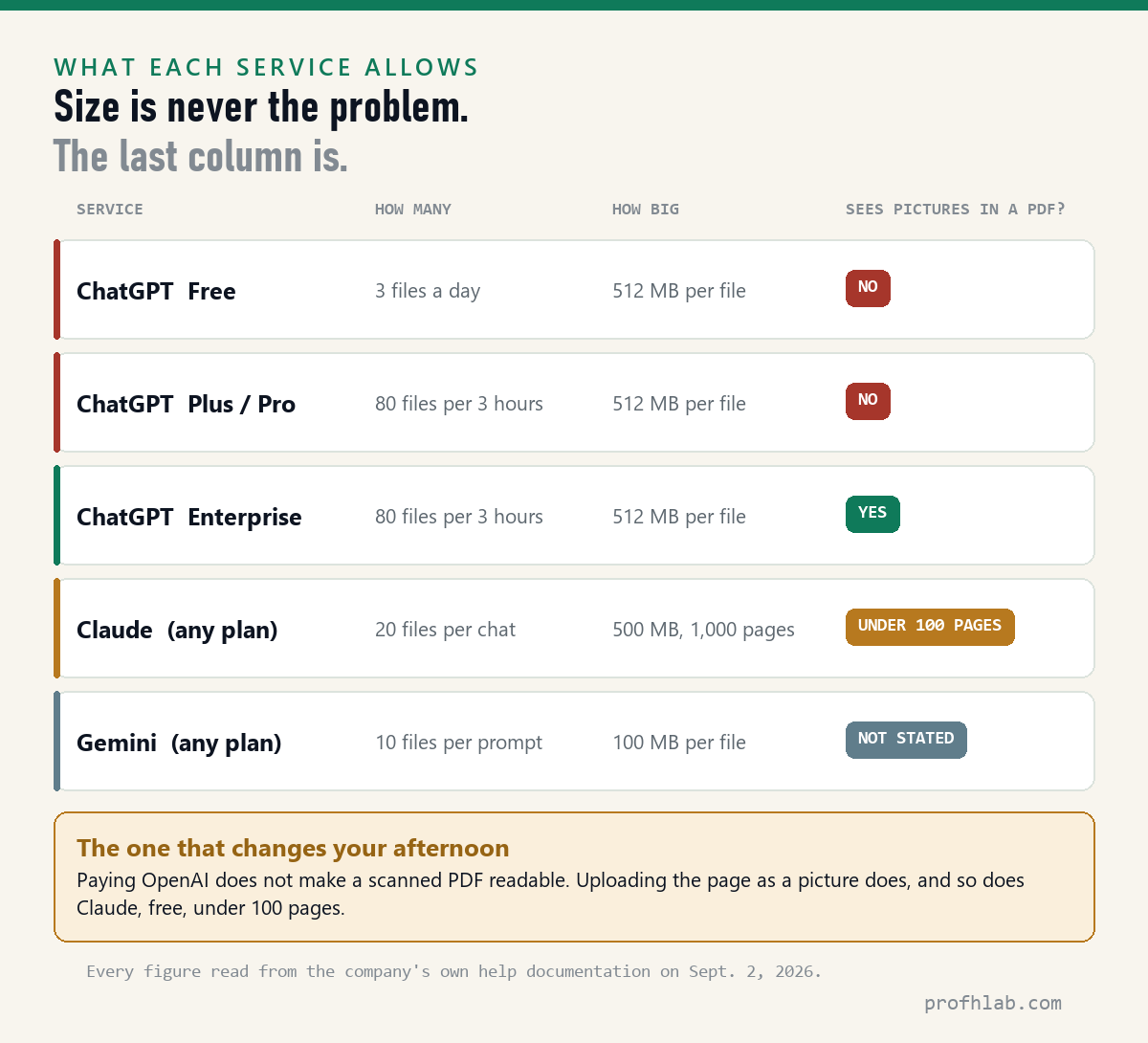
- ChatGPT, free plan. Three file uploads per day. Hard limit of 512 MB per file, and 2 million tokens per text or document file. Images capped at 20 MB. Pictures inside a PDF: discarded.
- ChatGPT, paid consumer plans. Up to 80 files every three hours, and 25 GB of stored files per user. Same per-file caps. Pictures inside a PDF: still discarded — paying does not change this.
- ChatGPT Enterprise. The only plan with visual retrieval for PDFs. OpenAI states it is “not supported for ChatGPT Free, Pro, Team, or Edu accounts.”
- Claude. 500 MB per file, up to 20 files per chat, PDFs up to 1,000 pages. Reads text and visuals in PDFs of 100 pages or fewer.
- Gemini. Up to 10 files in the same prompt; 100 MB per file for everything except video.
Notice what is missing from that list: any reason for a household document to fail on size. If you are wondering whether the paid tier would fix your PDF problem, the honest answer for this particular problem is no — we went through that arithmetic in is ChatGPT Plus still worth it and the real monthly cost of AI.
How to get ChatGPT to read a PDF out loud
This is the most common follow-up we found in Google’s own suggestions, and it deserves an honest answer: ChatGPT’s Read aloud button reads ChatGPT’s reply, not your file. There is no button that plays your PDF.
Two routes work better, and both are already on the device in front of you.
On an iPhone or iPad. Go to Settings › Accessibility › Read & Speak and turn on Speak Screen. Then open the PDF in Files or Mail and swipe down with two fingers from the very top of the screen. A small control bar appears to pause, rewind and change the speaking rate. Apple’s own guide adds that you can also just ask Siri to “speak screen.”
On a Windows PC. Microsoft Edge is the default PDF viewer, and it will read the file aloud. Open the PDF in Edge, then go to Settings and more › More tools › Read aloud. Microsoft notes that Read aloud works offline as well, with a smaller choice of voices.
There is one thing ChatGPT does add here, and it is the part worth having. A benefits letter read aloud word for word is still a benefits letter. Upload it, ask for the document restated in plain sentences at an eighth-grade reading level, and then press Read aloud on the answer. You get the meaning spoken instead of the jargon.
Before you upload: the two-minute privacy check
A PDF you upload is stored with the conversation. OpenAI states that files uploaded to ChatGPT are kept for as long as the chat they belong to, and that once you delete the chat, the file is deleted from its systems within 30 days.
Two habits make that a non-issue:
- Cover the identifiers. The model needs the amounts, dates and terms. It does not need your Social Security number, member ID, account number or address. On a photo, put a finger or a slip of paper over that line before you take the picture.
- Delete the chat when you are done. That starts the 30-day clock. We looked at what deletion does and does not do in are deleted ChatGPT chats really deleted.
Medical paperwork deserves its own thought, because the law that you assume is protecting it usually is not: see is it safe to upload medical records to ChatGPT. If the document arrived by email, it is also worth knowing what your mail provider’s AI already sees and what Copilot has access to.
Select one word first: it tells you which kind of PDF you have
- Test the file you are stuck on right now. Open it and try to select one word. Ten seconds, and it tells you which of the two documents you have.
- If the word highlights, upload the PDF and ask a narrow question with page numbers requested.
- If it does not, photograph or screenshot the page or two that matter and upload those as images.
- If the whole scan matters, put it through Claude if it is under 100 pages, or convert it in Google Drive if it is under 2 MB.
- Cover your identifiers first, and delete the chat afterward.
- If you need it read aloud, use Speak Screen on an iPhone or Read aloud in Edge on a PC — and use ChatGPT to translate the jargon before you press play.
Handwriting in a PDF is an image, and consumer plans discard those
Can ChatGPT read handwriting? Not inside a PDF, for the same reason as above: handwriting is an image, and images in documents are discarded on consumer plans. Photograph the page and upload it as an image and you are asking the vision model instead, which frequently manages neat handwriting. Expect errors on dates and numbers, and check them.
Is there a page limit? OpenAI publishes a limit in tokens, not pages — 2 million per text or document file. Our 128-page handbook came to roughly 75,000 tokens, so a normal book-length PDF is nowhere near it. Claude publishes a real page limit: 1,000, with visual analysis only under 100.
Why do so many guides tell me to install an extension? Because they are old and nobody updated them. Of the top results we recorded for this question on September 2, 2026, eight of twelve were companies selling a PDF or AI product, and one long-running technology site still instructs readers to install a Chrome extension on the grounds that ChatGPT cannot accept uploads at all.
It can, and OpenAI’s own FAQ says uploads are available on free as well as paid plans. When a “best tool” list is published by the maker of one of the tools, read it as an advertisement — the same rule we apply in our own roundups.
The questions people actually type
How do I get ChatGPT to read a PDF?
Click the paperclip in the message box, choose your file, wait for the tile with the file name to appear, then type your question in the same message and send. Free accounts can do this three times a day; paid accounts get 80 files every three hours. No extension and no subscription is required.
Why can’t ChatGPT read my PDF?
Almost always because the file is a scan — a photograph of a page rather than text. OpenAI states that on every plan except Enterprise, ChatGPT extracts the digital text from a document and discards any images, so a scanned page arrives empty. Try selecting a single word in the file: if the whole page highlights as one block, it is a picture.
Why can’t ChatGPT read my scanned PDF?
Same reason, stated in OpenAI’s File Uploads FAQ: visual retrieval for PDFs is available only to ChatGPT Enterprise and is “not supported for ChatGPT Free, Pro, Team, or Edu accounts.” The fix is to upload the page as an image instead of as a PDF, or to use Claude, which documents that it reads visual elements in PDFs of 100 pages or fewer.
Can ChatGPT read scanned handwritten documents?
Not from inside a PDF. Photograph the page and attach the photo as an image, and the request goes to the vision model rather than the document pipeline, which handles clear handwriting reasonably well. Verify every number and date it returns, because character recognition fails silently rather than reporting an error.
How many pages can ChatGPT read in a PDF?
OpenAI sets the limit in tokens, not pages: 2 million tokens per text or document file, with a hard ceiling of 512 MB per file. In our September 2, 2026 measurement, a 128-page federal handbook used about 3.8 percent of that token limit, so page count is rarely the constraint. Claude publishes an actual page limit of 1,000, and analyzes images inside a PDF only up to 100 pages.
How do I upload a PDF to ChatGPT free?
Exactly the same way as on a paid plan. OpenAI states that file uploads are available on free and paid plans; the free plan is limited to three file uploads per day. The per-file caps — 512 MB, 2 million tokens — are identical.
How do I get ChatGPT to read a PDF out loud?
ChatGPT’s Read aloud button plays its own reply, not your document. To hear the file itself, use Speak Screen on an iPhone (Settings › Accessibility › Read & Speak, then swipe down with two fingers from the top of the screen) or Read aloud in Microsoft Edge on Windows (Settings and more › More tools › Read aloud). For a better result, have ChatGPT restate the document in plain language first, then play that.
Is it safe to upload a PDF to ChatGPT?
It carries the same risk as any other thing you type into a chat. Files are stored with the conversation and, once you delete that chat, are removed from OpenAI’s systems within 30 days. Cover names, account numbers and identifiers before uploading, and delete the chat when you are finished. For medical paperwork specifically, HIPAA does not follow the copy you upload.
Sources
- OpenAI Help Center, File Uploads FAQ — plan availability, three uploads per day on free, 80 files per three hours, 512 MB and 2 million tokens per file, 25 GB per user, text-based retrieval and discarded images, file retention. Read September 2, 2026.
- OpenAI Help Center, Visual Retrieval with PDFs FAQ — Enterprise-only availability; images embedded in PDFs previously overlooked. Read September 2, 2026.
- Anthropic Help Center, Upload files to Claude, dated July 23, 2026 — 500 MB per file, 20 files per chat, 1,000-page ceiling, visual analysis in PDFs of 100 pages or fewer.
- Google, Upload & analyze files in Gemini Apps — 10 files per prompt, 100 MB per file. Read September 2, 2026.
- Google Drive Help, Convert PDF and photo files to text — 2 MB file limit, Open with Google Docs, formatting that survives conversion. Read September 2, 2026.
- Apple Support, Hear iPhone speak the screen, selected text, and typing feedback — Speak Screen setup and the two-finger swipe. Read September 2, 2026.
- Microsoft, Read aloud in Microsoft Edge — Settings and more › More tools › Read aloud; offline support. Read September 2, 2026.
- Source documents measured: Medicare & You 2026 and Your Medicare Benefits (medicare.gov); Form 1040, Form 1040-SR, Publication 554 and Publication 915 (irs.gov); Form SF 2809 (opm.gov); Form N-400 (uscis.gov); Form 21-526EZ (va.gov). All downloaded and measured September 2, 2026.
Uploading something private? Records and deleted-chat guides
- How to use ChatGPT: a beginner’s guide for people over 50 — start here if this is new
- Is it safe to upload medical records to ChatGPT?
- Are deleted ChatGPT chats really deleted?
- Ask ChatGPT for an Excel formula in plain English
- Prepare for a doctor’s visit with ChatGPT
- Using ChatGPT to write a letter or an email
- Restoring old family photos with AI
- The best AI tools for seniors
- How to tell if a picture is AI generated
- AI scams targeting seniors
- How do I talk to a real person?
- Is ChatGPT Plus still worth it?
- How to cancel ChatGPT Plus and get a refund
- ChatGPT vs Claude vs Gemini, compared on writing
- How do I get rid of AI on my phone?
- Start here — the whole site in one page
- The Briefing — what changed in AI that touches your money
- The AI price tracker — what each plan costs this month
- The AI jobs tracker — our own count, updated daily
- FAQ and Ask a question — we answer these in public
Written by Prof. H. Every limit in this article was read from the company’s own documentation on September 2, 2026, and the nine federal PDFs were downloaded and measured the same day. Our method is described on how we count; corrections go to contact.
Prof.’s H Newsletter
One short email a month, with the numbers in it
What actually moved in AI hiring, AI prices, and the scams aimed at older Americans. Counted here, dated, and linked to the source. One email a month, and your address goes nowhere else.