ChatGPT vs Claude vs Gemini for Writing (2026): Which One Wins?
Short answer: For the most natural, human-sounding prose, go Claude — $20/month. For a versatile all-rounder with the best persuasive copy, go ChatGPT — $20/month. If your work already lives in Google Docs, go Gemini — $19.99/month. The three standard plans are one cent apart, so the real question isn’t price, it’s fit. Brand new to AI? Start free on all three — that’s the smart first step, not a compromise.
Last verified: September 5, 2026 — checked against each company’s own pricing page today. Two things moved since this guide first ran. Google cut AI Plus from $7.99 to $4.99/month on June 8, 2026 (and doubled the storage to 400 GB), which makes Gemini the cheapest paid on-ramp of the three. And since February 9, 2026, ChatGPT shows ads on its Free and $8 Go tiers — Plus and Pro stay ad-free, and neither Claude nor the Gemini app shows ads today. Every plan and price lives on my AI price tracker.
Why trust this: I’m a professor of AI and robotics, a former Samsung research engineer, and I test every tool in this review hands-on. Commissions never affect my verdicts — see how I work on the Editorial & Review Policy page. This post contains a referral link, marked as such.
Every week someone asks me the same thing: “I only want to pay for one AI writing tool — which one?” It’s a fair question. ChatGPT, Claude, and Gemini all land within a dollar of each other, all have capable free tiers, and all can write a decent blog post. So the winner isn’t about raw power anymore. It’s about which one matches how you write.
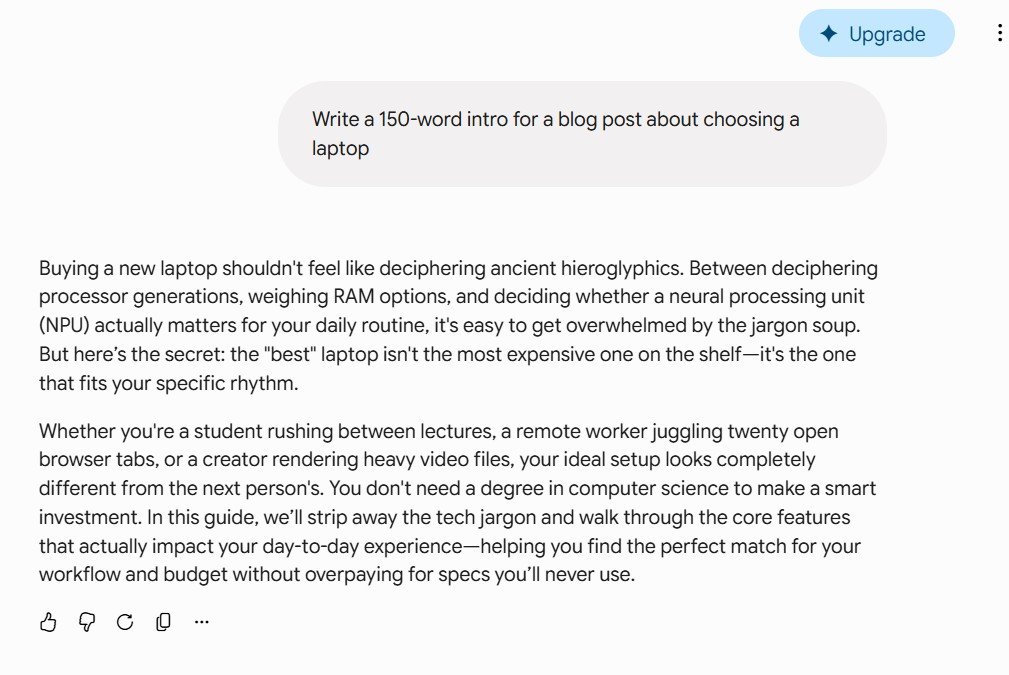
To keep this honest, I ran a controlled test for this article: the exact same brief — “Write a 150-word intro for a blog post about choosing a laptop” — given to all three, screenshots below, on top of my regular use of each. The differences showed up in the very first paragraph. Here’s the breakdown.
I run tests like this every week — get the results in one short weekly email.
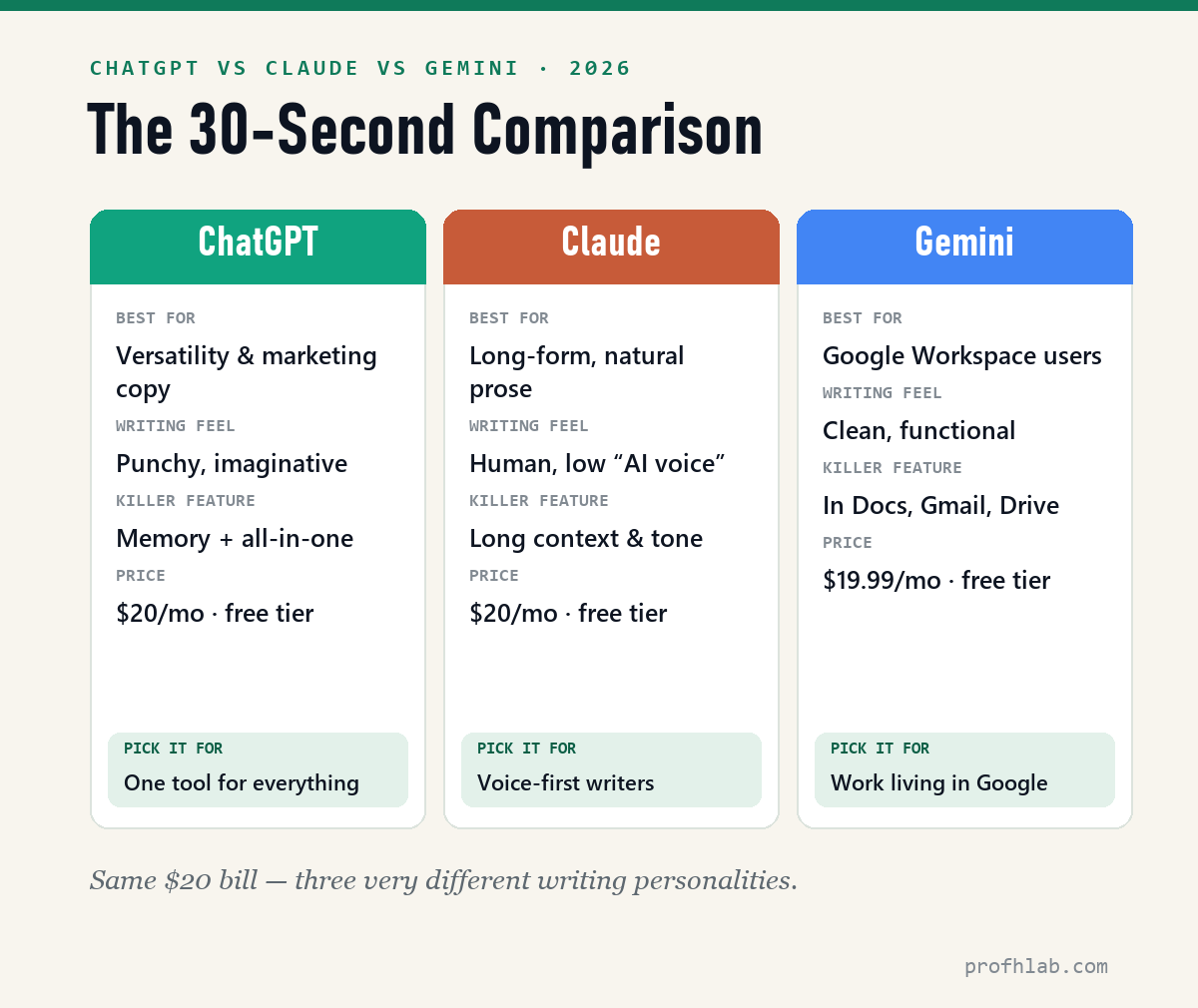
The 30-second comparison
| ChatGPT | Claude | Gemini | |
|---|---|---|---|
| Best for | Versatility, persuasive copy | Long-form, natural prose | Google Workspace users |
| Writing feel | Punchy, imaginative | Human, low “AI voice” | Clean, functional |
| Paid plan | $20/mo (Plus) $8/mo (Go) | $20/mo (Pro) $17/mo billed yearly | $19.99/mo (AI Pro) $4.99/mo (AI Plus) |
| Free tier | Yes (limited) | Yes (daily cap) | Yes |
| Ads? | Yes — Free & Go, since Feb 9, 2026 | No | No (Google says it is exploring) |
| Killer feature | Memory + all-in-one | Handles long docs, natural tone | Docs / Gmail / Drive |
ChatGPT — the versatile all-rounder
ChatGPT is the tool I reach for when I don’t know exactly what I need yet. It’s the most flexible of the three: it brainstorms, writes, edits, makes images, and remembers context from past chats, so it feels less like a blank text box and more like a collaborator that knows your projects.
For writing specifically, ChatGPT shines at short, persuasive copy with personality — landing page headlines, ad hooks, email subject lines, punchy social captions. Its dialogue and narrative voice are the most imaginative of the three, which makes it a favorite for creative and marketing work.
The trade-off: on very long pieces it can drift toward a recognizable “ChatGPT tone” — confident, list-happy, a little generic — that you’ll want to edit out.
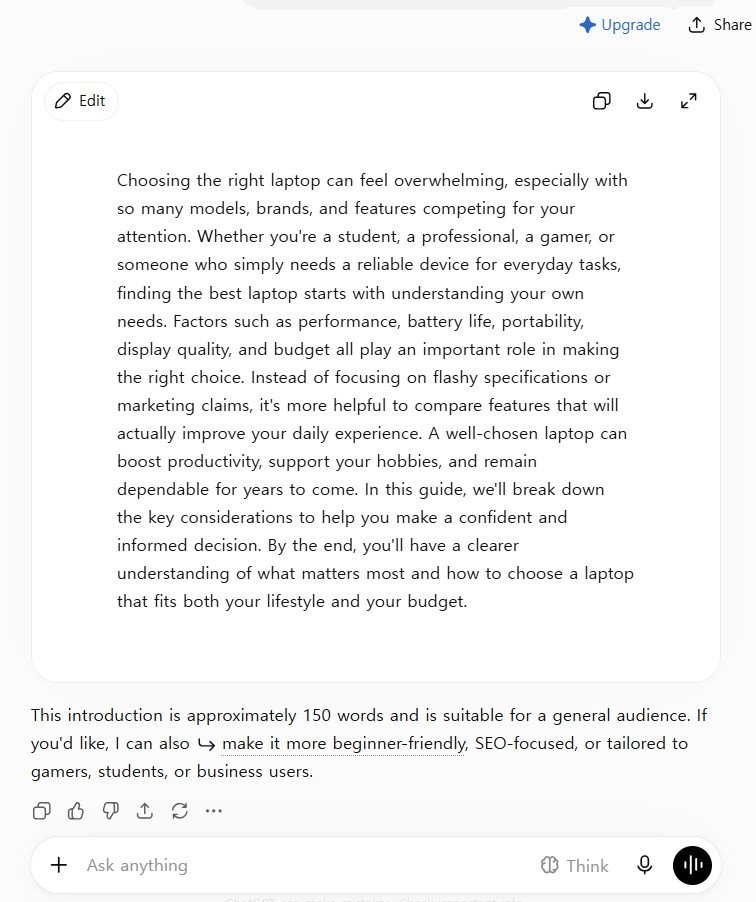
In my test, ChatGPT returned the most organized answer of the three: one tight paragraph that named the real decision factors — performance, battery life, portability, budget — and marched straight to the point. Then it offered, unprompted, to re-tailor the intro for beginners, gamers, or business users. That’s ChatGPT in one screenshot: structured, practical, and always ready with a next step.
- Pick ChatGPT if: you want one tool for everything, and you write a lot of marketing or persuasive copy.
- Skip it if: your priority is long, flowing prose that doesn’t read like AI.
Claude — the best pure writer
If the job is words on a page that sound like a person wrote them, Claude is the one. In side-by-side tests it consistently produces the most natural sentence rhythm, the most consistent tone across a long document, and the least of that tell-tale generic AI phrasing. It also holds a very long document in context, so it’s strong for guides, scripts, whitepapers, and anything where paragraph three has to remember paragraph one.
Writers who care about voice tend to land on Claude. The output usually needs less “humanizing” before it reads naturally — which, in a world where Google rewards genuinely helpful writing, matters more than ever.
Want to feel the difference yourself? Get a free week of Claude Pro (referral link — a card is required and it auto-renews after the week, so set a day-6 cancel reminder) — then run the 10-minute test below with it. One real task, your own verdict. No card? Claude’s free tier handles the test fine.
The trade-off: it’s more of a focused writing-and-reasoning tool than an everything-app. No native image generation to speak of, and a slightly more utilitarian interface.
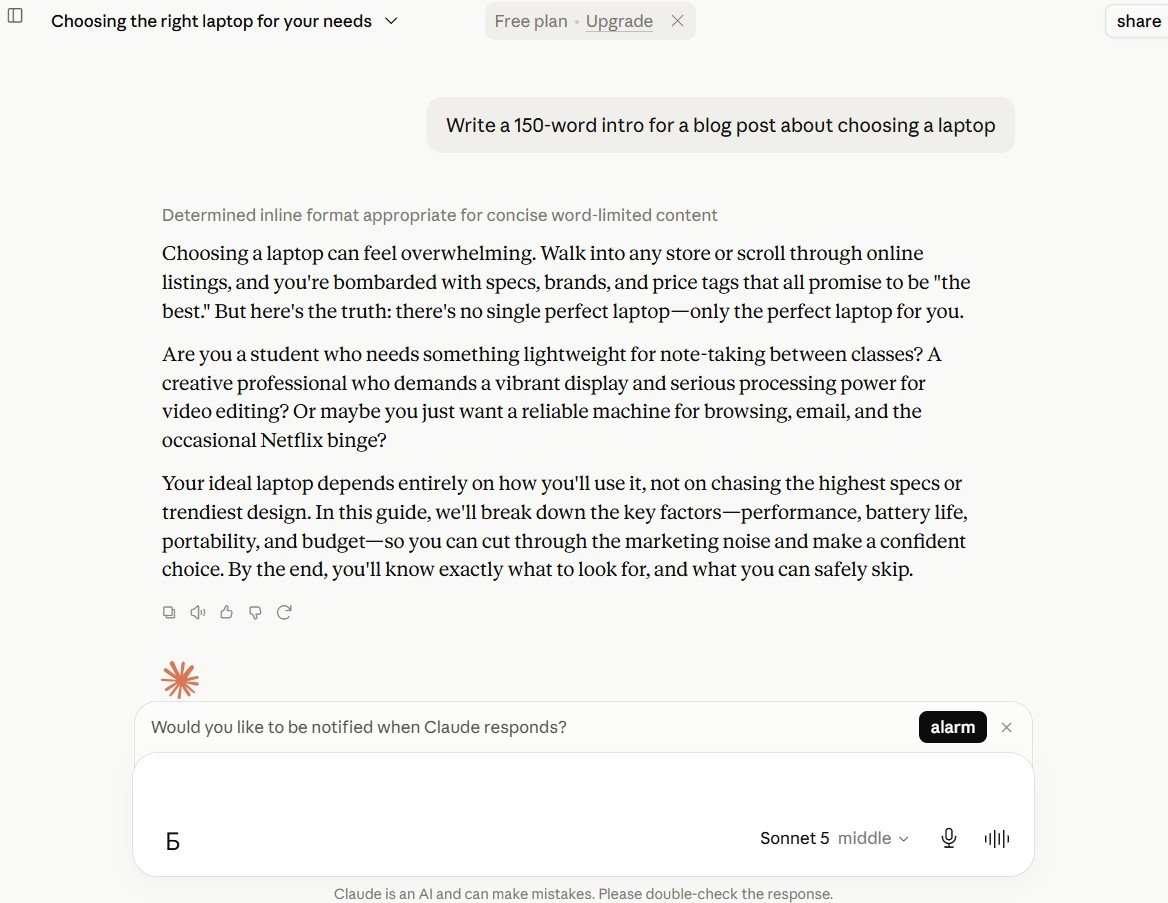
Claude’s answer to the same brief read the most like a human columnist. It opened with a plain truth — “there’s no single perfect laptop — only the perfect laptop for you” — and then spoke to the reader in questions (“Are you a student…? A creative professional…?”) instead of listing specs. Balanced framing, user-centered, unusually good at setting a direction for the piece. Of the three outputs, this is the one I’d publish with the least editing — which matches my experience with Claude on longer documents, too.
- Pick Claude if: you write long-form, and prose quality and natural tone are your top priority.
- Skip it if: you want an all-in-one that also makes images and handles every task type.
Gemini — the Google native
Gemini’s writing is clean and capable, but its real advantage isn’t the prose — it’s where it lives. If your workflow already runs through Google Docs, Gmail, Drive, and Sheets, Gemini sits right inside them. Drafting a doc, summarizing a thread, or turning notes into an outline happens without copy-pasting between tabs.
For a lot of people that convenience outweighs a small gap in prose quality. The best writing tool is the one that’s already in the window you’re working in.
Gemini actually surprised me in this test: its intro was the most playful of the three (“deciphering ancient hieroglyphics,” “jargon soup”) while staying soft and explanation-first — approachable, easy reading. The prose is more capable than its reputation suggests; the reason it sits third for writers is fit, not quality.
- Pick Gemini if: you live in Google Workspace and want AI built into the tools you already use.
- Skip it if: you want the strongest standalone writing quality and don’t care about Google integration.
Pricing: basically a tie
Here’s the part that surprises people: at the standard tier, price is almost a non-factor. Checked against each company’s own pricing page on September 5, 2026:
- ChatGPT Plus — $20/month (no annual discount)
- Claude Pro — $20/month, or $17/month if you pay $200 up front for the year
- Google AI Pro (formerly Gemini Advanced) — $19.99/month
Each also has a free tier that’s genuinely usable for light writing, and much pricier power-user tiers ($100–$200/month) if you hit heavy usage. But for most writers, the decision is which $20 tool fits your workflow — not which is cheapest.
The gap is at the bottom, not the top
Where the three genuinely differ now is the cheap tier, and that moved twice this year. Google AI Plus dropped from $7.99 to $4.99/month on June 8, 2026, with storage doubled from 200 GB to 400 GB. ChatGPT Go is $8/month in the U.S. after going worldwide in January 2026. Claude has no budget tier at all — its cheapest paid plan is the $20 Pro.
So the entry price runs $4.99 / $8 / $20, a 4× spread, while the standard tier runs $19.99 / $20 / $20, a one-cent spread. If you are price-shopping, shop at the bottom — there is nothing to shop for at the top.
And the cheap tier now costs you something else: ads. Since February 9, 2026, OpenAI has shown contextual text ads — labelled “Sponsored,” placed separately below the answer — to logged-in adult users on the Free and Go plans. Plus, Pro, Business, Enterprise and Education do not show them. Claude has no ads.
Google has said publicly that it is exploring ads inside the Gemini app, but nothing has shipped there as of today. That quietly reframes the $20 question for ChatGPT users: part of what the $20 buys is a clean screen. (Staying free? Here is what you can and cannot switch off.)
I keep every one of these numbers current on the AI price tracker, and I add up what I personally pay each month in the real monthly cost of AI.
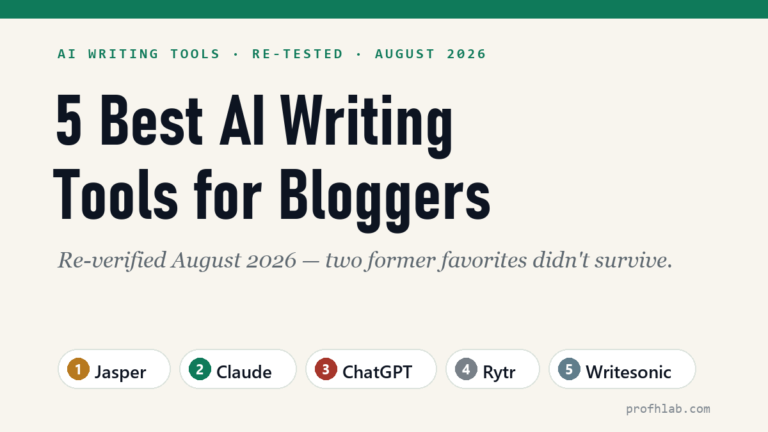
If you’re leaning toward a purpose-built blogging tool instead, I ranked the dedicated options in my guide to the best AI writing tools for bloggers, including a hands-on Jasper review.
The smart way to start (and grow)
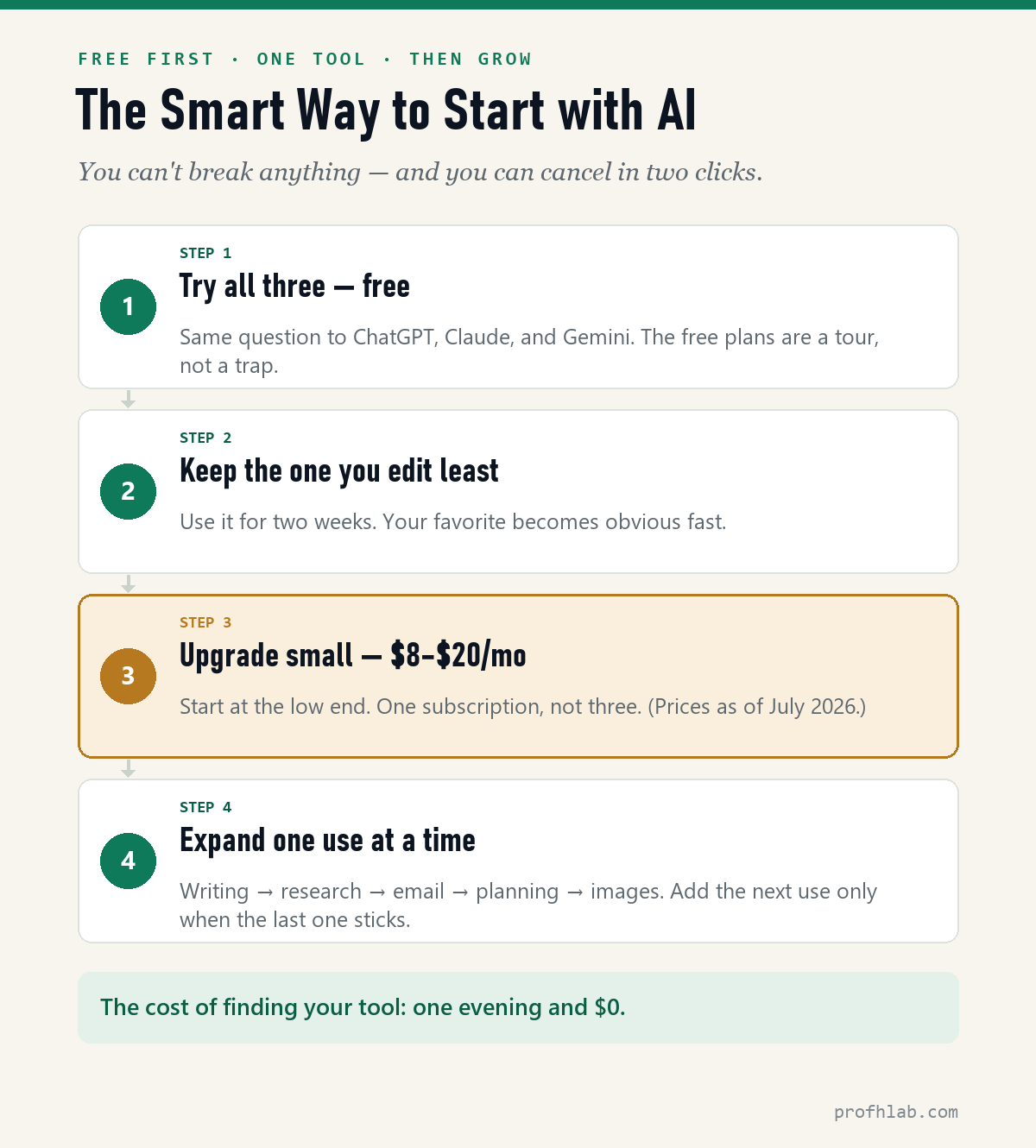
If you’re brand new to AI: don’t pick a winner yet — sample all three. The free plans have daily limits, but that’s exactly what makes them a safe tour: enough to learn each tool’s personality, not enough to overwhelm you. Trying several AIs first isn’t indecision — it’s the fastest way to find your fit, and the variety itself teaches you what these tools can do.
If you’ve already started: pick one — the one whose answers you edit least — and upgrade small. As of September 2026, the low end is genuinely low: ChatGPT Go is $8/month and Google AI Plus is $4.99/month in the U.S., with the standard tiers all around $20. (Claude skips the budget tier — its cheapest paid plan is the standard $20 Pro.) One subscription, not three. Then expand one use at a time: writing first, then research, then email, then planning. Add the next use only when the last one has become a habit.
And if you need permission to simply try: here it is. You cannot break anything, every subscription cancels in two clicks, and the total cost of finding your tool is one evening and $0.
What the top AI YouTubers tell beginners
Don’t just take my word for it. I went through what the biggest AI educators on YouTube — a combined audience in the tens of millions — tell beginners about these three tools, and their consensus lines up with my test above:
- Writing belongs to Claude. Jeff Su (1.8M subscribers, ex-Google) credits Claude with polished first-try copy, and business educator Dan Martell (2.9M subscribers) filmed an entire video about switching from ChatGPT to Claude for exactly this reason.
- ChatGPT is the all-rounder. Su’s take: it follows complex, multi-step instructions without losing the thread — and its memory of you and your projects is the best of the three.
- Gemini wins on big files and the Google ecosystem — video, audio, and document loads the others can’t swallow, inside the Gmail and Docs you already use, with one of the most generous free tiers.
- Start free, then pay for one. The most repeated upgrade advice across channels: test the free tiers, then pay for a single plan that fits your main work — not all three.
- The #1 beginner mistake: using AI like a fancy search engine. As Martell puts it, that’s “buying a Ferrari and only driving it in a parking lot.” Ask for drafts, rewrites, and plans — not just facts. Check citations yourself: check citations yourself — when any of them cites sources, verify the references: independent tests by academic YouTuber Andy Stapleton found citations are the weak spot for every model.
Two videos worth your time if you want to go deeper:
Jeff Su’s 12-minute map of when to use ChatGPT, Claude, and Gemini — the best short overview on YouTube (roughly 740,000 views as of July 2026).
Paul J Lipsky paid for all three $20 plans and compared them head-to-head — including a chapter specifically on writing (about 300,000 views, June 2026).
So which one should you pick?
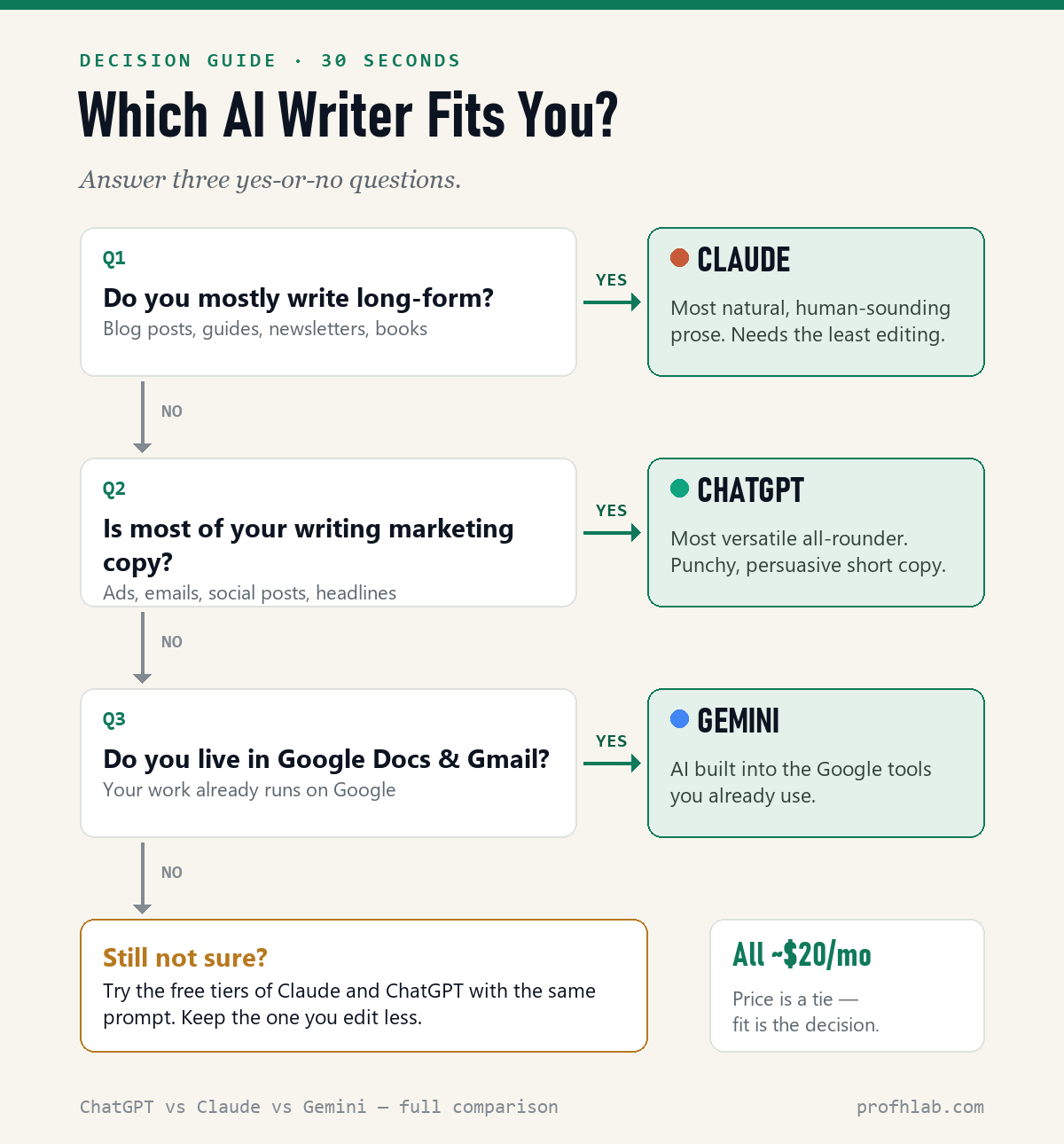
My overall read, as someone who teaches this technology for a living: Claude stands out for balanced framing and a user-centered voice — natural empathy, clear direction-setting. ChatGPT wins on structure — it organizes information and always hands you a next step. Gemini is the softest and most explanation-focused, with especially approachable readability. All three are useful; they simply have different personalities at the keyboard.
Match the tool to the writing you actually do:
- Bloggers & long-form writers → Claude, for natural prose that needs less editing.
- Marketers & copywriters → ChatGPT, for versatile, persuasive short-form.
- Google Workspace teams → Gemini, for AI inside the docs you already use.
- Still unsure? Start on the free tiers, run the same prompt through all three, and keep the one whose output you edit least.
Try it yourself: the 10-minute test
Reading about AI tools is like reading about swimming. Here’s the test I actually ran for this article — it takes ten minutes, costs nothing, and ends the “which one?” question for good.
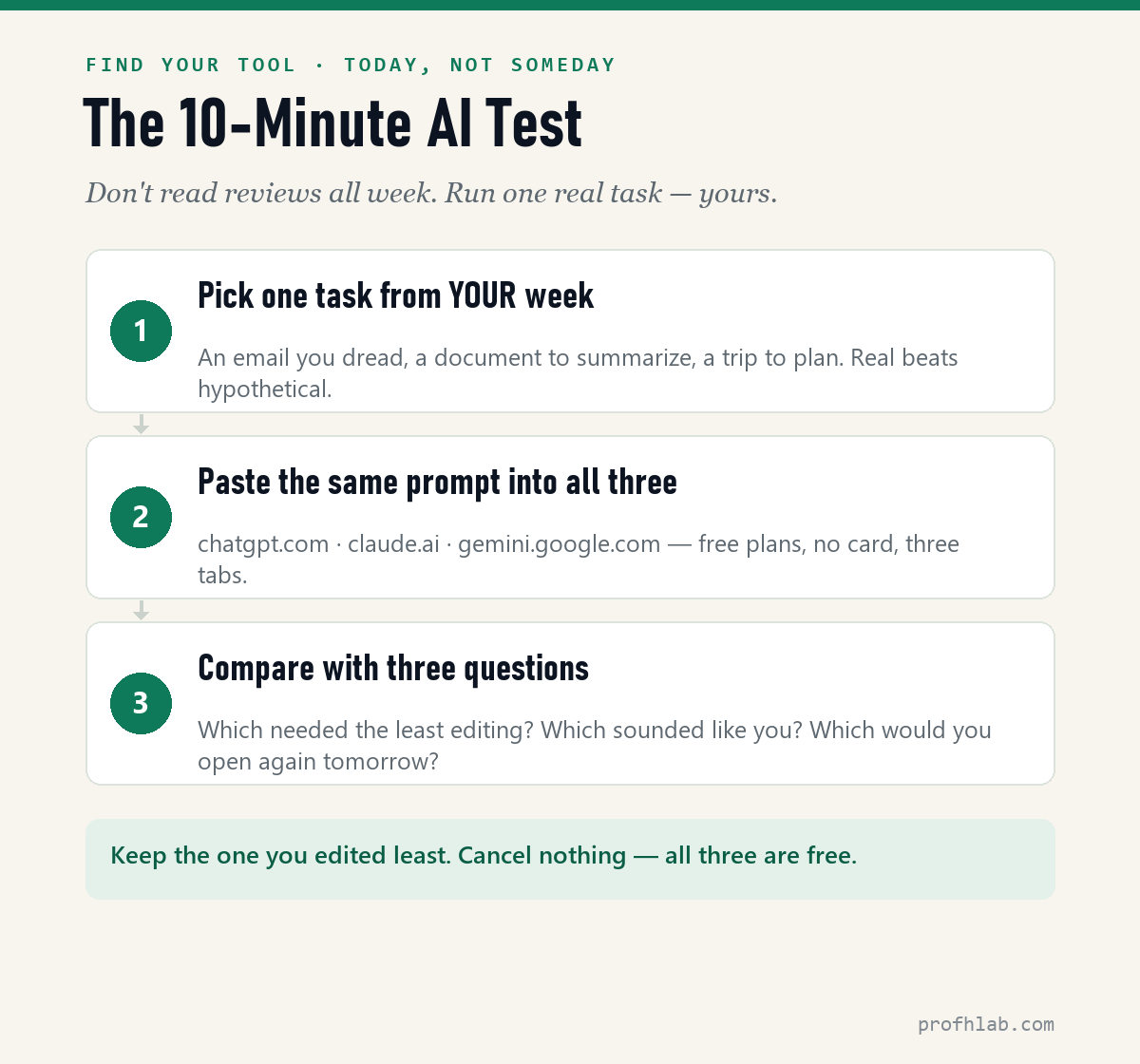
Steal one of these prompts — each plays to a different tool’s strength, so the differences show up fast:
The email test (ChatGPT’s home turf):
Rewrite this email so it’s friendly but firm, under 120 words, and impossible to misread: [paste your email]
The document test (where Claude shines):
Summarize this document in plain English. Then list the 3 decisions I actually need to make, with your recommendation for each: [paste the document]
The planning test (Gemini, inside Google):
Plan a 3-day trip to [city] for two people who love [interest] and hate rushing. Format it as a simple morning / afternoon / evening table.
Run one prompt through all three tabs, side by side. The tool that needed the least editing — that’s your answer, and you found it with evidence instead of opinions.
Which of the three sounds least like AI, and do you have to pay?
Which AI is best for writing that doesn’t sound like AI?
Claude is the most consistent at natural, human-sounding prose and generally needs the least editing to pass as human-written. That said, any AI draft still needs a human pass — that’s what keeps it genuinely good (and on the right side of Google). Here’s the exact 7-step workflow I use.
Do I need the paid version?
Not at first — the free tiers are genuinely usable. When you’re ready, start small: ChatGPT Go ($8/month) or Google AI Plus ($4.99/month) in the U.S., with standard plans around $20 (verified September 5, 2026). One catch worth knowing: the two cheap tiers are exactly where ChatGPT now runs ads. If you use AI daily, any of them pays for itself quickly — I ran that math in is ChatGPT Plus still worth it?
Can I just use one tool for everything?
Yes — most people should. Pick the one that matches your main writing task. ChatGPT is the safest single pick if your work is varied; Claude if it’s mostly long-form.
What is the difference between ChatGPT and Claude?
ChatGPT is the versatile all-rounder — the best memory, image tools, and multi-step instruction following. Claude is the specialist writer — the most natural prose that needs the least editing. They cost the same $20 a month; the difference is personality and fit, not power.
Is Claude better than ChatGPT for writing?
For long-form prose, yes — that is the one clean separation in my test. Given the identical brief, Claude’s draft was the only one of the three I would have published with almost no editing: natural sentence rhythm, consistent tone, and none of the tell-tale generic phrasing. For short persuasive copy — headlines, ad hooks, subject lines — ChatGPT wins instead. Both cost $20/month, so if writing is most of your work, Claude is the better $20.
Does ChatGPT have ads now?
Yes, on the cheap plans. Since February 9, 2026, OpenAI has shown contextual text ads — labelled “Sponsored” and placed separately below the answer — to logged-in adult users on the Free and $8 Go tiers. Plus, Pro, Business, Enterprise and Education plans stay ad-free. Claude shows no ads at all, and Google has confirmed it is exploring ads for the Gemini app without shipping anything yet. What you can actually switch off is in my guide to ChatGPT ads.
Which one is cheapest — ChatGPT, Claude, or Gemini?
Gemini, and it is not close at the entry level: Google AI Plus is $4.99/month, cut from $7.99 on June 8, 2026. ChatGPT Go is $8/month. Claude has no budget tier — the cheapest paid Claude is the $20 Pro, or $17/month if you pay for the year up front. At the standard tier they converge to $19.99 / $20 / $20. Current numbers for every plan sit on the AI price tracker.
Claude for prose, ChatGPT for range, Gemini inside Google
There’s no universal winner here, and anyone who tells you there is hasn’t used all three. Claude writes the most human prose, ChatGPT is the most versatile, and Gemini wins on Google integration. Pick the one that fits your workflow, spend a week actually writing with it, and switch only if it fights you.
And if Claude is the fit: start with a free week of Pro (referral link — card required, auto-renews; set a day-6 reminder) — then spend that week actually writing.
Want my full AI writing stack? Get the free AI Content Workflow Checklist (PDF) — I’ll send it straight to your inbox.
From draft to published: timed prompts and the 2026 re-ranking
- How to write a blog post with AI: the exact prompts, timed — the five-prompt sequence, measured on a real run (20 minutes, 610→455 words).
- The 5 best AI writing tools for bloggers — the full 2026 re-ranking, including two big names I dropped.
- Jasper AI review: sign-up to first post — the hands-on walkthrough of the top marketing system.
- How to use ChatGPT: step by step for beginners over 50 — the plain-English walkthrough I hand to anyone just starting, screenshots and all.
- The AI price tracker — every consumer plan from every major lab, with the date each price was last checked.
- Is ChatGPT Plus still worth it? — the $20 question, answered against what the free and $8 tiers can actually do now.
- The real monthly cost of AI — what I actually pay across every subscription, added up.
- Will AI take my job? — and if you want raw numbers instead of takes, I count the openings every week on the AI jobs tracker.
About the author
Prof. H is a professor of AI and robotics, a former Samsung researcher, and the author of dozens of textbooks on AI and automation. He writes hands-on, no-hype reviews of AI tools and software. More about the author →
Full index
Every guide in the Generative AI library
Start with AI, at any age
AI writing tools, reviewed
- ▸ ChatGPT vs Claude vs Gemini (you are here)
- The 5 best AI writing tools
- Jasper AI, reviewed
Curious about robots, humanoids, and the chips inside them? Physical AI library →
Prof.’s H Newsletter
One short email a month, with the numbers in it
What actually moved in AI hiring, AI prices, and the scams aimed at older Americans. Counted here, dated, and linked to the source. One email a month, and your address goes nowhere else.