Your First Page in Ten Minutes: No Install, No Account, One File
PART 4 OF 11 · THE VIBE CODING COURSE
New here? Start at Part 1 →
You do not need an account, an install, or a terminal. You need a text editor and a browser, and about ten minutes.
This is the exercise I give on day one. It works because the feedback is instant — you see the thing you described, in a browser, and the abstraction stops being abstract.
What you will have at the end
A working single-page site saved on your computer, which you changed four or five times by typing sentences. Not a toy: the same file can go on the internet in the next article. The first two minutes matter more than the other eight, and most people skip them.
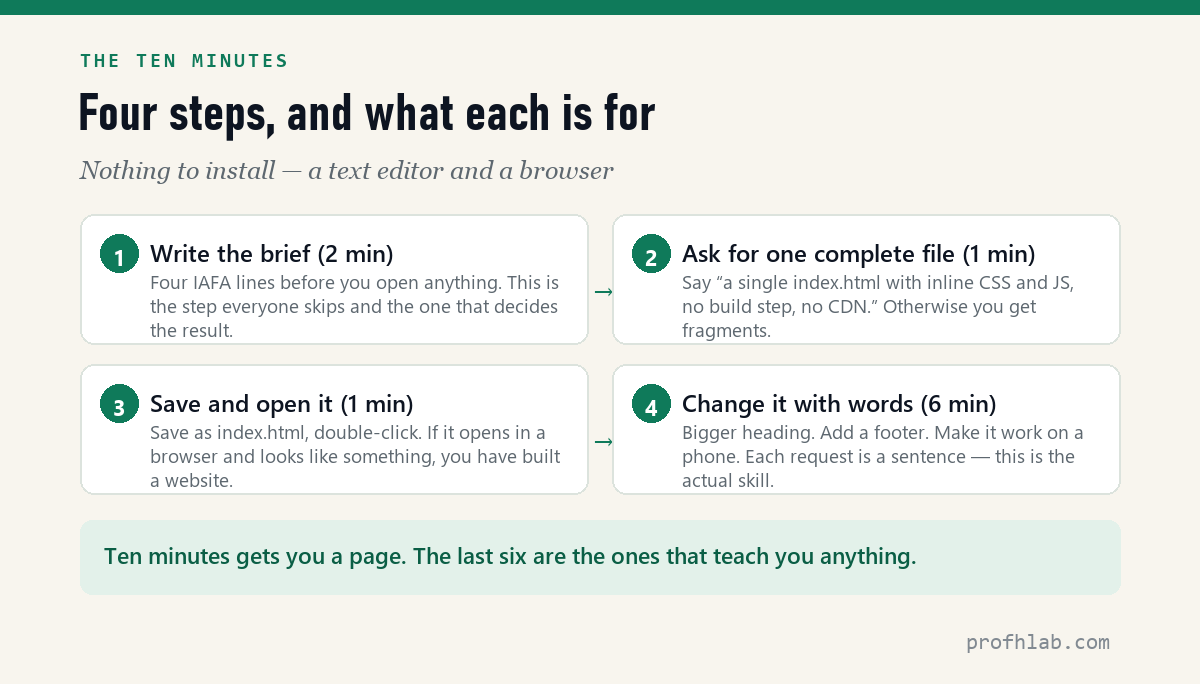
Step 1 — Write the brief before you open anything (2 min)
Open a blank note. Fill in four lines. This is the IAFA structure, and it is the difference between a grey page and one you would show someone.
Identity:  [who is making this — a role, not a name]
Audience:  [who it is for, and what they already know]
Function:  [what it must DO — behaviour, states, edge cases]
Aesthetic: [colours, type, spacing, mood — be specific]
Here is a filled-in one you can use as-is if you would rather just see the mechanism work:
Identity:  A freelance photographer who shoots film
Audience:  Art directors looking for someone in a hurry
Function:  One page. Contact details visible without scrolling.
           Three photo slots. Must work on a phone.
Aesthetic: Near-black background, one warm accent, large sans type.
           Lots of empty space. No rounded corners.
Step 2 — Ask for one complete file (1 min)
Paste your four lines into any capable chatbot — Gemini, Claude and ChatGPT all do this — and end with a sentence that matters more than it looks:
Build this as a single complete index.html.
Inline CSS and JavaScript. No build step, no CDN, no external files.
Give me the whole file so I can save it and open it.
Without that instruction you often get fragments, or a project structure that assumes you know how to run a build. “One complete file I can save and open” is the phrase that keeps a beginner unblocked.
Step 3 — Save it and open it (1 min)
- Copy everything from
<!doctype html>to</html>. - Paste into a plain text editor — Notepad on Windows, TextEdit in plain-text mode on a Mac.
- Save it as
index.htmlon your desktop. - Double-click it.
If a browser opens and shows your page, you have built a website. That is genuinely all a website is at this level: a file a browser knows how to read.
Step 4 — Now change it with words (6 min)
This is the part that teaches. Go back and ask for changes in plain sentences, one at a time:
- “Make the heading about twice as large and reduce the space under it.”
- “Add a footer with my email, quiet, small type.”
- “On a phone the photos should stack instead of sitting in a row.”
- “The accent colour is too bright. Take it two steps toward brown.”
Ask for the complete updated file each time, not a patch. Beginners lose more time pasting snippets into the wrong place than on any other single thing.
The four places people actually stall
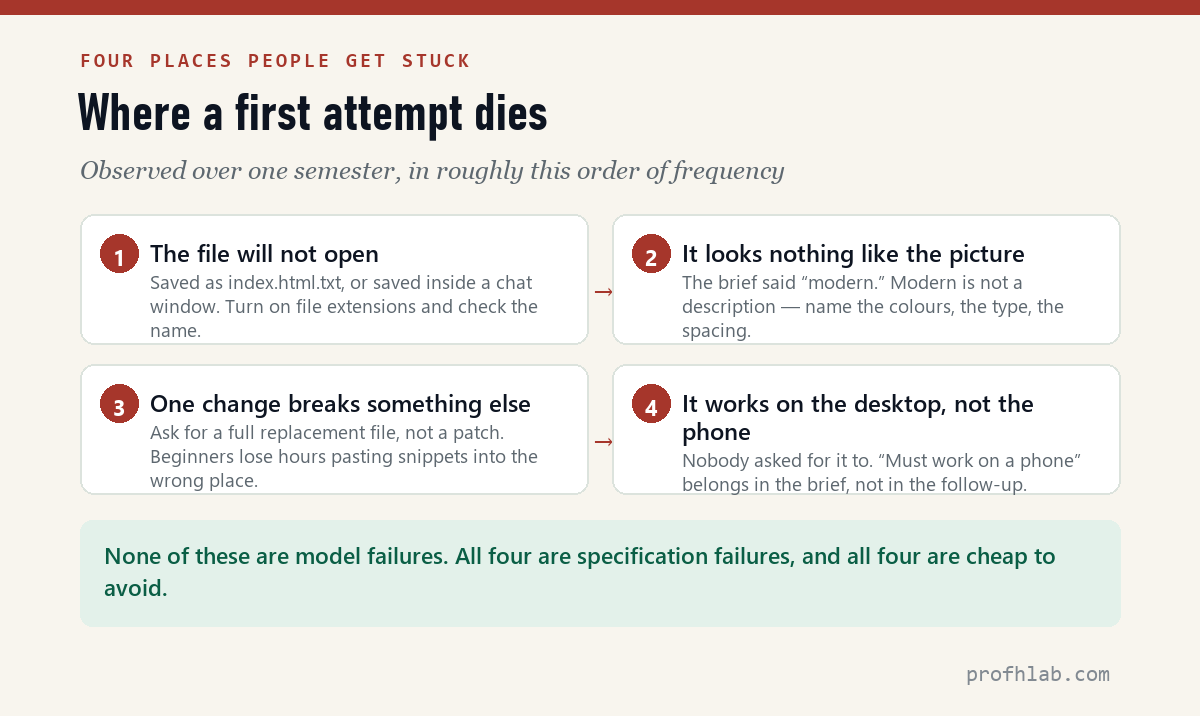
| Symptom | What is really happening | Fix |
|---|---|---|
| The file opens as text, not a page | Saved as index.html.txt — Windows hides the real extension | Turn on file extensions, rename properly |
| It looks nothing like you pictured | The brief said “modern” or “clean” | Name the colours, type and spacing. Adjectives are not a description |
| One change breaks something else | You pasted a fragment into the wrong place | Always ask for the full file back |
| Fine on the laptop, broken on the phone | Nobody asked for it to work on a phone | Put it in the Function box next time |
One honest expectation
Ten minutes gets you something that looks finished. It is not tested, not deployed, and not checked for the things you did not think to ask about. Those are the next two articles, and skipping them is how people end up with a site that breaks in front of someone who matters.
Website Learners (2.89M subscribers) builds a whole site on camera, if you want to see the loop before you try it. 1,516,104 views as of 11 August 2026.
Any chatbot will do, but read the code once anyway
Which chatbot should I use?
For this exercise, any of the main ones. The differences show up later — when you want an agent that can edit files and run things itself, which is a different category of tool.
Do I need to understand the code?
Not to finish this. But read it once anyway — not to understand every line, just to see that it is a normal text file with recognisable words in it. That demystification is half the value of the exercise.
Can I use this for a real portfolio?
Yes, after the next two steps: put it online, then check it properly. A page that only exists on your desktop is a draft.
What if I hate the result?
Then your brief was too vague, and that is good news — it is the cheapest possible lesson. Go back to the four boxes and make each one specific enough that two people could not build different things from it.
Can I make a website with AI for free?
Yes — the whole ten minutes here costs nothing. A free assistant tier, the text editor that came with your computer, and a browser. Hosting is free as well on a platform subdomain, which is the next article. The only part that costs money is a custom domain, and you do not need one to have a page a stranger can open.
Next
You have a file. Next: getting it onto the internet with a URL you can send someone — three routes, all free to start, and the data on which ones are still alive a year later.
THE AGENTIC AI SERIES
Eleven articles, in order
- 1. Generative AI vs Agentic AI — One writes the answer, the other does the job.
- 2. What Is Vibe Coding, Really? — The shift from worker to conductor.
- 3. The IAFA Prompt Framework — Four boxes between a grey button and a great one.
- 4. Your First Page in Ten Minutes — No install, no account, one file. (you are here)
- 5. From a File to a Live URL — Three routes, and which ones survive a year.
- 6. An Honest Agent Benchmark — 76 seconds to a draft, then two failures.
- 7. Verify Before You Ship — Four passes, with three failures I actually hit.
- 8. The 100-Point Scorecard — Grade your own site before anyone else does.
- 9. Adding a Database — A file cannot remember anything.
- 10. When Vibe Coding Fails — Same tools, same deadline, 17 to 81 points.
- 11. Teaching Vibe Coding — A 15-week course, and what I would change.
Start at the Agentic AI library.
Prof.’s H Newsletter
One short email a month, with the numbers in it
What actually moved in AI hiring, AI prices, and the scams aimed at older Americans. Counted here, dated, and linked to the source. One email a month, and your address goes nowhere else.