How Does ChatGPT Know My Age? The 4 Signals, Explained
The question that spiked this week was not what is ChatGPT for Teens. It was smaller and more personal than that: chatgpt thinks i am under 18. And right behind it, why is chatgpt asking for my government i.d.
On August 18, OpenAI launched ChatGPT for Teens, and it does not wait to be switched on. In OpenAI’s own words: “If our system estimates someone is under 18 or they state their age is between 13 and 17, they are automatically placed into ChatGPT for Teens.” Within two days, adults were writing about waking up inside a version of ChatGPT built for ninth graders.
Here is the part almost nobody explains, and it changes how you should feel about it: the system is not accusing you of being fifteen. It is admitting it does not know how old you are. And “does not know” has been filed, deliberately, under teenager.
What this article is. A plain-English walk through the four signals the age check actually reads, why ordinary adults get caught, what Persona does with your ID, and the four steps to undo a wrong guess. Every number here comes from OpenAI’s own help page and announcements, checked August 21, 2026.
How does ChatGPT know my age?
It does not look at your face. It does not read your birthday. It reads your habits.
OpenAI’s help page lists the inputs plainly: the age model “may look at general topics you talk about, the times of day you use ChatGPT, how and when your account is used, and how long your account has existed.” The January announcement adds one more, and it is the one people miss — “a user’s stated age” is a signal, not the signal.
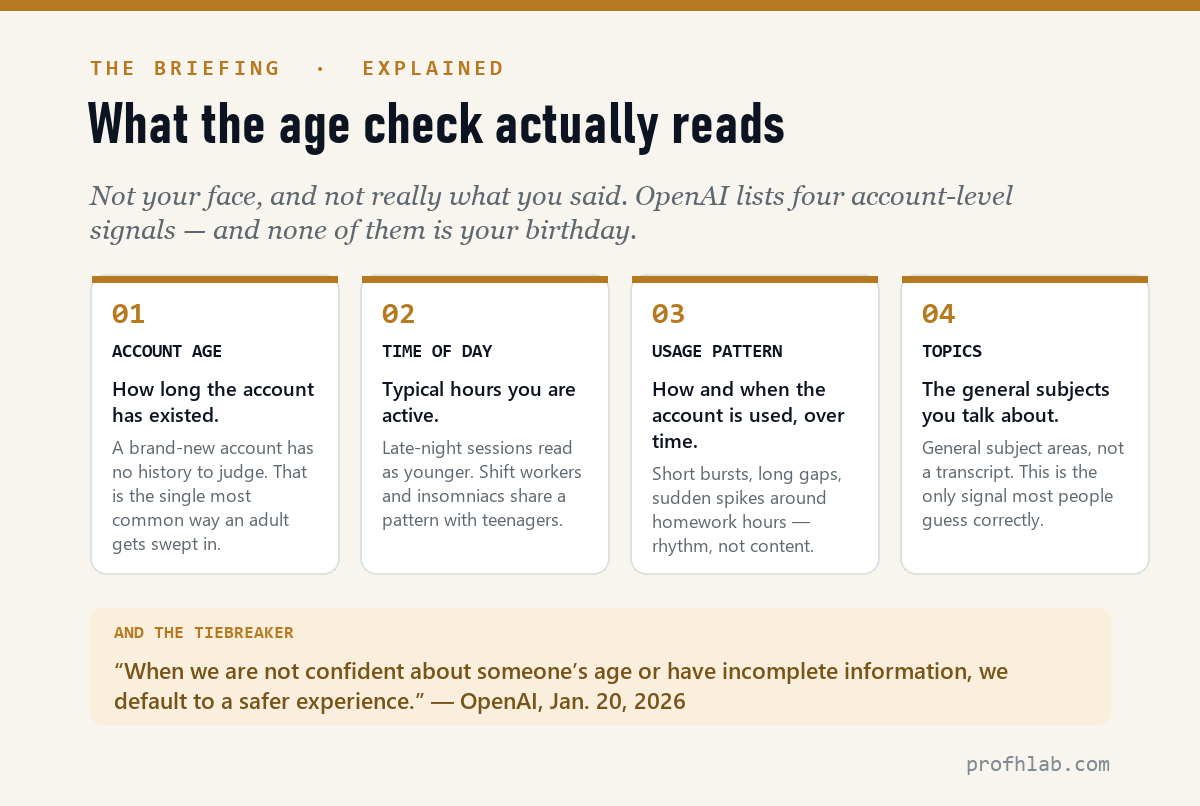
That last point is worth sitting with. The help page says it outright: age prediction “can identify an account as eligible for the ChatGPT for Teens experience even if you already gave your date of birth when you created your account.”
So the honest answer to “how does ChatGPT know my age” is: it doesn’t. It estimates. And OpenAI is unusually candid about the failure rate — “No system is perfect. Sometimes ChatGPT may get it wrong.”
Why does ChatGPT think I’m under 18?
Most people assume they got flagged for something they said. Usually they didn’t. Look again at the four signals: three of them are about rhythm, not content.
The single most important sentence OpenAI has published on this appeared back in January: “When we are not confident about someone’s age or have incomplete information, we default to a safer experience.”
Read that as an engineering decision, because that is what it is. A tie does not go to the adult. A tie goes to the teenager. Which means the adults most likely to get swept up are not the ones behaving suspiciously — they are the ones the system has the least information about:
- Brand-new accounts. No history means nothing to weigh. You look like a blank, and blanks default young.
- Night owls. Shift workers, insomniacs, and new parents at 2 a.m. share a usage curve with high schoolers.
- Light or bursty users. Someone who opens ChatGPT twice a week for ten minutes gives the model almost nothing to work with.

TechRadar reported that long-time paying subscribers were among those getting reclassified, and that the sorest point was not the extra click — it was being misread by software and then asked for identification to argue back. That is a fair complaint, and it deserves a straight answer rather than a shrug.
Why is ChatGPT asking for my government ID?
First, the reassuring part: you do not have to. OpenAI’s help page is explicit — “You do not need to verify your age to keep using ChatGPT with teen protections. You only need to verify your age if you are 18 or older and want those protections removed.” Teen mode is a content filter, not a lock. Your account stays active either way.
If you do want it lifted, the path is four steps, and it runs through an outside company called Persona.
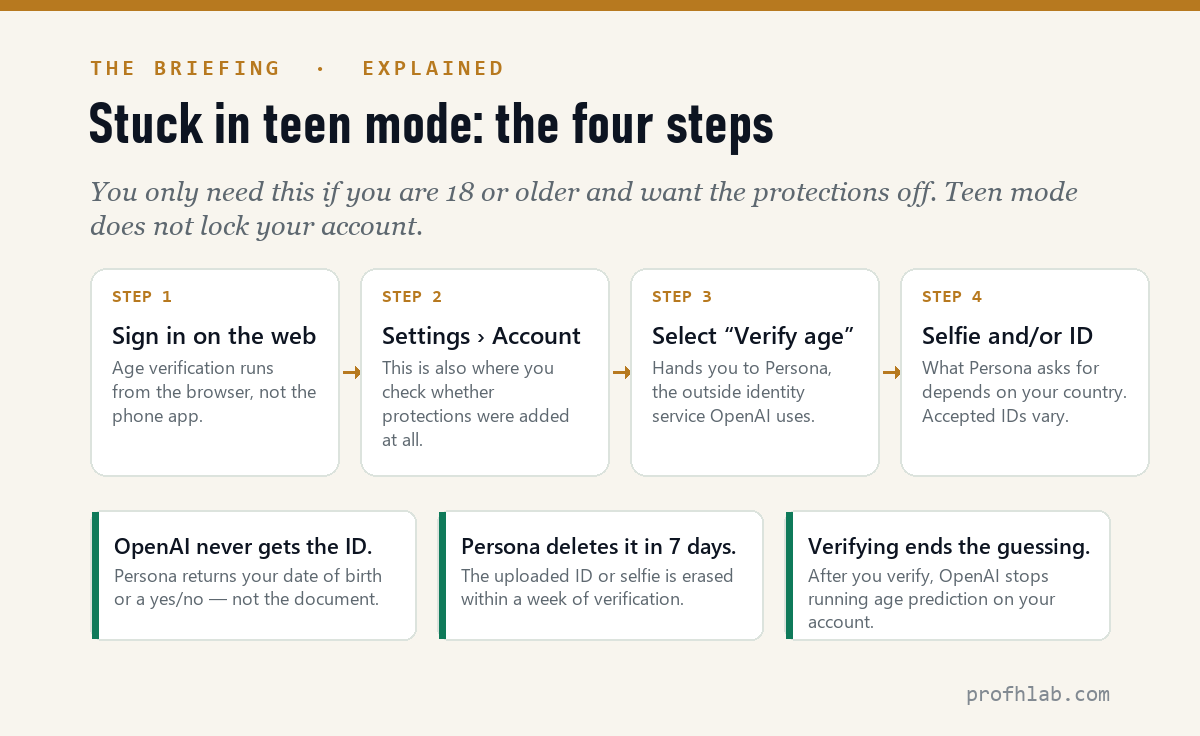
Depending on your country, Persona may ask for a live selfie, a government ID (driver’s license, passport, or state ID), or both. Accepted IDs vary by country. Then three things happen that are worth knowing before you decide:
- OpenAI never receives the document. Per the help page, “OpenAI does not receive the ID itself” — only your date of birth or an age determination comes back.
- Persona deletes it within 7 days of verification.
- Verifying permanently ends the guessing. This is the line almost every article skipped: “If you do not want OpenAI to predict your age, you can verify your age with Persona. After you verify, OpenAI will not run age prediction on your account.”

So the real decision is not “privacy versus convenience.” It is narrower than that: one ID check, handled by a third party and deleted in a week — or an open-ended behavioral estimate that keeps running on your account forever. Reasonable people land on both sides of that. But it is a different question than the one most of the outrage is answering.
One regional catch. In Italy, if ChatGPT asks you to verify, you have 60 days before certain features may be disabled. Everywhere else, verification is optional. In the EU, age prediction is still rolling out “in the coming weeks” to account for regional requirements, so you may not see it yet.
And one scam warning. A confusing new identity check is exactly the kind of event criminals imitate. OpenAI’s verification starts inside ChatGPT, at Settings › Account — never from an email or text link. If a message asks you to “verify your ChatGPT age” through a link, treat it the way you would any other AI-flavored scam we’ve documented.
What actually changes in teen mode
Being placed in ChatGPT for Teens does not cripple the product. It narrows it. OpenAI says the experience handles some topics with extra care and may reduce sensitive content in five named categories: graphic violence or gore; viral challenges that could encourage risky behavior; sexual, romantic, or violent role play; depictions of self-harm; and content promoting extreme beauty standards, unhealthy dieting, or body shaming.
Alongside the restrictions is a genuine build-out aimed at schoolwork: Study Mode, new “responsible homework reminders” that redirect a teen who appears to be shortcutting an assignment, quizzes, Learning Visualizations, and Study Hours — scheduled windows when Study Mode is on by default.

Parents can layer on more through parental controls — quiet hours, controls over memory and model training, and notifications if signs of acute distress are detected. Worth stating plainly, because parents ask: parental controls do not give a parent access to their teen’s conversations.
And one wrinkle that made us laugh, then think. The help page notes that in a teen account, “OpenAI will not show ads in your account.” ChatGPT began carrying sponsored cards for U.S. users this year, and paying for Plus is the documented way to remove them. Get sorted into teen mode by mistake and you get the ad-free experience for free — while losing the ability to talk about half the adult world. It is a strange little illustration of how these tiers are actually drawn.
What the coverage looks like
Check whether you were flagged before you verify your age
- Check whether you were actually flagged. Sign in on the web and open Settings › Account. That page shows whether protections were added — before you assume a refused answer means teen mode.
- Decide if you care. If your use of ChatGPT is email, spreadsheets, recipes, and travel plans, the five restricted categories may never touch you. Doing nothing is a legitimate choice.
- If you want it off, verify once. Settings › Account › Verify age, then follow Persona. Remember it also switches off future age prediction on your account.
- If you’re in Italy, note the date. 60 days from the prompt before features may be disabled.
- If you’re setting up a teen’s account, look at parental controls rather than relying on age prediction to do the work. Quiet hours and distress notifications are opt-in, not automatic.
- Questions or disputes about age prediction go to privacy@openai.com, per OpenAI’s help page.
Age is only one of the guesses an AI makes about you
- “Is this the start of ID checks for all AI?” Nobody can answer that honestly yet, but the direction is visible: OpenAI shipped age prediction in January and auto-enrollment in August, and other large platforms have run age-estimation systems for years with the same complaint pattern from misclassified adults.
- “What else does the AI know about me?” Age is one inference among several. We took the same approach to a different assistant in what Copilot can actually see in your inbox.
- “My parent or grandparent got locked into teen mode.” Likelier than you’d think — a new account with light, irregular use is the exact profile that defaults young. Our step-by-step ChatGPT guide for beginners over 50 covers the settings screen where the check lives.
Wrongly flagged as under 18? Teen mode, ID checks and your chats
How does ChatGPT know my age?
It estimates it. OpenAI’s age prediction model reads four account-level signals: the general topics you talk about, the times of day you use ChatGPT, how and when the account is used, and how long the account has existed. Your stated birthday is one input among several, not the deciding one.
Why does ChatGPT think I’m under 18?
Most likely because it isn’t sure. OpenAI states that “when we are not confident about someone’s age or have incomplete information, we default to a safer experience.” New accounts, light users, and people active late at night give the model the least to work with, so ties land in the teen category.
How do I turn off teen mode on ChatGPT?
Sign in on the web, go to Settings › Account, and select “Verify age.” You’ll be handed to Persona, a third-party identity service, for a live selfie and/or a government ID. If Persona confirms you’re 18 or older, teen protections are removed, though the change may take a short time to apply.
Why is ChatGPT asking for my government ID?
Only if you asked to have teen protections removed. Verification is optional — you can keep using ChatGPT with the protections in place. Persona may request a live selfie, a government ID such as a driver’s license, passport, or state ID, or both, depending on your country.
Does OpenAI see my ID or selfie?
No. According to OpenAI’s help page, Persona handles verification and OpenAI does not receive the ID or selfie itself — only your date of birth or an age determination. Persona deletes the uploaded ID or selfie within 7 days of verification.
Does age prediction read my chats?
OpenAI describes the signal as “general topics you talk about” rather than a transcript review, and the other three listed signals — account age, time of day, and usage patterns — are behavioral rather than content-based. If you’d rather not be estimated at all, verifying with Persona stops age prediction from running on your account.
What is restricted in ChatGPT for Teens?
OpenAI names five categories it reduces: graphic violence or gore; viral challenges that could encourage risky behavior; sexual, romantic, or violent role play; depictions of self-harm; and content promoting extreme beauty standards, unhealthy dieting, or body shaming. Teen accounts also see no ads.
Do parental controls let parents read their teen’s conversations?
No. OpenAI states that parental controls do not give a parent or guardian access to conversations. They allow a linked adult to manage selected settings, set quiet hours, control memory and model training, and receive notifications if signs of acute distress are detected.
Sources
- OpenAI Help Center, “Age prediction in ChatGPT” — signals, verification steps, Persona data handling, the 7-day deletion window, Italy’s 60-day rule, and the no-ads note. Checked August 21, 2026.
- OpenAI, “Introducing ChatGPT for Teens: Built for learning, backed by protections,” August 18, 2026 — auto-enrollment, Study Mode, responsible homework reminders, Study Hours.
- OpenAI, “Our approach to age prediction,” January 20, 2026 — the four behavioral signals, the five restricted content categories, parental controls, the EU rollout timing, and the default-to-safer rule.
- TechRadar, “ChatGPT’s new age-detection feature is misfiring — and adult users are getting stuck in teen mode” — reporting on misclassified adult subscribers.
Why scammers welcome a new ‘verify your identity’ step
- ChatGPT ads: what you can actually turn off — the tier that teen accounts skip by accident.
- AI scams targeting seniors — why a new “verify your identity” flow is a scammer’s favorite weather.
- How to use ChatGPT: a beginner’s guide for over-50s — including where the Settings screen lives.
Written by Prof. H. Every figure above was pulled from OpenAI’s own help page and announcements and checked on August 21, 2026. Where reporting rather than a primary source is cited, it is named in the text. If a detail changes, this page gets corrected rather than quietly rewritten.
Prof.’s H Newsletter
One short email a month, with the numbers in it
What actually moved in AI hiring, AI prices, and the scams aimed at older Americans. Counted here, dated, and linked to the source. One email a month, and your address goes nowhere else.