How to Use AI to Write a Eulogy in 5 Steps (and What Never to Type In)
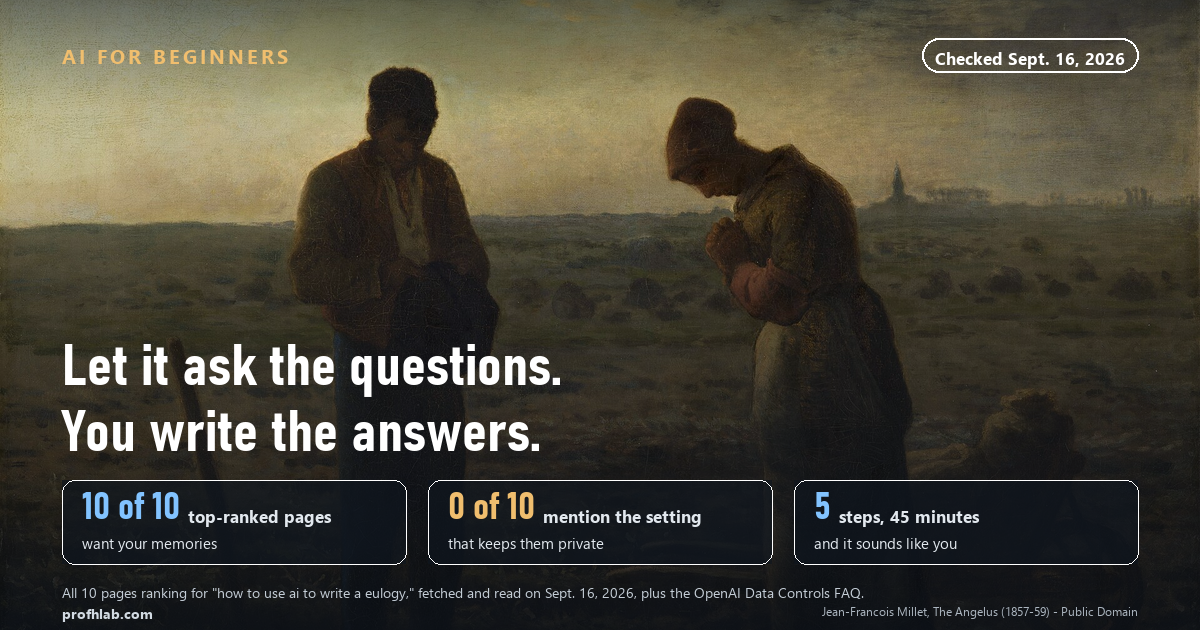
Use AI as an interviewer and an editor — never as the author. Turn on Temporary Chat, talk out loud for five minutes instead of filling in a form, then ask it to put ten questions back to you and write the answers in your own words. That takes about 45 minutes and gets you roughly 700 words, which runs about five minutes at the slow pace you will actually speak at. And do the privacy step first: on September 16, 2026 we fetched all ten pages Google ranks for this exact question, and none of them mentions the two free settings that keep a dead person’s details out of AI training data.
What we checked on September 16, 2026
We searched the exact phrase people type — “how to use ai to write a eulogy” — fetched the served text of all ten pages on the first screen, and counted what each one says. Seven of the ten are not articles at all. They are tools that want you to type into their box.
- 10 of 10 ask you for personal memories and stories.
- 6 of 10 ask for the deceased person’s full name.
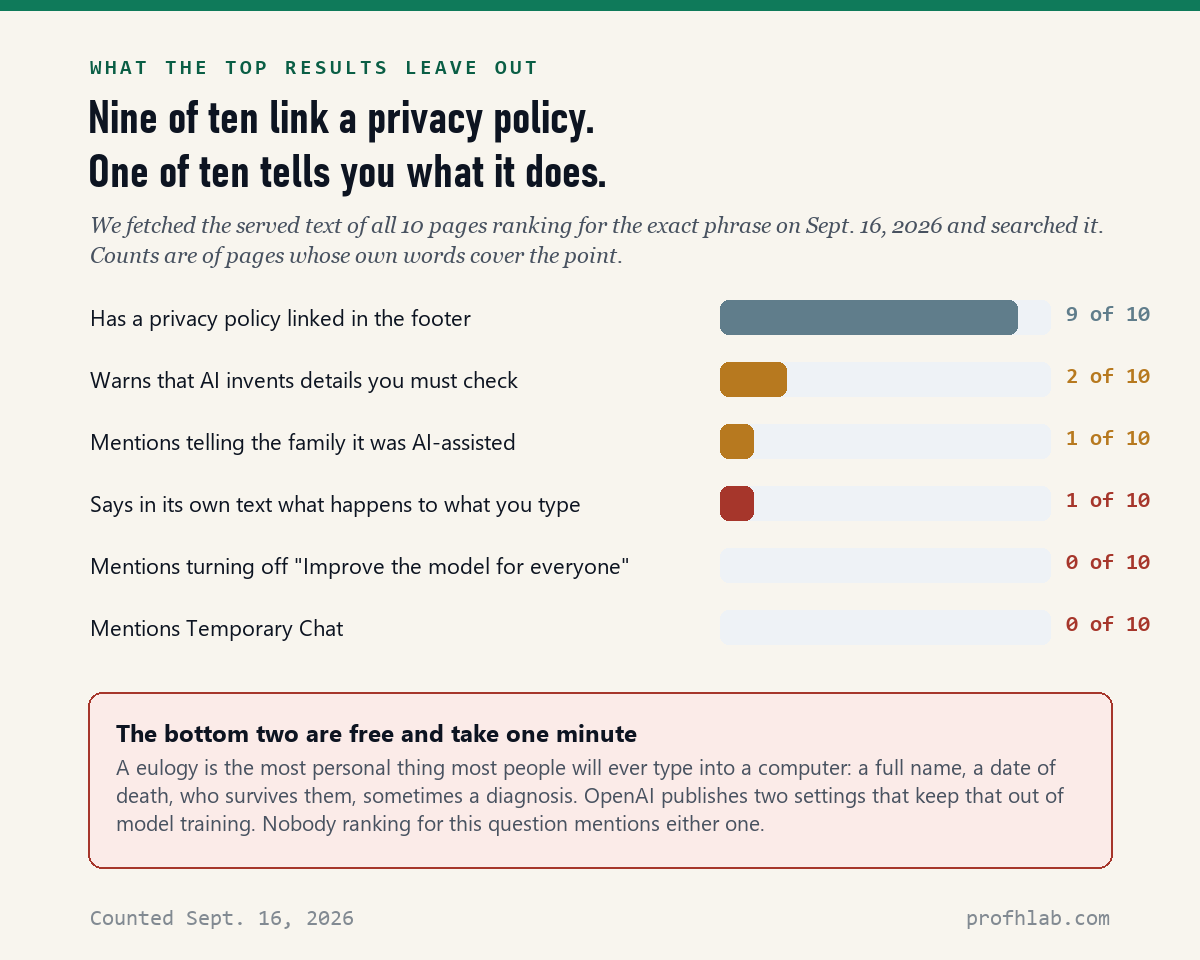
- 9 of 10 have a privacy policy linked in the footer — and 1 of 10 says anywhere in its own text what happens to what you type.
- 2 of 10 warn that AI invents details you have to check.
- 0 of 10 mention Temporary Chat or the “Improve the model for everyone” setting.
You are about to type the most personal paragraph of your life into a computer. It is worth one minute of setup first.
First, the one minute that protects your family
A eulogy is unlike anything else you will ever put into a chatbot. In one paragraph you may type a full name, a date of death, who survives them, where they lived, what they did for a living, and sometimes a diagnosis. That is a tidy little file on a person and on the family around them.
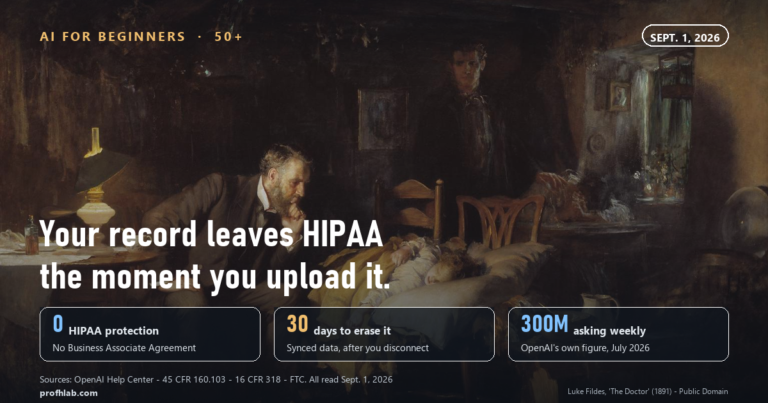
OpenAI publishes two settings that control where that goes. Both are free, both work on a free account, and both take seconds. We read the OpenAI Data Controls FAQ on September 16, 2026:
- Temporary Chat. OpenAI’s words: Temporary Chats “are deleted from our systems after 30 days,” they “aren’t used to train our models,” and they “don’t get saved in your history and don’t create memories.” Start one from the chat screen before you type a single name.
- Turn off model training. Profile icon > Settings > Data Controls > turn off Improve the model for everyone. OpenAI: “Your conversations will still appear in your chat history but won’t be used to train ChatGPT.” You can change it back any time — “there are no restrictions.”
Not signed in? You still get the switch. OpenAI’s instructions for signed-out users: click the ? icon in the bottom-right corner, choose Settings, and turn off Improve the model for everyone. If you would rather not have an account at all for this, that is a perfectly good way to do it.
This matters more for a eulogy than for almost anything else, because the person you are writing about cannot consent to any of it. If you want the longer version of where chat data actually lives, we worked through it in are deleted ChatGPT chats really deleted.
What the eulogy generators are actually asking you for
Seven of the ten pages that rank for this question are not guides. They are forms. You type, they generate, and the page is built to get you from grief to a finished block of text in under five minutes.
We counted what they ask for, across all ten pages, on September 16, 2026.
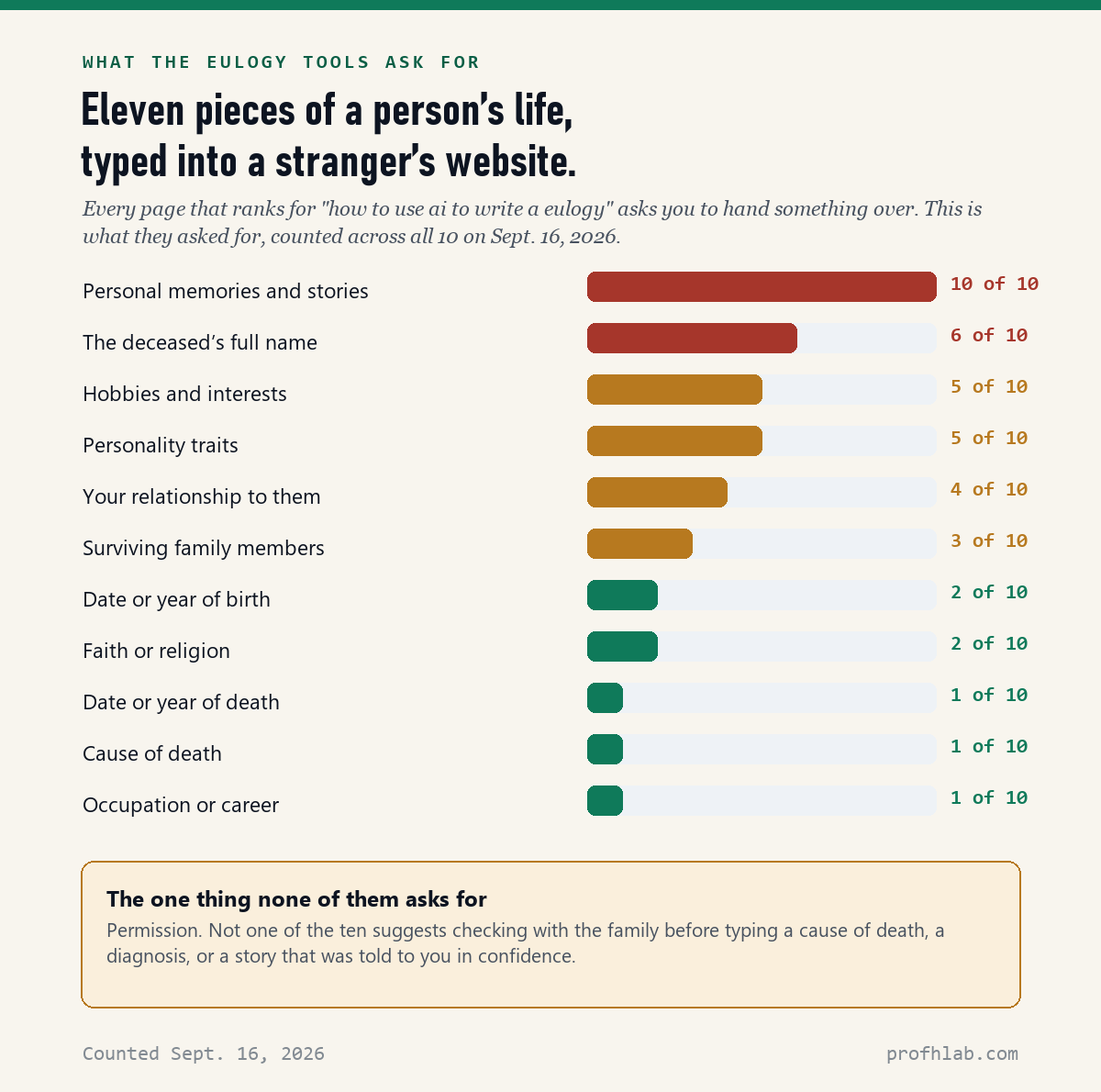
None of this is illegal and most of it is probably fine. But notice what is missing from all eleven boxes: anywhere to record that the family agreed to it. A cause of death, a diagnosis, an estrangement, a story someone told you in a hospital corridor — these arrive in a eulogy through trust, and a web form has no idea it is holding them.
Our rule is simple. If you would not say it into a microphone at the service, do not type it into a box that is not yours. Sketch around it instead: “a long illness she met with more grace than I would have” does the work without handing over a medical record.

The five steps, start to finish
This is the method we would use ourselves. It takes about 45 minutes, and the reason it works is that the machine never writes a sentence anyone will hear.
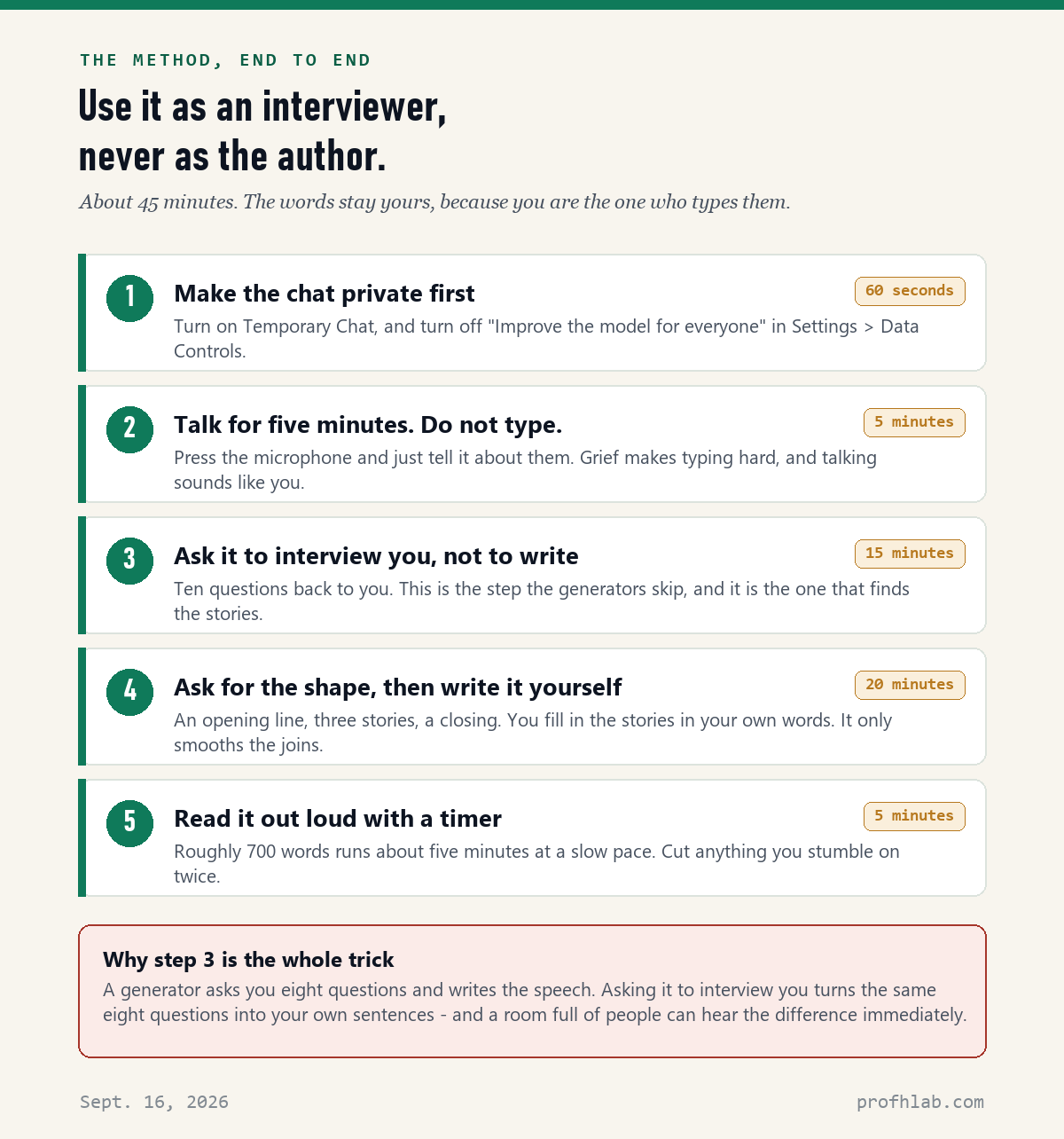
Step 1. Make the chat private. 60 seconds.
Temporary Chat on, “Improve the model for everyone” off, as above. Do this before you type the name.
Step 2. Talk for five minutes. Do not type. 5 minutes.
Press the microphone button and simply talk about them. Ramble. Repeat yourself. Say the thing about the car, and the thing about how they answered the phone. Do not organize it.
Two reasons. Grief makes typing miserable, and a blinking cursor makes it worse. And your spoken sentences already sound like you — which is the exact quality that a generated eulogy never has and that everyone in the room can hear is missing.
Step 3. Ask it to interview you, not to write. 15 minutes.
Here is the whole trick. Paste this:
Answer out loud, in fragments. The questions are what you are paying for here — a good one (“what did they always say when you walked in the door?”) will hand you a story you had genuinely forgotten. That is not something a form with eight blanks can do.
Step 4. Ask for the shape, then write it yourself. 20 minutes.
Then type the stories in your own plain words. Bad sentences are fine at this stage. When you have a rough draft, hand it back for one narrow job only:
“Do not add anything I did not say” is the load-bearing instruction. Without it the model will cheerfully invent a detail that sounds right and is not true, which is the failure mode we documented at length in using ChatGPT for genealogy research — six jobs it does well, four things it simply makes up.
Step 5. Read it out loud with a timer. 5 minutes.
Out loud, standing, at the slow pace you will actually use. Roughly 700 words comes out around five minutes that way — that is arithmetic at a deliberate funeral-service pace, not a rule, so time your own draft rather than trusting the count.
Two edits come out of this read. Cut any sentence you stumble over twice; it is written, not spoken. And mark one place to pause and breathe, on purpose, before the part that will be hardest to get through.

What never to type in
Whether you use a chatbot or one of the generators, some things should never go into the box — and some should never go into the printed obituary either.
- Social Security number. Never. There is no version of a eulogy that needs it.
- Full date of birth plus mother’s maiden name plus home address. Individually harmless, together the classic identity-verification set. Obituaries are a known hunting ground; you do not need to help.
- A cause of death or diagnosis the family has not agreed to share. This is the one people regret. Ask first.
- Account numbers, the address of a now-empty house, or funeral timing details in anything public.
- Anything about living people that they would not want said. A eulogy about one person routinely exposes three others.
Watch for this in the same week: funeral imposters
The FTC published a consumer alert on June 15, 2023 about scammers who pose as the funeral home and claim that unless the family pays more money immediately, the funeral will be canceled. The FTC’s guidance: “Honest businesses will give you time to make a decision. Anyone who pressures you to pay or give them your personal information is a scammer.” Call the funeral home back on a number you already know is real — not one from the text or email. Never pay by wire transfer, cryptocurrency, or gift card. Report it at ReportFraud.ftc.gov.
Grieving families get targeted precisely because they are busy and distracted. Our full rundown is in AI scams targeting seniors, and the monthly update is AI scam watch.
The two tests before you stand up
The recognition test. Read it and ask: would they recognize themselves in this? Generated eulogies fail here in a specific way — they produce a person who was kind, hardworking, and loved by all, which is true of almost everyone and a portrait of no one. If you could swap in another name and the speech still works, it is not finished.
The fact test. Go through with a pen and check every proper noun, year, place name, and number against something real. Models fill gaps confidently. The year someone moved, the name of the street, the make of the car — if the AI supplied it rather than you, verify it or cut it. Getting a detail wrong about the deceased in front of the people who knew them is the one mistake that cannot be walked back.
Is it wrong to use AI for this?
It is the question underneath the search, so here is a straight answer: no, if it helps you say something true, and yes, if it says something for you.
Nobody thinks it is dishonest to use a thesaurus, ask a friend to read a draft, or start from a template a funeral director handed you. An AI that asks you good questions and fixes your grammar sits in that same category. An AI that produces the speech while you supply eight facts is a different thing, and people can tell — the giveaway is the strange evenness, three paragraphs of equal length all making the same shape of point.
Do you have to announce it? We would not. You did not announce the thesaurus. What matters is whether every claim in the speech is something you actually know to be true. If you used it well, there is nothing to disclose, because the memories are yours and so are the sentences. If you used it badly, the disclosure is not what fixes the problem.
One exception worth naming: if someone asks you directly, say so plainly. This is a week for being straightforward with your family.

Two videos worth the time
If you have twenty minutes and would rather be talked through it:
What to do with this
Forty-five minutes, in this order. You do not need help with any of it.
- Open ChatGPT and start a Temporary Chat. Then Settings > Data Controls > turn off Improve the model for everyone.
- Press the microphone and talk for five minutes about the person. Do not organize it.
- Paste the interview prompt from step 3 above. Answer the ten questions out loud.
- Ask for an outline only — opening line, three stories, closing.
- Write the three stories yourself. Plain words. Bad sentences allowed.
- Hand the draft back for grammar and transitions only, with “do not add anything I did not say.”
- Check every proper noun and year against something real. Cut what you cannot verify.
- Read it out loud, standing, with a timer. Cut anything you stumble on twice. Mark one breathing pause.
- Print it in 16-point type, one side only, numbered. You will not be able to read small print on the day.
If you want to go deeper
- “What about the obituary?” Different document, different risk. A eulogy is spoken once to people who knew them; an obituary is published permanently and is the one that gets mined. Keep the full date of birth and the home address out of it.
- “I also have to write thank-you notes.” Same approach, much lower stakes — we wrote it up in how to write letters and emails with ChatGPT, which covers sympathy notes specifically.
- “There are legal documents too.” Be careful here. Can I use AI to write a will lays out why the signing, not the drafting, is the part that decides whether a document counts.
- “Which AI should I use for this?” Any of the big three will do it. We compared them on writing quality in ChatGPT vs Claude vs Gemini for writing. The free tier is genuinely enough for one eulogy — see is ChatGPT Plus still worth it before you pay for anything this week.
- “I want their photo restored for the service.” How to restore old family photos with AI has the exact prompts, and making AI photos with grandparents who have died handles the harder emotional version honestly.
Questions people actually ask
Can ChatGPT write a eulogy?
It can produce one, and it will be competent and forgettable. Used well it does something better: it asks you ten questions that surface specific memories, gives you an outline, and then fixes the grammar of the sentences you wrote yourself. Ask it to interview you rather than to write, and keep the writing in your own words.
How do I write a eulogy with ChatGPT?
Five steps, about 45 minutes. Turn on Temporary Chat. Talk out loud for five minutes using the microphone instead of typing. Ask it for ten interview questions, one at a time. Ask for an outline only — opening line, three stories, closing — and write the stories yourself. Then read it aloud with a timer and cut anything you stumble over twice.
What is a good ChatGPT prompt for a eulogy?
The one that works is a refusal to let it write: “I have to give a eulogy and I am not a writer. Do not write it. Ask me ten short questions, one at a time, that will get me to remember specific moments rather than general praise. Wait for each answer before asking the next.” For the editing pass: “Do not rewrite my sentences and do not add anything I did not say. Only fix grammar and smooth the transitions.”
Are free AI eulogy generators safe to use?
Be careful. Of the ten pages ranking for this question on September 16, 2026, nine link a privacy policy in the footer but only one states in its own text what happens to the details you type. Every one of them asks for personal memories, six ask for the deceased person’s full name, and one asks for eight separate personal items at once. If you use a chatbot directly instead, you at least get Temporary Chat and a documented training opt-out.
How long should a eulogy be?
Ask whoever is running the service, because they are working to a schedule — but three to five minutes is the usual request. As a planning figure, roughly 700 words lands near five minutes at the slow pace people actually speak at a funeral. Time your own draft out loud rather than trusting the word count, because nerves change your pace in both directions.
Should I tell people the eulogy was written with AI?
If you used it to ask you questions and fix grammar, there is nothing to disclose — the memories and the sentences are yours, and you would not announce a thesaurus. If it wrote the speech and you supplied eight facts, disclosure is not really the problem; the speech is. If someone asks you directly, answer plainly.
Can AI write a eulogy for a mother or father?
This is where the interview method matters most. The closer you were, the more the generic version stings, because a parent is exactly the person a list of adjectives fails to describe. Use the ten questions to find three small ordinary scenes — what they said on the phone, what they always cooked, what they nagged you about — and let those carry it instead of a summary of their life.
What is the difference between a eulogy and an obituary?
A eulogy is spoken at the service to people who already knew them, and it can be personal and uneven and funny. An obituary is a published notice of death, usually factual, and it stays online permanently. That permanence is why the identity-theft advice applies to the obituary far more than to the eulogy: keep the full date of birth, mother’s maiden name, and home address out of anything published.
Sources
- OpenAI, “Data Controls FAQ” — Temporary Chat retention, the “Improve the model for everyone” setting, and signed-out instructions. Read September 16, 2026.
- Federal Trade Commission, “Imposters prey on families preparing for the funeral of a loved one” — consumer alert by Alvaro Puig, June 15, 2023.
- Federal Trade Commission, “Shopping for Funeral Services” — the Funeral Rule and the right to buy goods and services separately. Read September 16, 2026.
- profhlab.com original counts — the served text of all ten pages ranking for “how to use ai to write a eulogy,” fetched and searched on September 16, 2026. Method and per-page results are available on request via Ask Prof H.
Keep reading
- How to Use ChatGPT: A Step-by-Step Guide for Beginners Over 50 — start here if this is your first week with any of it.
- How to Write Letters and Emails with ChatGPT — sympathy notes, complaints, and the thank-you notes that come after a funeral.
- Is It Safe to Upload Medical Records to ChatGPT? — the same privacy question, asked about a harder document.
- The Best AI Tools for Seniors in 2026 — free help for seeing, hearing, and writing.
- Start Here — the whole library, in the order that makes sense.
About the author. Prof. H writes profhlab.com for people who did not grow up with this stuff and would like a straight answer. We read the primary sources so you do not have to. The OpenAI settings above were read on OpenAI’s own help pages on September 16, 2026, the FTC alert is linked in full, and the counts of the ten ranking pages were made the same day. If you are here this week because someone died, we are sorry, and we hope the ten questions help. Found an error? Tell us — we correct in public.
Prof.’s H Newsletter
One short email a month, with the numbers in it
What actually moved in AI hiring, AI prices, and the scams aimed at older Americans. Counted here, dated, and linked to the source. One email a month, and your address goes nowhere else.