How to Turn Off AI on eBay: 2 Real Switches, 3 Buttons to Skip, and 3 With No Off Option
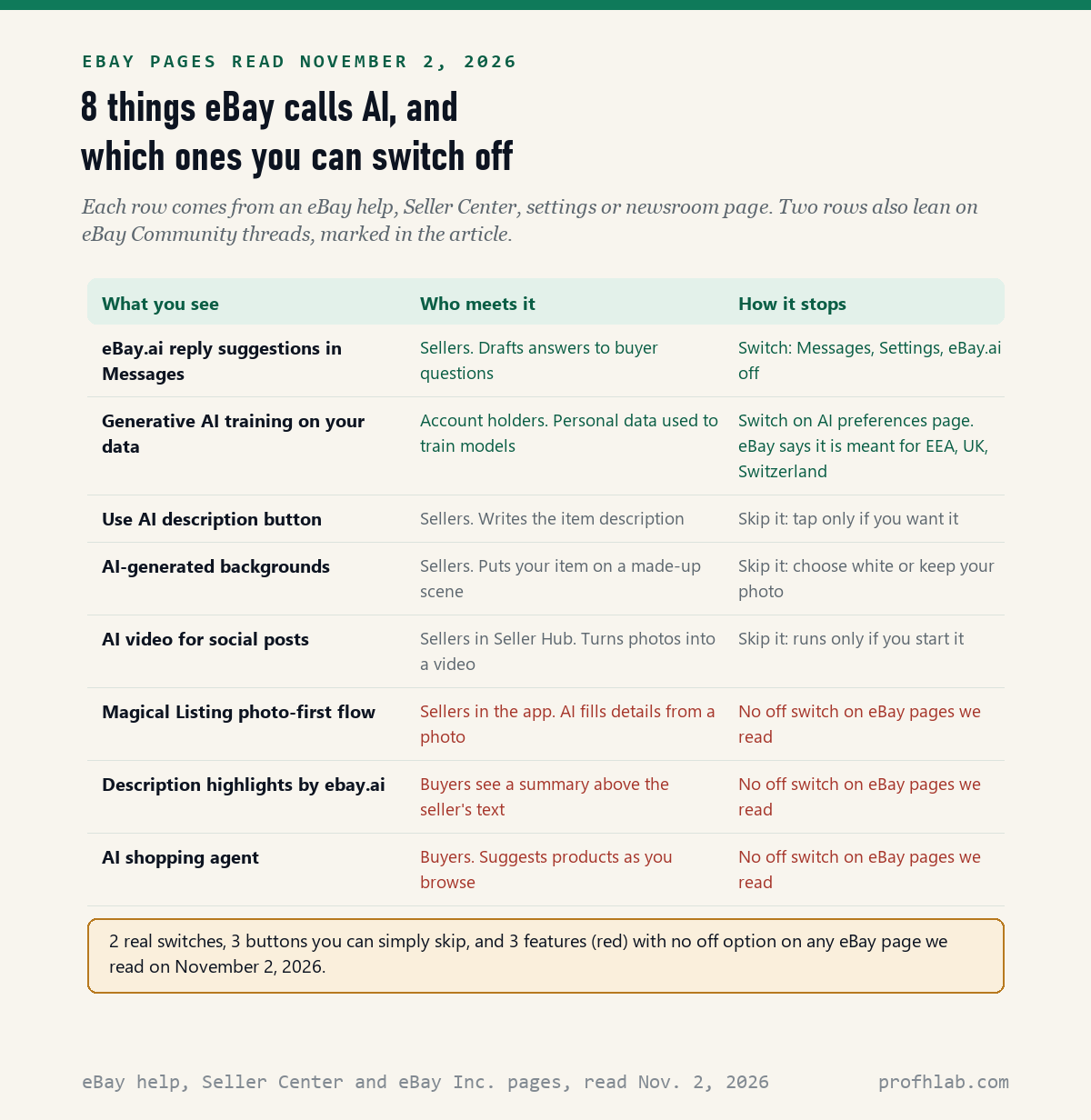
There is no single AI switch on eBay: on November 2, 2026, we read 10 eBay pages and 5 eBay Community threads and counted 8 features eBay calls AI. Only 2 have a real off switch, 3 are buttons you can simply skip, and 3 had no off option on any eBay page we read.
The switch most sellers want is in Messages. eBay.ai, the tool that drafts replies to buyers, turns off with one toggle. The AI that fills in a new listing from a photo is harder, and buyers cannot switch off the AI summaries or the shopping agent at all.
What we checked on November 2, 2026
We opened 13 pages on eBay’s own websites and could read 10: a Messages help page, three Seller Center pages, the AI preferences settings page, four eBay Inc. newsroom stories and eBay’s third-quarter 2026 results. 3 more, including eBay’s User Privacy Notice and two listing help pages, returned a security check page, so we quote nothing from them. eBay served the Messages help page to us in Korean; we translated it and quote the English Seller Center page instead.
Our own count: 8 features eBay calls AI. 2 have an off switch, 3 are optional buttons, and 3 had no off option on any eBay page. We also read 5 eBay Community threads, where sellers describe what they see; we label those as reports, not eBay rules. We did not list an item ourselves, so we have not seen every screen.
Written and checked by Prof. H. An AI assistant helped draft this article and ran the page reads; every quote was read on the source’s own page on the date shown.
Can you turn off AI on eBay?
Partly: in the 10 eBay pages we read on November 2, 2026, there is no master AI switch, but 5 of the 8 AI features can be stopped, 2 with a toggle and 3 by never pressing the button. The other 3 run whether you like it or not.
Think of eBay as a big flea market with helpers walking around. Some helpers wait until you call them, like the AI description button. One sits at your mailbox, eBay.ai, and you can send it home. A few follow every shopper, and eBay has not posted a way to wave them off.
Most of this is aimed at sellers. If you only buy on eBay, the two AI features you are likely to meet are the summaries above some descriptions and the shopping agent, and neither has an off switch on the pages we read.
How do I stop eBay.ai from writing replies to my buyers?
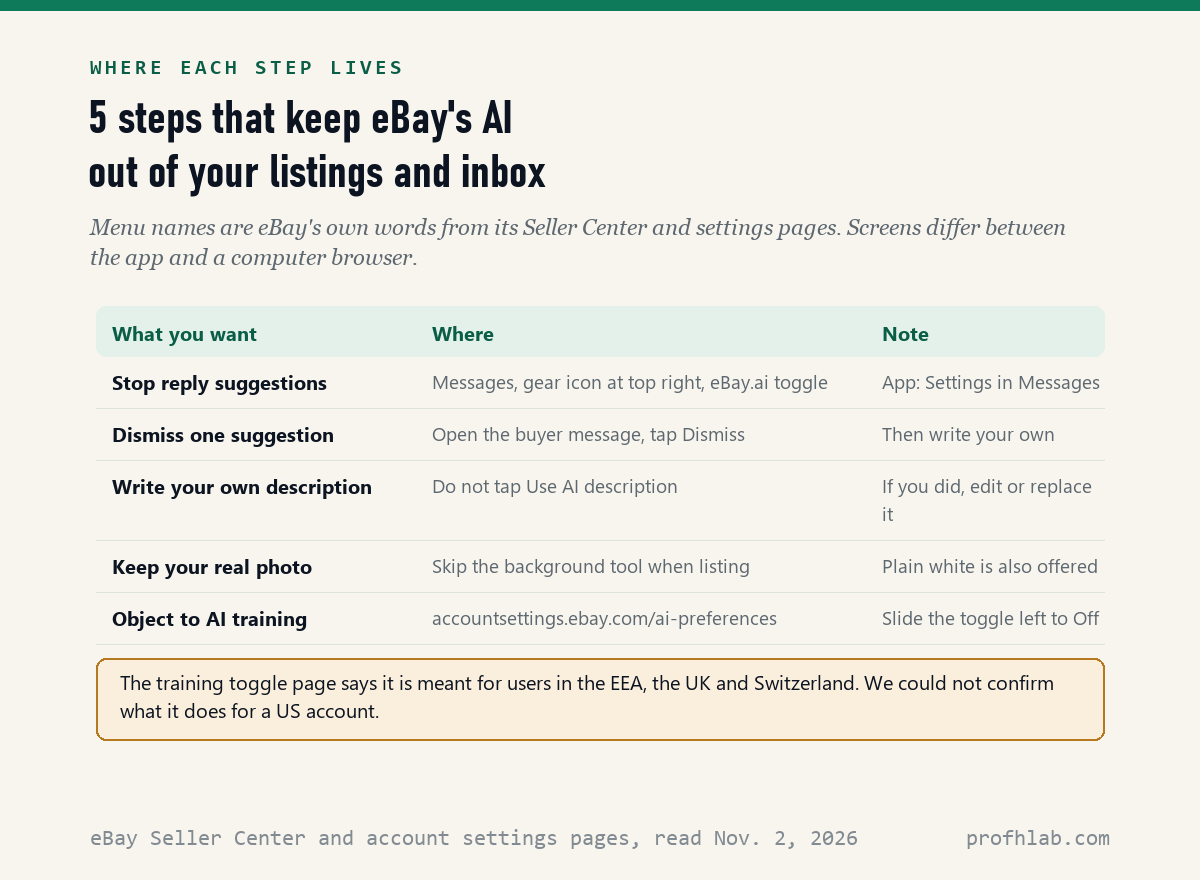
Turn off the eBay.ai toggle in Messages: eBay’s Seller Center page on its AI Assistant, read November 2, 2026, says “To turn it off anytime, toggle ‘eBay.ai’ off on your device.” On the app the toggle is in Settings inside Messages; on a computer it is in Messages itself.
The same page gives both places. On mobile, “go to ‘Settings’ in Messages.” On desktop, “use the ‘eBay.ai’ toggle in the bottom left of Messages.” eBay’s Messages help page, in the version we were served, puts the settings gear at the top right of the inbox. If one spot is empty, look in the other.
- Open eBay and go to Messages.
- Tap Settings, or the gear icon.
- Slide eBay.ai to off.
- Open a buyer message to check that no suggested reply appears.
You do not have to turn it off to stay in charge. The Seller Center page says “Review and refine each suggested message before sending, or simply write your own,” and the Dismiss button throws one suggestion away. Nothing is sent until you press send.
Why does eBay say eBay.ai is enabled when I switched it off?
Sellers have reported it, and we could not confirm a fix: in an eBay Community thread we read on November 2, 2026, one seller said a message read “eBay.ai has been enabled” even though the toggle was off. Another member wrote that “it appears there may be a bug.”
That member’s advice was to switch the toggle on and then off again, which made the message go away for a while, and to report the bug, which the member said you can do in the app by shaking your phone. This is what sellers wrote, not an eBay instruction, and the thread is now closed.

How do I list an item on eBay without the AI description?
Simply do not press the button: eBay’s Selling with AI page, read November 2, 2026, says that when creating a listing you “select ‘Use AI description’” to get one. If you never select it, eBay does not write the description for you. Type your own words in the description box instead.
If you already pressed it, you can change the text. The same page says to “Use it as-is, make edits to it, or use it as inspiration to write your own.” Read every line before you list. A wrong size or a missing flaw in an AI description is still your listing, under your name.
One community thread shows why to look first. A seller there, writing about two years ago, said the form would not take a typed description, and an experienced seller replied “You are NOT required to use AI description. It is an Option.” If the screen freezes, save a draft and try a computer browser.
Can you skip the AI photo listing in the eBay app?
Not with a switch on any eBay page we read: eBay Inc. said in its third-quarter results on October 28, 2026 that it “expanded the latest generation of its AI-powered Magical Listing technology to all new and reactivated listers” in the US and five other countries.
Magical Listing starts with a photo. eBay’s April 9, 2025 story says it lets sellers “take or upload a product image and use AI to help fill in item specifics,” and that the seller can “review and approve content.” So you can correct every field, but the app still offers AI guesses first.
In an Ask a Mentor thread posted about a month before we read it, a seller asked how to opt out on a phone. A volunteer mentor answered that “The only way I am aware of to stop the AI on the app is to sign up for Seller Hub or Business Policies.” Seller Hub is eBay’s seller dashboard on a computer. We did not test this.

Do I have to use eBay’s AI backgrounds on my photos?
No, they are optional: eBay’s Seller Center photo tips page, read November 2, 2026, lists AI-generated scenes as one choice beside plain colors, and advises “Try to only use this option for a few photos, and make sure the background doesn’t distract from your item.”
The tool removes the real background and puts your item in a made-up scene. eBay’s June 4, 2024 story says it is “powered by open source deep learning, inpainting models (Stable Diffusion).” The same story says eBay added reminders for sellers “to check for accuracy in the images they select.”
For used goods, a real photo is often the safer choice. Buyers want to see scratches, wear and true color. Skip the background step, or pick plain white, and the AI never touches the picture. The AI video tool for social posts, which eBay says works from Seller Hub, is also off unless you start it.
Can eBay use my data to train its AI, and can I stop it?
eBay has a toggle, but it says the toggle is meant for Europe, the UK and Switzerland: its AI preferences page, read November 2, 2026, says the setting is “intended to help our users in the European Economic Area (EEA), the United Kingdom, and Switzerland” control training of its generative AI models.
The page says you can opt out “by setting the toggle below to ‘Off’.” The address is accountsettings.ebay.com/ai-preferences, and you must be signed in. We could not confirm what the toggle does for a US account. The same page says training aimed at preventing fraud and abuse is not covered.
Is there any way to turn off AI as an eBay buyer?
Not on any eBay page we read: eBay’s May 6, 2025 story on its AI shopping agent says it shows up “either by reacting to a user’s request or through predictive messaging inline on the page the user is visiting,” and names no off switch. It said then that only “a small percentage of U.S. customers” had it.
Buyers on the app may also see description highlights labeled ebay.ai above the seller’s text. In a Community thread about a year old, a seller asked “Is there a way for me to turn this off or opt out?” Nobody gave a way, and the seller concluded it probably could not be done.
The fix for buyers is a habit, not a setting. Tap See Full Description and read the seller’s own words before you bid. A summary can drop one size or one flaw, and the seller’s text is what counts if something goes wrong.

One seller tests the photo lister, one shop shows the shortcut
We picked 2 videos on November 2, 2026. We found no eBay video on turning AI off, so both come from independent sellers. The first tests the photo lister; the second shows what the AI flow looks like, so you know which screen you are on.
Five minutes in Messages, the listing form and your settings
Do these with your phone or computer in hand. Our estimate is about a minute each. None of them removes a listing or a message.
- Silence the reply drafts. Messages, Settings or the gear icon, slide eBay.ai off.
- Check it stuck. Open one buyer message. If you still see a suggestion, switch the toggle on and off once.
- Write your own description. On your next listing, leave Use AI description alone and type your own text.
- Keep real photos. Skip the background step, or choose plain white.
- Read before you buy. Tap See Full Description on any listing with a summary.
If a screen does not match, the Help and Contact link at the bottom of every eBay page leads to support, and the Community boards answer listing questions. It is fine to ask a grandchild to sit with you. None of this is your fault; eBay changes these screens often.
Amazon, Gmail, Facebook and the rest of your selling week
- Shopping: how to turn off AI on Amazon and how to avoid surveillance pricing.
- Photos you sell or share: iPhone Photos, Google Photos, Canva and how to tell if a picture is AI.
- Email: Gmail and Yahoo Mail.
- Social sites: Facebook, Instagram, Pinterest and LinkedIn.
- Your phone and browser: Samsung phones and Chrome.
- Staying safe: AI scams that target seniors and what personal details to keep out of chatbots.
- New to all of this? Start from the Start Here page, our ChatGPT guide for beginners over 50 or our AI tools for seniors.
- Curious where AI work is hiring? Our AI jobs tracker counts openings every week.
What else do eBay sellers and buyers ask about its AI?
How to turn off AI on eBay?
There is no single switch. Turn off eBay.ai in Messages settings, skip the Use AI description button, and skip the AI background step. On November 2, 2026 we counted 8 eBay AI features: 2 with a toggle, 3 optional buttons and 3 with no off option.
How to turn off AI on eBay app?
In the app, open Messages, tap Settings and slide eBay.ai off. The photo-first listing flow has no off switch on any eBay page we read. A volunteer mentor on the eBay Community said signing up for Seller Hub stopped it for some sellers; we did not test that.
How to turn off AI on eBay listing?
Do not select Use AI description, and type your own text in the description box. eBay says an AI description can be used as is, edited, or used as inspiration. If one was added, edit or replace it and read every line before you list.
How to turn off AI assist on eBay?
eBay calls its reply helper AI Assistant, and the switch is labeled eBay.ai. In the app it sits in Settings inside Messages; on a computer, eBay says it is in the bottom left of Messages. Suggestions never send on their own.
Can eBay buyers turn off AI summaries?
We found no way. Some app listings show description highlights labeled ebay.ai, and a seller who asked on the eBay Community got no opt-out. Tap See Full Description and read the seller text before you buy.
Does eBay use my data to train AI?
eBay has an AI preferences page with a toggle to object to generative AI training, but the page says it is meant for users in the EEA, the UK and Switzerland. We could not confirm its effect on a US account. Fraud prevention training is not covered.
The eBay pages, newsroom stories and threads behind each quote
- eBay Seller Center, Save time responding to your buyers with AI Assistant, August 2025 seller news, read November 2, 2026.
- eBay Help, Messages, served to us in Korean, read November 2, 2026.
- eBay, Selling is now even easier with AI, read November 2, 2026.
- eBay Seller Center, Take great photos, read November 2, 2026.
- eBay account settings, Opt-out from training of generative AI models, read November 2, 2026.
- eBay Inc., eBay Inc. Reports Third Quarter 2026 Results, October 28, 2026, read November 2, 2026.
- eBay Inc., eBay Reduces the Time to List on Mobile With New Simplified Selling Tool, April 9, 2025, read November 2, 2026.
- eBay Inc., Background Enhancement Tool Turns Any Photo Into a Studio-Quality Product Image, June 4, 2024, read November 2, 2026.
- eBay Inc., eBay Uses Agentic AI to Supercharge Personalized Ecommerce, May 6, 2025, read November 2, 2026.
- eBay Inc., Introducing a New Way to Use Generative AI for Social Selling, May 13, 2025, read November 2, 2026.
- eBay Community threads, all read November 2, 2026: How do I turn OFF the ai in messages, How to Opt Out of Using AI when Creating Listings on My Phone, New AI prompts for sellers in the app, Description highlights summarized with ebay.ai and Don’t Want To Use AI For Description.
Prof.’s H Newsletter
One short email a month, with the numbers in it
What actually moved in AI hiring, AI prices, and the scams aimed at older Americans. Counted here, dated, and linked to the source. One email a month, and your address goes nowhere else.