How to Turn Off AI on Facebook: We Found 9 AI Features, and Only 2 Have an Off Switch
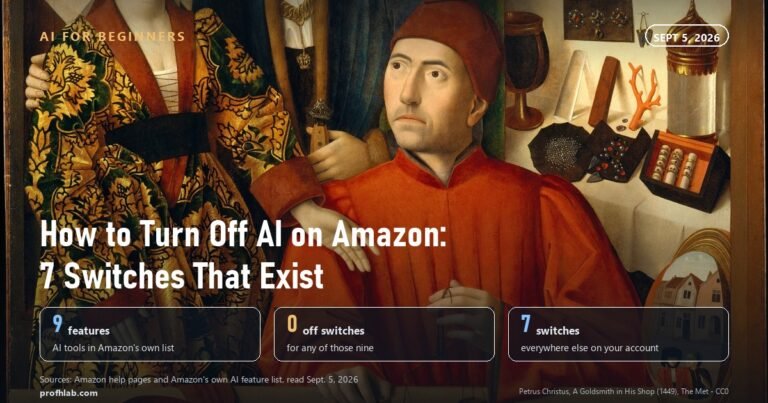
No, you cannot turn off all AI on Facebook: on October 3, 2026 we read Meta’s own Facebook Help Center and counted 9 AI features, and only 2 of them have a real off switch. Those two are the “AI images of you” toggle and the comment summary toggle for a Facebook Page. Three more can be quieted but not removed. Three have no switch at all, and one only runs when you tap it.
That is not your fault, and it is not a setting you missed. Meta built the assistant into the app itself. What you can do is shrink it, and this guide shows the five changes that work, in plain steps.
How we checked this
We searched Meta’s Facebook Help Center for “turn off meta ai” and read every AI article we found, in English, on October 3, 2026. We also read Meta’s Privacy Center page on generative AI. Then we ran a web search for “how to turn off ai on facebook” and opened all nine results. Seven opened. Two forum pages loaded empty for our reader, so we count them as unread and quote nothing from them.
We did not sign in to a Facebook account, so we did not test the steps on a phone. Meta says several of these features are still rolling out, so your app may not show all of them.
An AI assistant helped draft this article and ran the page reads. Every quotation below was read on the source’s own page on the date shown.
Can you turn off Meta AI on Facebook completely?
No: none of the 9 AI features we found on Meta’s Facebook Help Center, read October 3, 2026, comes with a single switch that removes Meta AI from the app. Meta’s pages explain how to use each feature. Only two explain how to turn one fully off.
Think of it like a new neighbor who moved into your building. You cannot make them move out. You can close your door, stop answering, and keep your photos off their table. That is what the settings below do.
Here is our count, feature by feature. “Partly” means you can quiet it, but it stays in the app.
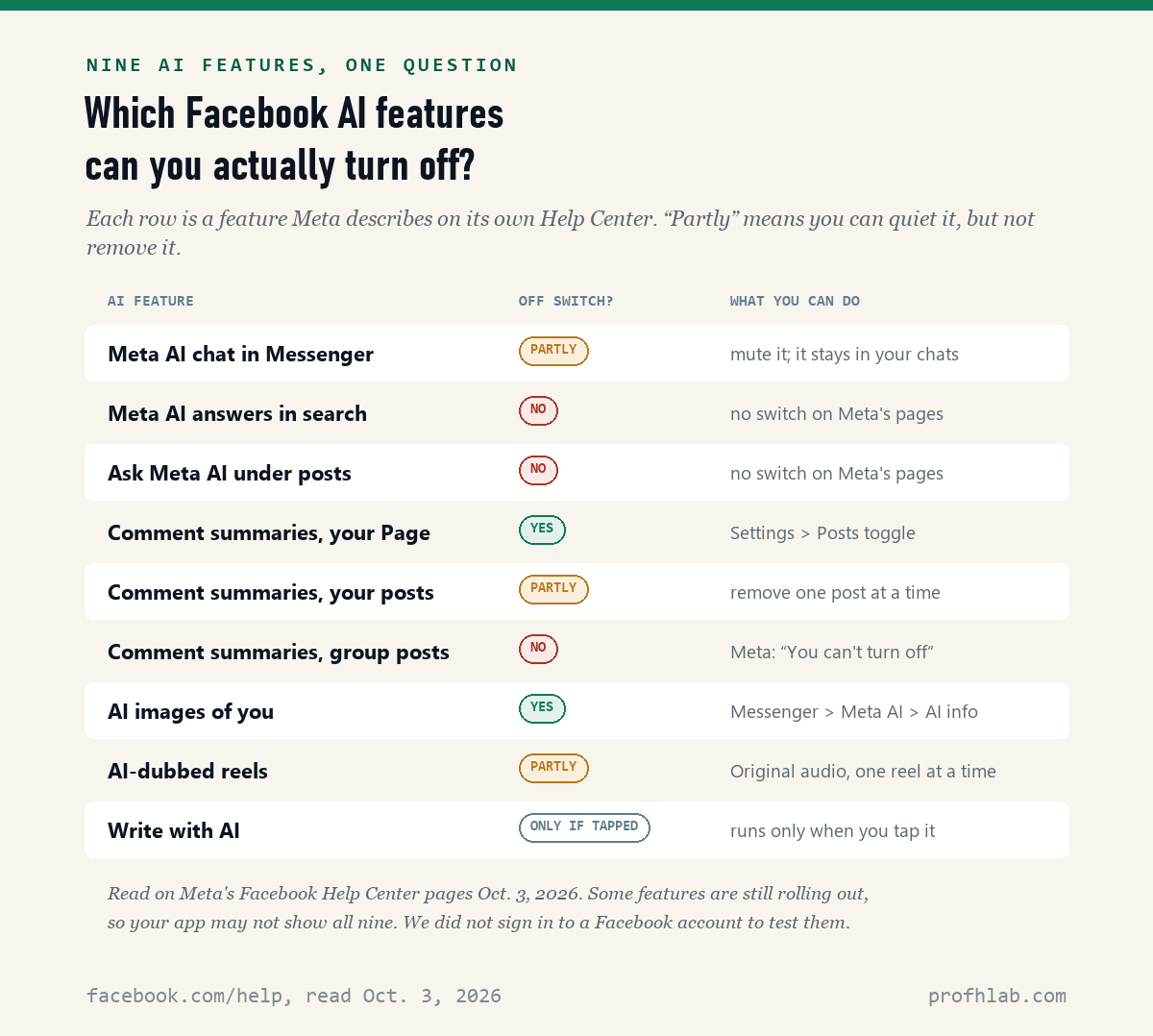
The three with no switch are Meta AI answers in Facebook search, the “Ask Meta AI” prompt under some posts, and comment summaries on group posts. Meta’s “Ask Meta AI on Facebook” page, read October 3, 2026, says that when you search, “You may see a summary or response from Meta AI.” It gives no way to stop that.
The good news is the ninth feature. Meta’s “Write with AI” page says it works only after you tap Help me write. If you never tap it, it never writes anything.
How do I mute Meta AI in Facebook Messenger?
You mute Meta AI by opening its chat, tapping the small “i” at the top, and choosing Mute, then “Until I change it,” according to Asurion’s guide dated August 18, 2025, and a CNET guide republished on Yahoo Tech, dated July 1, 2026. Muting stops it from sending you messages. It does not delete it.
- Open the Facebook app and tap the Messenger icon at the top right.
- Tap the round blue, purple and pink Meta AI icon, or the Meta AI chat in your list.
- Tap the small i in a circle at the top right of the chat.
- Tap Mute.
- Choose Until I change it.
One honest warning. We searched Meta’s Help Center for “turn off meta ai” on October 3, 2026, and read the first 20 of 37 results. None of the 20 explains how to mute Meta AI. The steps above come from those two guides, not from Meta; the “Until I change it” choice is in Asurion’s version. Your screen may name things a little differently.

How do I stop Facebook from making AI images of me?
You turn off AI images of yourself with one toggle inside the Meta AI chat, and Meta’s Help Center page, read October 3, 2026, says turning it off also deletes the setup photos you gave it. This is one of the two real off switches we found. It works in the phone and tablet apps, not on a computer.
- In the Facebook app, tap Messenger.
- Tap Meta AI to open your chat with it.
- Tap AI info.
- Tap Create image of me.
- Turn off the toggle next to Create AI images of yourself with Meta AI.
Meta says this feature is “being gradually introduced in the United States.” If you never set it up, you may not see the menu at all. That is fine. It means there are no setup photos to delete.
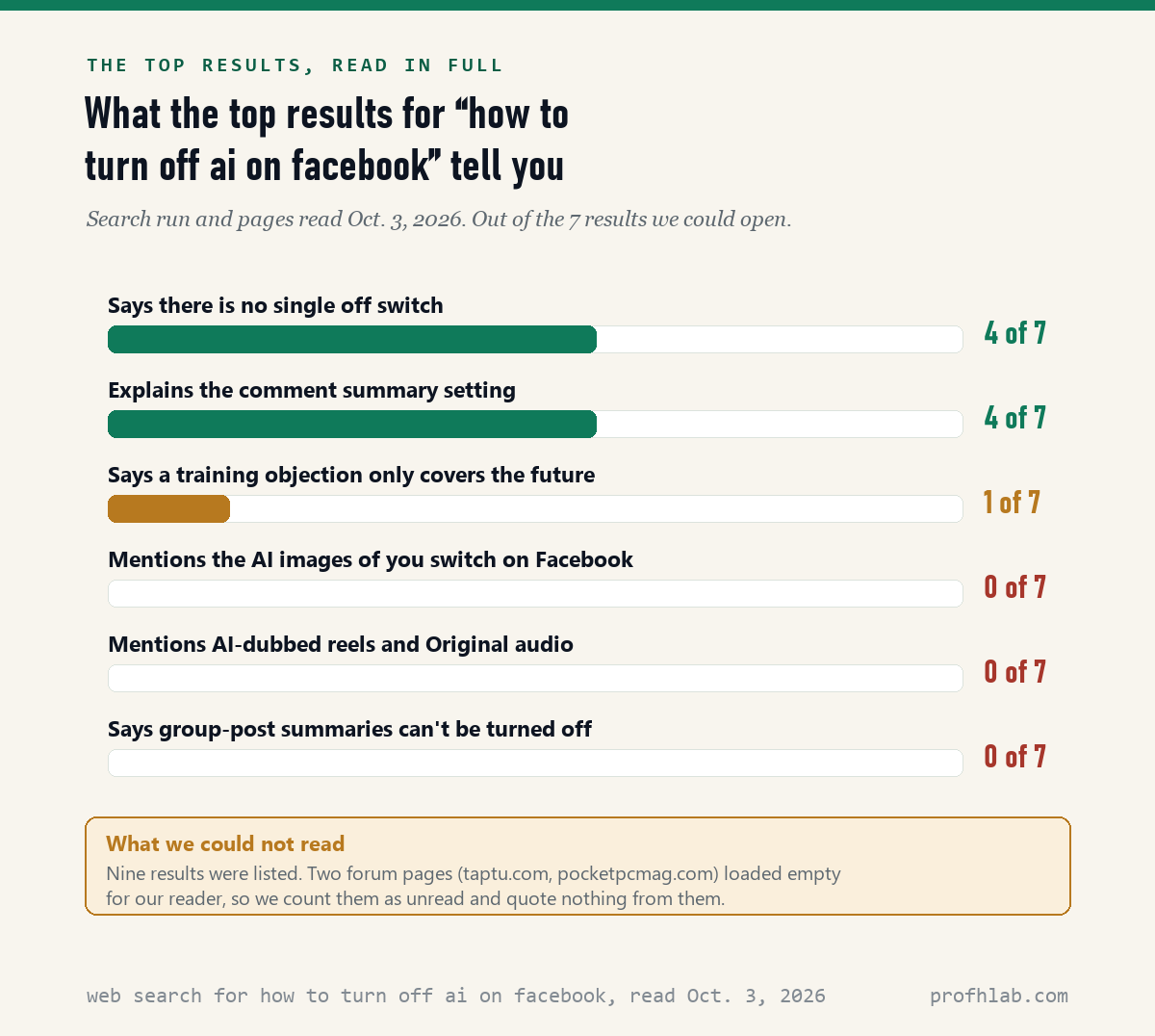
None of the 7 top results we could read mentions this Facebook toggle. Malwarebytes, in a post published July 9, 2026, covered a similar setting on Instagram. Our guide to Meta AI on Instagram walks through that side.
How do I turn off AI comment summaries on Facebook?
It depends on where you posted: Meta’s Help Center, read October 3, 2026, gives a full toggle only for Facebook Pages, a remove-one-at-a-time option for your own posts, and no option for posts in public groups. A comment summary is a short paragraph, written by Meta AI, that sums up what people said under a post.
If you run a Facebook Page. Switch into your Page. Tap or click Settings & privacy, then Settings. Under Audience and visibility, choose Posts. Turn off Allow comment summaries on your posts. Meta says summaries “are turned on by default” and this setting covers all posts on your Page.
If it is your own personal post. Open the post and tap Comment. On the summary, tap Options, then Remove comment summary. Meta says that once you remove it, “Meta AI won’t generate a new one” for that post. Some guides, including CNET’s and Avast’s, describe the same Settings toggle for personal accounts. Meta’s personal-post page does not mention it, and we could not check it.
If you posted in a public group. Meta’s page says it plainly: “You can’t turn off Meta AI comment summaries for posts in Facebook groups.” It adds that summaries “may also appear in search engine results.” Your only choice is to delete the post.

Our count, October 3, 2026: 4 of the 7 top results we read explain the comment summary setting. None of the 7 says that summaries on group posts cannot be turned off, which is what Meta’s own group page says.
How do I stop Facebook reels from playing in an AI voice?
You switch a dubbed reel back to the creator’s real voice with Settings, then Audio and language, then Original audio, according to Meta’s Help Center page read October 3, 2026. Meta says its AI can “automatically translate, dub, and lip sync” reels when the creator has turned that on.
- On a reel that says Meta AI translation under the caption, tap the settings or options button.
- Tap Audio and language.
- Tap Original audio to hear the creator’s own voice.
- To stop this for languages you already speak, tap Don’t translate and pick them.
We call this one “partly” because Meta’s pages describe it reel by reel and language by language. We found no single switch for all reels. None of the 7 top results we read mentions it. YouTube does something similar, and our guide to turning off auto-dubbing on YouTube covers that one.
Can I stop Meta from training its AI on my Facebook posts?
You can send Meta an objection, and its Privacy Center page on generative AI, read October 3, 2026, says Meta will then stop using your public posts and your Meta AI chats for future training. It also says that if a training run has already started, “we may still use your information for that training run.”
Meta’s page says you submit the request through your Facebook, Instagram or Meta account. It says the objection covers the account you are logged into and the other accounts in the same Accounts Center. You will get an email to confirm it.
Two limits matter. First, we read this page from outside the United States, and Meta says “You may need to be logged into your account to see the appropriate forms for your region.” Second, it does not undo past training. Only 1 of the 7 top results we read, Proton’s guide published October 27, 2025, says the objection covers only the future.
About your private messages: the same Meta page says it does not use them to train its AI “unless you or someone in the chat chooses to share those messages with our AIs.” Typing @Meta AI in a group chat is one way that happens. Our article on whether Meta AI reads your WhatsApp messages explains the same rule there.
What do the top results for “how to turn off ai on facebook” leave out?
Most of them leave out what Meta itself says: of the 7 top results we could read on October 3, 2026, 4 say there is no single off switch, but none mentions the AI images of you toggle, AI-dubbed reels, or the group-post rule. Most of these pages are about muting the chat. Muting is only one of the five changes.
Dates matter here too. The oldest page we read, a USA Today story on Yahoo, was updated July 5, 2024. Two years is a long time for a phone app. If a guide shows menus you cannot find, check its date before you blame yourself.
Detroit’s Channel 7 covered the missing switch in April 2024
Mute the chat first: the 15-minute Facebook sequence
The five changes take about 15 minutes in total, by our estimate, and each one is described on a Meta page or in a dated guide we read October 3, 2026. Do them in this order, because the first two need the same Meta AI chat.
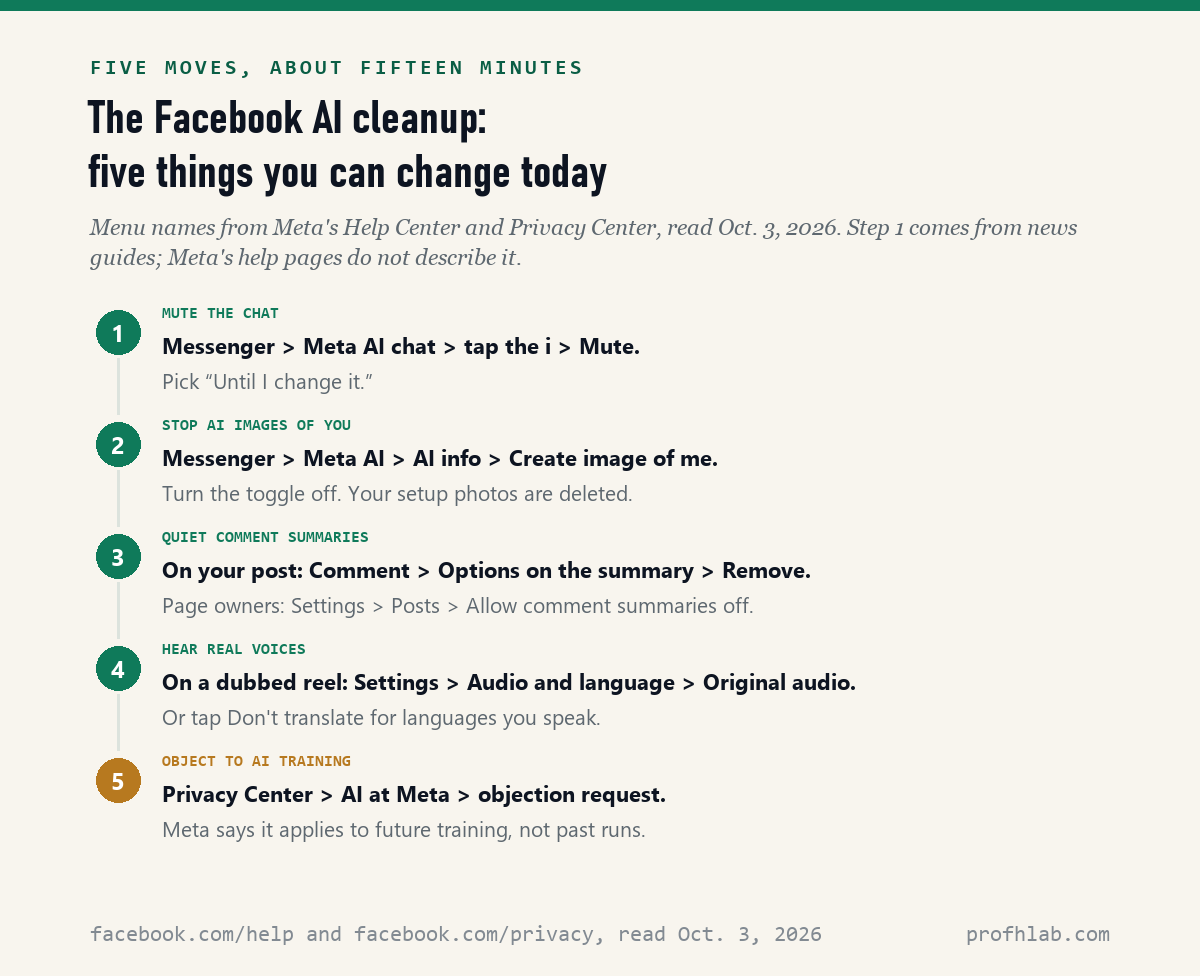
- Mute the Meta AI chat in Messenger: Mute, then Until I change it.
- Turn off AI images of you under AI info, then Create image of me.
- Remove comment summaries from your posts, or turn them off for your Page.
- Pick Original audio on dubbed reels, and set Don’t translate for your languages.
- Send the training objection in the Privacy Center, under AI at Meta.
Then add two habits. Do not tap “Ask Meta AI” under posts, and do not type @Meta AI in family group chats. If a relative asks you to “try the new AI” to fix your account, be careful. Scammers copy that line, and our family safe word guide helps you check who is really asking.

What muting Meta AI in Messenger does, and what it does not
How do I turn off AI on Facebook?
You can’t remove it, but you can mute the Meta AI chat, turn off AI images of you, remove comment summaries, switch dubbed reels to Original audio, and send a training objection. Only 2 of the 9 AI features we found have a real off switch.
How do I turn off Meta AI on Facebook Messenger?
Open the Meta AI chat, tap the “i” at the top, tap Mute, and pick “Until I change it.” This stops its messages. The Meta AI button stays in the app.
Can I turn off AI comment summaries on my Facebook posts?
On a Facebook Page, yes, under Settings, then Posts. On your own posts, Meta describes removing a summary one post at a time. On posts in public groups, Meta says you can’t turn them off.
Will deleting the Meta AI chat get rid of it?
No. Deleting the chat clears that conversation from your list. Meta AI is still in search, under some posts, and in comment summaries. To stop its messages, mute it instead.
Does Meta use my Facebook photos to train AI?
Meta’s Privacy Center says it trains on information shared on its products, such as posts or photos and their captions. You can send an objection, which Meta says covers future training only. Our guide on stopping Meta AI from using your Facebook photos goes further.
Instagram and WhatsApp run the same Meta AI
The same Meta AI lives in Instagram and WhatsApp, and your phone has its own AI settings on top. Start with turning off Meta AI on Instagram, then how to tell if Meta glasses are recording.
For your phone, see AI summaries on an iPhone or AI on a Samsung phone. Other apps work the same way: LinkedIn, Pinterest, Google Photos and Chrome.
On Facebook itself, fake ads are the bigger danger than the chatbot. Read how to tell if a Facebook ad is fake, how to tell if a picture is AI-generated, and our roundup of AI scams targeting seniors.
New to all of this? Begin at Start Here, try ChatGPT for the first time after 50, or see the AI tools we rate for seniors. Send a question on the Ask page. Our method is at How We Count.
Meta’s Help Center and Privacy Center pages, read October 3
- Meta, Facebook Help Center, Chat with Meta AI on Facebook. Read October 3, 2026.
- Meta, Facebook Help Center, Ask Meta AI on Facebook (iPhone version). Read October 3, 2026.
- Meta, Facebook Help Center, Turn off or retake setup photos for AI images of you on Facebook (iPhone version). Read October 3, 2026.
- Meta, Facebook Help Center, Turn Meta AI comment summaries on or off for posts on your Facebook Page. Read October 3, 2026.
- Meta, Facebook Help Center, Remove Meta AI comment summaries from your post on Facebook. Read October 3, 2026.
- Meta, Facebook Help Center, About Meta AI comment summaries on your posts in a public Facebook group. Read October 3, 2026.
- Meta, Facebook Help Center, See Meta AI translated reels in your native language on Facebook and Watch Facebook reels or videos in the original language. Read October 3, 2026.
- Meta, Facebook Help Center, Write with AI on Facebook. Read October 3, 2026.
- Meta, Privacy Center, How Meta uses information for generative AI models and features. Read October 3, 2026, from outside the United States.
- CNET via Yahoo Tech (Blake Stimac), AI on Meta Apps Is Unavoidable, but You Can Mute It Yourself, dated July 1, 2026. Read October 3, 2026.
- Asurion, How to get rid of AI on Facebook, Instagram, and Snapchat, dated August 18, 2025. Read October 3, 2026.
- Proton, How to turn off Meta AI on Facebook, Instagram, WhatsApp, published October 27, 2025. Read October 3, 2026.
- Avast, Turn off Meta AI on Facebook, Instagram, and WhatsApp, dated December 1, 2025. Read October 3, 2026.
- Malwarebytes, Turn off this Meta setting before someone generates AI images of you, published July 9, 2026. Read October 3, 2026.
- TechRadar, How to turn off AI in the apps you use every day, dated November 20, 2025. Read October 3, 2026.
- USA Today via Yahoo, Meta AI comment summaries is turned on in your settings by default, updated July 5, 2024. Read October 3, 2026.
- Web search results for “how to turn off ai on facebook,” nine listed October 3, 2026: seven opened and read; two forum pages (taptu.com and forum.pocketpcmag.com) loaded empty and are counted as unread.
This page describes what Meta’s help pages and public guides say; menu names can change after an app update, and some features reach some accounts before others. Corrections and questions go to the Ask page.
Prof.’s H Newsletter
One short email a month, with the numbers in it
What actually moved in AI hiring, AI prices, and the scams aimed at older Americans. Counted here, dated, and linked to the source. One email a month, and your address goes nowhere else.