How to Turn Off Meta AI on Instagram (2026): There Is No Switch. Here Are the 4 That Work
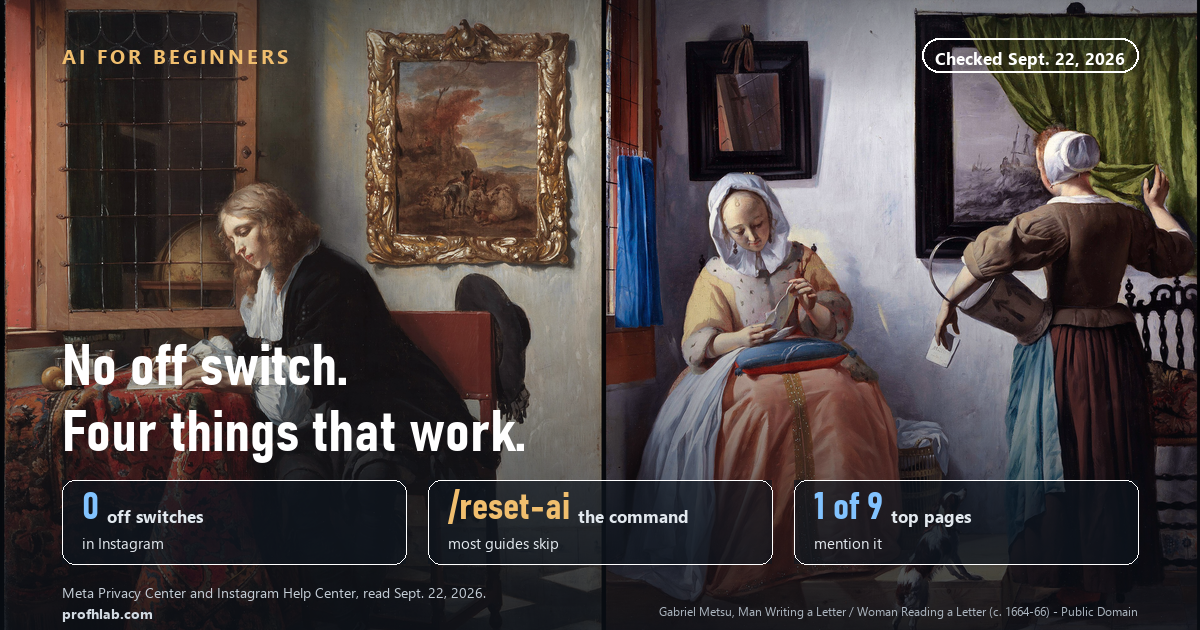
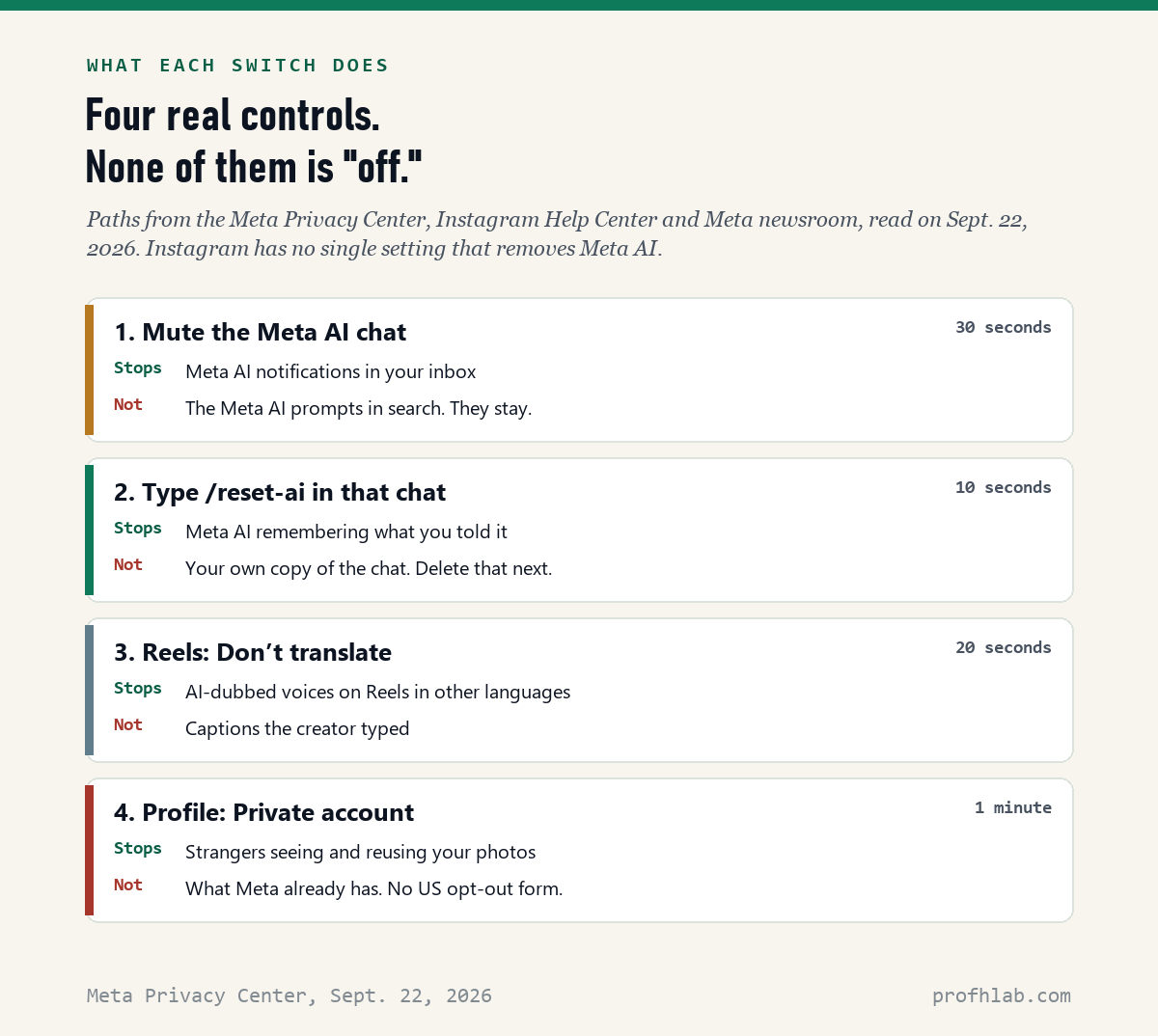
You cannot turn off Meta AI on Instagram. There is no setting that removes it, and Meta’s own help pages explain how to use it, never how to remove it. What you can do takes about 2 minutes: mute the Meta AI chat, type /reset-ai in that chat to wipe what it remembers, choose “Don’t translate” on dubbed Reels, and make your account private. The second step is the one people miss. On September 22, 2026 we read the nine top search results for this question, and only 1 of the 9 mentioned it.
What we checked on September 22, 2026
We read Meta’s Privacy Center page on deleting information from AI chats, the Instagram Help Center page “Use Meta AI on Instagram,” Meta’s newsroom posts on AI translations and ad personalization, and the nine search results for “how to turn off meta ai on instagram” that loaded with a full article.
- 0 off switches for Meta AI in Instagram.
- 2 commands that make Meta AI forget you:
/reset-aiand/reset-all-ais. - 18 languages Meta can dub Reels into with AI, using the creator’s own voice.
- Dec. 16, 2025: the day Meta began using what you tell Meta AI to choose your ads.
- 1 of 9 top search results gives the reset command. 0 of 9 mention the ads change.
Can you turn off Meta AI on Instagram?
No. Not completely, and not with one button.
Meta AI is the chatbot built into Instagram, Facebook, Messenger and WhatsApp. On Instagram it lives in two places. It sits at the top of your messages like a friend you never added. And it shows up in the search bar, where Instagram suggests questions you can “Ask Meta AI.”
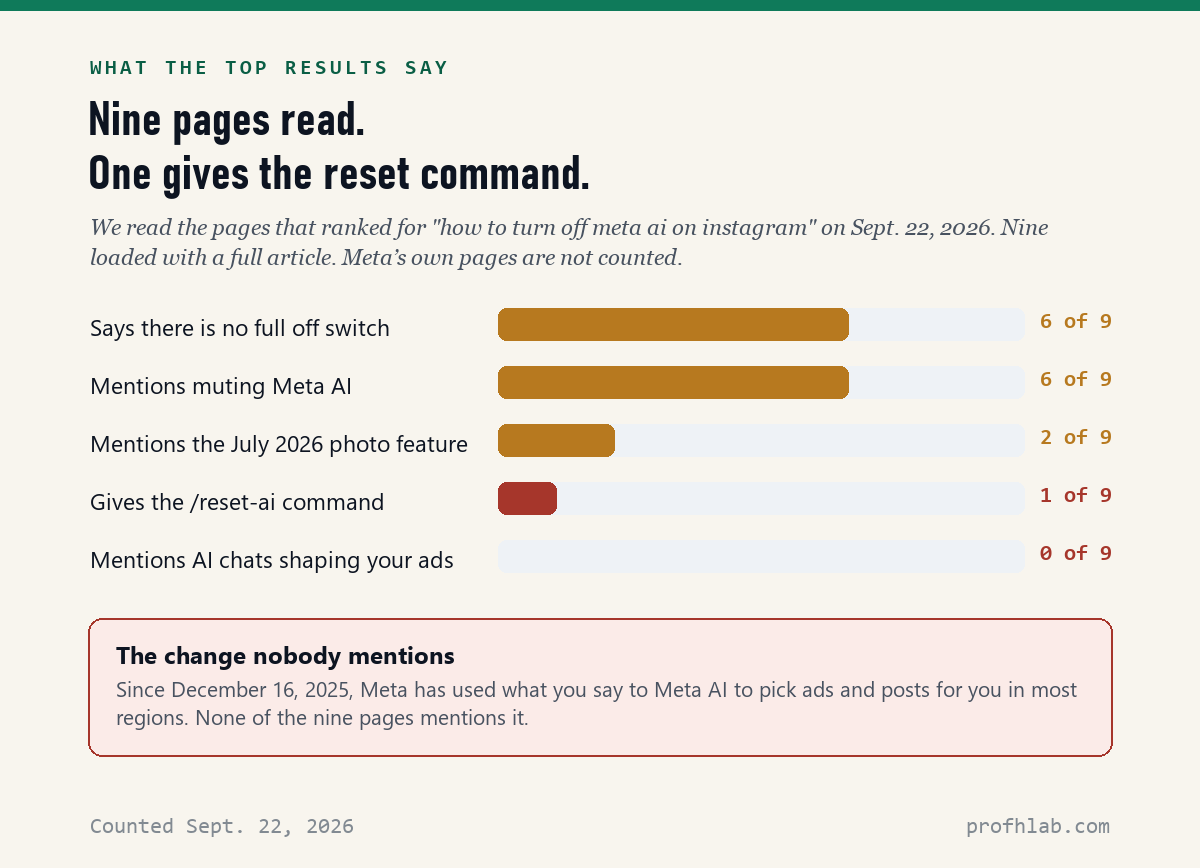
Meta’s help page describes how to start a chat with it, use it in group chats and use it from search. It has no section on removing it. Six of the nine top search results we read say the same thing in plain words: there is no full off switch.
Think of it like a TV channel you never watch. You cannot take it out of the cable box, but you can skip past it, turn it down and stop it from learning what you like. That is what the four steps below do.
Step 1: How to mute Meta AI on Instagram
Muting stops Meta AI from sending you notifications. It is the closest thing to “off” for the chat.
- Open Instagram and tap the messages icon (the paper airplane or speech bubble at the top right or bottom of the screen).
- Find the chat called Meta AI. It has a blue-and-purple ring for a picture.
- Open it, then tap the name Meta AI at the top of the chat.
- Turn on Mute messages. If it asks how long, choose the option that lasts until you change it.
This is the same way you mute any chat on Instagram, and the exact labels move a little between iPhone and Android. If you have never chatted with Meta AI, you may not see the chat at all. That is fine. There is nothing to mute.
What muting does not do: the Meta AI suggestions under the search bar stay. You can simply ignore them. Typing a normal name or word and tapping a person or account still works the old way.
Step 2: How to make Meta AI forget what you told it
This is the step almost nobody writes about, and it is the one that matters most for privacy.
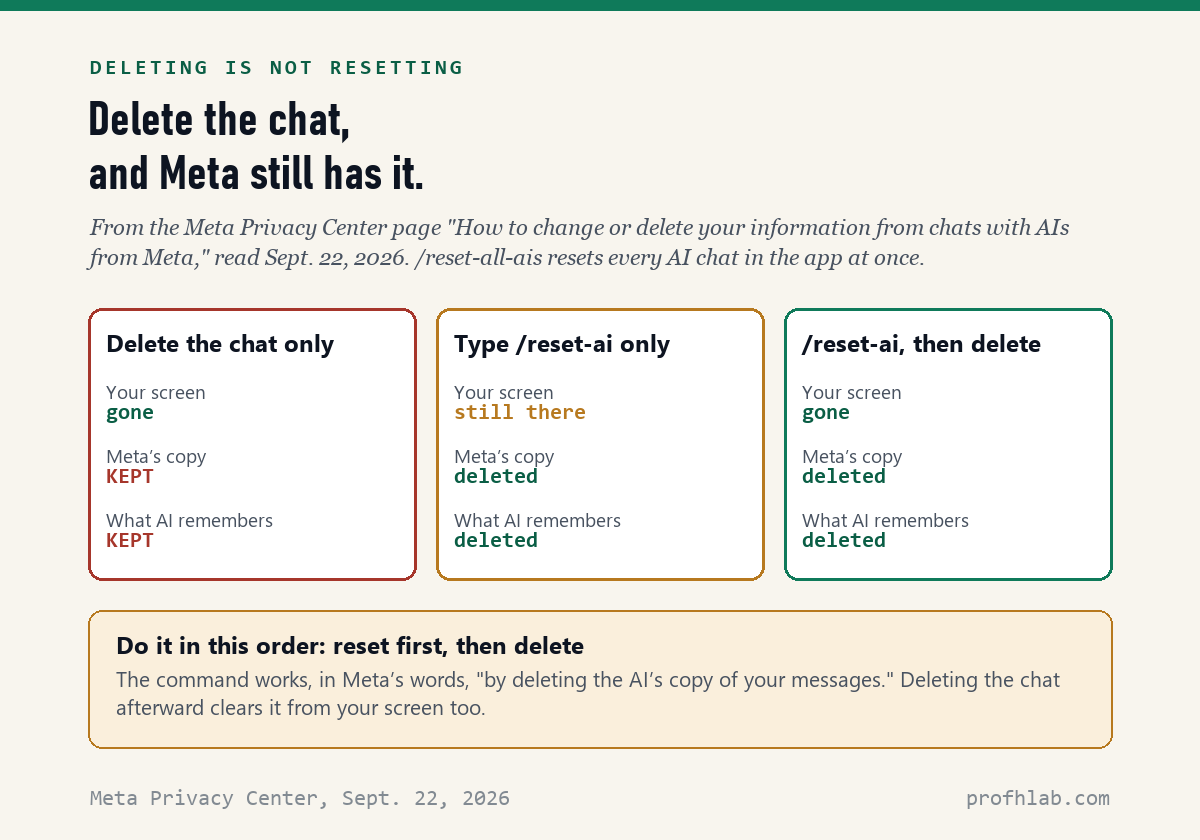
If you have ever asked Meta AI a question, it may have saved details about you from that chat. Here is the surprise: deleting the chat does not delete Meta’s copy. Meta says so on its own Privacy Center page. It says the reset command works “by deleting the AI’s copy of your messages.” Deleting the chat in the app clears it from your screen.
- Open your chat with Meta AI.
- Type
/reset-aiexactly like that, with the slash, and send it. - If you have used Meta AI in other chats too, including group chats, type
/reset-all-aisinstead. It resets every AI chat in Instagram at once. - Then delete the chat if you want it off your screen: press and hold it in your message list and choose Delete.
Order matters. Reset first, then delete. If you delete first, you lose the easy place to type the command. You can still send it by opening a new chat with Meta AI.
The same two commands work in Messenger and WhatsApp, one app at a time. We explain the WhatsApp side in Is Meta AI reading my WhatsApp messages?
What you say to Meta AI can shape your ads
Since December 16, 2025, Meta has used your chats with Meta AI to choose the ads and posts you see, in most regions, including the U.S. Meta’s example: if you chat about hiking, it may show you hiking ads. Meta says it does not use chats about health, religion, politics, sexual orientation, race or ethnicity, philosophical beliefs or union membership for ads. There is no separate off switch for this. None of the nine top search results mentioned it.
Step 3: How to stop AI-dubbed Reels
You may have heard a Reel where the person seems to speak perfect English but their lips do not quite match. That is Meta AI translating the video and copying the creator’s voice.
Meta says the feature works in 18 languages, and every translated Reel carries the label “Translated with Meta AI.” To hear the original instead:
- On a Reel, tap the three dots.
- Open the Audio and language section.
- Choose Don’t translate.
Step 4: Keep your photos out of Meta AI’s reach
In July 2026, Meta showed exactly why this step is worth doing.

On July 7, Meta launched a new image tool and let people make AI pictures by typing the name of any public Instagram account. Anyone could use your public photos in a new AI image, and you would not be told. It was switched on for everyone by default. After a flood of complaints, Meta said on July 10 that the feature “missed the mark” and was “no longer available,” according to TechCrunch.
That tool is gone, but the lesson is simple. Anything public can be reused. The strongest protection you have is a private account:
- Tap your profile picture at the bottom right.
- Tap the menu (three lines) at the top right.
- Tap Account privacy.
- Turn on Private account, then confirm with Switch to private.
If your menu also shows Sharing and reuse, open it and turn off the switches under “Allow people to reuse your content on Instagram and with AI features at Meta.” Malwarebytes gave this path in July. Meta has not said whether the menu stays now that the tool is gone, so it may not appear.
For the Facebook side of the same problem, see how to stop Meta AI from using your photos on Facebook.
Can I stop Meta from training its AI on my Instagram?
In the U.S., not really. Meta’s Privacy Center describes a “right to object” form, but it adds that you may need to be logged in “to see the appropriate forms for your region.” According to Proton, people in the EU, UK, Switzerland, Brazil, Japan and South Korea get that form. Most Americans do not.
Meta does say it does not use “the content of your private messages with friends and family” to train its AI, unless you or someone in the chat shares those messages with Meta AI. So the plain rule is: do not tag or ask Meta AI in a chat you want kept private.
What our reading of the top results found
We read every search result that loaded a full article for “how to turn off meta ai on instagram” on September 22, 2026. Nine did. Some were written in 2024, before most of the current features existed.
Two videos worth your time
A TV news explainer on why there is no off switch, and a short walk-through of the photo settings from July 2026.
What to do with this
A five-minute checklist. Do it once, then check again after big Instagram updates.

- Mute the Meta AI chat: Messages > Meta AI > tap the name > Mute messages.
- Reset: type
/reset-all-aisin the Meta AI chat. Then delete the chat. - Do the same in Messenger and WhatsApp if you use them. Each app is reset separately.
- Reels: three dots > Audio and language > Don’t translate.
- Private account: profile > menu > Account privacy > Private account.
- Check your ads: in Accounts Center, open Ad preferences and remove topics you do not want.
- Never type your address, date of birth, Medicare number or bank details into Meta AI. If a message claiming to be Meta asks for them, it is a scam. Our guide to AI scams targeting seniors shows what these look like.
If you want to go deeper
- Does this happen on my phone too? Yes, and it is a separate set of switches. See how to get rid of AI on your phone, with guides for iPhone and Samsung.
- What about the other apps I use? We have step-by-step guides for Pinterest, Chrome, Outlook and Gmail.
- How do I tell if a photo in my feed is fake? Start with how to tell if a picture is AI-generated and how to spot a fake Facebook ad.
Frequently asked questions
How do I turn off Meta AI on Instagram?
You cannot turn it off completely. Instagram has no setting that removes Meta AI. You can mute the Meta AI chat, type /reset-ai in that chat to delete what it saved about you, choose Don’t translate on AI-dubbed Reels, and make your account private.
How do I remove Meta AI from the Instagram search bar?
You cannot. The Ask Meta AI suggestions below the search bar are part of Instagram search and have no off switch. Type a name or word and tap an account or result instead, and search works the way it always did.
How do I delete my Meta AI chat on Instagram?
First type /reset-ai in the chat, or /reset-all-ais to reset every AI chat in Instagram. Meta says this deletes the AI’s copy of your messages. Then press and hold the chat in your message list and choose Delete to clear it from your screen. Deleting alone does not delete Meta’s copy.
Can Meta AI read my Instagram messages?
Meta says it does not use the content of private messages with friends and family to train its AI unless you or someone in the chat shares them with Meta AI, for example by asking Meta AI a question in that chat. Anything you type directly to Meta AI can be used to improve its AI and, since December 16, 2025, to personalize ads in most regions.
Is Meta AI on Instagram safe?
It is safe to ignore. The main risk is what you type into it: Meta’s help page warns that its answers may be inaccurate and says to be careful about sharing personal information such as your name, address, email or phone number.
How do I turn off Meta AI translation on Instagram?
On a Reel, tap the three dots, open Audio and language, and choose Don’t translate. Translated Reels are labeled Translated with Meta AI. Meta says the feature supports 18 languages.
Can I opt out of Meta using my Instagram posts for AI?
Meta offers a right-to-object form in some regions, including the EU, UK, Switzerland, Brazil, Japan and South Korea. Most U.S. accounts do not get one. Making your account private is the strongest step a U.S. user can take.
Sources
- Meta Privacy Center, “How to change or delete your information from chats with AIs from Meta” — read September 22, 2026.
- Instagram Help Center, “Use Meta AI on Instagram” (iPhone version) — read September 22, 2026.
- Meta Privacy Center, “How Meta uses information for generative AI models and features” — read September 22, 2026.
- Meta Newsroom, “Improving Your Recommendations on Our Apps With AI at Meta” (October 2025; changes effective December 16, 2025).
- Meta Newsroom, “Discover Reels From Around the World With Meta AI Translation” (October 9, 2025, updated July 14, 2026).
- Instagram Help Center, “Make your Instagram account private.”
- TechCrunch, “Meta removes controversial AI feature on Instagram after backlash,” July 10, 2026; Malwarebytes, July 2026 (Sharing and reuse path).
- Proton, “How to turn off Meta AI on Facebook, Instagram, WhatsApp,” October 27, 2025 (regions with an objection form).
- Counts of the nine top search results: made by us from each page’s own text on September 22, 2026.
Keep reading
- How to Stop Meta AI From Using Your Photos on Facebook — the Facebook half of this guide.
- Is Meta AI Reading My WhatsApp Messages? — what the little blue circle can see.
- How to Tell if Meta Glasses Are Recording — Meta AI, out in the world.
- Are Deleted ChatGPT Chats Really Deleted? — the same question, for ChatGPT.
- How to Talk to ChatGPT and Have It Talk Back — if you would rather use an AI on your own terms.
- Best AI Tools for Seniors — the AI worth keeping switched on.
- How to Use ChatGPT: A Beginner’s Guide for Over 50 — start here if all of this is new.
- AI Jobs Tracker — our own daily count of who is hiring for AI work.
- AI FAQ and Ask Prof. H — short answers, and a place to send the question we missed.
- Start Here — the whole beginners library, in order.
About the author. Prof. H writes profhlab.com for people who did not grow up with this stuff and would like a straight answer. The commands, quotations and dates above were copied from Meta’s help and privacy pages on September 22, 2026, and the counts of the top search results were made from each page’s own text the same day. Instagram moves its menus often, and labels differ slightly between iPhone and Android. If yours looks different, tell us — we correct in public.
Prof.’s H Newsletter
One short email a month, with the numbers in it
What actually moved in AI hiring, AI prices, and the scams aimed at older Americans. Counted here, dated, and linked to the source. One email a month, and your address goes nowhere else.