Is Meta AI Reading My WhatsApp Messages? What Meta Actually Gets
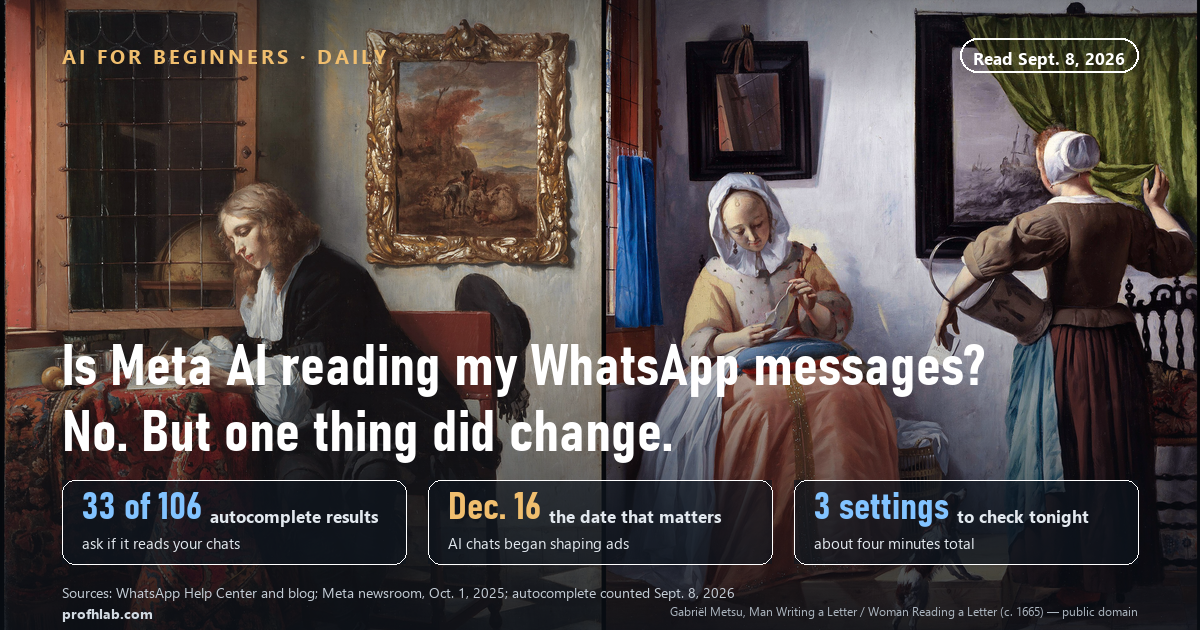
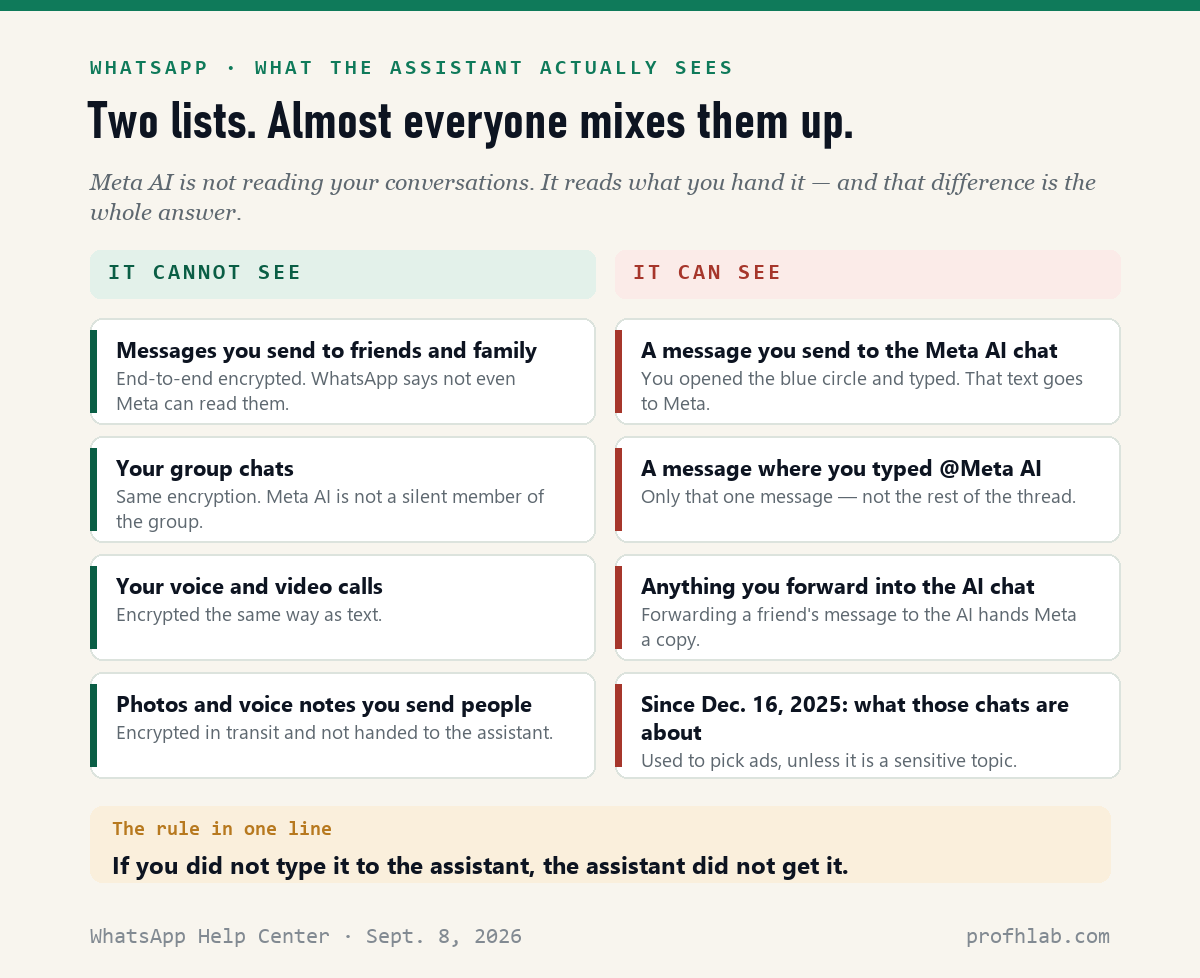
No. Meta AI is not reading the messages you send to your friends and family on WhatsApp. Those are end-to-end encrypted, and WhatsApp states it plainly: “your personal messages and calls are protected with end-to-end encryption, meaning no one outside of the chat, not even WhatsApp or Meta, can read, listen to, or share them.” The assistant sees exactly one thing — a message you deliberately send it, either by opening the blue circle or by typing @Meta AI in a chat.
But something did change, and it is not the thing people are worried about. Since December 16, 2025, what you type to Meta AI is used to pick the ads and posts you see across Meta’s apps.
On September 8, 2026 we ran twelve seed phrases through Google’s autocomplete and got 106 suggestions; 33 of them were some version of “can it read my chats,” and 21 asked how to shut it off. One of the 106, verbatim, was “meta ai reading messages december 16.” People have half the story. Here is the other half, and the three settings that are actually worth your time.
The rule, in one line. If you did not type it to the assistant, the assistant did not get it. Everything else in this article is a footnote to that sentence.
Can Meta AI read WhatsApp messages?
It cannot read the ones you send to people. It can read the ones you send to it.
That sounds like word-play, so let’s be concrete. WhatsApp’s own YouTube channel published a video on March 12, 2026 with this in the description: “When you choose to use Meta AI features, only messages sent to Meta AI can be read. Meta or WhatsApp can’t read any other messages in your personal chats.”

There are three ways a message reaches Meta AI, and all three require you to act:
- You open the blue circle and type. That is a chat with the assistant. It is not end-to-end encrypted, because the thing on the other end has to read it in order to answer.
- You type
@Meta AIin a group or a one-to-one chat. Only that one message goes to Meta — not the messages above it, not the ones after it. - You forward someone else’s message into the AI chat. This is the one people do without thinking. If your sister sends you a confusing insurance letter and you forward it to Meta AI to explain, you just handed Meta your sister’s letter.
Some newer features — Writing Help, Message Summaries — touch your messages without a chat window. For those, WhatsApp uses what it calls Private Processing, and says the technology “enables Meta AI to generate a response without Meta or WhatsApp being able to read your messages.” That is a real engineering claim, not just marketing, but it is also a claim you are being asked to take on trust. We say so plainly because we have made the same point about uploading medical records to ChatGPT: a company promising it cannot see something is different from that thing never leaving your phone.
Then why is there a blue circle I cannot delete?
Because WhatsApp put it there on purpose and has not given you a way to remove it. This is the honest, unsatisfying answer, and it is worth separating from the privacy question, because the two get tangled together constantly.
WhatsApp’s official channel says it in the first sentence of that same March 2026 video description: “While you can’t turn off Meta AI on WhatsApp, using Meta AI on WhatsApp is always optional. The chat will be visible even if you never use it.”
You will find a great many articles and videos promising a “Show Meta AI button” switch under Settings → Chats, described as rolling out region by region. It costs you nothing to look.
But when we searched WhatsApp’s own Help Center on September 8, 2026, the articles that came back covered chatting with Meta AI, deleting those chats, incognito chats and turning Meta AI web search on or off — and we could not find one about hiding or removing the assistant. If a switch existed everywhere, we would expect a help page for it. Treat “remove Meta AI in 10 seconds” headlines accordingly.
And note what hiding a button would and would not do. It would tidy your screen. It would not change one byte of what Meta receives, because Meta only receives what you send. This is the same distinction we drew when Windows users wanted to remove Copilot from Windows 11 and when Android users asked what Gemini is doing on their phone.
What actually changed on December 16, 2025
This is the part that deserved the headlines and mostly did not get them.
Meta announced on October 1, 2025 that it would “use your interactions with AI at Meta to personalize the content and ads you see,” with the change taking effect December 16. So your conversations with the assistant are now an advertising signal, alongside everything else Meta knows about you.
Three details from Meta’s own announcement matter, and each cuts a different way:
- Some subjects are carved out. Meta says that when people discuss “religious views, sexual orientation, political views, health, racial or ethnic origin, philosophical beliefs, or trade union membership,” it does not use those topics to show ads.
- WhatsApp has a conditional exemption. “If you have not added your WhatsApp account to an Accounts Center, interactions with Meta AI on WhatsApp will not be used to personalize experiences across different accounts.” That is a genuine off-ramp, and it is the single most useful sentence Meta published all year. Most people have never heard of Accounts Center.
- There is no opt-out switch. Meta points to Ads Preferences and feed controls, which let you adjust the ads you see — not whether AI chats feed them.
Three settings worth four minutes of your evening
None of these are dramatic. All three are real, and together they take about as long as boiling a kettle.
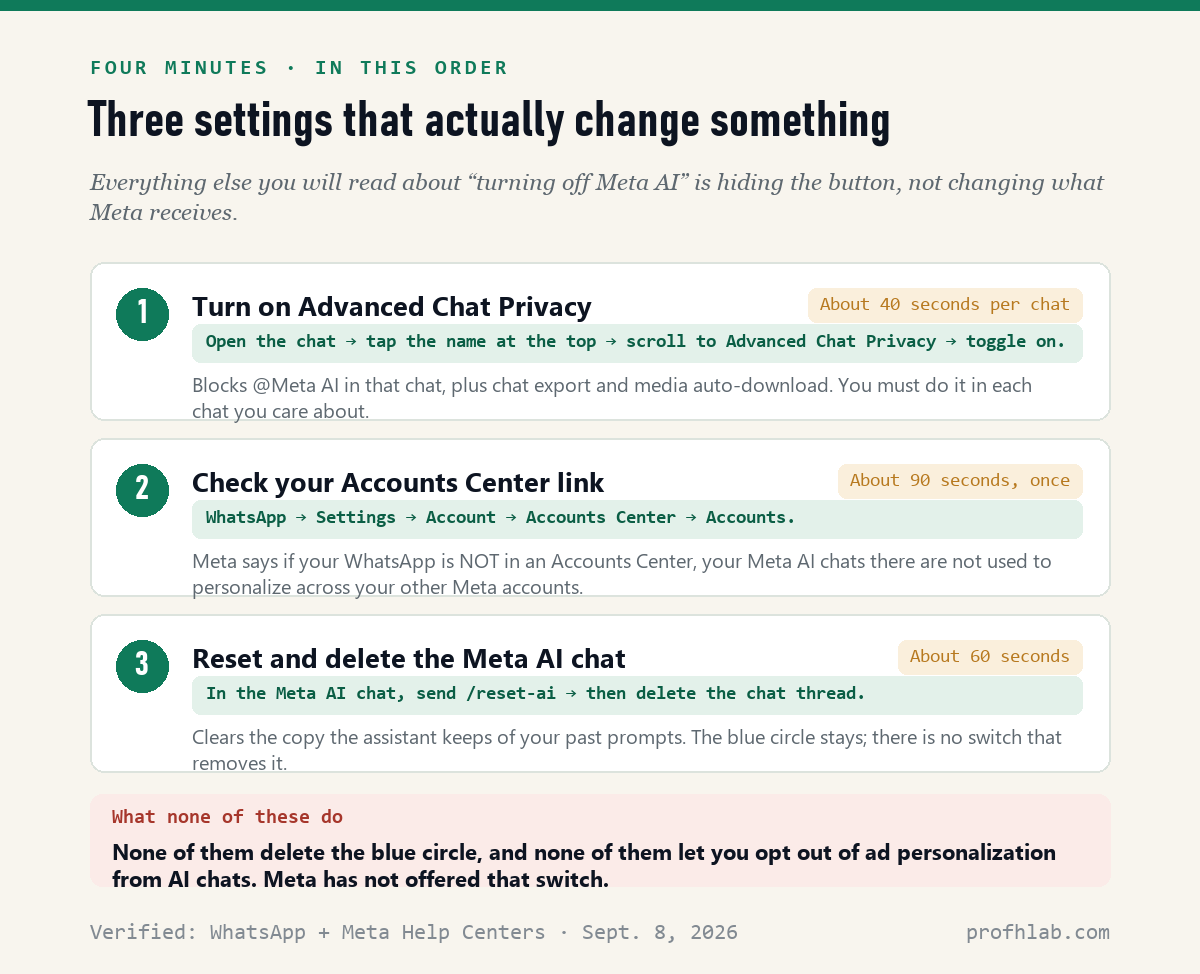
1. Advanced Chat Privacy, for the chats that matter. Open the chat, tap the name at the top, scroll down, tap Advanced Chat Privacy, toggle it on. WhatsApp introduced it on April 23, 2025, describing it this way: “you can block others from exporting chats, auto-downloading media to their phone, and using messages for AI features.”
Two limits you should know before you rely on it. It is off by default and applies per chat — there is no master switch. And the Electronic Frontier Foundation pointed out on September 2, 2025 that in a one-to-one chat, “there is currently no way to block the other person from changing” the setting. In a group, an admin can lock it down through Edit Group Settings. So think of it as a shared agreement, not a lock.

2. Check whether your WhatsApp is in an Accounts Center. Go to WhatsApp → Settings → Account → Accounts Center → Accounts. If your Facebook or Instagram account is listed there, you can tap it and choose Remove Account. Meta stated when it launched the option in January 2025 that “adding your WhatsApp to Accounts Center is completely optional and off by default.” Combined with the December 16 carve-out above, keeping WhatsApp out of Accounts Center is the closest thing to an opt-out that exists.
3. Reset and delete the Meta AI chat. Open the Meta AI conversation and send /reset-ai as a message. That clears the copy of the prompts and context the assistant has been holding. Then delete the thread itself — resetting does not remove the chat from your list. If you have been asking it about a health worry or a family problem, do this tonight rather than next month.
Worth saying out loud: none of these three settings delete the blue circle, and none of them let you opt out of ad personalization from AI chats. If someone promises you otherwise, they are selling clicks.
What America is actually asking about Meta AI
We built the numbers in this article rather than quoting someone else’s. On September 8, 2026 we sent twelve seed phrases to Google’s autocomplete endpoint in US English — phrases like “is meta ai,” “can meta ai,” “why is meta ai on my whatsapp” — and kept every distinct suggestion it returned.
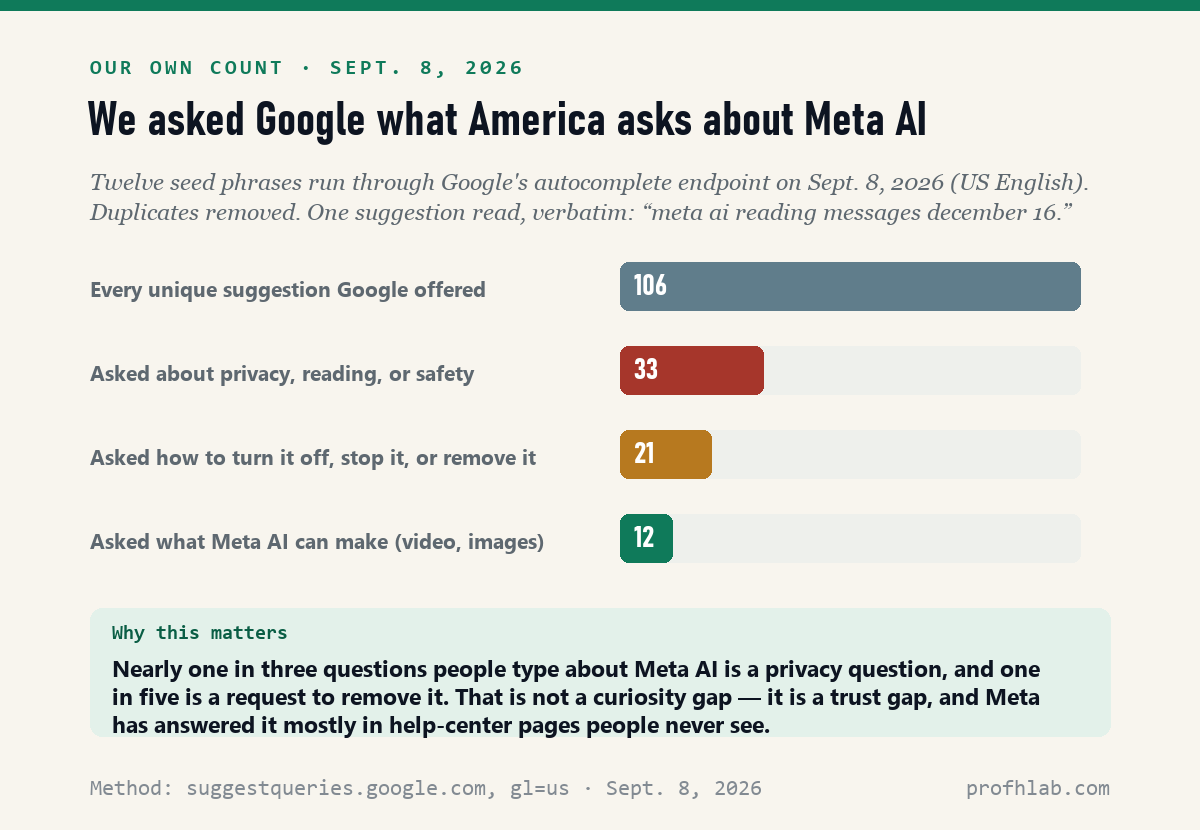
Of 106 suggestions, 33 asked about privacy, reading, or safety. Twenty-one asked how to turn it off, stop it, or remove it. Only 12 asked what the assistant can actually make — images, video, translation. Roughly half of everything a person types after the words “Meta AI” is a defensive question.
That gap is the story. The correct answer — your chats are encrypted, the assistant only sees what you hand it — is genuinely reassuring, and Meta has published it almost exclusively in help-center pages that no one reads. Meanwhile the change that does affect you got a corporate blog post. We think that is backwards, which is why we keep showing our counting method instead of asking you to trust a number.
Turn on Advanced Chat Privacy and stop forwarding to Meta AI
- Tonight, 4 minutes: turn on Advanced Chat Privacy in your two or three most sensitive chats; check Settings → Account → Accounts Center; send
/reset-aiin the Meta AI chat and then delete it. - Change one habit: stop forwarding other people’s messages to the assistant. That is the only routine action that hands Meta a conversation it could not otherwise see.
- Tell one person. If a relative has been avoiding WhatsApp because they think Meta reads their family group, they are avoiding it for a reason that is not true. That is a five-minute phone call worth making.
- Do not pay anyone to remove Meta AI. If you see an ad or a message offering to do it, that is the shape of a scam — see AI scams targeting seniors and how to tell if a Facebook ad is fake.
- If you want it in writing: WhatsApp’s Help Center article on Meta AI is at faq.whatsapp.com, and Meta’s ads announcement is on about.fb.com. Both are linked in Sources below.
Your public Facebook photos are a different case from encrypted chats
“What about my photos on Facebook — is that the same thing?” No, and Facebook is the weaker case. Photos posted publicly are a different legal and technical situation from encrypted messages; we walked through which two switches work and which two do not.
“My phone keeps adding AI things I did not ask for.” That is now the normal condition of owning a phone. Start with getting rid of AI on your phone, then Gmail, Amazon, and your television. If you own Meta’s glasses, the recording light is the thing to learn.
“How do I know a message is even from a real person?” Increasingly you cannot tell from the message alone. Our running AI scam watch for September 2026 tracks the current tactics, and spotting an AI-generated picture covers the visual half.
“I have never used any of this. Where do I start?” Start Here is the front door, using ChatGPT after 50 is the most-read piece we have written, and the tools worth your time is the short list.
WhatsApp answering this on its own channel
Both of these are from the official WhatsApp YouTube channel (7.06M subscribers, checked September 8, 2026). The first one addresses the removal question directly, and its description contains the sentence quoted throughout this article.
The blue circle, @Meta AI and what stays encrypted
Is Meta AI reading my WhatsApp messages?
No. Your messages to other people are end-to-end encrypted, and WhatsApp says no one outside the chat — including Meta — can read them. Meta AI sees only a message you send directly to it, a message where you typed @Meta AI, or something you forward into the AI chat.
Does Meta AI read my WhatsApp messages if I never open the blue circle?
No. The assistant is not running in the background of your conversations. WhatsApp describes using Meta AI as optional and says the chat is simply visible whether or not you ever use it.
How do I stop Meta AI from reading my messages?
Turn on Advanced Chat Privacy in the chats you care about — tap the chat name, scroll down, toggle it on. That blocks @Meta AI in that conversation along with chat export and media auto-download. It is set per chat, and either person in a one-to-one chat can switch it back off.
Can I remove the Meta AI blue circle from WhatsApp?
WhatsApp’s official channel said in March 2026 that you cannot turn Meta AI off. Blog posts describe a “Show Meta AI button” toggle under Settings → Chats rolling out in phases; look for it, but searching WhatsApp’s Help Center on September 8, 2026 turned up no article about hiding the assistant. Hiding a button would not change what Meta receives in any case.
Does Meta use my AI chats for ads?
Yes, since December 16, 2025. Meta announced on October 1, 2025 that AI interactions would personalize content and ads. Sensitive topics such as health, religion and politics are excluded, and Meta says WhatsApp AI chats are not used across your other accounts if your WhatsApp is not in an Accounts Center. There is no direct opt-out.
How do I delete what Meta AI already knows about me?
Send /reset-ai in the Meta AI chat to clear the retained context, then delete the chat thread itself. Resetting alone leaves the conversation sitting in your chat list.
Is WhatsApp still private in 2026?
For messages between people, yes — end-to-end encryption has not been weakened, and the EFF’s September 2025 analysis says regular chats stay encrypted regardless of your Advanced Chat Privacy setting. What is no longer private is your conversation with the assistant, which was never encrypted end-to-end and now shapes your advertising.
Sources
- WhatsApp, Meta AI in WhatsApp — end-to-end encryption, Private Processing, incognito chats. Read September 8, 2026.
- WhatsApp Help Center, About Meta AI — what the assistant can and cannot see.
- WhatsApp, “Can you remove Meta AI from WhatsApp?” official channel, March 12, 2026 — source of the “you can’t turn off Meta AI” statement.
- WhatsApp Blog, Introducing Advanced Chat Privacy, April 23, 2025.
- Meta Newsroom, Improving Your Recommendations on Our Apps With AI at Meta, October 1, 2025 — the December 16 change, sensitive-topic carve-outs, Accounts Center condition.
- Meta Newsroom, New Option to Add Your WhatsApp to Accounts Center, January 21, 2025.
- Electronic Frontier Foundation, What WhatsApp’s “Advanced Chat Privacy” Really Does, September 2, 2025.
- Our own count: 12 seed phrases sent to Google’s autocomplete endpoint (US English) on September 8, 2026; 106 distinct suggestions retained. Method notes: How we count.
Beyond WhatsApp: your photos, your phone, your doctor and your car
- How to stop Meta AI from using my photos on Facebook: two switches work, two don’t
- How do I get rid of AI on my phone?
- Why is my doctor recording my appointment?
- How to turn off call screening on iPhone
- Is my car spying on me?
Have a question about a setting on your own phone? Send it to us through Ask — we answer real reader questions there, and the FAQ collects the ones that come up most.
About the author. Prof. H writes Prof. H Lab’s AI for Beginners series for readers who did not ask for any of this and now have to live with it. Every setting path in this article was checked against the company’s own documentation on the date shown, and every number we call ours was counted by us. Where we could not verify something — such as a “hide the button” toggle that WhatsApp does not document — we say so instead of guessing. See our editorial and review policy.
Prof.’s H Newsletter
One short email a month, with the numbers in it
What actually moved in AI hiring, AI prices, and the scams aimed at older Americans. Counted here, dated, and linked to the source. One email a month, and your address goes nowhere else.