How to Turn Off AI on a Samsung TV: 15 Features, 3 Places, and the Switch That Is Not Called AI
There is no single switch that turns off AI on a Samsung TV, because Samsung uses the word for fifteen different things. On September 28, 2026 we counted 15 features Samsung brands as AI on its own Vision AI page, and 0 pages that explain how to switch any of them off anywhere in the 2,605 addresses listed in Samsung’s United States support and help sitemaps.
Nine of the fifteen only change how the picture and sound are processed, and nothing leaves the set. Six of them talk to a company. And the setting most people are actually hunting for is a sixteenth thing that is never called AI at all.
How we checked this
We counted the AI-branded features on Samsung’s Vision AI television page, then downloaded Samsung’s two United States sitemaps for support and help content and searched all 2,605 addresses for the words Vision AI, AI Mode, ACR, Viewing Information Services and Interest-Based Ads. We read the State of Texas petition against Samsung and the Texas Attorney General’s press releases on the Samsung and LG settlements. Everything was read on Sept. 28, 2026.
An AI assistant helped draft this article and ran the page reads and the sitemap count. Every quotation below was read on the source’s own page, on the date shown beside it.
So how do you turn off AI on a Samsung TV?
You do it in three separate places, because there are three separate things. Most guides cover one of them and leave you thinking the job is done.
The first is picture and sound processing. Nothing leaves your television. Turning it off is a matter of taste, and the fastest way is to change the picture mode away from AI Mode.
The second is the assistants: Vision AI Companion, Copilot by Microsoft and Perplexity. These send what you ask to a company. Samsung’s own footnote says they open with “the AI button, or by the Home button (long press) on the remote control without an AI button.”
The third is the data setting, and it is the one almost everyone is really looking for. It is buried four menus deep, it is switched on for most people, and it is not called AI.
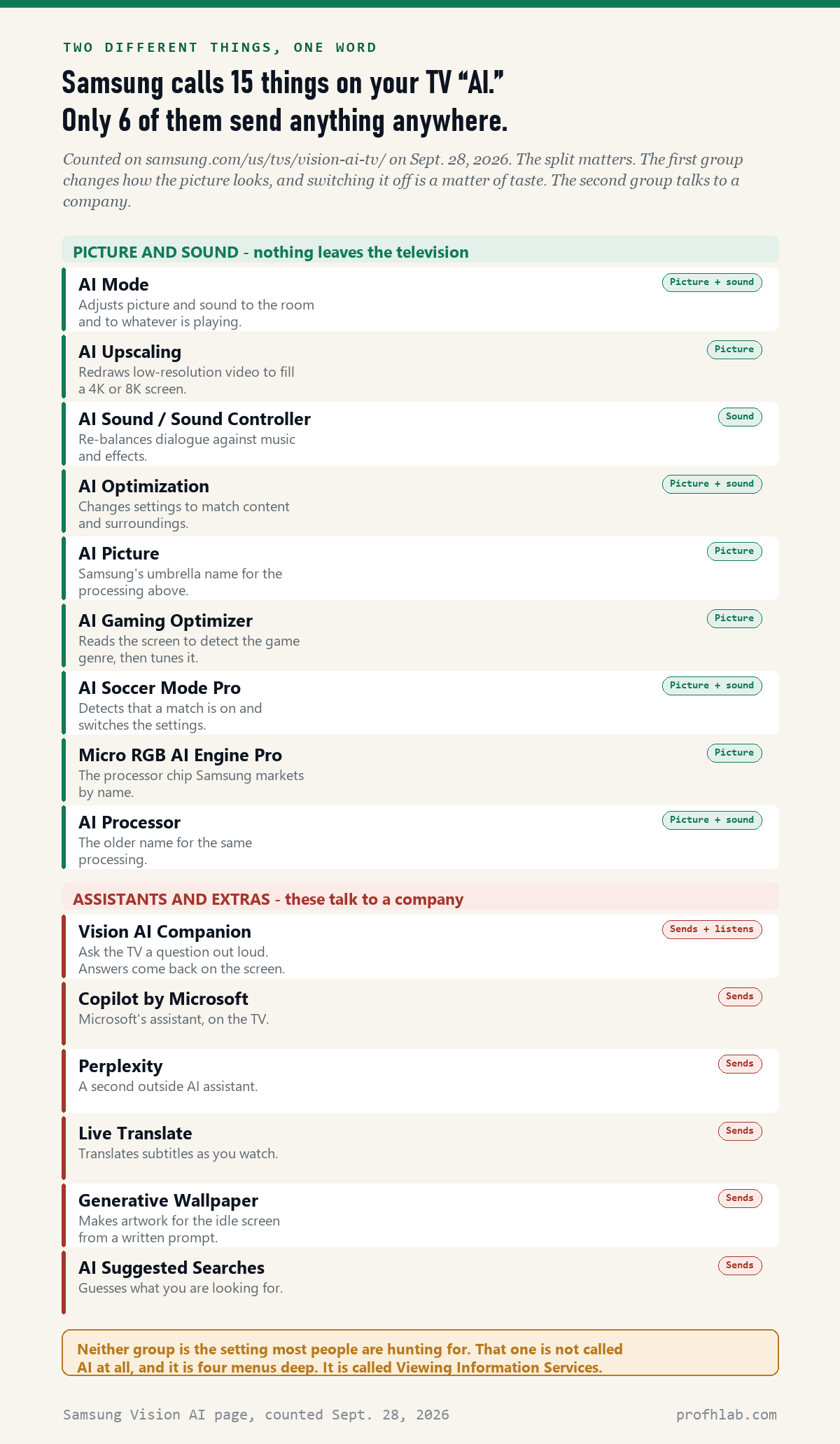
Fifteen things share one word, and only six of them leave your house
This is the distinction that makes the rest of the job simple, and no page on the first screen of Google results draws it.
Nine of the fifteen are processing. AI Upscaling redraws a low-resolution picture to fill a 4K screen. AI Sound re-balances dialogue against music. AI Gaming Optimizer reads the screen to guess the game. Micro RGB AI Engine Pro is a chip. None of these sends anything anywhere, and none of them is a privacy question.
Six are different. Vision AI Companion listens to a spoken question. Copilot and Perplexity are outside companies answering on your screen. Live Translate reads subtitles. Generative Wallpaper makes artwork from a written prompt. AI Suggested Searches guesses what you want.
If someone tells you to “turn off the AI” on your Samsung and means privacy, they mean the second group and the data setting below. If your picture looks strange, they mean the first.
The setting most people are hunting for is not called AI
It is called Viewing Information Services, and it is Samsung’s name for automatic content recognition, or ACR. ACR takes a fingerprint of what is on the screen and matches it against a library, so the set can tell what you are watching.
It works on everything, not just Samsung’s own apps. The Texas petition describes it capturing from “external inputs such as cable, satellite, HDMI devices, gaming consoles, even if the Smart TV used simply as a monitor for the laptop.”
The name is the reason nobody finds it. Search your television’s settings for “AI” and this does not appear. Search for “tracking” and it does not appear. You have to already know the phrase to go looking for it.
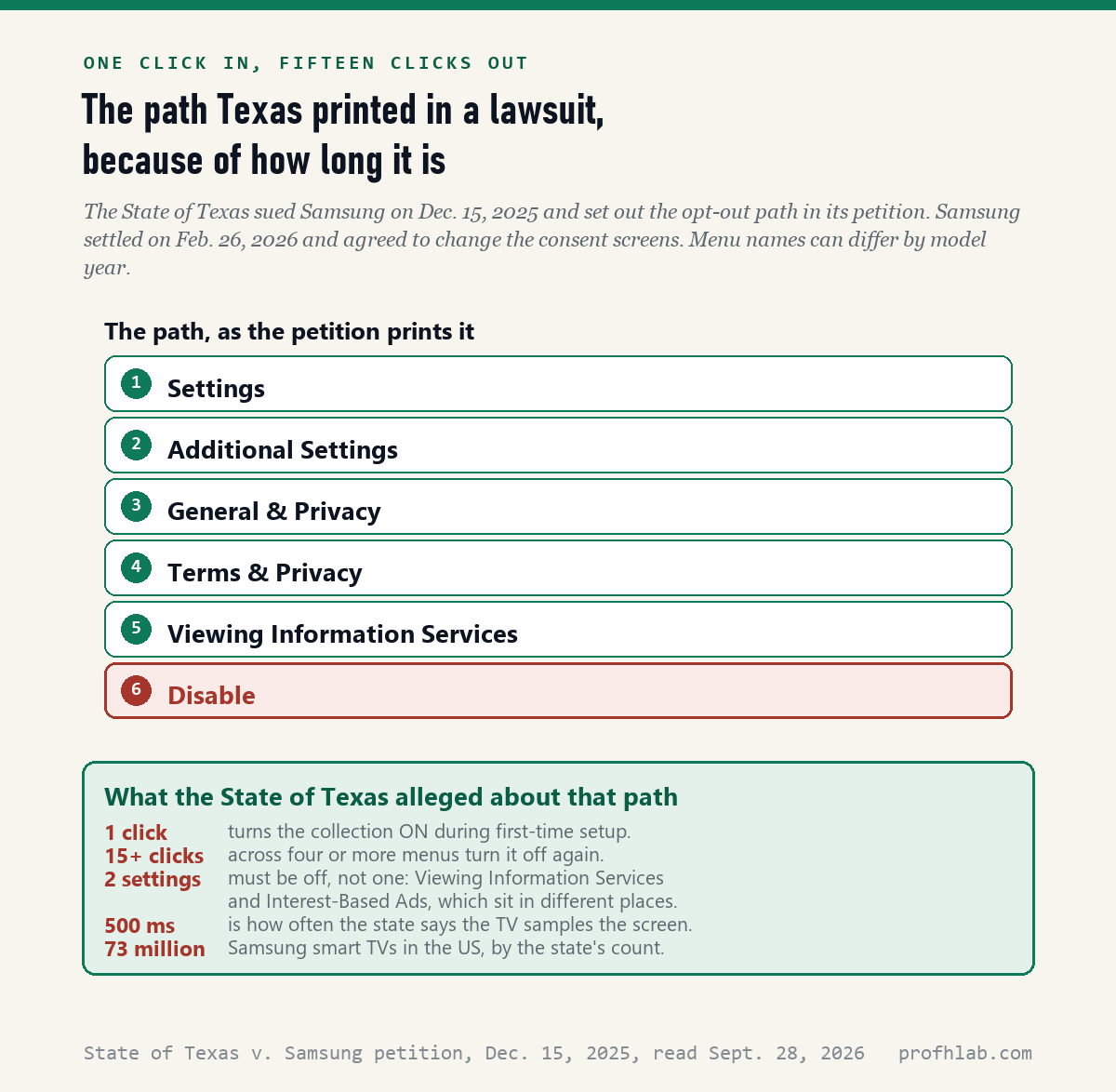
What Texas found when it opened those menus
On December 15, 2025 the State of Texas sued Samsung Electronics America over this setting. Whatever you think of the lawsuit, the petition is useful for one reason: the state walked the menus and wrote down what it found.
It counted one click to switch the collection on during first-time setup, against fifteen or more clicks across four or more menus to switch it off again. It noted that two settings have to be off, not one: Viewing Information Services and Interest-Based Ads, which sit in different parts of the interface.
The state also alleged the television samples the screen every 500 milliseconds, across more than 73 million Samsung sets in the United States, and called the name itself “non-intuitive nomenclature.”
One passage names our readers directly. The petition alleges the conduct was “calculated to acquire or deprive money or other property from consumers who were 65 years of age or older.” That is a state’s allegation, not a court’s finding, and Samsung has admitted no wrongdoing.

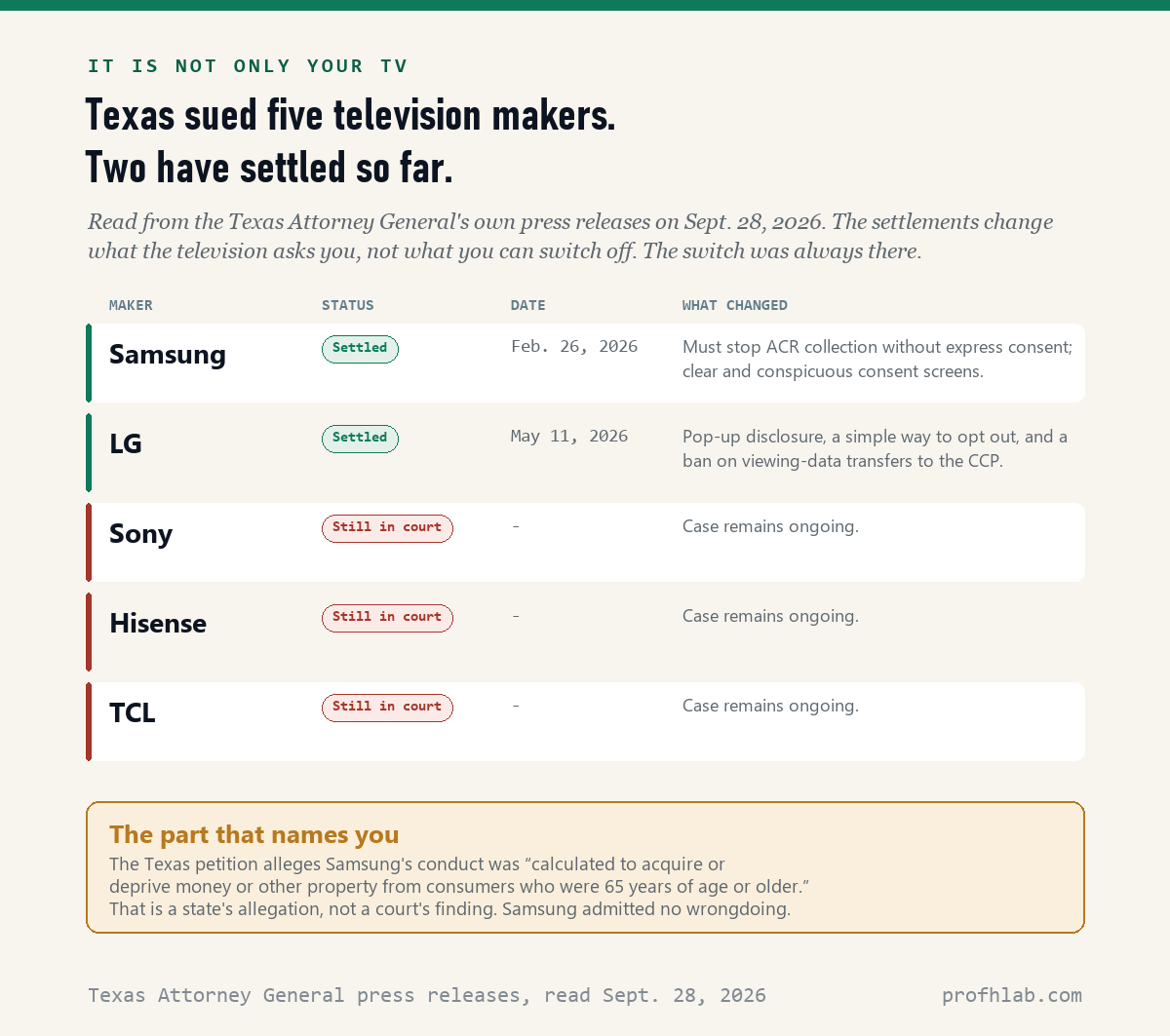
Samsung settled in February. Sony, Hisense and TCL have not.
Samsung reached an agreement with the Texas Attorney General on February 26, 2026. Under it, Samsung “must halt any collection or processing of ACR viewing data without obtaining Texas consumers’ express consent,” and must update its televisions with consent screens the office called “clear and conspicuous.”
LG followed on May 11, 2026, agreeing to a pop-up disclosure and “a clear and simple way to opt out.” The same release says the cases against Sony, Hisense and TCL remain ongoing.
Read carefully, these settlements change what your television asks you. They do not add a switch that was missing. The switch was always there. What was missing was a plain question at the moment you set the set up.
Why does my Samsung TV look like a soap opera?
This is the most common complaint that gets filed under “turn off the AI,” and it is a different problem with a different fix.
That over-smooth, videotaped look comes from motion processing, which invents frames between the real ones. Film is 24 frames a second. Your television is showing many more, and your eye reads the extra smoothness as cheap.
The honest answer on the fix: the menu name for this changes between model years, and we could not find it documented anywhere on Samsung’s United States support site. What is documented is the picture mode. Samsung describes AI Mode as a menu that “adjusts adaptive picture and sound settings” to your surroundings, so moving off AI Mode to a fixed mode such as Movie or Filmmaker is the change that sticks.
No 2026 Samsung set in hand, so three details stay unverified
We read documents. We did not have a 2026 Samsung set in front of us, and we are not going to print a menu path we did not walk.
Three things are therefore unverified here. We could not confirm the current wording of the consent screens Samsung agreed to change in February. We could not confirm the menu path on any specific model year, only the path the State of Texas recorded. And we could not find Samsung’s own instructions for any of this, because as far as those 2,605 support addresses go, they do not appear to exist.
That last gap is the finding, not a failure of searching. The four support pages on Samsung’s United States site whose addresses contain “ai” are for a dryer, two refrigerators and a washer-dryer combination.

Tonight, in the order that matters
Do these in order. The first one is the only one with a privacy consequence, so if you stop after step two you have done the important part.
- Open Settings and look for Terms & Privacy, under General & Privacy or Additional Settings depending on your model year. Inside it, turn off Viewing Information Services.
- Find Interest-Based Ads in the same area and turn that off too. Texas made the point that one without the other leaves the job half done.
- Decide about the assistants. If you never want the television answering questions, stop pressing the AI button, and check whether your model lets you sign out of the voice assistant entirely.
- Change the picture mode from AI Mode to Movie or Filmmaker if the picture looks wrong to you. This is taste, not privacy.
- Write down what you changed and the date. Television updates have restored settings before, and a note lets you tell a restored setting from a mistaken memory.
If someone helps an older relative with this, do it on their set too. The Texas petition’s allegation about people over 65 is exactly the argument for spending ten minutes on it.
Is Viewing Information Services on by default, and safe to turn off?
Does turning off Viewing Information Services break anything?
It stops the recommendations that are built from what you watch. Your apps, channels and inputs all keep working. Samsung describes the service as providing personalized content; the State of Texas argued in its petition that personalization does not require fingerprinting the screen every 500 milliseconds.
Is Viewing Information Services on by default?
Texas alleged it is switched on by a single click during first-time setup, in a screen with an “I Agree to all” option, and that switching it off afterwards takes fifteen or more clicks. Samsung agreed on February 26, 2026 to change those screens, so a set bought recently may ask differently.
What is the AI button on my Samsung remote?
It opens Vision AI Companion. Samsung’s own footnote says the feature is “accessible by the AI button, or by the Home button (long press) on the remote control without an AI button.” Pressing it sends your question out to be answered.
Does my TV listen to me all the time?
The Texas case is about pictures and sound taken from what is playing on the screen, not about a microphone recording the room. Voice features are separate, and they are the ones tied to the remote’s microphone button.
Do I have to do this on every television in the house?
Yes. These are per-set settings, and each television goes through its own first-time setup. A second set in a spare room is usually the one nobody ever went back to.
Does any of this apply to me if I do not live in Texas?
The settings are the same everywhere. The legal agreements are with Texas, but Samsung agreed to update its televisions rather than to build a Texas-only screen, and the switch itself has always been available on any set.
Linus Tech Tips walks the menus; Gamers Nexus digs into LG
The same question, on the other screens in your house
The pattern on the television repeats everywhere: the feature is sold by name and the off switch is filed under a different one. We have walked the same ground on the Samsung phone, in Google Photos, on the Ring doorbell, in Chrome, in Outlook, on Pinterest, on Instagram and in Windows 11.
If the data question is what brought you here, the closest relative of this article is what six carmakers say they collect from your car, and the most useful next read is the safe word that beats AI voice scams. For a calmer starting point there is using ChatGPT for the first time after 50 and the tools worth your time. New to all of it? Begin at Start Here, or send us the question directly on the Ask page. Our counting method is written out at How We Count.
From Samsung’s 2,605 support pages to the Texas petition
- Samsung, Samsung Vision AI Smart TVs – the 15 AI-branded features and the AI button footnote, counted Sept. 28, 2026.
- Samsung, United States support and help content sitemaps – 2,605 addresses, searched Sept. 28, 2026. Matches for Vision AI, AI Mode, ACR, Viewing Information Services and Interest-Based Ads: zero.
- State of Texas v. Samsung Electronics America, petition filed Dec. 15, 2025 – the opt-out path, the one-click and fifteen-click counts, the 500 millisecond and 73 million figures, and the allegation concerning consumers 65 and older.
- Texas Attorney General, agreement with Samsung, published Feb. 26, 2026.
- Texas Attorney General, agreement with LG, published May 11, 2026 – and the status of the Sony, Hisense and TCL cases.
- Samsung, Privacy Policy, dated Jul. 20, 2026 – the Tizen advertising identifier held by Samsung visual display devices.
Corrections and questions go to the Ask page. If Samsung publishes support documentation for these settings, or if a reader walks the menus on a 2026 set and finds the path differs, we will update this page and say what changed.
Prof.’s H Newsletter
One short email a month, with the numbers in it
What actually moved in AI hiring, AI prices, and the scams aimed at older Americans. Counted here, dated, and linked to the source. One email a month, and your address goes nowhere else.