How to Turn Off AI on LG TV: We Found 8 Off Switches and 3 Features With None
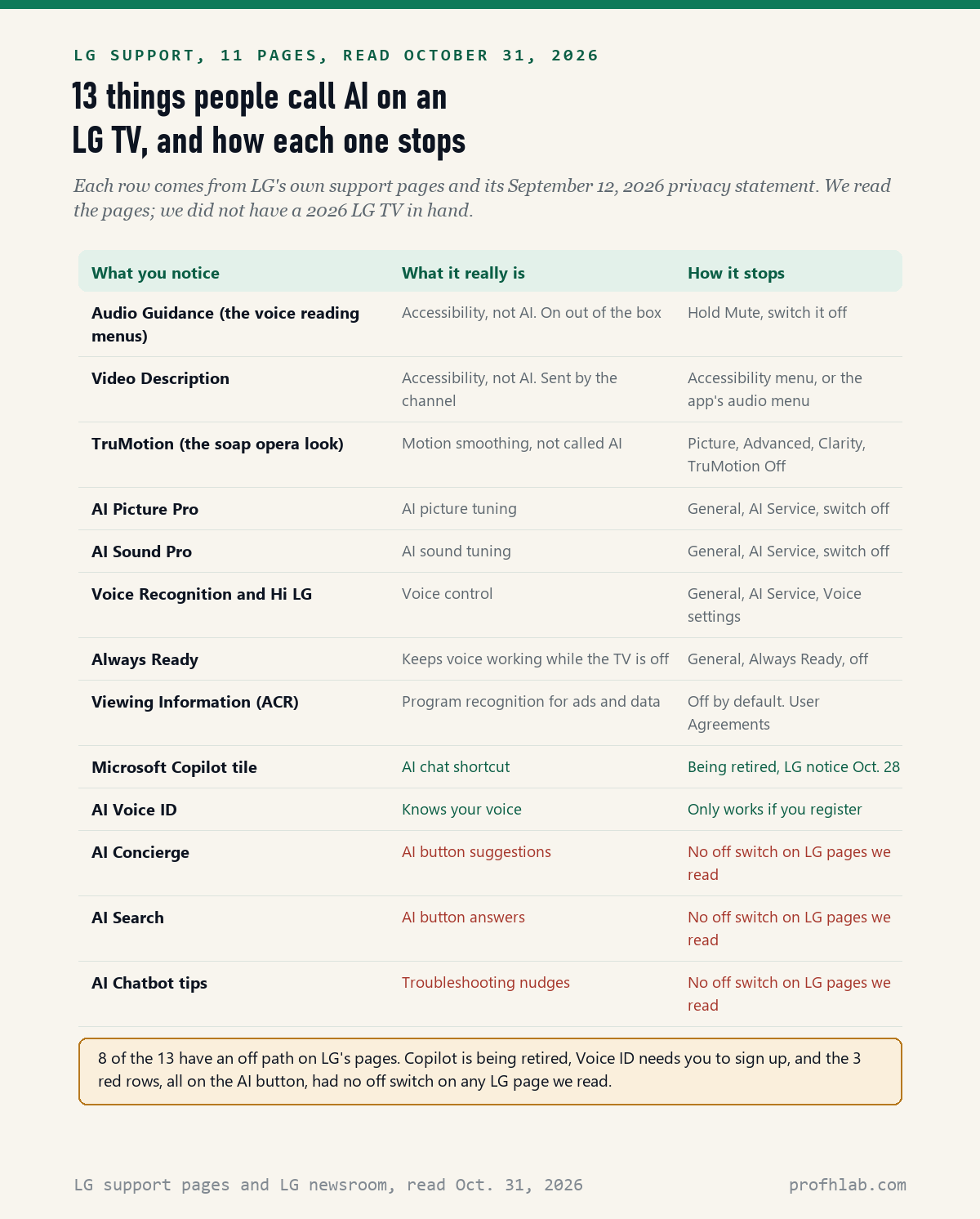
There is no single switch that turns off AI on an LG TV: on October 31, 2026, we read 11 LG support and newsroom pages and listed 13 things owners call AI, and 8 of them have an off path on LG’s own pages. The 3 features that live behind the AI button on the remote had no off switch on any LG page we read.
The good news is that the thing most people want gone has an easy fix. The voice that reads every menu out loud is not AI at all. LG calls it Audio Guidance, and LG’s own page says it is turned on out of the box. One long press of the Mute button gets you to the switch.
What we checked on October 31, 2026
We opened 13 LG pages and could read 11 of them: 8 LG USA Help Library articles (Audio Guidance twice, Video Description, AI Picture Pro, AI Sound Pro, voice commands, the Hi LG wake word and Always Ready), 1 LG Canada article on TruMotion, LG’s AI TV feature page, and LG’s September 12, 2026 privacy statement. 2 more LG USA links sent us to LG’s general help index, so we quote nothing from them.
Our own count: 13 things an owner may call AI. 8 have an off path on LG’s pages, 1 (Copilot) is being retired, 1 (Voice ID) only works if you sign up for it, and 3 have no switch on any page we read. We read the pages; we did not have a 2025 or 2026 LG TV in hand, so menu names on your set may differ a little.
Written and checked by Prof. H. An AI assistant helped draft this article and ran the page reads; every quote was read on the source’s own page on the date shown.
Can you turn off AI on LG TV?
Partly: across the 11 LG pages we read on October 31, 2026, there is no single AI on-off switch, but 8 of the 13 features owners call AI can be switched off one at a time. Most of those switches sit in one place, the General menu under All Settings.
Think of your TV like a house with many light switches. The picture and sound switches are in one hallway, called AI Service. The talking voice has its own switch in the Accessibility room. And a few lights, the ones on the AI button, only come on when you press that button yourself.
So the useful question is: what is bothering you right now? The sections below start with the complaint we see most in Google’s search box, a TV that will not stop talking.
How do you turn off AI voice on LG TV?
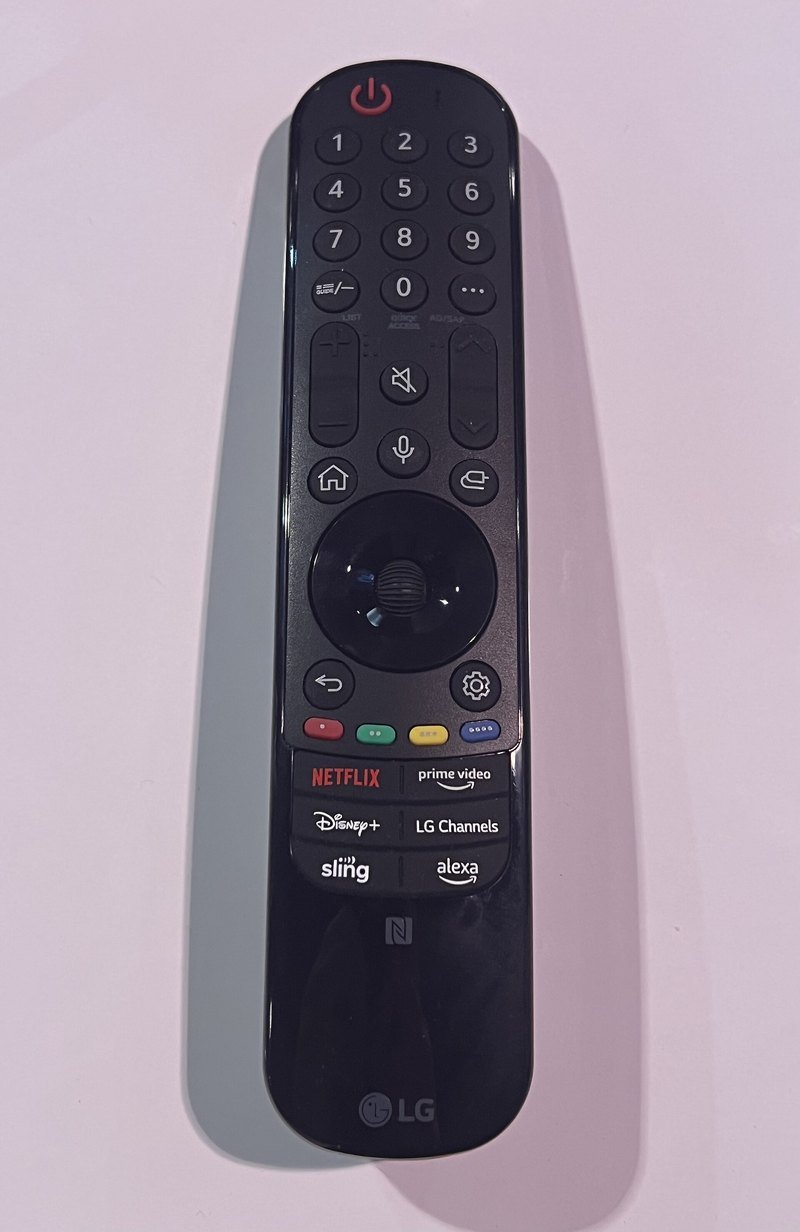
Hold down the Mute button until the Accessibility menu opens, then set Audio Guidance to Off: that is the fix on LG’s Help Library page How To Turn On/Off Audio Guidance, dated July 12, 2026, and read October 31, 2026. The same page says the feature is “enabled out of the box” to help people with low vision.
So the voice is not a robot listening to you. It is a screen reader, like the one on a phone, and it reads menus aloud. LG’s page also says that if you shake a Magic Remote and the pointer appears, Audio Guidance is off.
If holding Mute does nothing, use the menu instead:
- Press the gear button (Settings) on the remote.
- Select All Settings.
- Select General, then Accessibility.
- Select Audio Guidance and switch it off.
LG’s page How to Turn Off Audio Guidance, dated November 6, 2025, gives that path for TVs from 2021 on, including 2024 and 2025 sets. On TVs made before 2020, Accessibility sits right under All Settings, without the General step.
Why does my LG TV describe what is happening in the movie?
That is Video Description, and it comes from the channel or app, not from LG’s AI: LG’s page How to Turn Off Video Description, dated July 17, 2026, and read October 31, 2026, says the commentary “is only available if supported by the broadcasting company.” You turn it off in Accessibility, under Video Description.
When the narration is inside a streaming app, the switch belongs to the app. LG’s Audio Guidance page says it “is not a feature of the LG TV” but of the smart app or the device plugged into the TV, and that it is usually turned off in that app’s captions menu. On a cable box, look in the box’s own settings.
Our broader guide, how to turn off AI on any TV, explains how to tell the menu voice from the movie voice by listening to what it says.
Can you turn off AI upscaling on LG TV?
Yes, on the TVs LG documents: its page How to Enable AI Picture Pro, dated November 5, 2025, says the feature uses “deep learning technology” to adjust resolution and color, and it lives at All Settings, General, AI Service. The page shows the path for 2022 and 2023 sets.
The same page says AI Picture Pro works only on digital broadcasts, USB videos and HDMI inputs. It does not run in the Game Optimizer picture mode or on copy-protected content. AI Sound Pro sits next to it, in the same AI Service menu, according to LG’s page How to Set Up AI Sound Pro, also dated November 5, 2025.
LG’s pages show how to turn these on, so the off step is the same toggle in reverse. A December 2025 video from HardReset.Info on a 2025 LG model says in its description that the same menu holds AI Sound Pro, AI Acoustic Tuning and AI Picture Pro. We could not open a 2025 or 2026 set to confirm every name.

Why does my LG TV look like a soap opera, and is that AI?
It is motion smoothing called TruMotion, and LG does not label it AI: LG Canada’s page on the soap opera effect, dated August 25, 2025, and read October 31, 2026, says to go to All Settings, Picture, Advanced Settings, Clarity, then set TruMotion to Off or Cinematic Motion.
The page explains why it exists. TruMotion was built to reduce blur on LCD screens, and it makes sports look smooth. Movies are filmed at 24 frames a second, so the extra smoothness can make them look like home video. Turning it off is safe; you can always turn it back on for a football game.
Is LG TV listening to my conversations?
Not all the time, according to LG: its privacy statement of September 12, 2026, read October 31, 2026, says “The TV does not continuously listen to, record, or store conversations in the home.” It says voice recognition and the program-recognizing feature called ACR are optional and “not enabled by default.”
That is LG’s own claim, and we cannot test it from outside. What you can do is check three switches yourself:
- Voice Recognition. LG’s voice commands page, dated July 17, 2026, puts it under General, AI Service, Voice Recognition Settings on 2021 and 2022 sets.
- Always Ready. LG’s Always Ready page says that in this mode “you can still use the voice recognition function” while the TV is off. Turn it off under General if you do not use it.
- Viewing Information. LG’s statement says ACR “is turned off by default” and only starts if you accept the Viewing Information Agreement, which you can withdraw in the TV’s settings.
The same statement says some models have a hardware switch that turns the TV’s microphone off. If you are unsure whether you agreed to anything during setup, look for User Agreements in Settings. For the same check on a Samsung, see our Samsung TV guide.

What is the Copilot app on LG TV, and can I delete it?
It is a shortcut to Microsoft’s AI chat, and it is going away: Windows Central reported on October 28, 2026, that a pop-up on LG TVs told owners Microsoft “has recently decided to end support for Copilot functionality on all TVs.” The notice said the feature “may stop functioning shortly.”
The tile caused complaints when it appeared after an update in December 2025. PCWorld reported on December 22, 2025, that LG would “take steps to allow users to delete the shortcut icon if they so desire.” Windows Central says no end date has been confirmed by Microsoft, and that LG expects it before the end of 2026.
If you see that pop-up, nothing is wrong with your TV and you do not need to do anything. For Copilot on a computer, our Windows 11 Copilot guide covers the steps.
What does the AI button on the LG remote do if I never press it?
Nothing that LG describes: LG’s AI TV feature page, read October 31, 2026, says AI Concierge starts when you “press the AI button” and AI Search answers questions “with Google Gemini providing answers right on your TV screen.” We found no off switch for either, or for the AI Chatbot tips, on LG’s pages.
AI Voice ID is different. The same page says you “register your voice” first, and it is available on many LG TVs from 2024 on. If you never registered, there is nothing to turn off. LG also warns the voice lock “can be unlocked by someone with a similar voice.”
An LG customer care answer on a Best Buy product page about the 2025 C5 OLED says owners can toggle off “Voice Recognition and other AI features” under General, AI Service. It did not name AI Concierge, so we count that one as unconfirmed. If you are new to AI chat in general, our ChatGPT guide for beginners over 50 starts from zero.

A 2020 talking-voice fix with 947,982 views, and a 2025 AI Service tour
We picked 2 videos on October 31, 2026. Neither is from LG. The first is the most-watched guide we found to the talking-voice fix. The second is a short tour of the AI Service menu on a 2025 set.
Eight stops with the remote in hand, from Audio Guidance to User Agreements
Do these in order with the remote in your hand. Our estimate is about a minute per step. LG’s privacy statement says that, depending on the market, declining the optional agreements does not stop streaming apps, live TV or software updates.
- Find your TV’s year. LG’s AI Picture Pro page says pressing Mute 3 times in a row shows the webOS version. webOS 23 means 2023.
- Silence the menus. Hold Mute, then turn Audio Guidance off.
- Stop movie narration. Accessibility, Video Description, Off. In an app, use its audio or captions menu.
- Fix the soap opera look. Picture, Advanced Settings, Clarity, TruMotion, Off.
- Open AI Service. General, AI Service. Turn off AI Picture Pro and AI Sound Pro if you prefer the plain picture and sound.
- Decide on voice. In AI Service, turn off Voice Recognition if you never talk to the TV, then turn off Always Ready under General.
- Check your agreements. Settings, User Agreements. Leave Viewing Information off unless you want it.
- Leave the AI button alone. It does nothing until you press it.
If a menu name on your screen does not match, LG’s support site has an online chat. If a family member set the TV up for you, it is fine to ask them to sit with you for these ten minutes. None of this is your fault; the menus change every year.
Other screens and speakers in the house that added AI
- Every TV brand: how to turn off AI on my TV and Samsung TVs.
- What plays on the screen: YouTube, YouTube auto-dubbing and how to tell if a YouTube video is AI.
- Speakers that listen: Alexa+ and Gemini on Google Home.
- Around the house: Ring doorbells, Amazon and Spotify.
- On the computer: Copilot on Windows 11 and the Edge browser.
- Staying safe: AI scams that target seniors and family safe word examples.
- New to all of this? Browse every guide from the Start Here page or see our AI tools for seniors.
- Curious where AI work is hiring? Our AI jobs tracker counts openings every week.
Which LG TV AI questions do people type into Google?
How to turn off AI on LG TV?
There is no single switch. Go to All Settings, General, AI Service to turn off AI Picture Pro, AI Sound Pro and Voice Recognition, and hold Mute to turn off the talking Audio Guidance. The AI button features have no off switch on the LG pages we read on October 31, 2026.
How to turn off AI talking on LG TV?
The talking is Audio Guidance, a screen reader, not AI. Hold the Mute button until Accessibility opens and set Audio Guidance to Off, or go to All Settings, General, Accessibility, Audio Guidance. LG says it is on out of the box.
How to turn off AI sound on LG TV?
Go to All Settings, General, AI Service and switch off AI Sound Pro. LG shows this path for 2022 and 2023 TVs. LG says it only applies to the TV speakers and to sound devices on the HDMI eARC or ARC port that support Sound Share.
Can you turn off AI features on LG TV?
Most of them. 8 of the 13 things we listed have an off path on LG pages. Copilot is being retired, Voice ID only works if you register, and AI Concierge, AI Search and AI Chatbot tips had no off switch on the pages we read.
How do I delete Copilot on my LG TV?
You may not need to. LG TVs showed a notice in late October 2026 that Microsoft is ending Copilot on all TVs, as Windows Central reported on October 28. LG said in December 2025 it would let owners delete the shortcut.
Is LG TV always listening?
LG says no. Its September 12, 2026 privacy statement says the TV does not continuously listen to or record conversations, and that voice recognition and ACR are off by default. You can turn off Voice Recognition and Always Ready yourself.
LG pages and news reports quoted above, with links
- LG USA Support, LG TV – How To Turn On/Off Audio Guidance, dated July 12, 2026, read October 31, 2026.
- LG USA Support, How to Turn Off Audio Guidance (Screen narration), dated November 6, 2025, read October 31, 2026.
- LG USA Support, How to Turn Off Video Description – WebOS 4.5, dated July 17, 2026, read October 31, 2026.
- LG USA Support, How to Enable AI Picture Pro, dated November 5, 2025, read October 31, 2026.
- LG USA Support, How to Set Up AI Sound Pro, dated November 5, 2025, read October 31, 2026.
- LG USA Support, LG TV – Using Voice Commands, dated July 17, 2026, read October 31, 2026.
- LG USA Support, How to Change the Voice Recognition Call Word, dated July 17, 2026, read October 31, 2026.
- LG USA Support, How to Use the Always Ready Function, dated July 17, 2026, read October 31, 2026.
- LG Canada Support, Movie picture quality unsettling (soap opera effect turn off), dated August 25, 2025, read October 31, 2026.
- LG Canada, LG AI TV feature page, read October 31, 2026.
- LG Newsroom, Statement: Understanding Privacy on LG Smart TVs, September 12, 2026, read October 31, 2026.
- Windows Central, Microsoft is killing Copilot on all smart TVs, Zac Bowden, October 28, 2026, read October 31, 2026.
- PCWorld, LG will let TV owners remove Microsoft’s Copilot app after backlash, December 22, 2025, read October 31, 2026.
- Best Buy, Can I disable all the AI functions?, answer by LG Digital Customer Care, read October 31, 2026.
Featured image: Vilhelm Hammershøi, Woman in an Interior, 1909, Museum of Fine Arts, Boston, via Wikimedia Commons, public domain, cropped.
About the author. Prof. H writes profhlab’s AI for Beginners guides for readers who are new to AI or over 50. Each guide is built from the pages it quotes, read on the date shown. Does your LG TV show an AI switch we missed, or a different menu name? Tell us on the Ask page and we will update this guide with a dated correction. More about Prof. H on the About page.
Prof.’s H Newsletter
One short email a month, with the numbers in it
What actually moved in AI hiring, AI prices, and the scams aimed at older Americans. Counted here, dated, and linked to the source. One email a month, and your address goes nowhere else.