How to Turn Off Auto Dubbing on YouTube as a Viewer: Phone, Computer and TV
To turn off auto dubbing on YouTube as a viewer, open the video’s Settings (the gear), tap Audio track and pick the one marked “original.” That takes about 10 seconds and fixes one video. To fix every video, add the language the creator speaks to your Preferred languages list. YouTube’s own Help page says content in one of your preferred languages “will not be translated.” There is no single off switch for viewers. On September 24, 2026 we read the nine articles that rank for this question, and only 2 of 9 explain why the second fix works.
What we checked on September 24, 2026
We read two YouTube Help pages (“Use automatic dubbing” and “Watch videos in your preferred language,” in their Computer, Android and iPhone versions), the YouTube Blog post of February 4, 2026 that announced the language setting, and the nine articles that ranked for “how to turn off auto dubbing on youtube.”
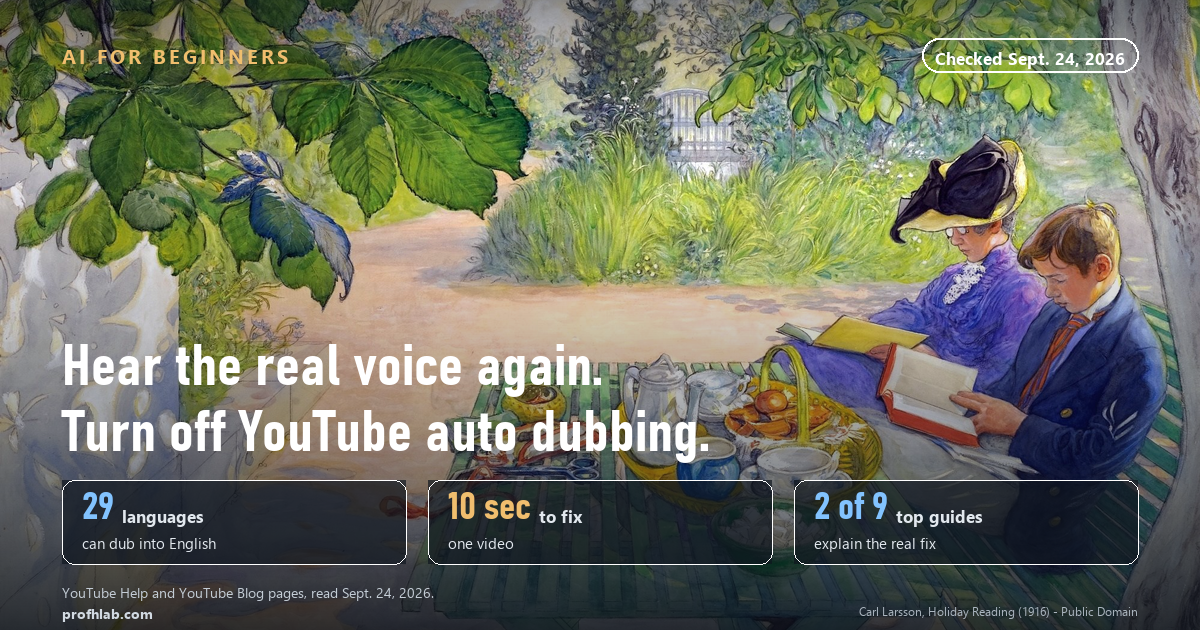
- 29 languages: we counted YouTube’s own table. Of the 30 original languages it lists, 29 can be dubbed into English.
- 6 million: daily viewers who watched at least 10 minutes of auto-dubbed video in December 2025, per the YouTube Blog.
- “auto-dubbed”: the word YouTube puts in the description of every video with a machine-made audio track.
- 0 off switches: neither Help page offers viewers a setting that turns dubbing off everywhere.
What is auto dubbing on YouTube, and why did my video change?
Auto dubbing is YouTube’s AI translating a video’s speech and reading it back in another language with a computer voice. The creator did not record it. YouTube made it.
YouTube’s Help page says the feature is “enabled by default for eligible creators.” It also says YouTube “may also generate dubs for previously published videos.” That is why a cooking channel you have watched for years can suddenly sound like a stranger.
Here is the part that surprises most people. If you speak English and watch a creator who speaks Spanish, Hindi or Portuguese, YouTube assumes you want English. We counted YouTube’s own language table on September 24: 29 languages can be turned into English this way. So the more you watch the world, the more dubbed voices you hear.
Think of it as a hotel that hands you a translated menu without asking. Helpful for some guests. Annoying if you wanted the real one.
The machine voice is also not perfect. YouTube’s Help page warns that dubs “might contain errors due to mispronunciations, accents, dialects, or background noise,” and that it can have trouble with names, idioms and jargon.
Fix 1: Switch back to the original voice on one video
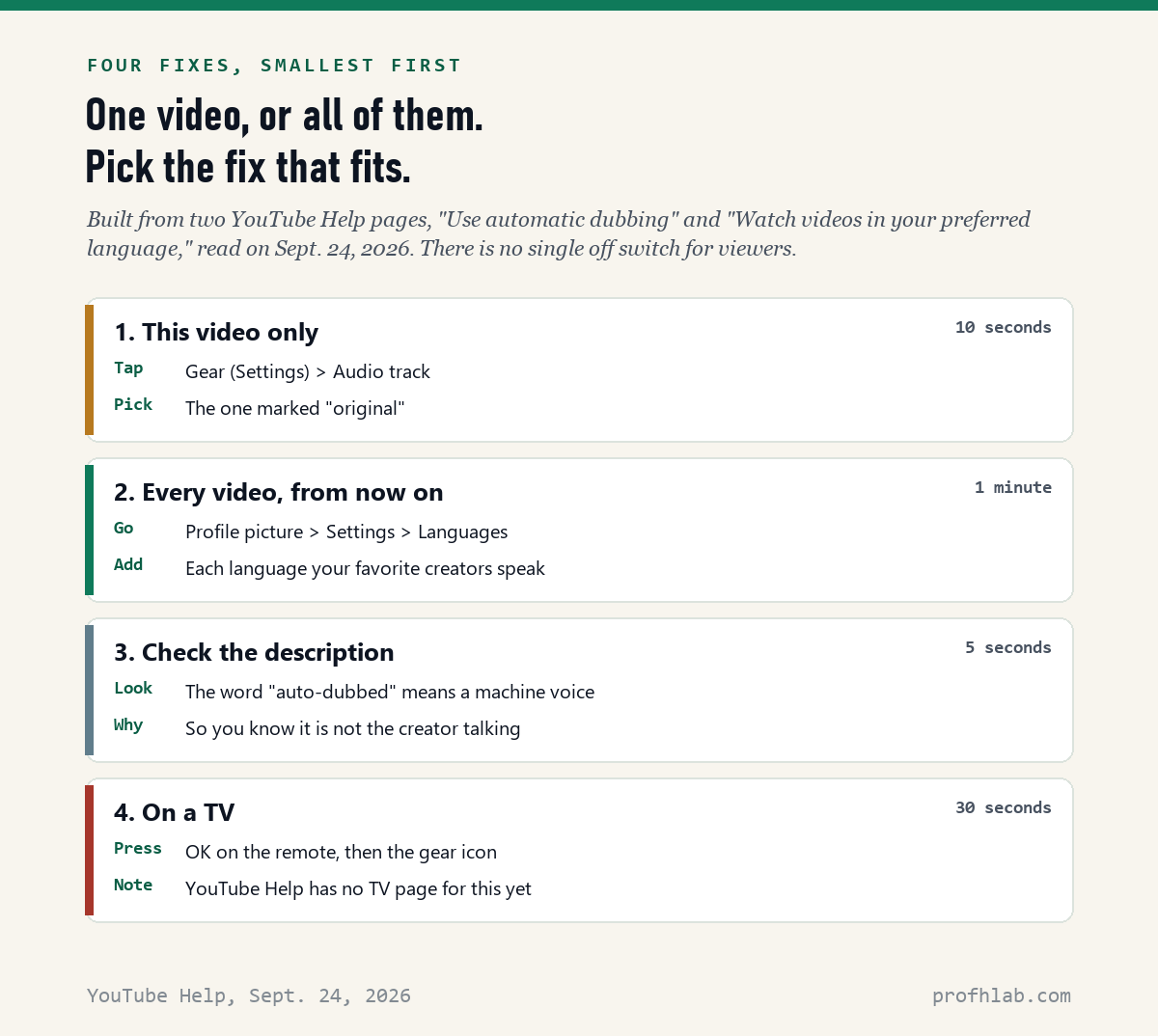
This works on a phone, a tablet and a computer. It takes about 10 seconds.
- Start the video.
- Tap the video once so the controls appear. On a computer, move your mouse over it.
- Tap Settings. It looks like a small gear.
- Tap Audio track.
- Pick the language marked original, for example “Spanish (original).”
If you do not see Audio track, the video has only one voice. Nothing was dubbed.
The catch: this fixes one video only. The next video may start dubbed again. That is what Fix 2 is for.
Fix 2: Stop auto dubbing on every video (the step most guides skip)
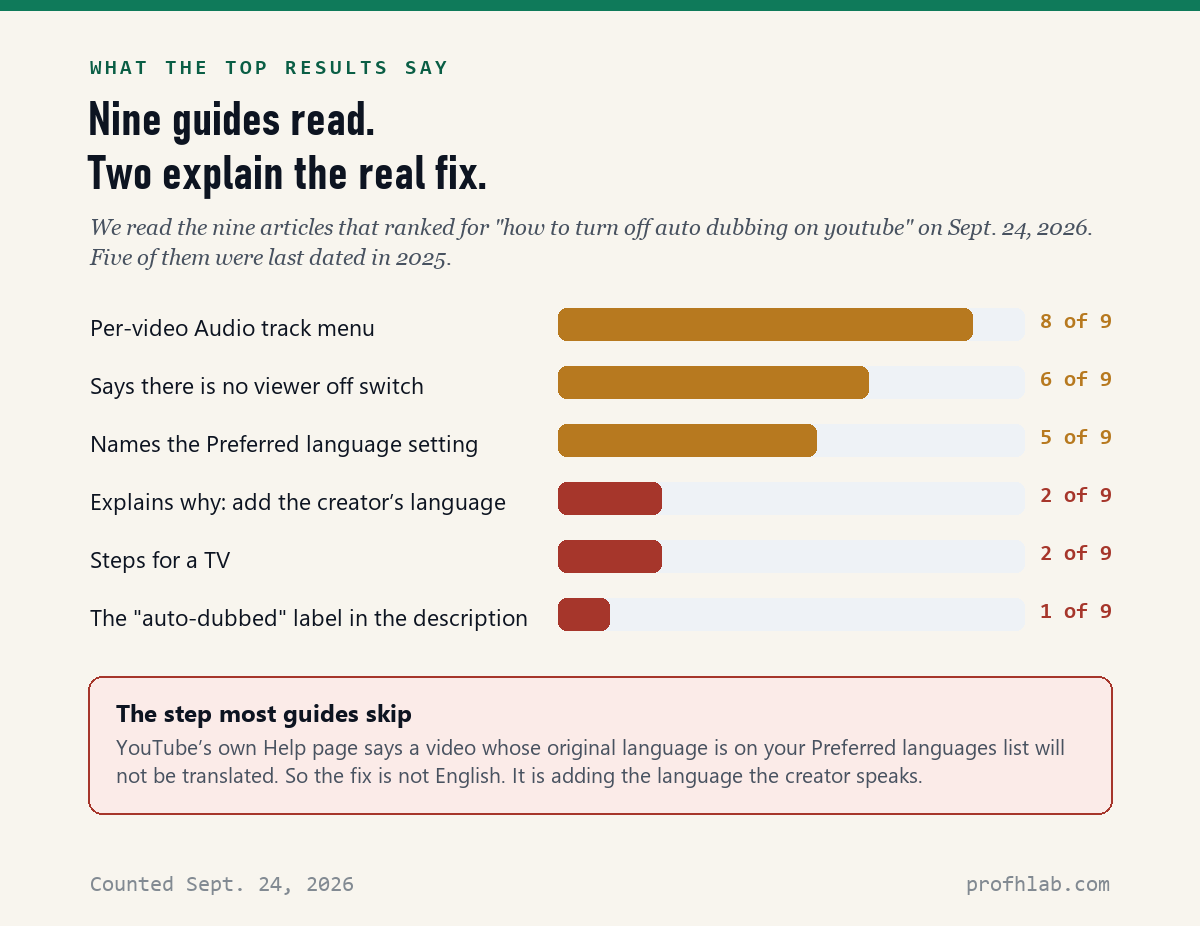
YouTube added a Preferred languages setting for this. Five of the nine top guides name this setting. Only two explain what to put on it.
YouTube’s Help page says: “Content with the original audio in one of your preferred languages will not be translated and will default to the original audio.” Read that slowly. The dub disappears when the creator’s language is on your list. So if you watch a Spanish gardening channel and want to hear the gardener, add Spanish. You do not need to speak it well. You just need to want the real voice.
On a phone or tablet (iPhone, iPad or Android)
- Open the YouTube app and tap your profile picture.
- Tap Settings, then Languages.
- Tap Preferred languages.
- Select English and every language your favorite creators speak.
- Tap Confirm.
On a computer
- Go to youtube.com and click your profile picture at the top right.
- Click Settings, then Playback & Performance.
- Under Language, click add or edit languages.
- Select your languages and click Confirm.

Two notes from the Help page. First, this setting is “separate from your app language and location settings,” so it does not change your menus. Second, it does not change your search results or your recommendations. It only decides which voice, title and description you get when a video has translations.
The path starts at your profile picture, and that picture only appears when you are signed in. If you watch YouTube without signing in, Fix 1 is the one you have.
What if YouTube dubs English videos into Spanish or German?
That is the same problem in reverse, and people search for it often. YouTube’s blog says it already picks a language “based on your watch history.” If you once watched a lot of Spanish videos, it may guess Spanish. The cure is the same list: put English on it, and remove any language you do not want to hear.
Fix 3: How to tell if a voice is AI in the first place
Open the video’s description, the text under the title. YouTube’s Help page says videos with these tracks “are marked as ‘auto-dubbed’ in the video description.” If you see that word, the voice you hear is a computer, not the person on screen.
This matters beyond comfort. Some newer dubs copy the speaker’s tone. YouTube calls it “expressive speech” and says it now covers 8 languages, including English and Spanish. It also says it is testing a lip-sync pilot that moves the speaker’s mouth to match. A dub that sounds and looks real is still a translation by a machine. Only 1 of the 9 top guides we read mentioned the label.
Why this is worth knowing
A friendly computer voice on YouTube is harmless. The same technology on the phone is not. If a call sounds exactly like a grandchild asking for money, hang up and call them back on a number you already have. We explain the family “safe word” in AI Scams Targeting Seniors and what to do after a slip in What Happens if You Say Yes on a Scam Call.
Fix 4: How to turn off auto dubbing on YouTube on a TV
YouTube’s Help page for preferred languages has versions for Computer, Android and iPhone. On September 24 it had no TV version. So here is what works on the TV screen itself.
- Start the video.
- Press OK or the center button on the remote to show the controls.
- Move to the gear (Settings) and press OK.
- Choose Audio track, then the one marked original.
For every video, set Preferred languages on your phone while signed in to the account your TV uses. YouTube’s Help page does not say whether TV apps follow that list. If your TV still plays the dub, first check that it is signed in to the same account, then fall back on the gear.
For more on the AI features TV makers are adding, see How to Turn Off AI on My TV.
Can you turn off auto dubbing on YouTube permanently?
Not with one switch, as of September 24, 2026. The closest thing is Fix 2. Once the creators’ languages are on your list, their videos should play in the original voice every time.
You may see advice to install a browser extension or a modified YouTube app such as ReVanced. We do not recommend it for most readers. Those tools are not made by Google, and apps installed from outside the App Store or Google Play are a common way that harmful software gets onto phones.
Only the creator can turn dubbing off at the source. If a channel you love sounds wrong, a polite comment asking them to turn off automatic dubbing is fair. YouTube tells creators how: in YouTube Studio, Settings > Channel > Advanced settings, then uncheck Allow automatic dubbing.
Some videos are never dubbed. The Help page lists videos over 120 minutes, videos that are only music, speech that is too fast, and videos with copyright claims.
Pick the original track, then add your preferred languages
A five-minute checklist.
- Today: on the next dubbed video, tap the gear, then Audio track, then “original.”
- Then: write down the languages of the three to five channels you watch most.
- Add them: profile picture > Settings > Languages > Preferred languages (phone), or Settings > Playback & Performance > add or edit languages (computer).
- Check your TV: make sure it is signed in to the same account.
- Learn the label: “auto-dubbed” in the description means a machine voice.
- Still stuck? Send us the channel name through Ask Prof. H and we will look.
Why YouTube dubs videos, and which other AI features turn off
- Why is YouTube adding AI everywhere? Dubs help a video reach viewers in other countries, and YouTube says they do not hurt a video’s reach. Our Generative AI library explains how AI voices are made.
- Can I turn off other AI features too? Yes, in many places. See Chrome, iPhone summaries, Samsung phones and Google Search.
- How do I spot other AI fakes? Start with How to Tell if a Picture Is AI-Generated.
Auto dubbing questions people ask
How do I turn off auto dubbing on YouTube as a viewer?
For one video, tap the gear, then Audio track, and pick the language marked original. For every video, add the creator’s language to Preferred languages: profile picture, Settings, Languages, Preferred languages. Viewers do not have a single off switch.
Can you permanently turn off auto dubbing on YouTube?
There is no permanent off switch for viewers as of September 24, 2026. The closest thing is the Preferred languages list. YouTube says content whose original language is on that list will not be translated and will play in the original audio.
How do I turn off auto dubbing on YouTube Shorts?
YouTube’s Help page does not give separate steps for Shorts. On a Short, the player menu is behind the three dots, where you can look for Audio track. YouTube says the Preferred languages rule covers content in general, so it is the better fix for Shorts too.
How do I turn off auto dubbing on YouTube on my TV?
Press OK on the remote to show the controls, move to the gear, choose Audio track, and pick original. For every video, set Preferred languages on your phone with the account the TV uses, and check the TV is signed in to it.
Why is my YouTube dubbed in a different language?
YouTube picks a dub language based on your watch history unless you tell it otherwise. Set your Preferred languages to the languages you actually want, and remove the ones you do not.
How do I stop the AI voice on YouTube on my phone?
Tap the video, tap the gear, tap Audio track and pick original. To stop it on future videos, open the YouTube app, tap your profile picture, then Settings, Languages, Preferred languages, and add the creator’s language.
How do I know if a YouTube video is auto-dubbed?
Look in the video’s description. YouTube marks videos with machine-made audio tracks as auto-dubbed there. If the player’s Audio track menu shows more than one language, one of them may be a dub.
How do I turn off auto dubbing on YouTube as a creator?
Sign in to YouTube Studio, click Settings, then Channel, then Advanced settings, and uncheck Allow automatic dubbing. Click Save. You can also choose to review dubs before they are published.
Sources
- YouTube Help, “Use automatic dubbing” (Computer and Android versions) — read September 24, 2026, including the supported-languages table we counted.
- YouTube Help, “Watch videos in your preferred language” (Computer, Android and iPhone & iPad versions) — read September 24, 2026.
- YouTube Blog, “Unlocking a global audience with auto dubbing,” Chandralekha Motati, February 4, 2026.
- Counts of the nine top search results: made by us from each page’s own text on September 24, 2026.
- Video figures from each video’s YouTube page, September 24, 2026.
The TV side of the problem, and when an AI voice is the point
- How to Turn Off AI on My TV — the TV side of the same problem.
- How to Talk to ChatGPT and Have It Talk Back — when an AI voice is the point, not the problem.
- How to Turn Off Meta AI on Instagram and on Pinterest — more apps, same idea.
- How to Turn Off AI on Amazon — shopping without the chatbot.
- Best AI Tools for Seniors — the AI worth keeping.
- AI Jobs Tracker — our own daily count of who is hiring for AI work.
- AI FAQ and Ask Prof. H — short answers, and a place to send the question we missed.
- Start Here — the whole beginners library, in order.
About the author. Prof. H writes profhlab.com for people who did not grow up with this stuff and would like a straight answer. The menu paths and quotations above were copied from YouTube’s Help Center and the YouTube Blog on September 24, 2026, and the counts of the top search results were made from each page’s own text the same day. YouTube moves its menus often, and labels differ a little between phones, computers and TVs. If yours looks different, tell us — we correct in public.
Prof.’s H Newsletter
One short email a month, with the numbers in it
What actually moved in AI hiring, AI prices, and the scams aimed at older Americans. Counted here, dated, and linked to the source. One email a month, and your address goes nowhere else.