How to Turn Off AI on Pinterest: 3 Switches, and the One Everyone Skips
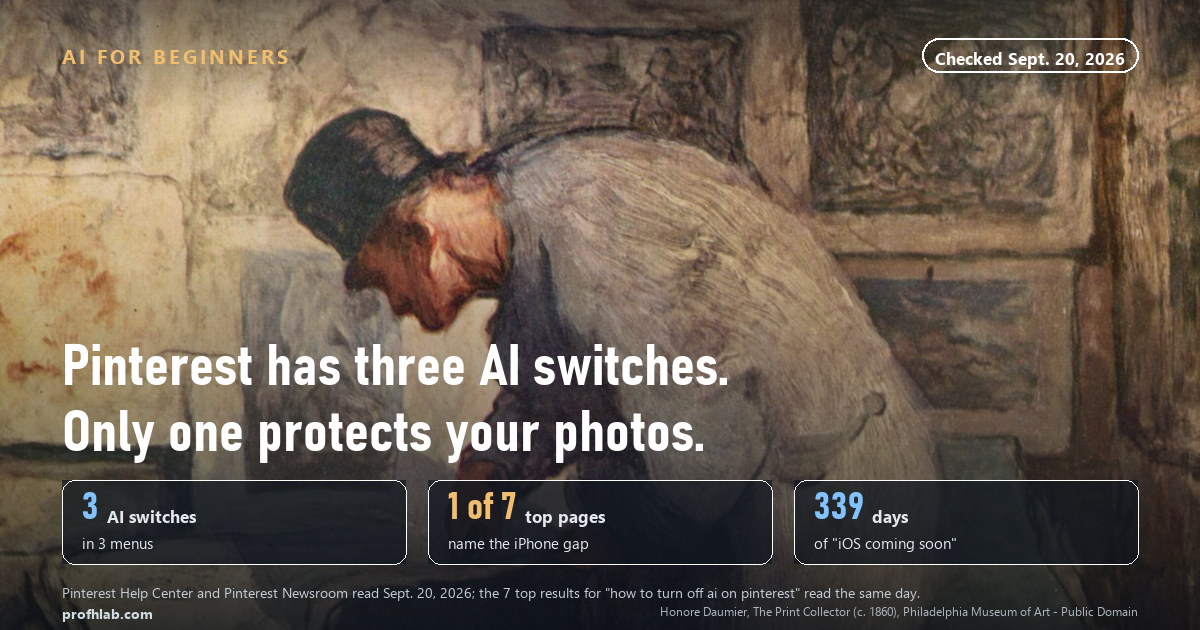
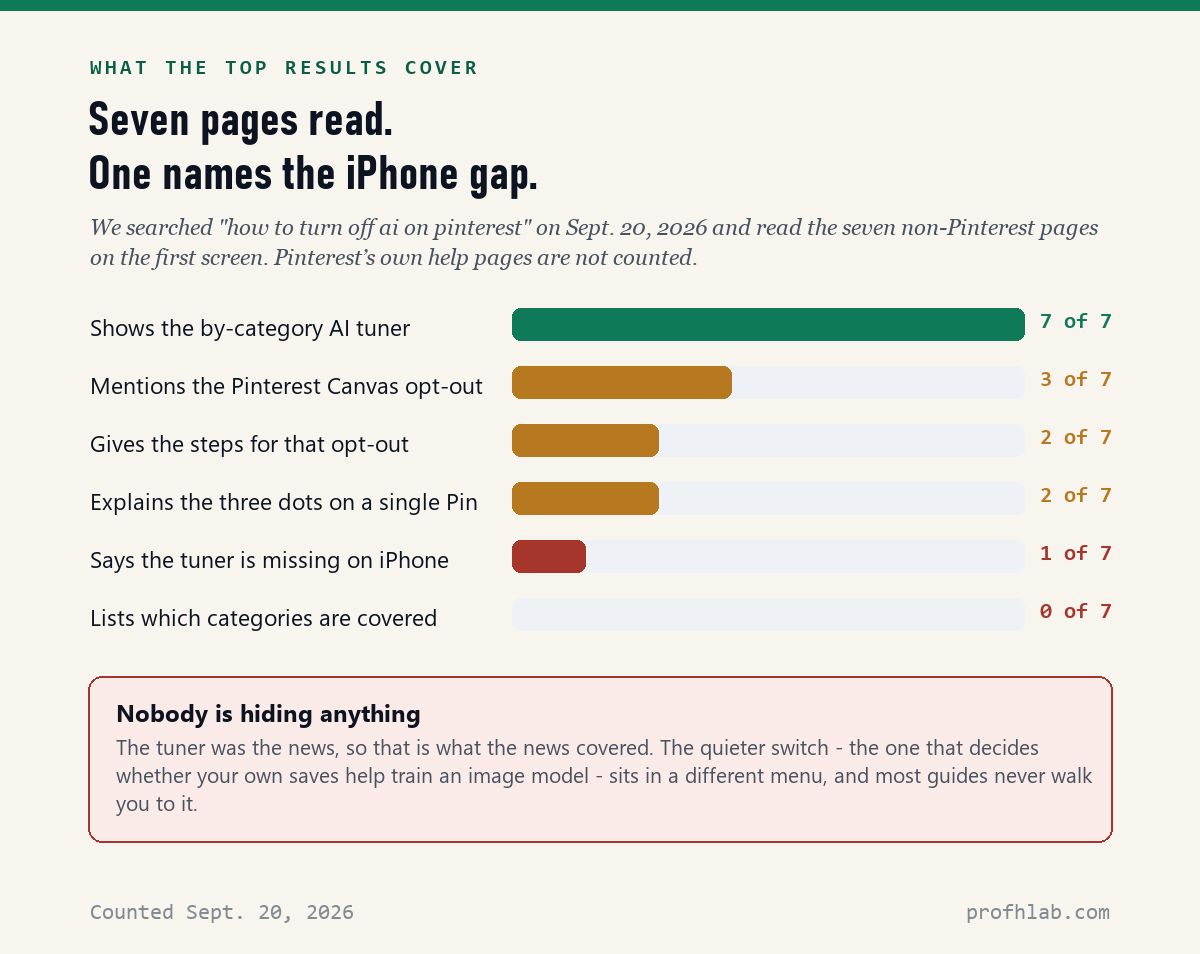
Pinterest has three AI switches, not one. On a computer: click More options at the bottom left, choose Refine your recommendations, and open the AI content tab to see fewer AI images in eleven categories. Then go to Settings > Privacy and data and untick “Use your data to train Pinterest Canvas,” which is the only switch that involves your own photos. The third is the three-dot menu on any single Pin. On September 20, 2026 we read the seven top articles for this question: 7 of 7 explain the first switch, 2 give the steps for the second, and 1 mentions that the first switch still is not on the iPhone.
What we checked on September 20, 2026
We read every Pinterest help page and newsroom post about AI, then searched “how to turn off ai on pinterest” and read the seven non-Pinterest pages on the first screen.
- 3 separate AI switches exist, in 3 different menus.
- 11 categories are covered by the by-category control. Everything else is not.
- 339 days after Pinterest said the control would reach iPhones “over the following weeks,” its own help page still says desktop and Android only, with iOS coming soon.
- 2 of 7 top pages give the steps for the switch that decides whether your saves help train an image model.
- 0 of 7 list which categories the control actually covers.
Every menu path below was copied from the Pinterest Help Center the same day.
Why is my Pinterest feed suddenly full of AI?
You did not do anything wrong, and you did not change a setting.
Pinterest changed. On October 16, 2025 the company announced new controls and said, in its own words, that it had heard from users who “want the creativity and inspiration they love, with the right mix of human and AI-generated content.” A company does not build a switch unless people are asking for it.
The categories Pinterest chose tell you where the problem is worst. It picked the ones it called “highly prone to AI modification or generation”: beauty, art, fashion and home decor. If your feed is a recipe board or a bird-watching board, you may barely have noticed. If it is a kitchen remodel or a haircut you were thinking about, you have.

Switch 1: see fewer AI Pins, by category
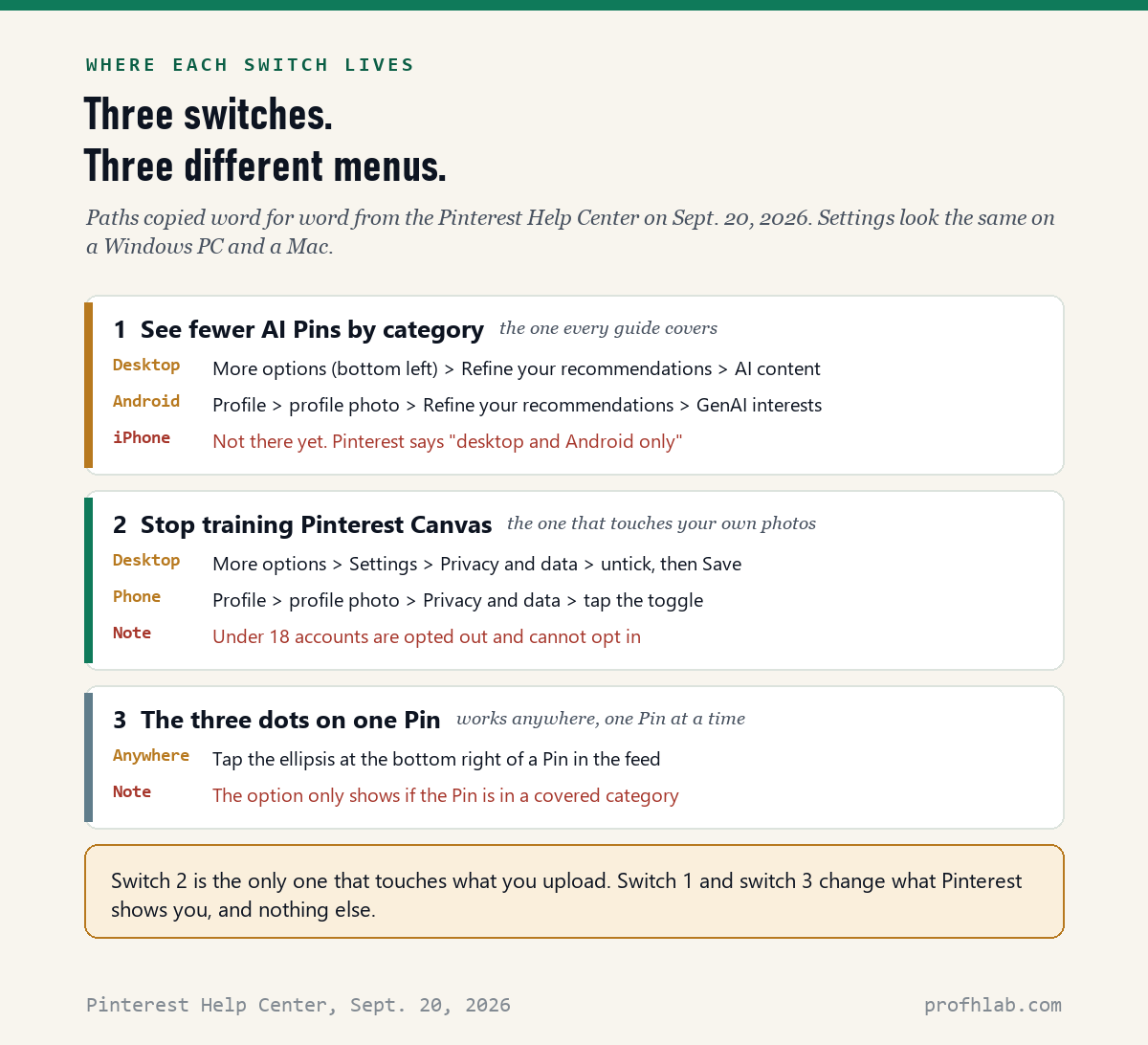
This is the one every guide covers. It lives in a menu called Refine your recommendations.
On a computer (Windows or Mac):
- Sign in to Pinterest in your web browser.
- Click the More options icon at the bottom left of the screen. Not the top.
- Click Refine your recommendations.
- Click the AI content tab.
- Turn down the categories you are tired of. Your changes save as you go.
On an Android phone or tablet:
- Open the Pinterest app and sign in.
- Tap your profile picture at the bottom right.
- Tap your profile photo again at the top left. Yes, twice. This trips up almost everyone.
- Tap Refine your recommendations.
- Tap the GenAI interests tab and switch off what you do not want.
On an iPhone or iPad: it is not there. Pinterest’s own help page carries this note, which we copied on September 20, 2026: “The ability to customize your GenAI interests is available on desktop and Android only, with iOS coming soon.”
That is worth sitting with. Pinterest announced the control on October 16, 2025 and said it would “roll out gradually across iOS over the following weeks.” That was 339 days ago. If you are on an iPhone, the fix is to open Pinterest in a web browser on a computer and do it there once. The setting belongs to your account, not to the device, so it follows you back to the phone.
Which categories does it actually cover?
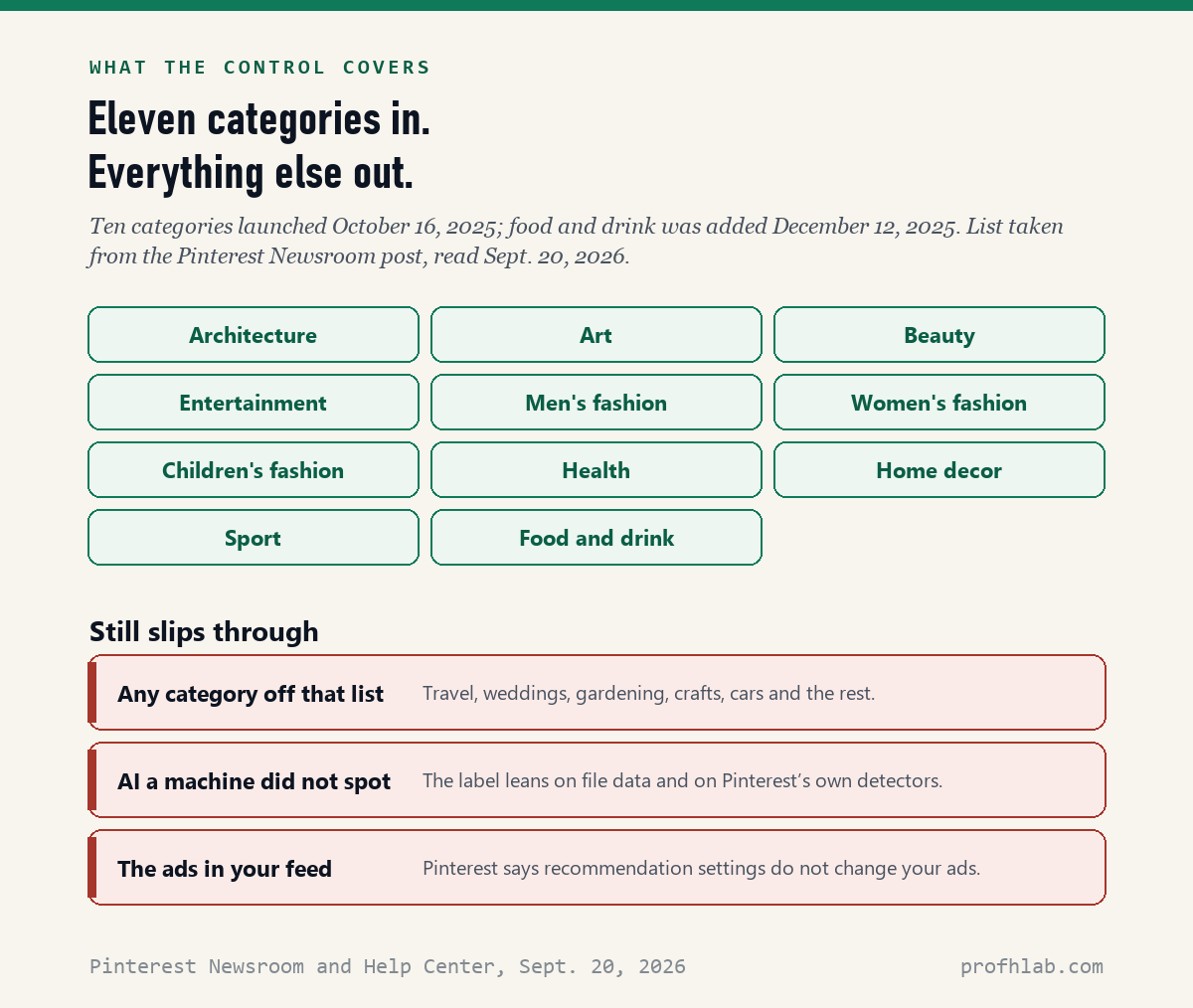
Eleven, and Pinterest has never put the list on the help page. It is in the newsroom post.
Ten launched on October 16, 2025: architecture, art, beauty, entertainment, men’s fashion, women’s fashion, children’s fashion, health, home decor and sport. Food and drink was added on December 12, 2025, in an update printed at the top of the same post.
If your interest is not on that list — travel, weddings, gardening, crafts, cars — this switch does nothing for you. That is not a bug. It is the scope of the feature, and it is the single most useful thing to know before you go looking for a setting that does not exist.
Switch 2: stop your saves from training Pinterest’s image model
This is the one most guides skip, and it is the only one that is about you rather than about your feed.
Pinterest built an image model it calls Pinterest Canvas, used mainly to generate backgrounds behind products in ads. In its own model transparency notice, Pinterest says Canvas version 6 was trained on approximately 500,000,000 rows of publicly available Pins, Pin descriptions and Pin metadata that users saved or uploaded. It says the data goes back as far as 2009, that collection is ongoing, and that the datasets “may include limited personal information.”
You can opt out. Pinterest’s help page says so plainly: “You can opt out of this use of your data at any time.”
On a computer:
- Sign in and click More options at the bottom left.
- Click Settings.
- Choose Privacy and data.
- Untick the box next to Use your data to train Pinterest Canvas.
- Click Save. On this screen, nothing happens until you click Save.
On any phone, iPhone included: open the app, tap your profile picture at the bottom right, tap your profile photo at the top left, tap Privacy and data, then tap the toggle next to Use your data to train Pinterest Canvas. This one is on the iPhone.
Two details worth knowing. Accounts belonging to anyone under 18 are opted out automatically and cannot opt in — so if you set up Pinterest for a grandchild, that part is already handled. And opting out is forward-looking: it governs whether your content is used to improve the model, not whether anything already trained is unlearned.
If this sounds familiar, it is the same question we walked through for Facebook and your photos and for Meta AI in WhatsApp. Every large platform now has a version of this switch, and every one of them puts it somewhere different.

Switch 3: the three dots on a single Pin
If you would rather not visit any settings at all, there is a per-Pin version.
Tap or click the ellipsis — the three dots — at the bottom right of a Pin while it is in your feed. If that Pin belongs to one of the eleven categories, you will see a “see fewer” AI Pins option. Choose it.
Pinterest is careful about what this does: it “will send a signal to our systems to recommend less of this type of content.” A signal, not a block.
Does the Pinterest AI filter actually work?
Partly, and the honest answer is more useful than a yes.
It works as a dial, not a wall. Pinterest never promises removal; it promises fewer. Three things limit it, all of them straight from Pinterest’s own pages:
- Scope. Eleven categories. Everything outside them is untouched.
- Detection. A Pin has to be recognized as AI first. Pinterest says it reads the file’s metadata under the IPTC Photo Metadata Standard, runs its own classifiers for content with no obvious markers, and accepts the creator’s own declaration. Anything all three miss stays in your feed unlabeled.
- Ads. Pinterest states that turning recommendations on or off “won’t affect the ads you see on your home feed.” If the AI image that annoyed you was an ad, this is the wrong switch.
So: expect a noticeably calmer feed in home decor and beauty, and no change at all in the corners of Pinterest nobody has gotten to yet.
How to tell if a Pin was made by AI
Pinterest adds a label, but it hides in a spot you have to know about.
For an ordinary Pin, click the Pin first. The “AI modified” label appears at the bottom left of the close-up view. You will not see it while scrolling.
For an ad, the label works differently: click the ellipsis next to the Pin, and the disclosure appears with the other ad details. It will say the Pin was modified with AI, or contains an AI-generated person, or — when Pinterest’s systems flagged it rather than the advertiser declaring it — that it may be modified with AI.
If one of your own Pins gets a label you disagree with, Pinterest says to contact support to appeal it.
The label is a good habit but a weak net. For the checks that do not depend on a platform being honest with you, see how to tell if a picture is AI generated — and if the image is trying to sell you something, how to tell if an ad is fake.
Where Pinterest’s “57% of the internet is AI” number comes from
Pinterest opened its announcement by saying AI content now makes up “an incredible 57% of all online material,” with a footnote. We followed the footnote on September 20, 2026.
It credits “Vasilopoulos, Hendrycks & Steinhardt, A Survey of Catastrophic AI Risks,” and links to arXiv paper 2401.05749. That paper number is a different paper: A Shocking Amount of the Web is Machine Translated, by Brian Thompson and colleagues at Amazon’s AI lab, published January 2024.
And the 57.1% in it is not a measure of AI-generated content. It is the share of sentences in the researchers’ corpus of translated sentences that appear in three or more languages at once — a sign of machine translation, in text, not images. The number is real. It does not say what it is being used to say. This is not a reason to distrust the settings, which work as described. It is a reason to click every footnote.
Two videos worth your time
SamDoesArts, an artist channel with 2.1 million subscribers, walked through the controls when they launched. The video had 367,083 views when we checked on September 20, 2026.
If you want to see why this matters in a way no settings menu can explain, Safiya Nygaard bought the dresses behind AI-generated Pinterest images and filmed what arrived. 5,677,568 views, from a channel with 10.2 million subscribers.
What to do with this

Five minutes, once, on a computer if you have one:
- Do the training opt-out first. Settings > Privacy and data > untick “Use your data to train Pinterest Canvas” > Save. This is the one that is about you, and it works on every device.
- Then the category dial. More options > Refine your recommendations > AI content. Turn down the two or three categories you actually browse.
- iPhone only? Open pinterest.com in Safari or Chrome on a computer and do step 2 there. The account remembers.
- Learn the three dots. Next time an obviously fake room or dress goes by, tap the ellipsis and pick “see fewer.” It costs one tap.
- Before you buy from a Pin, click it and look at the bottom left for the AI label, then look up the seller somewhere other than Pinterest.
If you want to go deeper
- “What is Pinterest Assistant?” A second Pinterest AI model, called Navigator-1, was built in January 2026 by fine-tuning an open-source language model on about 150,000 synthetic conversations. Pinterest says the training text was machine-made, not collected from users.
- “Will this clean up my old boards?” No. These settings change recommendations. Pins you already saved stay saved. Pinterest also says recommendations are switched off automatically for archived and secret boards.
- “What about the rest of my screen?” The same week-by-week creep is happening everywhere: Chrome, Samsung phones, iPhone summaries, Gmail, Outlook, Amazon and even your television. The short version for phones is in how do I get rid of AI on my phone.
Frequently asked questions
How do I turn off AI on Pinterest?
There are three switches. On a computer, click More options at the bottom left, then Refine your recommendations, then the AI content tab to see fewer AI Pins in eleven categories. Separately, go to Settings > Privacy and data and untick “Use your data to train Pinterest Canvas,” then click Save. Third, tap the three dots at the bottom right of any Pin in your feed and choose “see fewer.”
How do I turn off AI on Pinterest on an iPhone?
The by-category control is not on iOS yet. On September 20, 2026, Pinterest’s help page still said the ability to customize GenAI interests is “available on desktop and Android only, with iOS coming soon.” Sign in on a computer and set it once; it applies to your account. The training opt-out under Privacy and data does work on the iPhone app.
Does the Pinterest AI filter really work?
It reduces AI Pins, it does not remove them. Pinterest describes the choice as sending “a signal to our systems to recommend less of this type of content.” It only applies to eleven categories, it only applies to Pins the system recognizes as AI, and Pinterest says recommendation settings do not change the ads you see.
Is Pinterest using my photos to train AI?
By default, saved and uploaded content may be used to improve Pinterest Canvas, its image model. Pinterest says Canvas version 6 was trained on about 500,000,000 rows of publicly available Pins, descriptions and metadata, with collection ongoing. You can opt out at Settings > Privacy and data. Accounts under 18 are opted out automatically.
Which categories can I turn AI down in on Pinterest?
Eleven: architecture, art, beauty, entertainment, men’s fashion, women’s fashion, children’s fashion, health, home decor, sport, and food and drink. The first ten launched October 16, 2025 and food and drink was added December 12, 2025.
How can I tell if a Pinterest image is AI?
Click the Pin to open the close-up view and look at the bottom left for an “AI modified” label. You cannot see it while scrolling. For ads the label is elsewhere: click the ellipsis next to the Pin and read the ad disclosure. The label depends on file metadata, Pinterest’s own detectors and the creator’s declaration, so it misses things.
Can I get an AI label removed from my own Pin?
Pinterest says to contact its support team to appeal a Gen AI label on a Pin you posted.
Will turning off AI on Pinterest delete AI Pins I already saved?
No. These are recommendation settings and they change what Pinterest shows you next. Boards you already built are untouched, and Pinterest says recommendations are already off for archived and secret boards.
Sources
- Pinterest Help Center, “Refine your recommendations,” “See fewer AI Pins,” “Manage GenAI settings,” “Gen AI labels” and “AI at Pinterest” — all read September 20, 2026.
- Pinterest Newsroom, “Pinterest rolls out new tools to give users more control over GenAI content,” October 16, 2025, with the December 12, 2025 update — read September 20, 2026.
- Brian Thompson et al., “A Shocking Amount of the Web is Machine Translated: Insights from Multi-Way Parallelism,” arXiv 2401.05749, January 2024.
- Counts of the top seven search results: made by us from each page’s own text on September 20, 2026.
Keep reading
- How to Stop Meta AI From Using My Photos on Facebook — the same switch, on a different platform.
- How to Tell if a Picture Is AI Generated — three checks that beat your eyes.
- How to Tell if a Facebook Ad Is Fake — before you buy from a picture.
- AI Scams Targeting Seniors — the safe word that beats them all.
- How Do I Get Rid of AI on My Phone? — the whole-phone version.
- Best AI Tools for Seniors — the AI worth keeping switched on.
- How to Use ChatGPT: A Beginner’s Guide for Over 50 — if you want to try it on your own terms.
- AI Price Tracker — what every major AI plan costs this month.
- AI Jobs Tracker — our own count of who is hiring for AI work.
- AI FAQ and Ask Prof. H — short answers, and a place to send the question we missed.
- Start Here — the whole beginners library, in order.
About the author. Prof. H writes profhlab.com for people who did not grow up with this stuff and would like a straight answer. Every Pinterest menu path above was copied from the Pinterest Help Center on September 20, 2026, and the category list from the Pinterest Newsroom the same day. The counts of the top search results were made from each page’s own text. Pinterest moves these menus; if yours looks different, tell us — we correct in public.
Prof.’s H Newsletter
One short email a month, with the numbers in it
What actually moved in AI hiring, AI prices, and the scams aimed at older Americans. Counted here, dated, and linked to the source. One email a month, and your address goes nowhere else.