How to Turn Off AI on a Ring Doorbell: 8 Features, 6 Menus, and the One Already Switched On
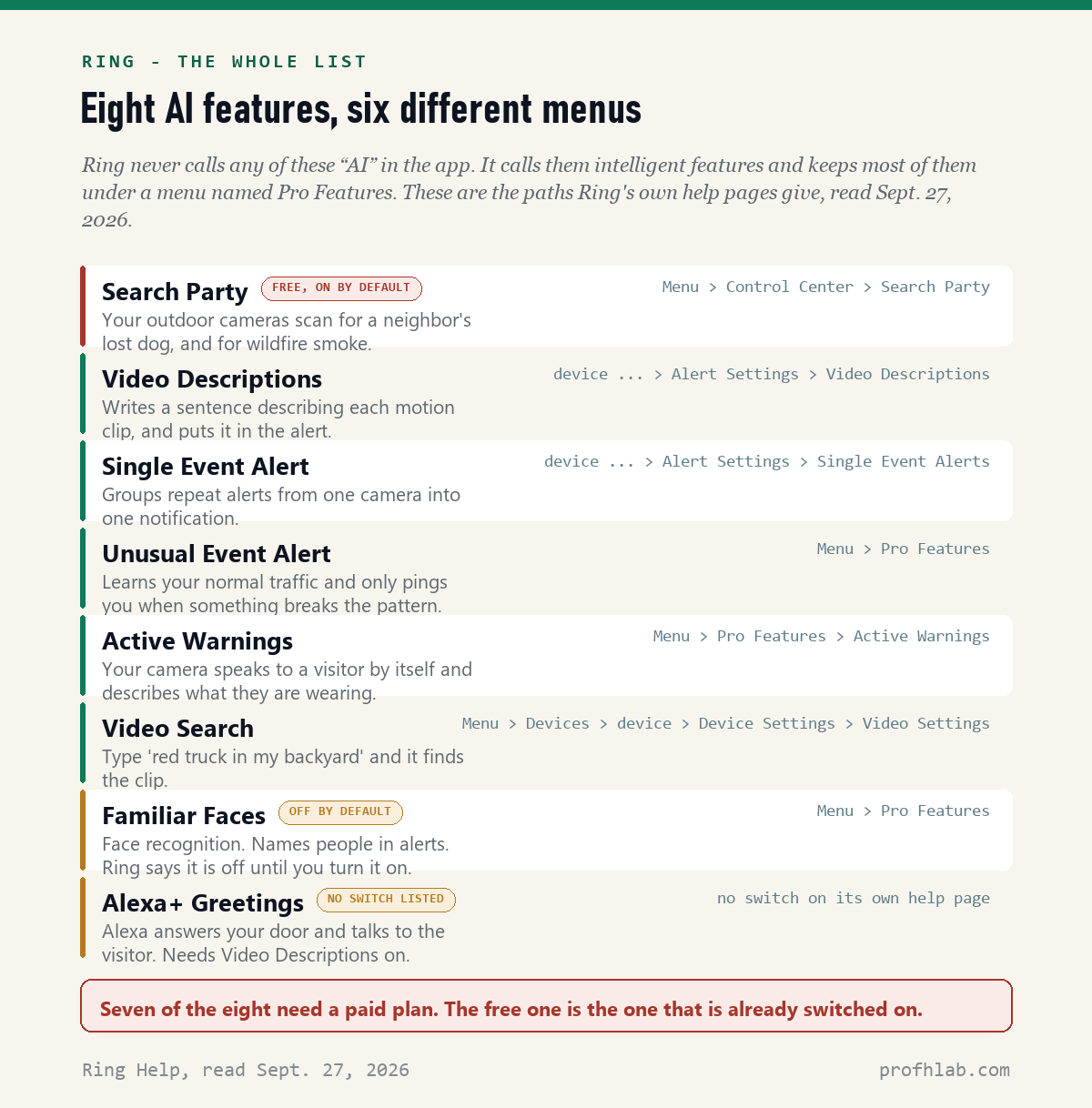
You probably cannot turn off “AI” on your Ring doorbell, because Ring does not call it that. On September 27, 2026 we read nine of Ring’s own help pages and counted eight AI features, sitting behind six different menus. Not one of the eight has the letters AI in its name. Seven of them only run if you pay $19.99 a month. The eighth is free, it is switched on unless you went looking for it, and it is not in the menu every guide sends you to.
How we checked this
We read Ring’s help pages for intelligent features, Video Descriptions, Video Search, Active Warnings, Familiar Faces, Alexa+ Greetings, Search Party and end-to-end encryption, plus the Ring Protect plans page, on September 27, 2026. We counted the features, the menu paths Ring gives for each one, and the places where Ring says a feature is unavailable.
An AI assistant helped draft this article and ran the page reads. Every quote below was read on Ring’s own page or in the cited document on the date shown.
Why is there nothing called AI in the Ring app?
Because Ring renamed it. In the app the menu is called Pro Features, and the help pages call the features intelligent features. Search the app for “AI” and you find nothing, which is exactly the moment most people give up.
The renaming is visible in Ring’s own web address. The page at ring.com/ring-ai-features now serves an article titled “Intelligent features.” The URL still says AI. The page does not: across the nine help pages we read, the standalone word “AI” appears ten times, and six of those ten are on one page about lost dogs.
This matters more than it sounds. Older guides tell you to tap Menu > AI Features. That menu is now Pro Features, so the instruction fails on the first tap and readers assume the setting was removed. It was not. It moved.
Which of the eight is already running on your doorbell?
Search Party. It lets your outdoor cameras scan for a neighbor’s lost dog, and for wildfire smoke. Ring’s own page says it plainly: your cameras “use AI to spot missing dogs or signs of fire.”
It is free. It does not need the $19.99 plan. And it is on unless you turned it off.
That last part does not come from a blog. In a letter to Ring’s chief executive dated February 26, 2026, Representative Raja Krishnamoorthi wrote that because the program is opt-out, Search Party “is automatically enabled for Ring devices that save video recordings to the cloud,” and that users must go through a six-step process in the app to switch it off. The letter asked Ring seven questions about the feature by March 12, 2026.

Ring advertised it during the Super Bowl in February 2026, which is how most people found out. The ad is worth ninety seconds of your time, because it shows what the feature does in your neighborhood rather than on your phone.
How do you turn Search Party off?
Six taps, and you have to do the last one for every camera. This is the path from Ring’s own help page, read on September 27, 2026:
- Open the Ring app to the main dashboard.
- Tap the menu (the three lines, top left).
- Tap Control Center.
- Select Search Party.
- Tap Disable next to Search for Lost Pets, then tap the blue pet icon beside it to switch it off camera by camera.
- Do the same for Natural Hazards (Fire Watch), using the blue flame icon.
Two separate switches, because they are two separate things. Fire Watch is the wildfire half, run with the non-profit Watch Duty. If you live where wildfires happen, you may want to keep that one and drop the other.
Nobody has to choose both ways. That is the point of doing it camera by camera.
Where are the switches for the other seven?
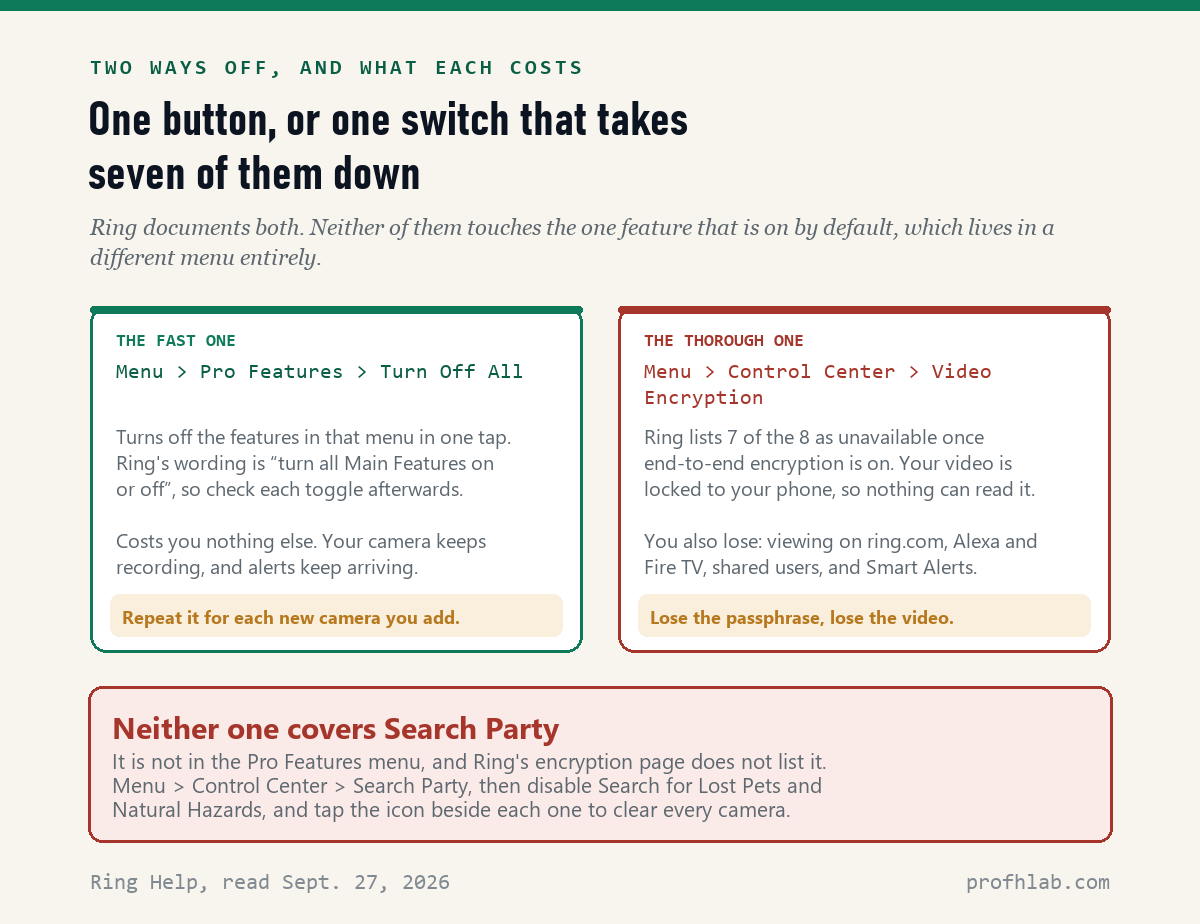
Mostly in one place. Open the app, tap the menu, tap Pro Features, and you can toggle each feature. Ring’s page adds the line most guides miss: to turn all Main Features on or off, tap Turn On All or Turn Off All.
One tap. That is the fastest answer on this page.
Two cautions. Ring’s wording is “Main Features,” not “all features,” so scroll down afterwards and check each toggle by eye. And Ring warns that you have to switch Video Descriptions off again on any new camera you add later.
There is also a chain worth knowing. Ring states that if you turn off Video Descriptions, Single Event Alert and Unusual Event Alert turn off automatically. And the Alexa+ Greetings page lists Video Descriptions as a requirement. So one switch takes down four of the eight.
That is useful, because the Alexa+ Greetings help page, last updated about a month before we read it on September 27, 2026, gives no off switch at all. It tells you how to send feedback. Turning off its prerequisite is the documented way to stop Alexa answering your door.
Do you have to pay for any of this?
For seven of the eight, yes, and this is the happiest sentence in the article: if you pay Ring less than $19.99 a month, there is almost nothing to switch off.
On the Ring Protect plans page, read on September 27, 2026, Ring Solo is $4.99 a month for one device and Ring Multi is $9.99 a month for a whole address. Neither includes the intelligent features. They appear on Ring Pro at $19.99 a month and on Virtual Security Guard at $99.00 a month. The same page offers a Pro Intelligence add-on that puts them on a single camera; it does not print a price beside it.
So the honest check is: look at what you pay. If it is the cheap plan or nothing at all, the only AI feature running on your doorbell is the free one, Search Party. Turn that off and you are done.
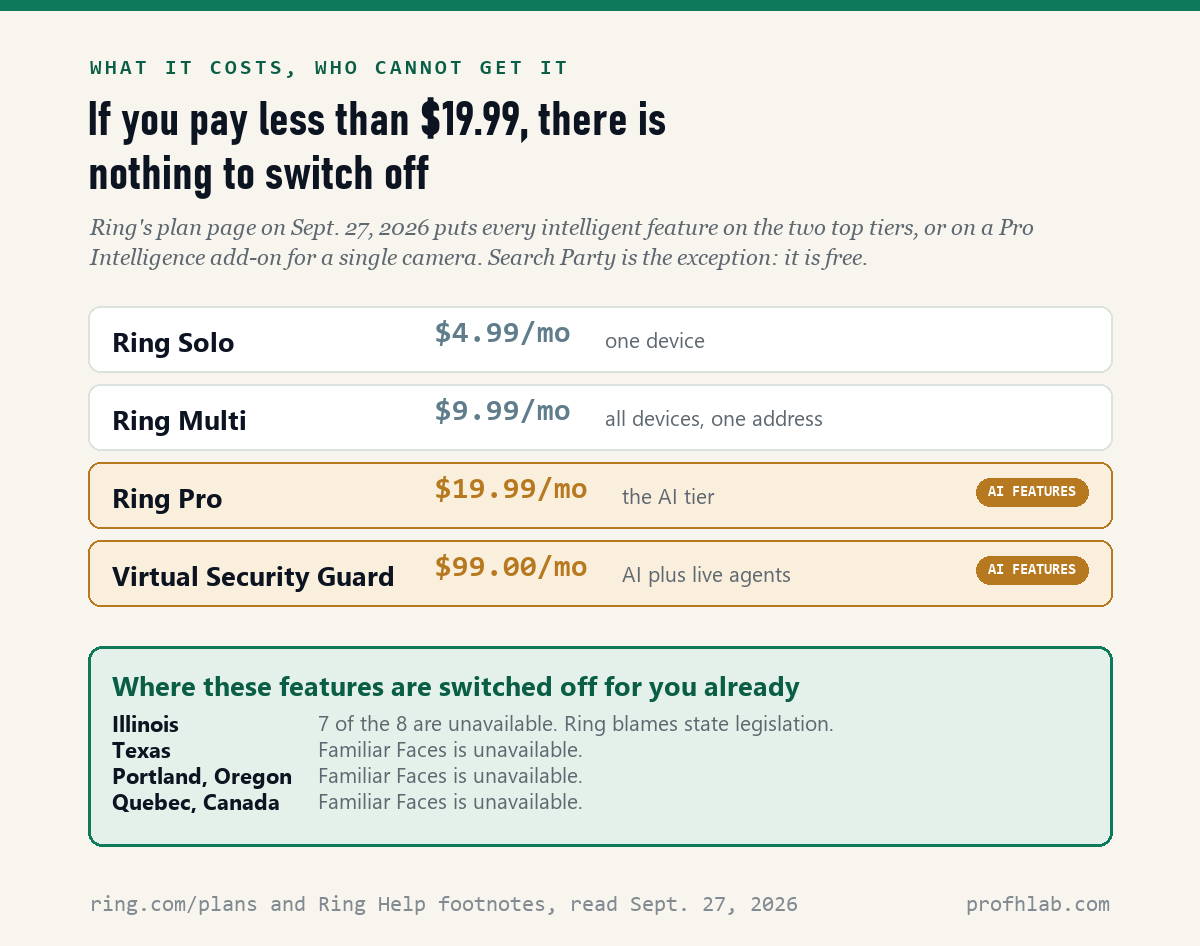
There is a second group of people with nothing to turn off: anyone in Illinois. Ring’s footnotes say seven of the eight are unavailable there. Familiar Faces is also unavailable in Texas, in Portland, Oregon, and in Quebec.
Does your doorbell know who is at the door?
Only if you turned that on. Familiar Faces is the face-recognition feature, and it is the one place where Ring states a default in writing: “Familiar Faces is disabled by default and can be enabled or disabled for each of your Ring devices at any time.”
Of the ten Ring pages we read, that is the only one that says whether a feature starts on or off. For the rest you are guessing, which is its own answer about how clear this is.
If you did switch it on and want it gone, delete the profiles rather than only toggling the switch. Ring says deleting a profile removes “the profile, facial recognition information, and all images being used for recognition.” Unnamed profiles go automatically after 30 days without a match, and if you cancel your subscription everything goes after 180 days.
The feature is also in court. A proposed class action was filed against Amazon and Ring in the U.S. District Court for the Western District of Washington on June 1, 2026, over Familiar Faces. Biometric Update reported on September 22, 2026 that the companies have moved to dismiss it, with the plaintiffs’ response due October 30, 2026. Nothing is decided.
Is there one switch that stops all of it?
Nearly. Turn on end-to-end encryption and your video is locked to your phone, so nothing at Ring can read it. Ring’s encryption page lists seven of the eight as unavailable once it is on: Video Descriptions, Single Event Alert, Unusual Event Alert, Active Warnings, Video Search, Familiar Faces and Alexa+ Greetings.
The path is menu > Control Center > Video Encryption. The app gives you a twelve-word passphrase. Write it down somewhere you will still have it in five years.
Now the price, and it is not small. With encryption on you also lose viewing on ring.com, Alexa and Fire TV, shared users, video links, Bird’s Eye View, third-party integrations and Smart Alerts. If your adult children watch the camera while you are away, this switch ends that.
And it still does not stop Search Party. Ring’s encryption page does not list Search Party among the features it disables, so we cannot tell you from Ring’s own pages what happens to it. Use the Control Center switch for that one either way.

What does page one of Google leave out?
We ran the search ourselves on September 27, 2026 and tried to read all eight results. Two returned nothing readable, and two more returned near-empty pages, so treat this as a floor rather than a verdict.
Of the pages we could read, one mentioned Search Party — and that one is Consumer Reports, behind a membership wall. The top result was a commerce site’s product-insights page. The third result was Ring’s United Kingdom help page, which does not carry the Illinois, Texas or Portland notices a U.S. reader needs.
So the single most useful fact about turning off AI on a Ring doorbell — that the one running by default is not in the menu everyone names — was effectively absent from the free page one. That is the gap this article exists to fill. We have written the same kind of audit for Google Photos and for Amazon.
Five minutes tonight, in this order
- Check what you pay. Menu > Plans. If it is not Ring Pro or Virtual Security Guard, skip to step 3.
- Menu > Pro Features > Turn Off All. Then scroll the list and confirm each toggle is off by eye.
- Menu > Control Center > Search Party. Disable Search for Lost Pets, and decide separately about Natural Hazards.
- If you ever turned on Familiar Faces, open it and delete the saved profiles, not just the switch.
- Write the date on a note. Ring adds features. When a new camera arrives, the intelligent features have to be switched off on it again.
If you share the account with family, do this on the phone that owns the account. A shared user cannot change most of it.
The questions Ring owners ask once they find the Pro Features menu
Why can I not find AI Features in my Ring app?
Ring renamed that menu. It is now called Pro Features, and the help pages call the features intelligent features. Open the app, tap the menu at the top left, and look for Pro Features. Guides that say “Menu > AI Features” were written before the change.
Does turning off the AI features stop my camera recording?
No. Recording, motion alerts and Live View are separate. Turning off the intelligent features only removes the written descriptions, the search, the spoken warnings and the face labels. Your videos still save to your event history exactly as before.
Is Search Party really on by default?
Ring’s help page does not say either way. Representative Raja Krishnamoorthi’s letter to Ring dated February 26, 2026 states that the program is opt-out and automatically enabled for cameras that save video to the cloud. Checking takes four taps, so check rather than assume.
Do I need to pay to turn these off?
No, and mostly you do not need to pay to be rid of them. Seven of the eight features only exist on Ring Pro at $19.99 a month or Virtual Security Guard at $99.00 a month, as listed on the plans page we read on September 27, 2026. Search Party is free and is the exception.
Will Ring stop identifying faces if I switch Familiar Faces off?
Switching it off stops new recognition on that camera. To remove what was already built, delete each saved profile; Ring says that permanently deletes the profile, the facial recognition information and the images behind it. In Illinois, Texas, Portland, Oregon and Quebec the feature is not offered at all.
My camera talks to visitors by itself. How do I stop that?
Two different features do that. Active Warnings is Ring’s automated spoken warning, switched off under Pro Features or under Smart Responses in Device Settings. Alexa+ Greetings is Alexa answering the door, and its own help page lists no off switch — but it requires Video Descriptions, so turning that off stops it.
Three more settings worth an evening
If the Ring menus were a surprise, the same pattern is waiting elsewhere in the house. Your phone has its own version: we counted four switches on iPhone and nineteen on a Samsung, spread across two companies.
Your mail and browser have theirs: five switches in Gmail, four in Outlook, and five in Chrome, one of which is worth keeping. The shopping apps are the same story on Amazon and Pinterest, and on Instagram, where there is no switch at all.
And because a doorbell is a security device, two neighbors of this article: the safe word that beats a cloned voice, and what actually happens if you say yes on a scam call. If your car is next on the list, we read six carmakers’ privacy notices, and if the television started narrating, that one is usually not AI at all.
New to all of this? Start with our step-by-step guide for beginners over 50, or the plain-English answer to what Gemini is doing on your Android phone. Everything we publish for this audience is gathered on our Start Here page.
Where these numbers came from
- Ring Help, “Intelligent features,” and the same article served at ring.com/ring-ai-features — feature list, the Pro Features path, Turn Off All, and the Illinois, Texas and Portland footnotes. Read on September 27, 2026.
- Ring Help, “Video Descriptions, Single Event Alert (beta) and Unusual Event Alert (beta)” — the per-device path and the automatic switch-off chain. Read on September 27, 2026.
- Ring Help, “Familiar Faces” — disabled by default, the deletion wording, the 30-day and 180-day retention, and the places it is not offered. Read on September 27, 2026.
- Ring Help, “Keeping your community safe with Search Party” — the six-step off path, the two sub-features, and the Watch Duty partnership. Read on September 27, 2026.
- Ring Help, “Using video end-to-end encryption” — the list of features unavailable with encryption on. Read on September 27, 2026.
- Ring Protect plans page, ring.com/plans — $4.99, $9.99, $19.99 and $99.00 tiers and the Pro Intelligence add-on. Read on September 27, 2026.
- Letter from Rep. Raja Krishnamoorthi to Ring CEO Jamie Siminoff, dated February 26, 2026 — the opt-out design, the six-step disable process, and seven document requests due March 12, 2026.
- Biometric Update, “Amazon and Ring seek dismissal of Familiar Faces biometric privacy lawsuit,” published September 22, 2026 — case posture and the October 30, 2026 response date.
- profhlab scan of the eight results Google returned for “how to turn off AI on Ring doorbell,” run on September 27, 2026. Two results could not be read and are recorded as unread.
About the author. Prof. H writes plain-English guides to consumer AI for readers who did not ask for any of it. Settings move; this page was checked on September 27, 2026, and if Ring renames the menu again, write to us and we will re-read the pages.
Prof.’s H Newsletter
One short email a month, with the numbers in it
What actually moved in AI hiring, AI prices, and the scams aimed at older Americans. Counted here, dated, and linked to the source. One email a month, and your address goes nowhere else.