How to Turn Off AI in Google Photos: 7 Switches, and the One That Deletes the Face Models
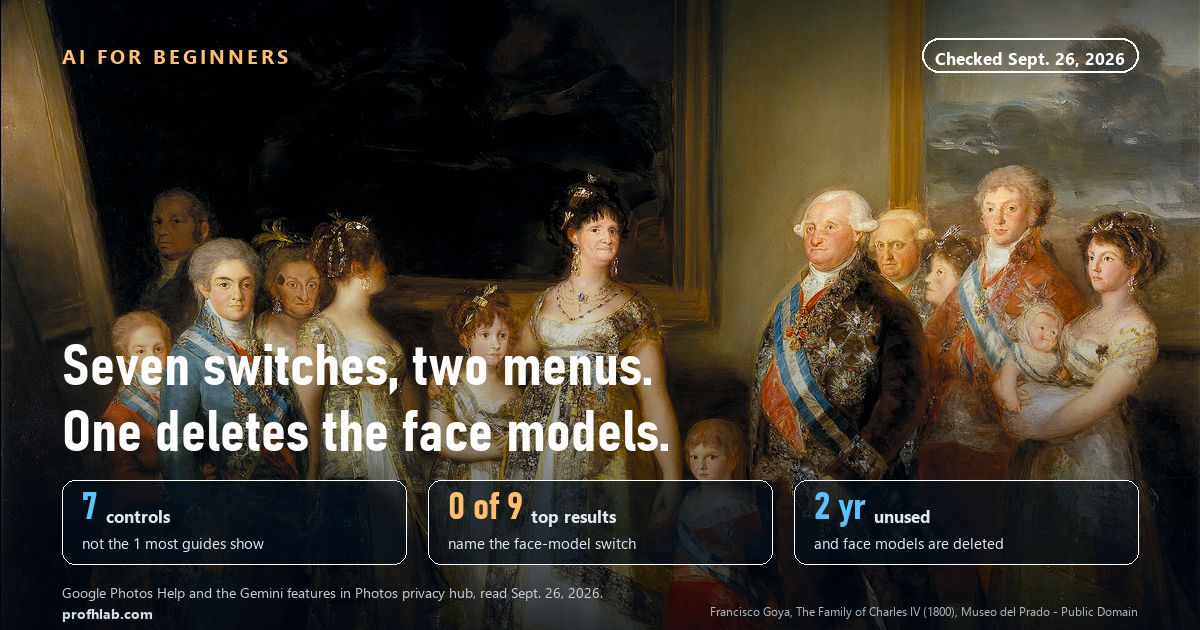
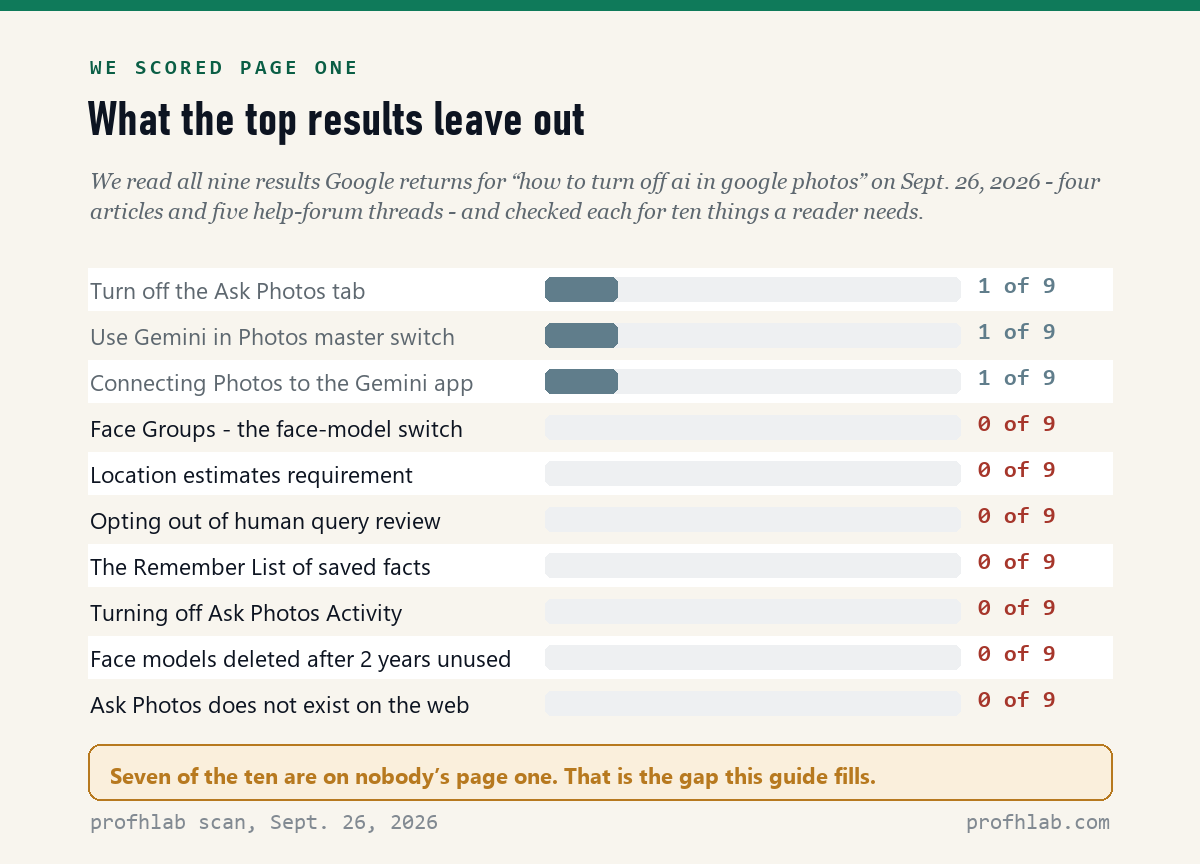
To turn off AI in Google Photos, open the app, tap your profile picture, then Photos settings → Preferences → Gemini features in Photos, and turn off Use Gemini in Photos. That takes about 20 seconds and switches off Ask Photos and the other Gemini features together. But that is one of seven controls, and it leaves the face models alone. On September 26, 2026 we read all nine results Google returns for this question, and 0 of 9 mention the switch in the Privacy menu that actually deletes them.
What we checked on September 26, 2026
We read Google’s own pages — the “Gemini features in Photos privacy hub” (last updated February 18, 2026), “Use Ask Photos to search, edit & get assistance” in its Android, iPhone and Computer versions, “Set up & manage your face groups,” the “Face Groups retention policy,” the location-estimates page, and the Gemini Apps page for connecting a gallery — then scored the nine results on Google’s first page against them.
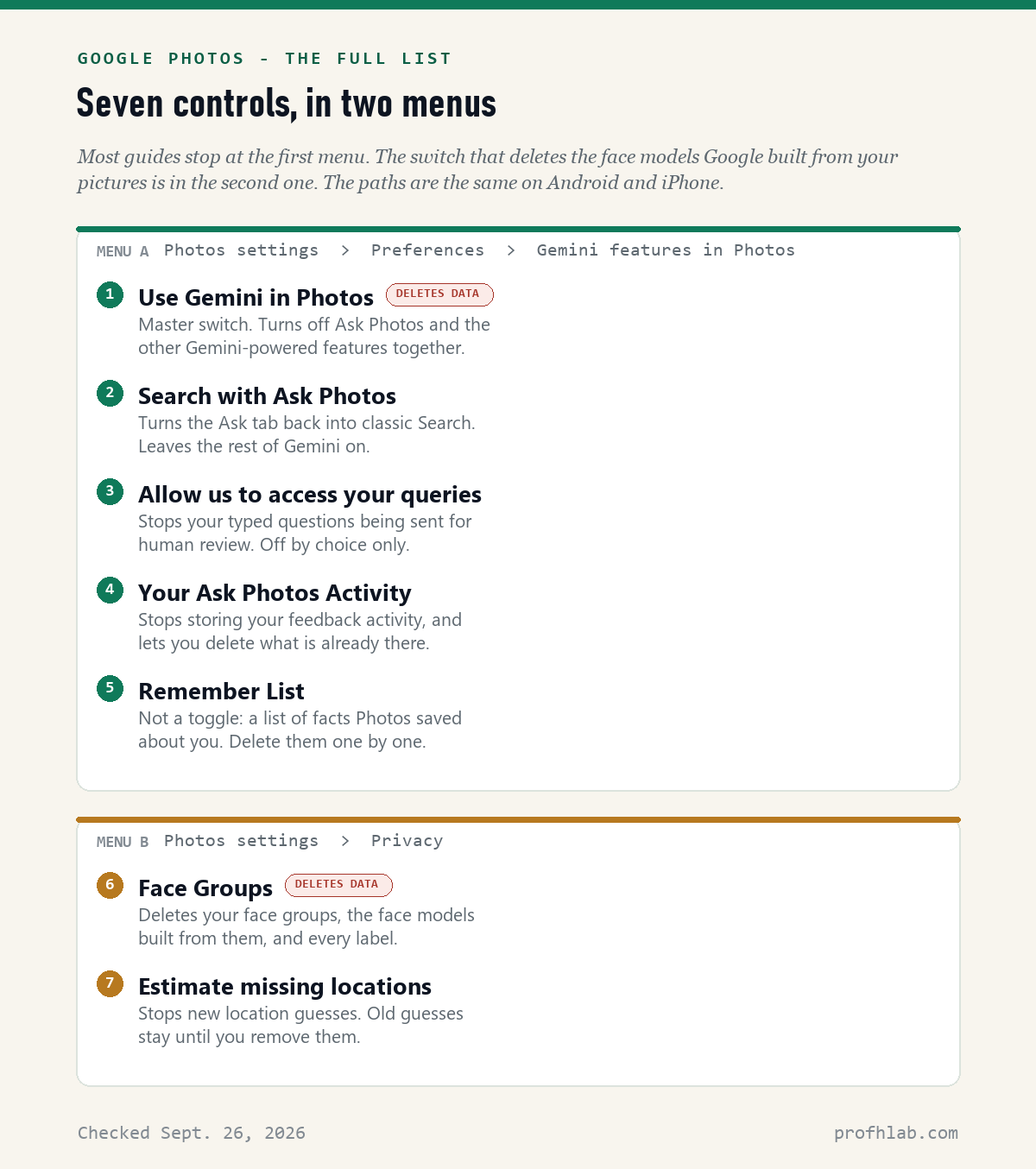
- 7 controls, 2 menus: five sit under Gemini features in Photos. Two sit under Privacy, and those two are the ones Google says the AI requires.
- 0 of 9: results on page one that mention Face Groups, location estimates, the query-review opt-out, the Remember List, or the two-year rule.
- 2 years: go that long without using Google Photos and Google deletes all your Face Groups content, models included.
- 104: countries and territories where Photos can be connected to the Gemini app. The UK, Canada, Germany and France are not among them.
The 20-second version, if you just want it off
Do this on your phone. The path is the same on Android and iPhone.
- Open the Google Photos app.
- At the top, tap your profile picture or initial.
- Tap Photos settings, then Preferences, then Gemini features in Photos.
- Turn off Use Gemini in Photos.
That is Google’s own wording for the master switch: it turns off “Ask Photos and other Gemini-powered features in Google Photos.” If you only wanted your old search bar back and nothing else, turn off Search with Ask Photos instead and leave the rest alone.
You can stop reading here and nothing bad will happen. The rest of this page is for the part that switch does not cover.
Why one switch is not the whole answer
Turning off Use Gemini in Photos stops the features. It does not delete what the features were built on.
Before Ask Photos existed, Google Photos was already doing something to your pictures: finding faces, deciding which ones are the same person, and building what Google calls a face model for each one. Google’s Face Groups page describes it in three steps — detect a face, create “face models that numerically represent the images of faces,” then group the ones likely to be the same person.
That is a mathematical description of your mother’s face, sitting in your account. It is what lets you tap a face and see fourteen years of one person. It is also the thing most guides never mention when they tell you how to turn the AI off.
The part page one misses: Google says the AI requires two older switches
This is the finding that changed how we wrote this page.
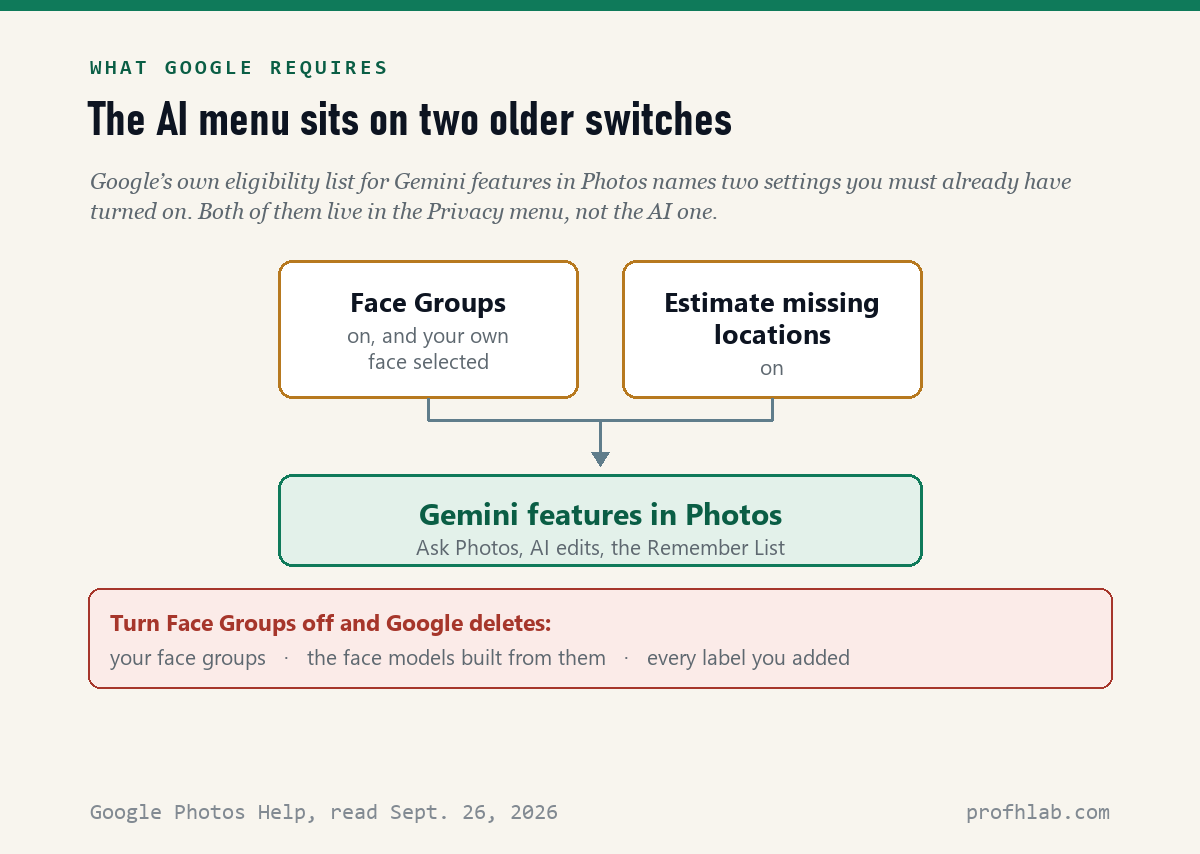
On the privacy hub, under “Eligibility & things to know,” Google lists what you must have to use Gemini features in Photos. You must be 18 or over, you must be in a launched location, and you must:
“Have Face Groups turned on and have selected which face is yours”
“Have location estimates enabled”
The Gemini Apps help page says the same thing independently. To connect Google Photos to the Gemini app you need Face Groups on with your face chosen, and Estimate missing locations on.
So the AI menu is sitting on top of two switches that are not in the AI menu. They are in Photos settings → Privacy.
One honest caveat. Google states the requirements. It does not spell out what happens the second you switch Face Groups off while Gemini features are on, so we are not going to tell you it instantly kills Ask Photos — we did not see Google say that, and we are not going to invent it.
What Google does say plainly is the other half, and it is the more useful half.
What turning off Face Groups actually deletes
From Google’s Face Groups retention policy, word for word. If you turn off Face Groups, you delete all:
- Face groups in your account
- Face models used to create those face groups
- Face labels you created
That is the only switch in this article that removes data rather than hiding a feature. Here is how to find it:
- Open the Google Photos app and tap your profile picture.
- Tap Google Photos settings, then Privacy.
- Turn Face Groups off.
On Android you may also find it as Preferences → Group similar faces. If you only want to stop it for animals, there is a separate Show pets with people toggle.
Think before you flip this one.
Face Groups is also the feature that lets you type a grandchild’s name and get every photo of them. Turning it off deletes your labels, so that search stops working. This is the one switch on the page with a real cost. The other six cost you nothing but a feature you were not using.
Two more deletion rules from the same page, both worth knowing:
- Delete an individual photo and you delete “any face models derived specifically from that photo or video.”
- Go more than two years without using Google Photos and all of your Face Groups content is deleted — groups, models and labels. Nobody on page one mentions this.
Does Google Photos use my photos to train AI?
People type this exact question into Google, so here is the precise answer rather than a comfortable one.
Google’s privacy hub says: “We don’t train any generative AI models outside of Google Photos with your personal data in Google Photos.” It also says your personal data in Google Photos “is never used for ads.”
Read that first sentence slowly. The words doing the work are outside of Google Photos. It is a promise about where models live, not a promise that nothing is learned from your library.
And there is a documented exception, in Google’s own text, for when you connect Photos to another Google service:
“Google may train on things like summaries, inferences, and generated media that are based on the contents of your Photos library.”
So the pictures themselves are not the training material. Descriptions of them can be. Google also spells out what those inferences include: “guessing the age and locations of your top face groups and inferring insights related to your life.”
If you never connect Photos to the Gemini app or to Personal Intelligence, that exception does not apply to you. If you have connected it, you can disconnect it in your Connected Apps setting in Gemini. We wrote about the wider picture in What Is Gemini on My Android Phone.
The switch nobody writes about: human review of your questions
Google’s privacy hub says human reviewers do not read Ask Photos responses unless you give feedback or there is an abuse concern. Your queries are a different matter:
“To help us improve Photos, Ask Photos queries may be reviewed by humans… You may turn off query review in settings.”
Google says it disconnects those queries from your account first and strips sensitive content, and that they do not include your photos or the answer. Still — there is an off switch, it is on by default, and none of the nine pages we read tells you where it is. It is here:
- Google Photos app → your profile picture.
- Photos settings → Preferences → Gemini features in Photos → Help us improve photos.
- Turn off “Allow us to access your queries.”
The Remember List: facts Photos has saved about you
If you tell Ask Photos something about your life, it may keep it. Google calls this the Remember List, and when it happens you see “Added to Remember List” in the chat.
Most people never look at it. You can:
- Go to Photos settings → Preferences → Gemini features in Photos.
- Tap Remember List.
- Tap Delete next to anything you would rather it forgot.
In the same menu you can turn off Your Ask Photos Activity, which is where your feedback is stored. Google notes that deletion “isn’t immediate.”
If you only use Google Photos on a computer
Then there is nothing to turn off, and you can stop worrying.
Google’s own Computer version of the Ask Photos page says it plainly: “Currently, Ask Photos isn’t available on web.” The feature is phone-and-tablet only. Face Groups still runs on your account, but the Gemini chat layer is not there at all.
This one surprised us, and it is another item nobody on page one mentions.
Where you live decides what you get
On September 26 we counted Google’s list of places where Photos can be connected to the Gemini app: 104 countries and territories.
The United States is on it, with an asterisk in plain English — “United States (except some regions).” The United Kingdom, Canada, Germany and France are not on the list at all.
Google does not explain the gaps, and we are not going to guess at the legal reasoning. The practical point is simpler: if the menu we describe is missing on your phone, you may not be eligible rather than lost. Ask Photos is also still labelled experimental, from Google Labs.
Match the switch to what you want gone, from Gemini to face models
Pick the row that matches you. Each takes under a minute.
| If you want… | Do this |
|---|---|
| All of it off | Gemini features in Photos → turn off Use Gemini in Photos |
| Just my old search bar | Turn off Search with Ask Photos only |
| No human reading my questions | Help us improve photos → off: Allow us to access your queries |
| The face models gone | Privacy → turn off Face Groups. This deletes your labels too |
| To see what it saved | Gemini features in Photos → Remember List → delete |
One thing worth doing even if you keep everything on: open the Remember List once and read it. It is the shortest way to see what the feature has actually noticed about your life.

In Gmail, Chrome and Search, the obvious switch isn’t the only one
- “Is this the same as Facebook scanning my photos?” Not quite — Meta’s controls sit in a different place and work differently. See How to Stop Meta AI From Using My Photos on Facebook.
- “What about the rest of Google?” The same pattern repeats in Gmail, Chrome and Search: one obvious switch, and others further down.
- “Am I paying for this?” Gemini features in Photos do not require a paid plan, but people often find a charge they did not expect. We traced every door in Why Am I Being Charged for Google AI Pro?
- “Is there AI here worth keeping?” Yes — photo restoration is genuinely good. See How to Restore Old Family Photos with AI and The Best AI Tools for Seniors.
Watch how it actually works
Training, face groups and who reads your Ask Photos queries
How do I turn off AI in Google Photos?
Open the app, tap your profile picture, then Photos settings, Preferences, Gemini features in Photos, and turn off Use Gemini in Photos. That is the master switch for Ask Photos and the other Gemini features. It does not delete face models — for that, turn off Face Groups under Photos settings, Privacy.
How do I turn off Ask Photos?
Go to Photos settings, Preferences, Gemini features in Photos, and turn off Search with Ask Photos. The Ask tab becomes the classic Search tab again. You can turn it back on at any time.
Does Google Photos use my photos to train AI?
Google says it does not train generative AI models outside of Google Photos with your personal data in Google Photos, and that this data is never used for ads. But if you connect Photos to another Google service, Google says it may train on “summaries, inferences, and generated media” based on your library’s contents. The pictures are not the training data; descriptions of them can be.
How do I turn off face groups in Google Photos?
Open the app, tap your profile picture, then Google Photos settings, then Privacy, and turn Face Groups off. Google says this deletes your face groups, the face models used to create them, and every label you made. Your name-based photo searches will stop working.
How do I stop Google Photos from making AI photos and memories?
Turning off Use Gemini in Photos stops the Gemini-powered creations and edits. Memories are a separate, older feature with its own settings in Preferences, so turning off the AI switch does not stop memories appearing.
Can I stop humans reviewing my Ask Photos questions?
Yes. Go to Photos settings, Preferences, Gemini features in Photos, Help us improve photos, and turn off “Allow us to access your queries.” Google says reviewed queries are disconnected from your account first and never include your photos or the response.
Is there an AI switch in Google Photos on a computer?
No. Google’s Computer help page says Ask Photos “isn’t available on web” as of September 26, 2026. It is a phone and tablet feature. Face Groups still applies to your account, and you can manage that from the mobile app.
What happens to my face models if I stop using Google Photos?
Google’s Face Groups retention policy says that if you do not use Google Photos for more than two years, all of your Face Groups content is deleted — the groups, the face models and the labels. Deleting a single photo also deletes any face model derived specifically from it.
Sources
- Google Photos Help, “Gemini features in Photos privacy hub” — read September 26, 2026; the page states it was last updated February 18, 2026. Source of the eligibility list, the training wording, the human-review wording and the Remember List.
- Google Photos Help, “Use Ask Photos to search, edit & get assistance” — Android, iPhone & iPad and Computer versions, read September 26, 2026. Source of every menu path and of the “isn’t available on web” line.
- Google Photos Help, “Set up & manage your face groups” and “Face Groups retention policy” — read September 26, 2026. Source of the deletion list and the two-year rule.
- Google Photos Help, “Understand, find & edit your photos’ locations” (Android and Computer) — read September 26, 2026.
- Gemini Apps Help, “Search for your photos, videos & more with Gemini Apps” — read September 26, 2026. Source of the second statement of the requirements and of the country list we counted.
- Scores of the nine top search results: made by us from each page’s own text on September 26, 2026.
- Video figures from each video’s YouTube page, September 26, 2026.
The phone under the app, and the other half of the photo question
- How to Turn Off AI on Samsung Phone and How to Turn Off AI Summaries on iPhone — the phone underneath the app.
- How to Turn Off Meta AI on Instagram, on Pinterest, on Amazon and on YouTube — the same hunt, other apps.
- How to Turn Off AI in Outlook and How to Remove Copilot From Windows 11 — for the computer.
- How to Tell if a Picture Is AI Generated — the other half of the photo question.
- How to Make AI Photos With Grandparents Who Have Died and Using ChatGPT for Genealogy — family pictures, handled gently.
- AI Scams Targeting Seniors and How to Tell if a Phone Call Is AI — when the AI is not on your side.
- Is My Car Spying on Me? — we read six carmaker privacy notices so you do not have to.
- AI Jobs Tracker — our own daily count of who is hiring for AI work.
- AI FAQ and Ask Prof. H — short answers, and a place to send the question we missed.
- Start Here — the whole beginners library, in order.
About the author. Prof. H writes profhlab.com for people who did not grow up with this stuff and would like a straight answer. Every menu path and quotation above was copied from Google’s own help pages on September 26, 2026, and the scores of the top search results were made from each page’s own text the same day. Google moves these menus often, and the wording differs slightly between Android and iPhone. If yours looks different, tell us — we correct in public.
Prof.’s H Newsletter
One short email a month, with the numbers in it
What actually moved in AI hiring, AI prices, and the scams aimed at older Americans. Counted here, dated, and linked to the source. One email a month, and your address goes nowhere else.