Why Am I Being Charged for Google AI Pro? Nine Doors, and Only Five Are Google’s
Short answer: open payments.google.com, click “Subscriptions & services,” and read the amount before you read the name. A US Google AI Pro subscription is $19.99 a month; a Verizon perk version is $10 a month and lands on your phone bill instead. We counted nine different ways that charge can start, all of them described on Google’s or Verizon’s own help pages, and only five of the nine put anything on a Google statement at all.
The search looks like a shrug typed into a box: why am I being charged for Google AI Pro. Behind it is almost always a small, specific moment. A $19.99 line arrived and nobody in the house remembers ordering it. A Verizon bill grew by $10. A daughter set up a laptop in August and something started renewing in September.
What makes this one genuinely hard is not Google’s price. It is that the thing you are being charged for and the company doing the charging are often two different companies — and the cancel button that works belongs to the second one.
Read the charge before you touch the app
Google’s own guidance for unrecognized charges starts with a sorting rule most people never hear: charges for Google products “appear on your card statement starting with ‘Google.'” And then the sentence that saves an afternoon — “If the charge isn’t in one of these formats, it didn’t come from Google.”
So there are only three places a Google AI Pro charge can be sitting, and each has a different door out.
Where the charge lives, in the order to check.
1. A card statement line beginning “Google.” Sign in at payments.google.com → Subscriptions & services. This is the only place a subscription bought from Google can be canceled.
2. Your phone or internet bill. Then it is a carrier perk, and you cancel it in the carrier’s account portal, not in any Google app.
3. An Apple receipt. Then it is an App Store subscription, and only Apple can stop it — Settings → your name → Subscriptions.
If you cannot find any of the three, that is itself an answer: the charge may not be Google’s at all. Our September scam roundup and the safe-word guide for older adults cover the version of this that is fraud rather than forgetfulness.
Nine doors, and the second column is the one that matters
We read Google One’s help center and Verizon’s Google AI Pro support pages on September 4, 2026 and counted every documented route by which a Google AI Pro charge can begin. Nine. Here they are with the party that actually bills you.
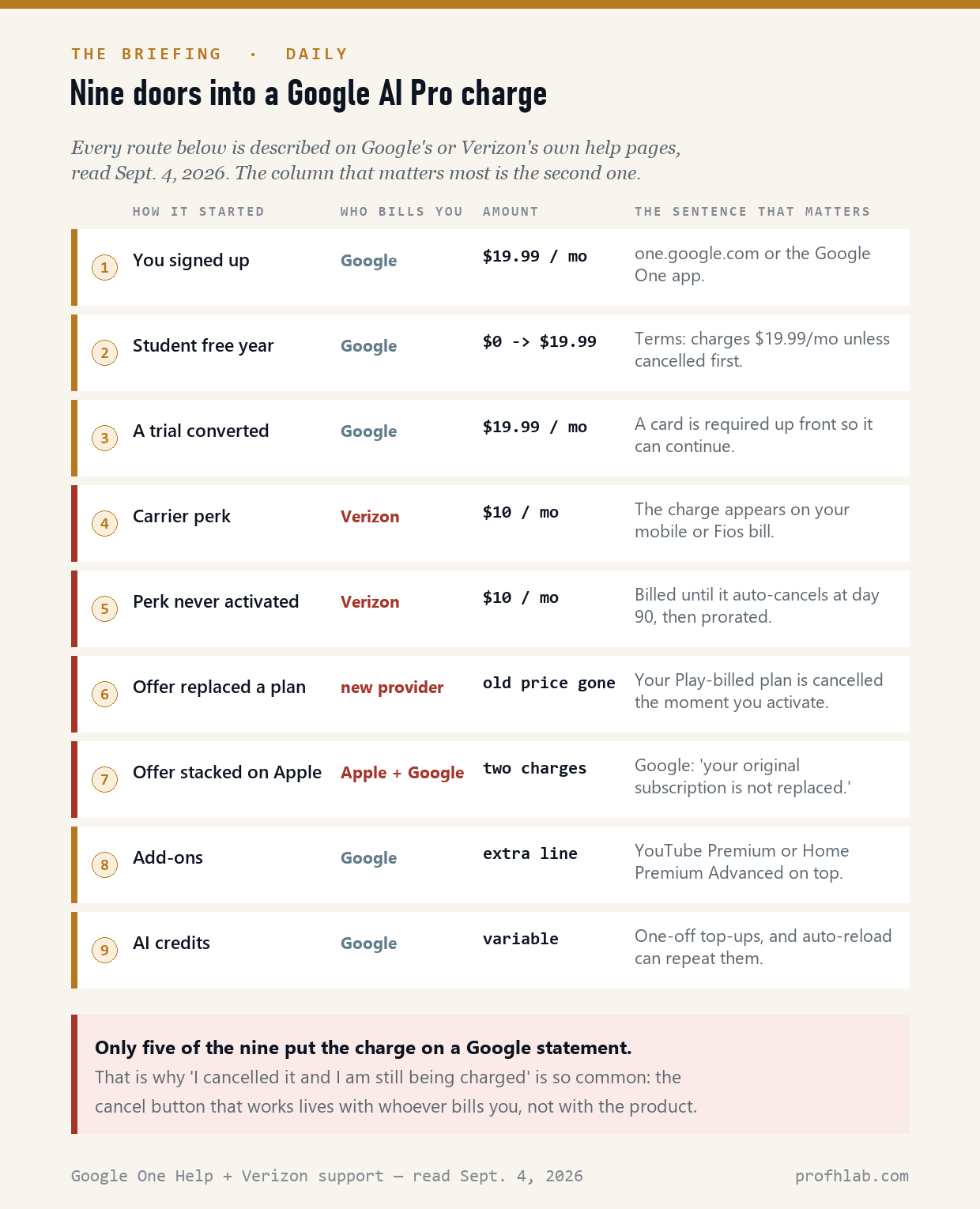
Four of the nine can put money on a bill that is not Google’s. That single fact explains most of the frustration in Google’s own support forum: people cancel inside the Gemini app, see the subscription disappear, and get charged again next month by a company they never associated with the product.
The trap nobody on page one writes down: a free offer can cancel the plan you pay for
This is the one that costs real money, and it is buried in a help page called “Learn about third-party Google One subscriptions.”
Suppose you already pay Google for storage — the old Google One Premium plan, say, bought years ago at a price that no longer exists. Then a carrier or a device offers you AI Pro free or cheap, and you accept. Google’s page describes what happens next in one flat sentence: if your account “already has a Google One subscription through Google Play billing,” then “The current plan will be canceled, and your new plan activates immediately.”
Verizon’s version of the same page is blunter about the cost: “When you cancel your existing subscription, you may lose any remaining value associated with that subscription.” And on promotional pricing: “the promotion doesn’t carry over.”
There is a second edge to it. If your storage need is bigger than the new plan, Google warns that “you or your family group may experience issues with your Google services, such as Gmail, Drive, or Photos.” Your files are not deleted — but a free upgrade that quietly downgrades your storage is not what most people think they are accepting.
Before you accept any “free Google AI Pro” offer: check what you are already paying, at what price, and how much storage you are actually using. A grandfathered plan is a thing you can lose in one tap, and there is no button to get it back.
If you pay Apple, the offer does not replace anything. It stacks.

The iPhone case is the sharpest version of the whole problem, and both companies document it in the same words.
Google: if the account “already has a Google One subscription through Apple Billing,” then “Your current plan continues and your new plan activates immediately.” Verizon, describing the identical situation from its own side: “your original subscription is not replaced. You will have 2 Google One subscriptions. If you don’t want 2 subscriptions you must cancel your existing annual or monthly subscription directly with Apple.”
Two subscriptions. Two charges. And the older one is invisible from every Google screen you are likely to open, because Apple — not Google — is the merchant. Google’s cancellation page says it plainly: for a plan bought on an iPhone or iPad, you cancel in the App Store, and only then delete the service from your Google Account.
The $10 perk that can bill you before you ever use it

Verizon sells Google AI Pro as a $10-a-month perk on eligible mobile, 5G Home and Fios plans, describing it as “a $19.99/month value.” We wrote about whether that counts as free in August; the short version is that it does not, and $10 is still the answer.
What we had not seen documented anywhere else is the timing. Verizon’s FAQ says billing “starts when the eligible mobile line or home internet plan or Fios account is active and you order the perk” — ordering, not using. And then: “You must activate the subscription within 90 days of buying the perk or the perk automatically cancels.”
Read those two together. You can be paying $10 a month for up to three months for a subscription you never switched on. Verizon does refund the unused part when the perk auto-cancels — the FAQ says the charge is prorated and “we refund you for any days in the billing cycle that remain” — but the months in between are yours to notice.
The free student year has a date printed on it
On August 19, 2026, Google announced a year of Google AI Pro at no cost for eligible US college students, “valued at $19.99/mo,” with 5 TB of storage. It is a genuinely good offer. It is also the single largest future source of this exact search, because of the footnote:
“Eligible students in the U.S. only. Offer Terms apply. Redeem until December 31, 2026. Valid form of payment required at sign-up. Unless canceled earlier, Google AI Pro will automatically charge $19.99/month after the trial ends. Cancel anytime.” — Google, August 19, 2026
A card is required at signup. That is not a trick; it is how the plan continues. But it means the card on file in September 2026 is the card charged in September 2027, and if that card belongs to a parent or grandparent, they are the one who will be typing this search. The same structure applies to ordinary Google One trials: the help page states that a payment method “is required so that your membership can continue at the end of your trial,” and that when it ends “You’ll be automatically charged.”
What a US Google AI plan actually costs right now
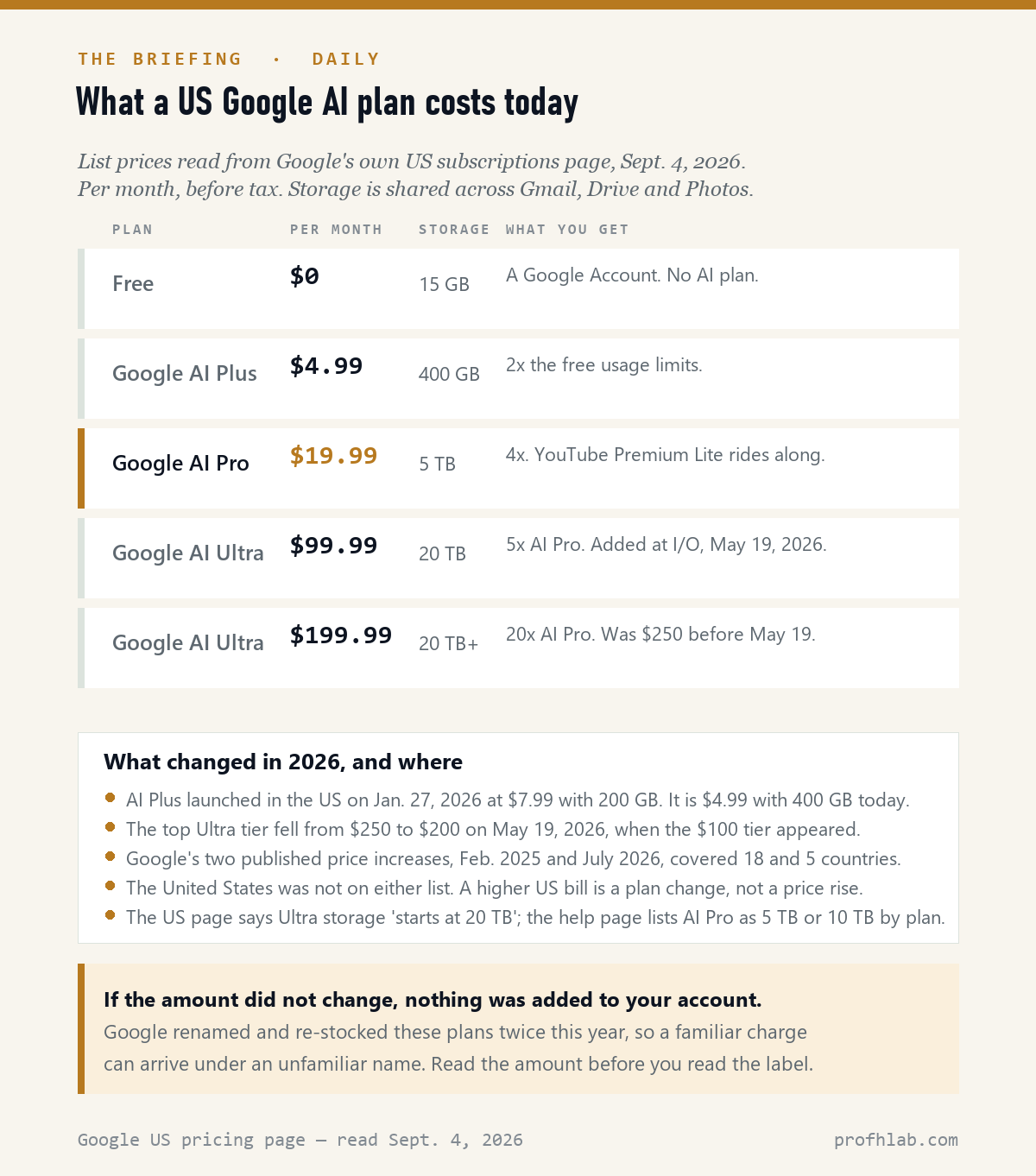
This is worth stating flatly, because it eliminates the assumption most people start with. Google did not raise US consumer AI plan prices in 2026. It published two price increases: February 2025, covering 18 countries, and July 2026, covering five — Algeria, Egypt, Nigeria, Pakistan and Turkey. The United States is not on either list.
What did move went the other way. Google AI Plus launched in the US on January 27, 2026 at $7.99 a month with 200 GB; today Google’s own page lists it at $4.99 with 400 GB. The top AI Ultra tier fell from $250 to $200 on May 19, 2026, when a $100 tier was added below it.
So if your Google bill is larger than it was, the cause is a plan change, an add-on, a family member, or a promotion ending — not a price rise. That distinction is the whole diagnosis. (If you are trying to work out what your total AI spending actually is across every service, we keep a running AI price tracker and did the arithmetic in what AI really costs you per month.)
Two things that look like a new charge and are not
A renamed plan. When Google AI Plus reached the US in January, Google wrote that “Existing Google One Premium 2TB subscribers in these countries will also automatically get access to all the benefits of Google AI Plus in the next few days.” Nobody was billed for that. But an account whose plan quietly acquires a new label can produce a statement line you do not recognize, at an amount you have been paying for years. Check the amount first; if the number is unchanged, nothing was added.
Family sharing. A Google AI Pro plan can be shared with up to five other people, and only the plan manager’s payment method is charged. If you are on somebody’s family plan, you will see the benefits and no charge; if you are the manager, a plan you think of as “my daughter’s” is on your card. Google’s unauthorized-charge page lists this first among the things mistaken for fraud: “Check to find if family or friends who have access to your card or account bought something.”
The two charges that are not the subscription
Two more lines can appear on a Google AI Pro account, and neither is the monthly plan.
Add-ons. YouTube Premium and Google Home Premium Advanced can be attached to a Google One membership as paid extras. Google’s family-sharing page notes the wrinkle that AI Pro members who already have a YouTube Premium add-on cannot buy the Home Premium Advanced one, and that add-ons cannot be purchased on iOS at all. (AI Pro already includes YouTube Premium Lite at no extra cost — we sorted out which version you get here.)
AI credits. This is the newest and least understood line. When an AI Pro or Ultra member hits their usage limit, Google sells top-up credits — “2,500, 5,000, or 20,000 AI credits” — and offers auto-reload, which “automatically tops up the Google AI credit balance when it falls below a set minimum threshold.” A subscription is a predictable monthly number. Auto-reload is not. Google says credits “may expire after a certain period,” and that members on third-party, Pixel Pass or Apple billing cannot buy them at all.
We scored page one. The expensive facts were missing.
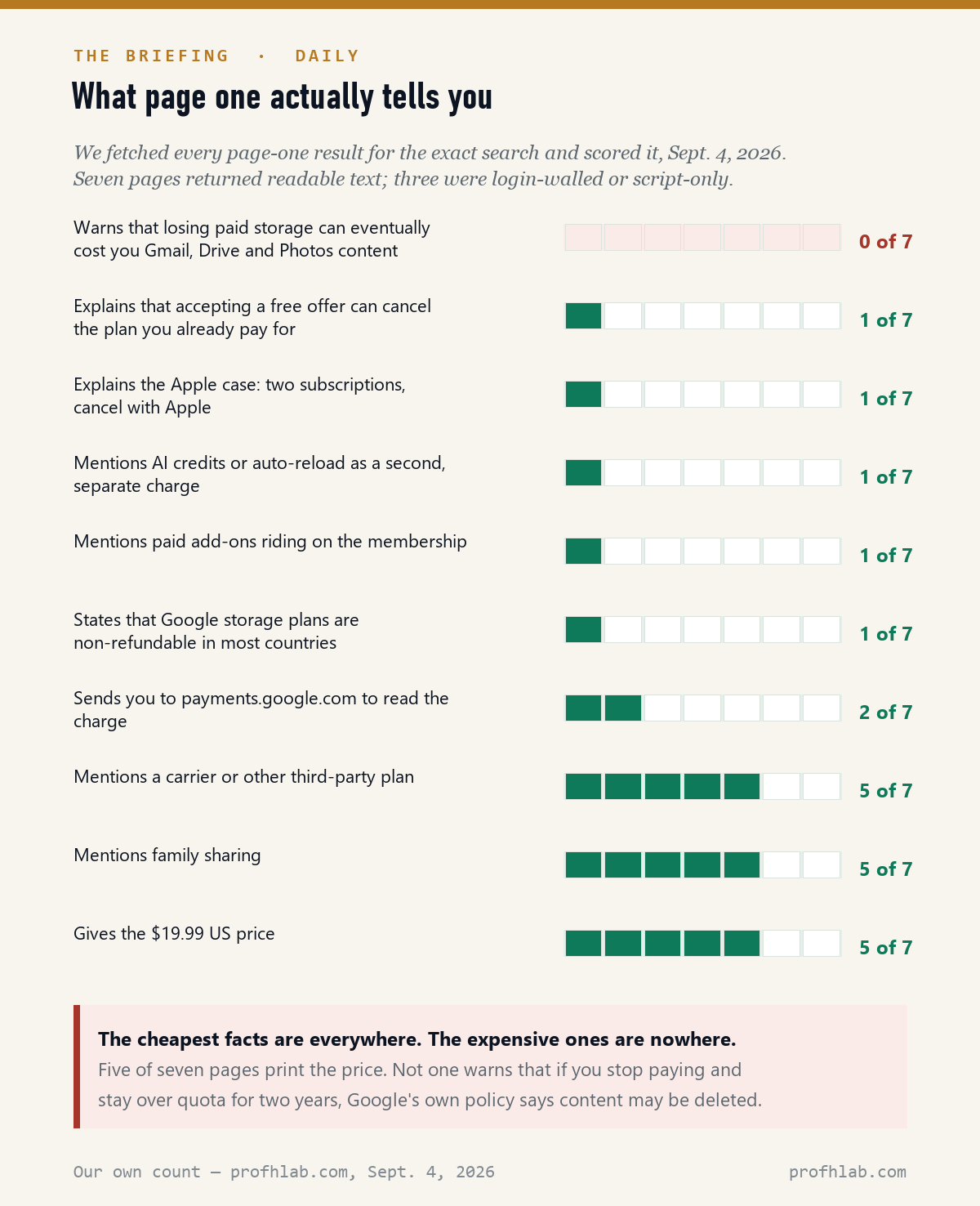
The pattern is consistent enough to be a rule. Facts that are cheap to look up are everywhere: five of seven pages print the $19.99 price, five mention carrier plans, five mention family sharing. Facts that require reading a policy page are almost nowhere: one page in seven mentions that accepting an offer can cancel the plan you already pay for, one covers the Apple double-billing case, one mentions AI credits.
And the item with the highest consequence scored zero. Not one of the seven warns what happens if you simply stop paying and stay over your storage limit.
What actually happens if you just cancel

Canceling is the right move for a lot of people. It is worth knowing exactly what it buys and what it costs, because Google’s policy page is unusually direct on both.
You keep the plan until the end of the billing cycle you have already paid for — “your Google One storage and benefits don’t immediately end.” After that you drop to the free 15 GB. And in most countries, “Google storage plan purchases are non-refundable.” The storage you bought is yours for the term; the unused months are not coming back. (Refunds work differently on Play and on Apple, which is another reason to know which company billed you. We walked through the equivalent process on the other big AI subscription in how to cancel ChatGPT Plus and get a refund.)
Then the part page one skipped. If canceling leaves you above the free limit, Gmail stops sending and receiving, Drive stops syncing and creating files, and Photos stops backing up. Google gives a short cushion when a renewal simply fails — “a seven-day grace period will be added to your subscription” so you can update a card. But the long-run warning is in the same document, and it is the reason this article exists:
“If you’re over your storage quota for 2 years or longer, all of your content may be deleted from your Google account.” — Google One, “Purchase, cancellation & refund policies,” read September 4, 2026. Before you cancel, check how much storage you are using. If you are above 15 GB, clear space or export first.
Two short videos worth the time
One on whether the plan is worth keeping, one on what breaks if you stop paying. Both from large, calm channels; neither is trying to sell you a referral link.
Read the statement line, then match the amount to a plan
Ten minutes, in this order.
1. Read the statement line. If it does not start with “Google,” Google says it did not come from Google — call your card issuer.
2. Match the amount. $19.99 = AI Pro bought from Google. $10 = a Verizon perk on your phone or Fios bill. $4.99 = AI Plus. Anything else is an add-on, a credit purchase, or not this at all.
3. Sign in at payments.google.com → Subscriptions & services → click into the item for its transaction history. If it is not listed there, Google is not the merchant.
4. Check the other two places. Your carrier’s account portal, and on an iPhone: Settings → your name → Subscriptions.
5. Ask the household. Family sharing means one card pays for up to six people; Google lists this first among things mistaken for fraud.
6. Check your storage before canceling. Above 15 GB, clear space or export first — Gmail stops receiving when you go over.
7. If it is genuinely unauthorized, use Google’s own report flow from the payments center, then your bank. Do not call a number you found in a search result — see our guide to reaching a real person at a real company.
Whether $19.99 is worth it hinges on storage and YouTube
“Is the plan worth $19.99 to me at all?” Depends almost entirely on whether you would otherwise pay for storage and YouTube separately. AI Pro includes 5 TB and a YouTube Premium Lite individual plan that Google values at $8.99 a month. Our comparison of the competing subscription is in is ChatGPT Plus still worth it, and the arithmetic on paying per-use instead is in API vs subscription cost.
“Can I get the AI features without the subscription?” Often, yes — the free tier gets a real amount. We track which AI subscriptions are currently being given away with phones, carriers and schools in who is giving away AI subscriptions right now.
“What else is quietly switched on in my account?” Different question, same instinct. See how to stop AI from reading your Gmail, how to get rid of AI on your phone, and for Windows users, how to remove Copilot from Windows 11. The Microsoft equivalent of this billing question is how to get Microsoft 365 without Copilot.
“How did you arrive at these numbers?” Our method, and what we will and will not count, is on How We Count. More of this kind of thing is in The Briefing, and if you are new here, Start Here.
Google One on your statement, refunds and cancelling AI Pro
Why am I being charged for Google AI Pro?
Because one of nine documented routes started a subscription on an account or a payment method you control. The most common are: you or a family member subscribed at $19.99 a month; a free trial or a free student year ended and converted; or a $10 carrier perk was added to a phone plan. Google bills five of the nine routes; the others arrive on a phone bill, an Apple receipt, or a new provider’s bill. Start at payments.google.com → Subscriptions & services, and if the charge is not listed there, Google is not the merchant.
Is Google AI Pro and Google One the same thing?
They overlap. Google AI Pro is the current name for the paid plan that bundles Google’s AI features with Google One cloud storage — 5 TB in the US listing, and Google’s help page notes some plans carry 10 TB. Plain Google One storage plans still exist below it. This is why a familiar charge can appear under an unfamiliar name: Google relabeled and re-stocked these plans twice in 2026.
What is a Google One charge on my bank statement?
It is a Google storage or AI subscription. Google’s guidance is that its charges appear “starting with ‘Google'” on a card statement, and that anything not in that format did not come from Google. To see which product and which plan, sign in at payments.google.com and open Subscriptions & services, then click into the item for its transaction history.
How do I cancel Google AI Pro?
Wherever it was bought. Bought from Google: one.google.com → Settings → Cancel membership. Bought on an iPhone or iPad: the App Store → your name → Subscriptions → cancel there, then delete the service at myaccount.google.com/deleteservices. Bought as a carrier perk: the carrier’s own portal — Verizon’s is My Verizon → Products & plan perks. Canceling in the wrong place is the single most common reason a charge keeps arriving.
Can I get a refund from Google One?
Usually not from Google. Its policy page states that in most countries or regions “Google storage plan purchases are non-refundable,” and that the storage you bought is yours for the length of the subscription even if you cancel. Purchases made through Google Play follow Play’s refund policy; purchases made through the App Store are handled by Apple. A Verizon perk is different: Verizon prorates the $10 charge and credits the unused days when you cancel.
What happens to my photos if I cancel my Google One subscription?
Nothing immediately, and then possibly quite a lot. You keep your benefits until the end of the paid billing cycle, then drop to 15 GB free. If that leaves you over the limit, Photos stops backing up new items, Drive stops syncing and Gmail stops sending and receiving. Existing files are not deleted right away — but Google’s policy says that if you stay over quota “for 2 years or longer, all of your content may be deleted from your Google account.” Clear space or export before you cancel.
How do I stop Google charges on my credit card?
Cancel the subscription at its source rather than blocking the card, which usually just breaks the account instead. Check all three places — payments.google.com, your carrier’s portal, and Apple’s subscriptions screen — and remember that family sharing means the charge may be for someone else in your household. If you genuinely do not recognize it after that, use Google’s report-an-unauthorized-charge flow in the payments center and contact your card issuer.
How much is Google AI Pro per month?
$19.99 a month in the US, read from Google’s own subscriptions page on September 4, 2026, with 5 TB of cloud storage and a YouTube Premium Lite individual plan included. Google AI Plus below it is $4.99 with 400 GB; Google AI Ultra above it is $99.99 or $199.99. Verizon sells an AI Pro perk for $10 a month on eligible plans. Google’s two published price increases, in February 2025 and July 2026, did not include the United States.
Sources
- Google One Help, Use Google AI Pro benefits — benefits list, 5 TB or 10 TB, AI credits. Read September 4, 2026.
- Google One Help, Learn about third-party Google One subscriptions — the Play-billed plan is canceled; the Apple-billed plan is not.
- Google One Help, Learn about Google One trials — payment method required, automatic charge when the trial ends.
- Google One Help, Purchase, cancellation & refund policies — non-refundable in most countries, seven-day grace period, two-year over-quota deletion warning.
- Google One Help, Cancel your Google One membership — the App Store route.
- Google One Help, Google One price update: July 2026 and February 2025 — the affected countries, five and eighteen.
- Google One Help, AI credits and AI credits with Google One — one-time purchases and auto-reload.
- Google One Help, Start or stop sharing with your family — add-on rules and iOS limits.
- Google One Help, Find your Google purchase history — payments.google.com, Activity and Subscriptions & services.
- Google payments center, Report unauthorized charges — the “starting with Google” statement-line rule.
- Verizon support, Google AI Pro perk with select mobile and home plans FAQs — $10/month on the Verizon bill, 90-day activation window, two subscriptions on Apple billing, prorated cancellation.
- Google, College students get 12 months of Google AI free, August 19, 2026 — offer terms and the $19.99 auto-charge footnote.
- Google, Google AI Plus is now available … including the U.S., January 27, 2026 — $7.99 launch price, 200 GB, automatic upgrade for Premium 2 TB subscribers.
- Google, Everything new in our Google AI subscriptions, fresh from I/O 2026, May 19, 2026 — the $100 Ultra tier, $250 to $200, YouTube Premium Lite valued at $8.99.
- Google AI plans, US pricing page — $0 / $4.99 / $19.99 / $99.99 / $199.99, storage per tier. Read September 4, 2026.
Where else AI charges come from: Verizon, YouTube, ChatGPT Plus
- Is Google AI Pro free with Verizon? The honest answer, and 7 other AI perks
- Is YouTube Premium free with Google AI Pro? Yes, but not the full version
- How to cancel ChatGPT Plus and get a refund
- Is my electric bill going up because of AI?
- Is it illegal to charge different prices for the same product?
Written by Prof. H, who reads the help pages so you do not have to. Every figure here was read from a primary source on September 4, 2026 and is dated in the text. This is general consumer information, not financial advice. About the author · Corrections
Prof.’s H Newsletter
One short email a month, with the numbers in it
What actually moved in AI hiring, AI prices, and the scams aimed at older Americans. Counted here, dated, and linked to the source. One email a month, and your address goes nowhere else.