How to Turn Off AI on Netflix: There Is No Off Switch, but 4 Settings Steer What It Picks
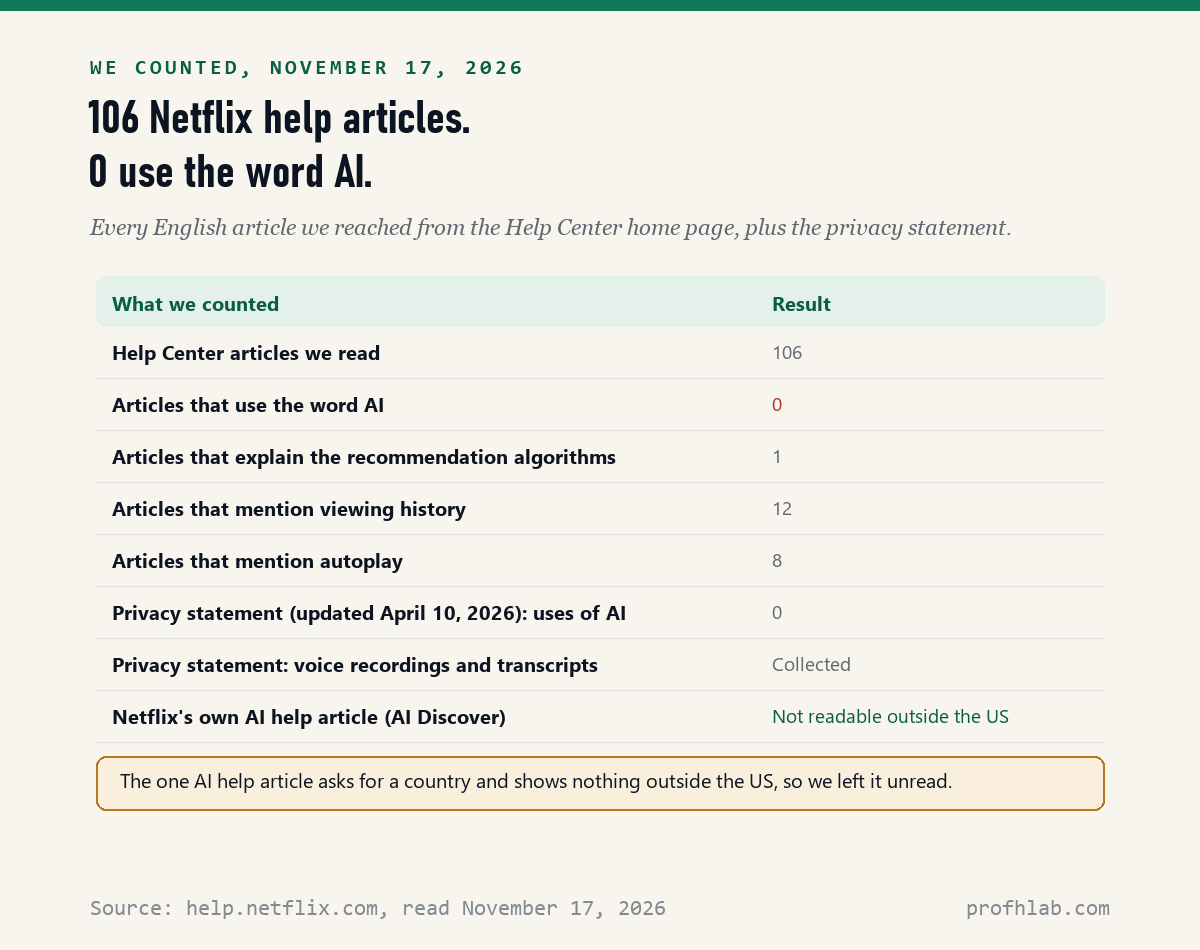
You can’t: on November 17, 2026, we read 106 Netflix Help Center articles and Netflix’s privacy statement, and none of them uses the word AI or offers an AI off switch. The one feature Netflix itself calls AI, the AI Discover tab announced on November 3, 2026, is a separate tab on some US TVs that you can simply leave closed.
What Netflix does have is a recommendation system that picks the rows on your home screen, and 4 settings that steer it: hiding titles from your viewing history, removing titles from Continue Watching, turning off preview autoplay, and, on plans with ads, turning off Behavioral Advertising. This guide walks through each one in plain steps, using Netflix’s own pages.
What we checked on November 17, 2026
We opened every English article we could reach by following links from the Netflix Help Center home page, 106 in all, and searched each one for AI, artificial intelligence, generative, machine learning and chatbot. 0 articles use any of those words. We also read Netflix’s Privacy Statement (last updated April 10, 2026) and found 0 uses of AI there, too.
Netflix has one help article about AI Discover. From our location it asked for a country and then showed only “AI Discover is not available in this country,” so that article is unread, and we quote Netflix’s November 3, 2026 news post instead. We did not sign in to Netflix or flip these settings ourselves, so the menu steps are Netflix’s words.
Written and checked by Prof. H. An AI assistant helped draft this article and ran the page reads; every quote was read on the source’s own page on the date shown.

Is there a setting to turn off AI on Netflix?
No: none of the 106 Netflix Help Center articles we read on November 17, 2026 describes a switch that turns off AI, recommendations or personalized rows, and the Account menus they describe have no such toggle.
Think of Netflix like a video store clerk who has watched you shop for years. The clerk puts the movies you are most likely to pick at eye level. You cannot fire the clerk. But you can tell the clerk which rentals to forget, and that changes what lands on the shelf next time.
Netflix’s article How Netflix’s Recommendations System Works calls that clerk “our algorithms.” It says the picks come from your viewing history, how you rated titles, members with similar tastes, and facts about each title, plus the time of day, your languages, your device and how long you watched.
One line in that article will reassure many readers: “The recommendations system does not include demographic information (such as age or gender) as part of the decision making process.” So Netflix says your age is not one of the inputs.

What is the new AI Discover tab, and can you hide it?
AI Discover is a test tab on Netflix’s TV app that Netflix announced on November 3, 2026; its news post says it is rolling out first to US members who use Netflix in English on supported TVs, and it names no way to remove the tab.
If you have it, Netflix says you will see “Discover” with a red gem icon and a “New” label in the top menu. Inside, you pick a theme such as “Something Light,” “Scare Me,” “Family Movie Night” or “Quick Watches,” and Netflix shows matching titles.
Netflix says plainly that “AI helps create the themes you see,” and calls the tab “our test kitchen.” It also says some of these ideas “may even make their way into the main Netflix experience.” That last line is a plan, not a promise, and it is the part to keep an eye on.
For now the simple answer is this: the tab is a separate place on the menu. If you never select it, you never use it. Your regular home screen, search and My List work the same way they did before.
How do I tell Netflix to stop recommending something?
Hide it: Netflix’s article How to hide titles from viewing history, read on November 17, 2026, says a hidden title will not be used to make recommendations to you “unless you watch them again,” and it disappears from Continue Watching too.
- Using a web browser, go to your Account page.
- Select Profiles, then choose a profile.
- Open Viewing activity for that profile.
- Click the hide icon next to the episode or title. If you hide an episode, you can choose to hide the whole series.
- To start fresh, select Hide all at the bottom of the page and confirm.
Netflix says it can take up to 24 hours for a hidden title to disappear from all your devices. Titles cannot be hidden from a Netflix Kids profile. These steps are for a web browser, so if you only use a TV, borrow a computer or a phone browser for five minutes.
This is the most useful setting for a shared account. If a grandchild watched cartoons on your profile, hiding those titles stops them from shaping your rows.
Removing a show from Continue Watching takes two clicks
Netflix’s article on the Continue Watching row, read on November 17, 2026, gives steps for 3 kinds of screens: computers, TVs and phones, on the latest version of the Netflix app.
- Computer: put your cursor over the title in the row and select Remove From Row.
- TV: open the title’s details page and select Remove from Continue Watching from the menu.
- Phone or tablet: tap the menu for the title in the row and select Remove From Row.
Netflix notes that older app versions lack this option. On those, hiding the title in Viewing activity, as described above, also takes it out of Continue Watching.

Can I stop Netflix trailers from playing by themselves?
Yes: Netflix’s article How to turn preview autoplay on or off, read on November 17, 2026, gives a toggle for phones, tablets and web browsers, and notes that iPads and some older TVs do not play previews automatically at all.
On an Android phone or tablet, iPhone or iPad:
- Open the Netflix app, select a profile, and tap My Netflix in the lower right.
- Tap the profile name at the top, then Manage Profiles.
- Choose the profile and turn off Autoplay Previews. On iPhone and iPad, tap Done.
In a web browser, go to your Account page, select Profiles, choose a profile, select Playback settings, and switch off Autoplay previews. If nothing changes, Netflix says to switch to another profile and back, or sign out and back in.
Previews are not AI, but they are the part of Netflix that feels most like it is choosing for you. Turning them off makes the home screen calmer for many people.
Does Netflix record what you say to it?
Yes, if you use voice features: Netflix’s Privacy Statement, last updated April 10, 2026, lists “voice inputs (including transcripts and recordings) when using voice-related features” among the information it collects, next to “search queries on the Netflix service.”
So the easiest privacy step costs nothing: type your searches with the remote instead of speaking them. Netflix’s search article says the top results also depend on “the actions of other members who have entered the same or similar queries,” so typed searches are shaped by other viewers either way.
If your plan has ads, the same Privacy Statement says eligible members get a Behavioral Advertising setting in the “Privacy and data settings” menu for each profile, in the Account section of the website. With it off, you still see ads, but they are not based on your behavior. Netflix says Kids profiles get no behavioral ads at all.
Netflix has also tested AI search on phones. MacRumors reported on April 18, 2025 that a search tool “powered by OpenAI technology” was being tested with select iPhone users in Australia and New Zealand, and that it was opt-in. None of the 106 help articles we read on November 17, 2026 describes it.

A 65-second look at who gets AI Discover first
The video matches Netflix’s own post on the main point: the tab is going to a small group first. If your TV does not show it, your account is not missing a setting.
Your 10-minute Netflix tune-up, in order
- Give each person a profile. Netflix’s profiles article lets you add, edit or delete profiles; shared profiles mix everyone’s picks.
- Hide what is not yours. In a web browser, open Viewing activity and hide titles someone else watched.
- Clean up Continue Watching. Remove anything you will not finish.
- Turn off Autoplay previews if the moving trailers bother you.
- Type, do not talk, when you search, if you would rather Netflix not keep voice recordings.
- On a plan with ads, open Privacy and data settings and turn off Behavioral Advertising.
- Leave the Discover tab closed if it appears and you do not want AI picks.
If an email says your Netflix account is on hold and asks you to click a link, do not click it; go to netflix.com yourself. Our guide to AI scams aimed at seniors explains why fake streaming bills are so common, and how to tell if a website is fake shows the checks.
YouTube, Roku and your TV itself have their own AI switches
Netflix runs inside other apps and screens, and several of them give you more control than Netflix does:
- Your TV: Samsung TV AI settings, LG TV AI settings, Roku TV, Fire TV and our overview of AI on any TV.
- Other video and audio apps: the 12 AI features on YouTube, YouTube auto-dubbing, Spotify and Libby.
- Voice assistants in the living room: Alexa+ and Gemini on Google Home.
- Spotting fakes: how to tell if a video is AI.
If you want to try AI on your own terms instead, start with ChatGPT for beginners over 50, and read what is safe to tell ChatGPT before you type anything private. Sharing one account with family? See whether two people can share a ChatGPT account. All our beginner guides are on the Start Here page; we also track AI hiring on the AI jobs tracker, and you can send us a question on Ask Prof. H.
Netflix viewers ask about AI search, upscaling and voice
Can you turn off AI on Netflix?
No. On November 17, 2026, none of the 106 Netflix help articles we read offered an AI off switch. You can hide titles from viewing history, turn off preview autoplay and leave the AI Discover tab closed.
How do I turn off Netflix AI search?
The help pages we read describe only regular search, with no AI search setting. MacRumors reported in April 2025 that Netflix tested an opt-in AI search on iPhones in Australia and New Zealand.
Can I remove the AI Discover tab from Netflix?
Netflix named no way to remove it in its November 3, 2026 announcement. It is a separate tab on some US TVs, so you can simply not select it.
Does Netflix use my age to recommend shows?
Netflix says no. Its recommendations article says the system does not use demographic information such as age or gender to make decisions.
Does Netflix keep my voice searches?
Yes. The Netflix Privacy Statement, last updated April 10, 2026, lists voice inputs, including transcripts and recordings, among the information it collects when you use voice features.
Can you turn off AI upscaling on Netflix?
Not in Netflix. The video quality help article we read lists HD, 4K and HDR labels but no upscaling or AI setting. Picture processing on your TV is a TV setting, covered in our Samsung and LG guides.
The 106 Netflix help articles, one news post and one page we could not read
- Netflix Help Center, 106 English articles reached from the home page at help.netflix.com, read November 17, 2026.
- Netflix Help, How Netflix’s Recommendations System Works; read November 17, 2026.
- Netflix Help, How to hide titles from viewing history; read November 17, 2026.
- Netflix Help, How to remove titles from the ‘Continue Watching’ row; read November 17, 2026.
- Netflix Help, How to turn preview autoplay on or off; read November 17, 2026.
- Netflix Help, How to search and browse Netflix and How to get the best video quality; read November 17, 2026.
- Netflix, Privacy Statement, last updated April 10, 2026; read November 17, 2026.
- Netflix, Introducing AI Discover: A New Place to Find Your Next Great Watch, published November 3, 2026; read November 17, 2026.
- MacRumors, Netflix’s New AI Search Feature Will Understand Your Viewing Moods, Tim Hardwick, April 18, 2025; read November 17, 2026.
- Not read: Netflix Help, Explore in new ways with AI Discover, showed only “not available in this country” from our location on November 17, 2026.
Prof.’s H Newsletter
One short email a month, with the numbers in it
What actually moved in AI hiring, AI prices, and the scams aimed at older Americans. Counted here, dated, and linked to the source. One email a month, and your address goes nowhere else.