How to Use ChatGPT to Make a Christmas Card: 6 Steps, and Why to Ask for a Tall 5:7 Picture
You can make a Christmas card in ChatGPT for free in 6 steps: on October 24, 2026, OpenAI’s help page said its image tool, ChatGPT Images, is available on all plans, including Free. The step most guides skip is the picture’s shape. Of the 3 standard picture sizes OpenAI lists, the square one falls below Shutterfly’s posted minimum for a 5×7 card, so ask for a tall 5:7 picture from the start.
This guide walks through the words, the picture, the family photo, the printing and the mailing date. Every menu name comes from OpenAI’s own help pages, and every print number comes from a print shop’s own page.
What we checked on October 24, 2026
We read 10 pages: 4 OpenAI Help Center pages (Images in ChatGPT, the ChatGPT Free Tier FAQ, the ChatGPT release notes and Data controls in ChatGPT), OpenAI’s Terms of Use and its image generation guide for developers, 2 Shutterfly pages, Walgreens’ developer page of minimum image sizes, and Walmart Photo’s help page. We also read the USPS holiday mailing release of September 22, 2026.
Our own work: we compared the 3 picture sizes OpenAI lists with the 5×7 card minimums that Shutterfly and Walgreens post, and did the trimming math ourselves. We did not make or print a card for this guide. Walgreens’ photo copyright page returned an error (503) when we tried it, so we quote nothing from it.
Written and checked by Prof. H. An AI assistant helped draft this article and ran the page reads; every quote was read on the source’s own page on the date shown.
Can ChatGPT make a Christmas card for free?
Yes: OpenAI’s page “Images in ChatGPT,” updated October 24, 2026, says “ChatGPT Images is available on all tiers,” on the web, iPhone and Android. Free is one of those tiers.
There is a limit, and OpenAI does not print it. The ChatGPT Free Tier FAQ, read the same day, lists “Create images in ChatGPT” among the tools with “separate usage limits.” It says ChatGPT will tell you when you reach one. It gives no number, so plan for a few tries a day, not dozens. That last part is our estimate, not OpenAI’s.
The tool is newer than most guides on this topic. OpenAI’s release notes date ChatGPT Images 2.0 to April 21, 2026 and ChatGPT Images 2.5 to September 8, 2026. Some older guides on this topic still describe DALL·E and a paid plan. OpenAI’s help page says the DALL·E GPT has been retired.
Six steps from an empty chat to a card in the mailbox
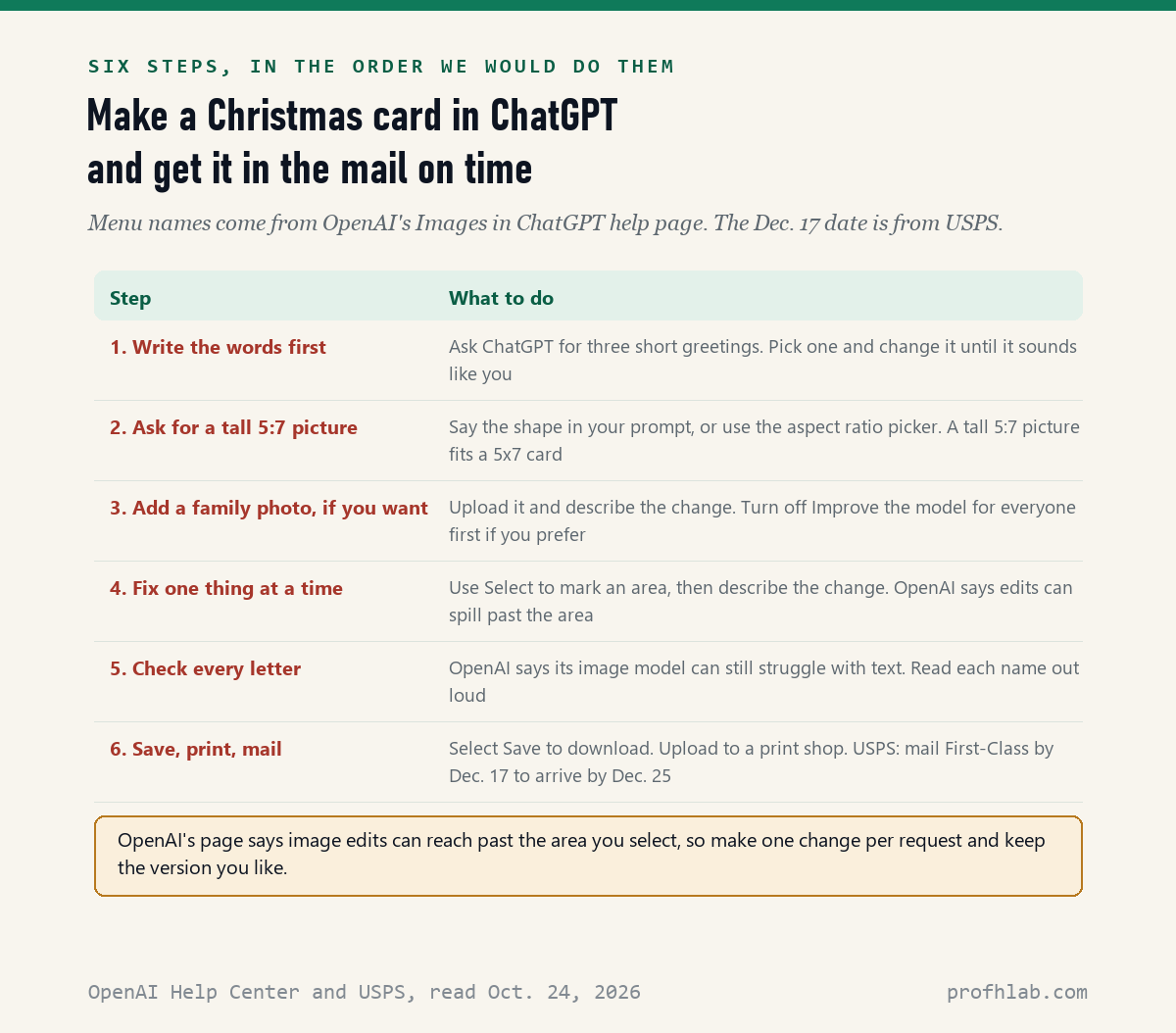
The six steps take one evening, and the only one that needs care is the picture shape in step 2. Here they are, one sentence each.
- Write the words first. Ask ChatGPT for three short greetings, pick one, and change it until it sounds like you.
- Ask for a tall 5:7 picture. OpenAI’s help page says you can use the aspect ratio picker or put the shape in your prompt.
- Add a family photo, if you want one. Upload it and describe the change you want, such as a snowy background.
- Fix one thing at a time. In the editor, choose Select, mark an area, then describe the change.
- Check every letter. Read each name on the card out loud before you print.
- Save, print and mail. Choose Save to download the picture, upload it to a print shop, and mail it by December 17.
A comparison helps with step 4. Editing an AI picture is like asking a painter to touch up one corner: the painter may also nudge the brush strokes next to it. OpenAI’s page says the same thing in plainer words: “Highlights are not always precise, and edits may extend beyond the area you selected.” So make one change per request, and keep the version you like before trying the next one.
Do not want to start from a blank box? The same page describes Templates. Open the sidebar, select Images, then Templates, and pick a category. ChatGPT may ask follow-up questions about style, and you can answer by tapping an option.
How do you ask ChatGPT to make a Christmas card that sounds like your family?
Give ChatGPT 4 things in one message, the shape, the scene, the exact words and the style, because OpenAI’s help page, read October 24, 2026, says to “describe what it’s for and any text you want it to include.” Here is an example prompt we wrote for this guide. Change the details to fit your family.
Example prompt (ours, not OpenAI’s)
“Make a tall 5:7 Christmas card front. A red barn and a snowy pine tree at dusk, in a soft watercolor style. Leave the top third mostly sky. Across the bottom, in large plain letters, write: Merry Christmas from the Lopez Family. Spell Lopez L-O-P-E-Z.”
Spelling the name out letter by letter is our own habit, not an OpenAI rule. It costs one line and gives the tool a second chance to get the name right.
For the message inside the card, ask in a separate chat. Try: “Write three Christmas card messages, 2 sentences each, from grandparents to a grandson who started college this year. Warm, not sappy.” Then edit the one you pick. Our guide to writing a letter or email with ChatGPT covers how to make the words sound like you, not like a greeting card factory.
Will a ChatGPT picture print sharp on a 5×7 card?
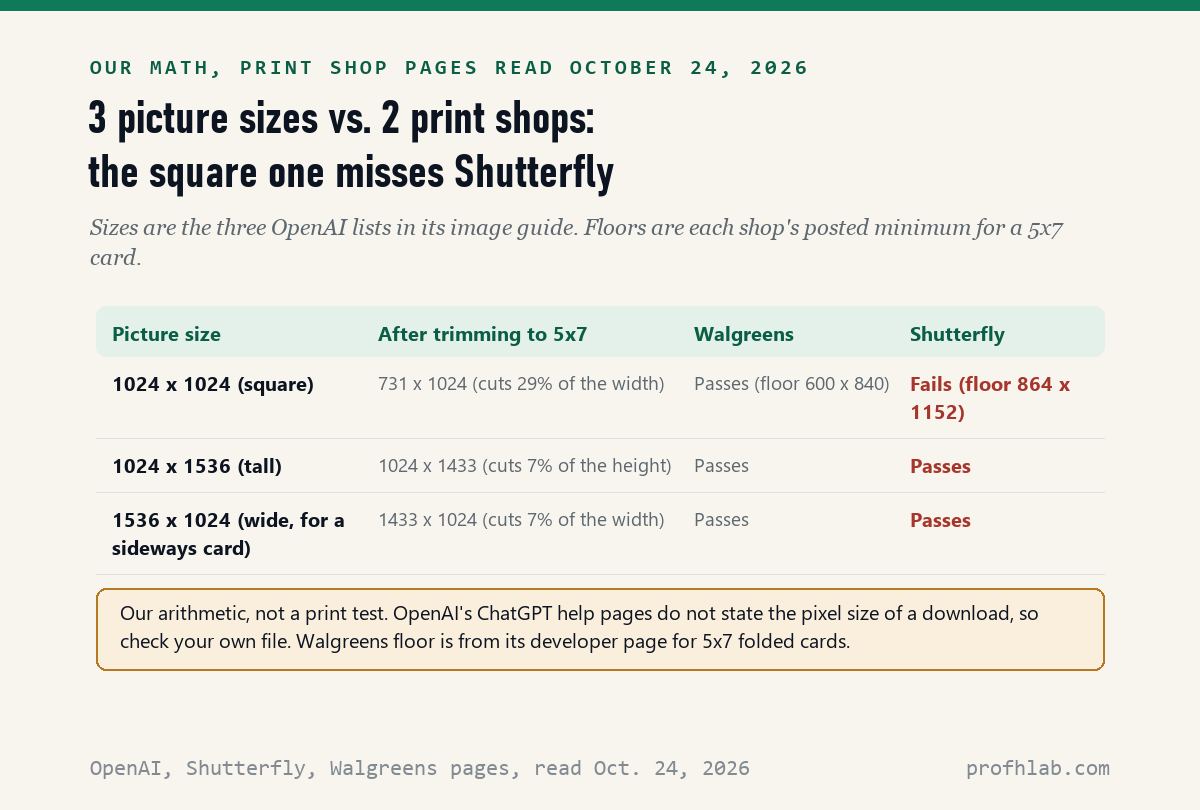
A tall or wide picture should clear both print shops’ posted minimums, but a square 1,024-pixel picture falls below Shutterfly’s 5×7 minimum of 1,152 x 864 pixels, by our math on October 24, 2026. Here is how we got there.
OpenAI’s image generation guide lists 3 recommended sizes: 1024 x 1024 (square), 1536 x 1024 (wide) and 1024 x 1536 (tall). That guide is written for developers. OpenAI’s ChatGPT help pages do not say what size a downloaded picture is, so check your own file before you order.
Then we read the print shops. Shutterfly’s support page “Personalizing Cards,” updated October 6, 2026, lists 1152 x 864 for 5×7 folded and flat cards. Walgreens’ developer page lists 840 x 600 pixels for 5×7 folded cards. That floor is about half of Shutterfly’s in total pixels, by our count.
| Picture size | After trimming to 5×7 | Walgreens floor (600 x 840) | Shutterfly floor (864 x 1152) |
|---|---|---|---|
| 1024 x 1024, square | 731 x 1024 | Passes | Fails |
| 1024 x 1536, tall | 1024 x 1433 | Passes | Passes |
| 1536 x 1024, wide | 1433 x 1024 | Passes | Passes |
Trimming means cutting the picture to the card’s shape. A square picture loses 29% of its width to become 5×7. A tall picture loses only 7% of its height. That is the whole reason for step 2: if you ask for 5:7 at the start, nothing important gets cut off later.
Two cautions keep this honest. This is arithmetic, not a print test, and the two shops disagree a lot about what counts as enough. The Walgreens page also says “Please make sure images are 300 DPI,” and at 300 dots per inch a 5×7 would need 1,500 x 2,100 pixels, by our math. The page does not explain the gap between that line and its own table.
Shutterfly’s page gives a simple test that beats any math: if the order screen shows a Low Resolution warning, the photo is too small for that card. Its page “Why Christmas card photos can look blurry,” updated August 7, 2026, also warns that screenshots are usually lower resolution. So use Save in ChatGPT, not a screenshot of the picture.
Is it safe to upload a photo of the grandchildren?
It is safe enough for a holiday card if you change one setting first: OpenAI’s page “Data controls in ChatGPT,” read October 24, 2026, says that on Free, Plus and Pro accounts, “data sharing is enabled by default.” That means your chats, and what you upload in them, can be used to train OpenAI’s models unless you switch it off.
The switch is called Improve the model for everyone. On the web, OpenAI’s steps are: open your account menu, select Settings, then Data controls, turn off Improve the model for everyone, and select Done. On a phone, open the sidebar, tap your profile icon, then Data controls. The page says this does not delete your chat history.
Another choice is a temporary chat. The same page says temporary chats are not used to train models and do not appear in your history, but “may be retained for up to 30 days for safety purposes.” Think of it as a pencil note that is erased later, not one that was never written.
Ask before you upload. A grandchild’s parent may not want their child’s face in any app, and that is their call. Our guide Is it safe to give ChatGPT my personal information? lists what we would never type into a chat, such as account numbers.
Can you print ChatGPT images at Walgreens?
Nothing we read on October 24, 2026 rules it out: OpenAI’s Terms of Use, effective January 1, 2026, say that you “own the Output,” and OpenAI assigns you its rights in it. The terms add that other users “may receive similar output,” so your picture may not be one of a kind.
We could not read Walgreens’ own photo copyright policy. Its help page returned an error when we tried, so we do not know whether it says anything about AI pictures. If a store clerk asks about a picture, the plain answer is that you made it in ChatGPT and OpenAI’s terms say you own it.
Walmart Photo’s help page, read the same day, did not list pixel minimums. It only recommends uploading at “Full resolution.” If you use Walmart, watch for a warning on the order screen the same way.
December 17 is the USPS date for cards that must arrive by Christmas
USPS recommends mailing First-Class Mail by December 17 for delivery by December 25, in its holiday release dated September 22, 2026. Most Christmas cards travel by First-Class Mail.
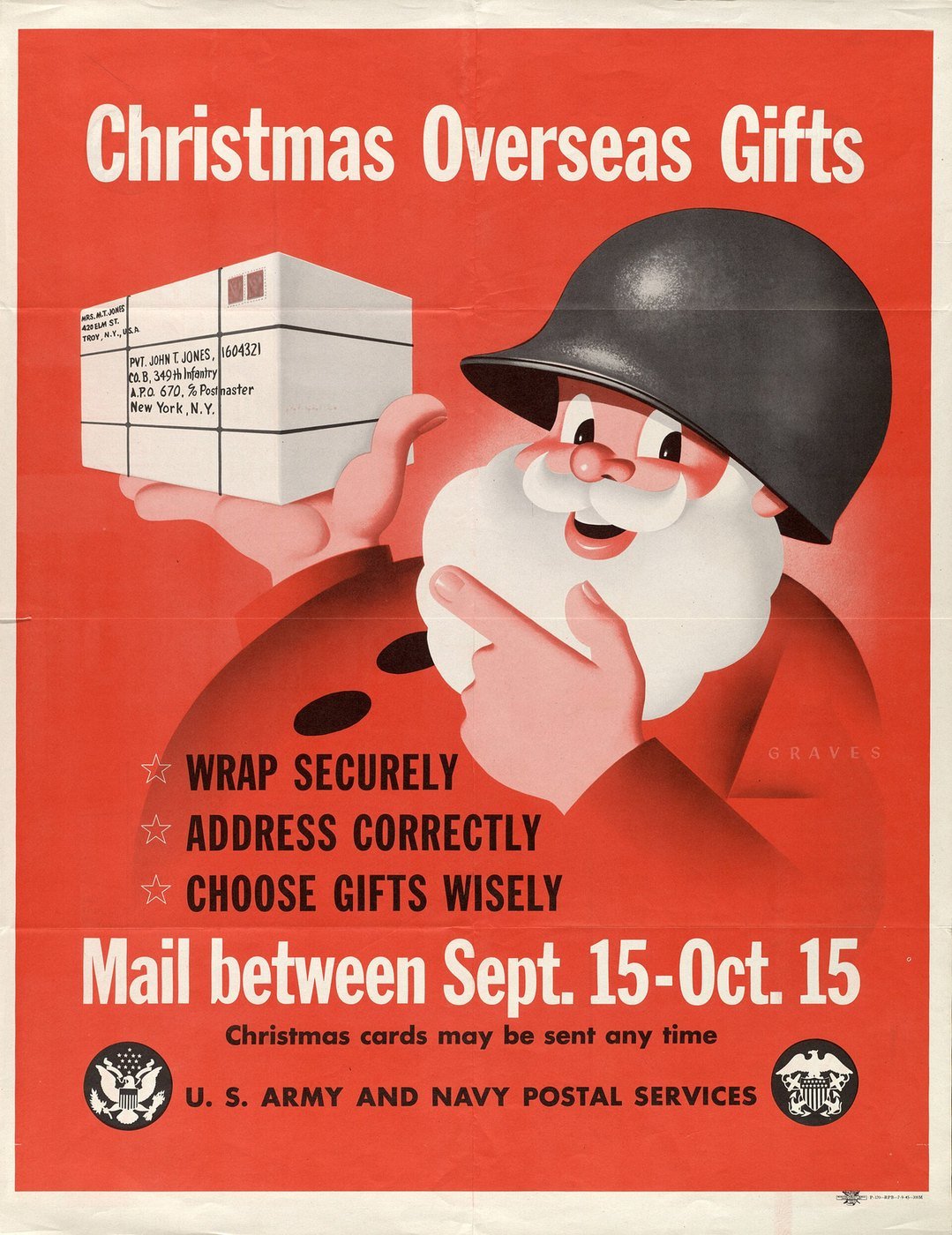
Work backward from that date. A print shop may need a few days to make and ship a card order, and you still need time to address envelopes. If you plan to send cards overseas or to a military address, the same release says to check the USPS holiday shipping page, which posts those earlier dates from mid-October.
OpenAI’s April demos of the image tool behind your card
OpenAI’s own channel posted these two short demos on April 21, 2026, the day ChatGPT Images 2.0 arrived. They show version 2.0, not Images 2.5, which came on September 8, 2026, so your screen may look a little different.
Demos show the best results. OpenAI’s developer guide still says the model “can still struggle with precise text placement and clarity.” So step 5 stays: read every name out loud before you print.
A one-evening plan for your first ChatGPT card
- In ChatGPT, open Settings, then Data controls, and decide on Improve the model for everyone.
- Ask for three greetings. Pick one and edit it.
- Ask for a tall 5:7 card front with the exact words, and spell your family name out.
- Fix one thing per request. Keep the best version.
- Read every word out loud. Then choose Save, not a screenshot.
- Upload to your print shop and watch for a Low Resolution warning.
- Mail by December 17, earlier for overseas or military addresses.
Making the card with a grandchild on a video call? Let them type the prompt while you pick the scene. Our guide to making AI photos with grandparents has more projects to do together, and setting up parental controls on ChatGPT covers a teen’s account.
More first projects for grandparents new to AI
- How to use ChatGPT, for beginners over 50, if this card is your first time in ChatGPT.
- Restoring old photos with AI, for a card built on a family photo from decades ago.
- How to use ChatGPT to write a memoir, for the longer family letter.
- How to use ChatGPT for genealogy research, a good project for the family visit.
- How to talk to ChatGPT and have it talk back, if typing is hard.
- Can two people use the same ChatGPT account? for couples who share.
- How to tell if a picture is AI-generated, the other side of this project.
- Planning a trip with ChatGPT, for holiday travel.
- AI scams targeting seniors and family safe word examples. Holiday season is busy season for scammers too.
- The best AI tools for seniors, if ChatGPT is not the right fit.
New here? Our Start Here page lists every AI for Beginners guide, and the AI Jobs Tracker shows the data we collect ourselves each day. Short answers to common questions are on our FAQ page.
What else do people ask about making Christmas cards with ChatGPT?
Can ChatGPT make a Christmas card?
Yes. On October 24, 2026, OpenAI said ChatGPT Images is available on all plans, including Free. Describe the scene, the exact words and a tall 5:7 shape, then save the picture and print it.
Is the ChatGPT Christmas card free?
Making the picture can be free. Free accounts can create images, with a usage limit that OpenAI does not state as a number. Printing and postage cost extra.
What size should a ChatGPT picture be for a 5×7 card?
Ask for a tall 5:7 picture. By our math, a 1024 x 1536 picture trims to 1024 x 1433, above Shutterfly’s 5×7 minimum of 1152 x 864. A 1024 x 1024 square falls below it.
Why are the words on my AI card misspelled?
OpenAI’s own guide says its image model can still struggle with text. Spell names out letter by letter in your prompt, check every word, and ask for a fix on just that area.
Can I use a photo of my family in ChatGPT?
Yes, you can upload a photo and describe the change. OpenAI says data sharing for training is on by default for Free, Plus and Pro, so turn off Improve the model for everyone first if you prefer.
Ten pages behind this card guide, each with the date we read it
- OpenAI Help Center, Images in ChatGPT, updated and read on October 24, 2026.
- OpenAI Help Center, ChatGPT Free Tier FAQ, read on October 24, 2026.
- OpenAI Help Center, ChatGPT release notes (entries of April 21, 2026 and September 8, 2026), read on October 24, 2026.
- OpenAI Help Center, Data controls in ChatGPT, read on October 24, 2026.
- OpenAI, Terms of Use, effective January 1, 2026, read on October 24, 2026.
- OpenAI for developers, Image generation guide, read on October 24, 2026.
- Shutterfly Support, Personalizing Cards, updated October 6, 2026, read on October 24, 2026; and Shutterfly Ideas, Why Christmas card photos can look blurry, updated August 7, 2026.
- Walgreens Developer Portal, Image Requirements, read on October 24, 2026.
- Walmart Photo, Help Section, read on October 24, 2026.
- USPS Newsroom, Postal Service Recommends 2026 Holiday Mailing and Shipping Dates, September 22, 2026, read on October 24, 2026.
Featured image: Currier and Ives, American Homestead, Winter, 1868, Cleveland Museum of Art, public domain, via Wikimedia Commons, cropped.
About the author. Prof. H writes profhlab’s AI for Beginners guides for readers who are new to AI or over 50. Each guide is built from the pages it quotes, read on the date shown. Did your print shop flag a ChatGPT picture, or did OpenAI move a menu? Tell us on the Ask page and we will update this guide with a dated correction. More about Prof. H on the About page.
Prof.’s H Newsletter
One short email a month, with the numbers in it
What actually moved in AI hiring, AI prices, and the scams aimed at older Americans. Counted here, dated, and linked to the source. One email a month, and your address goes nowhere else.