How to Turn Off AI in Firefox: One Switch Covers 7 Features, but Not Google’s AI Answers
Open Settings, click AI Controls and turn on Block AI enhancements: on October 21, 2026, that one switch in Firefox 158 blocks all 7 AI features that Mozilla’s own admin policy lists. It takes under a minute on a computer. What it does not touch is the AI summary Google puts on top of your search results, and we show the fix for that separately below.
If AI buttons started showing up in your Firefox this year, you did not turn anything on by mistake. Mozilla added them in updates, and it also added the off switch. You do not need any add-on, and you will not break your bookmarks or passwords.
What we checked on October 21, 2026
We read 9 Mozilla sources: the desktop AI Controls help page (revised October 13, 2026), the Android AI Controls page (updated June 9, 2026), the Smart Window help page, the search engine help page, the AIControls admin policy page, Mozilla’s February 24 and May 19, 2026 blog posts, and the release notes for Firefox 148, 155 and 158 plus Firefox for iOS 151. We also read Mozilla’s version feed: the current desktop release is 158.0.1.
Our own count: the help page lists 6 AI features, the admin policy lists 7, and the missing one is Smart Window. The Android page lists 5 controls. We did not find a Mozilla help page with the iPhone taps, so we do not give them. We read these pages; we did not install and test each version ourselves.
Written and checked by Prof. H. An AI assistant helped draft this article and ran the page reads; every quote was read on the source’s own page on the date shown.
Can you turn off AI in Firefox with one switch?
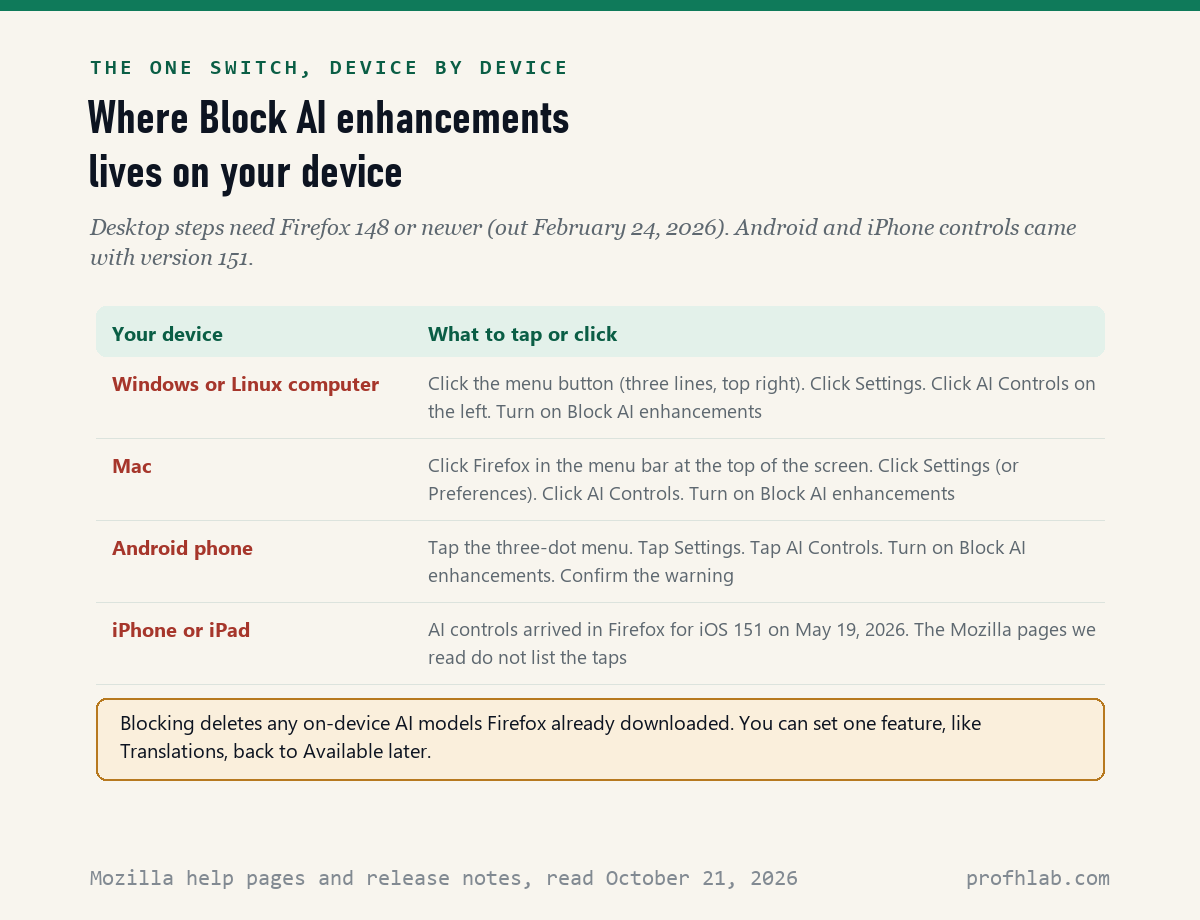
Yes: Mozilla’s AI Controls help page, revised October 13, 2026, says that with the Block AI enhancements switch on, “you won’t see new or current AI features in Firefox,” and you also stop seeing pop-ups that promote them. The switch arrived in Firefox 148 on February 24, 2026.
Here is how to turn it on, one step per line:
- On Windows or Linux, click the menu button, the three short lines in the top right corner. On a Mac, click Firefox in the menu bar at the top of the screen.
- Click Settings. On some Macs it says Preferences.
- Click AI Controls in the list on the left.
- Click the Block AI enhancements switch so it turns on.
That is the whole job. Think of it like the main breaker in a fuse box: one flip turns off every circuit on the panel, and any new circuit an electrician adds later starts out off too. Mozilla says future AI features stay blocked by default while the switch is on.
What does Block AI enhancements actually turn off in Firefox?
It turns off 6 features named on Mozilla’s help page and a 7th, Smart Window, that the help page does not list: we counted 7 feature keys on Mozilla’s AIControls admin policy page on October 21, 2026, against 6 features on the help page.
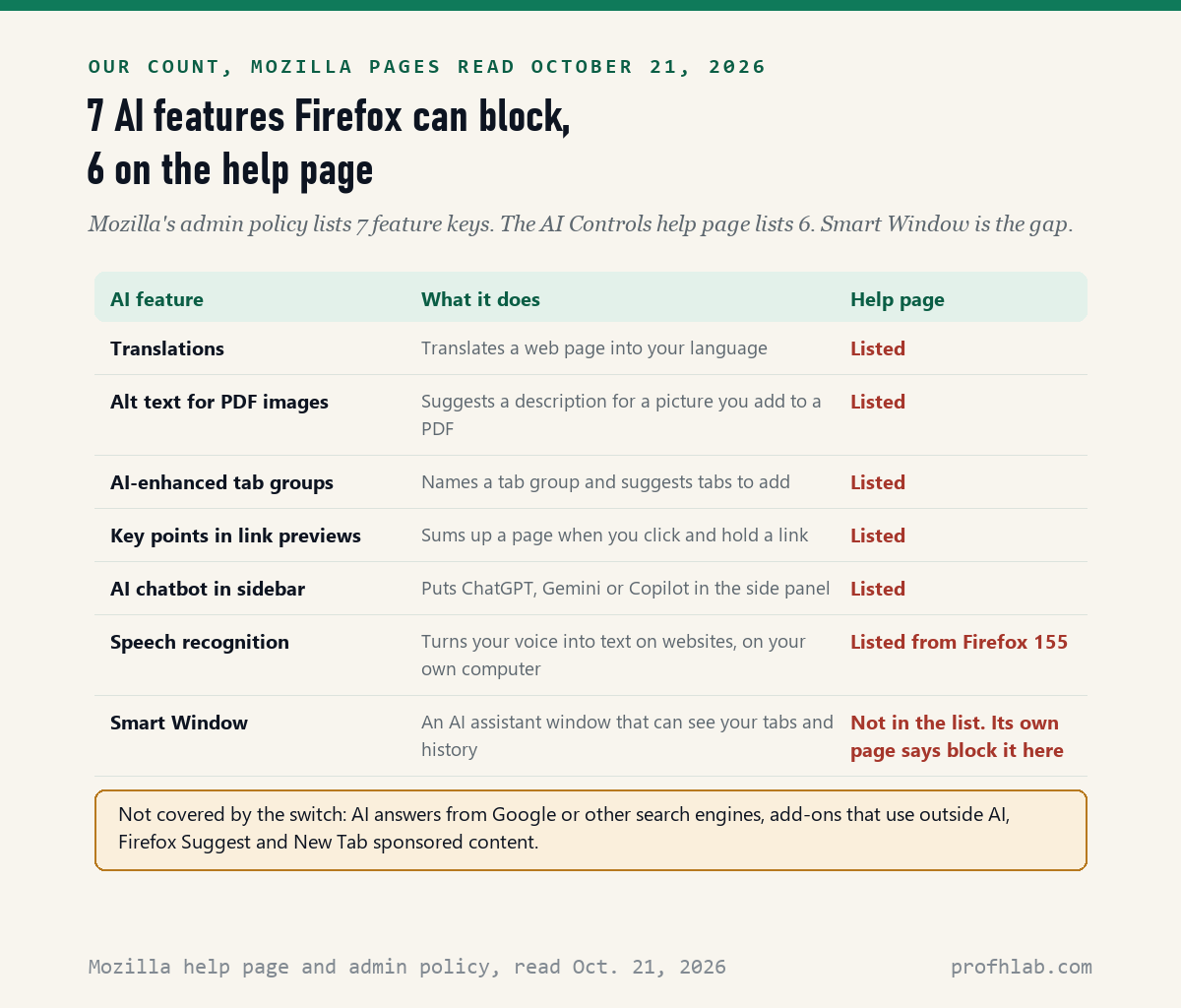
In plain words, the 6 listed features are: page translation; suggested descriptions for pictures you add to a PDF; names and tab suggestions for tab groups; a short summary when you click and hold a link; a ChatGPT, Gemini or Copilot chatbot in the side panel; and speech recognition, which turns your voice into text on websites.
The help page only shows speech recognition to people on Firefox 155 or newer. If you are on an older version, including the Extended Support Release (153.5.1 on October 21), you will see 5 features, not 6.
Blocking has one side effect worth knowing. Mozilla’s page says that for AI that runs on your own computer, “any models already downloaded are removed.” That can free disk space. It also means translation has to download again if you turn it back on later.
Is Smart Window covered by the Firefox AI off switch?
Yes: Mozilla’s Smart Window help page, read October 21, 2026, says that if you already chose Block AI enhancements, Smart Window “will already be blocked.” You can also block only Smart Window by choosing Blocked next to it in AI Controls.
Smart Window matters more than the other six for privacy. It is a separate kind of Firefox window with a built-in assistant. Firefox 155, released September 1, 2026, made it available to all users in the United States, Canada and France to try.
Mozilla’s own page draws the line clearly. The sidebar chatbots in a regular window cannot see your browsing history or open tabs. The Smart Window assistant can see your recent and open tabs and your history, and it can save “memories” built from activity in both kinds of window, if you allow memories.
It also needs a Mozilla account, and using it means agreeing to its own terms. Firefox 158, out October 13, 2026, added form filling that suggests data from your open tabs and saved autofill details. You only get any of this if you open a Smart Window. If you never want the offer, block it.
How do I turn off AI in Firefox on my phone?
On Android, Mozilla’s page updated June 9, 2026 lists 5 steps: tap the three-dot menu, tap Settings, tap AI Controls, turn on Block AI enhancements, then confirm the warning. Mozilla says AI controls reached Android and iPhone with version 151 on May 19, 2026.
The Android page lists 5 things the switch controls: Shake to Summarize, Translations, voice search, AI-related notifications and AI-related experiments. Mozilla says you are taken out of those experiments after you restart Firefox, so close the app fully once you are done.
On iPhone and iPad, the Firefox for iOS 151 release notes promise “one place to turn them on, off or customize them individually,” and Mozilla’s May 19 blog post lists translations and Shake to Summarize there. We did not find an iPhone help page with the exact taps, so check Firefox’s Settings screen yourself rather than trusting a guess.
Your phone may have its own AI too, separate from Firefox. Our guides to getting rid of AI on your phone, turning off AI summaries on iPhone and Gemini on Android phones cover that layer.
How do I turn off AI Overview in Firefox?
Not with AI Controls: Mozilla’s help page, revised October 13, 2026, says the panel does not include features “controlled by third parties,” and it names the search engines you choose. Google’s AI Overview comes from Google, so Firefox’s switch cannot reach it.
What does work is a search shortcut that asks Google for plain web results. Mozilla’s search help page says Firefox 140 and newer can add a custom search engine in Settings:
- Open Settings and click Search on the left.
- Scroll to Search Shortcuts and click Add.
- Name it something like Google Web.
- In the URL box, paste
https://www.google.com/search?q=%s&udm=14and click Add Engine. - Pick it as your default search engine at the top of the same Search page.
The udm=14 part asks for Google’s Web results view. When we tested it on 16 searches on September 11, 2026, it gave the same AI-free page as Google’s own Web tab. Our guide to getting the old Google search back has that test and the phone workaround.
Should you keep any Firefox AI features on?
Maybe one: translation. Mozilla says page translation uses generative AI, but if you read recipes, news or family messages in another language, it is the most useful item on the list. You can block everything and still keep it.
To do that, leave Block AI enhancements on and change the drop-down next to Translations to Available. Mozilla’s page says this works, and new AI features still stay blocked. Speech recognition is the other one to think about if you use voice typing on websites. Mozilla says that transcription happens entirely on your device.
The chatbot in the sidebar is easier to judge. If you want ChatGPT, you can open it in a normal tab. Before you paste anything personal into any chatbot, read our guide to what chatbot makers say to leave out.
Why can I not change the AI setting on a library or work computer?
Because the people who manage that computer can lock it: Mozilla’s AIControls admin policy page, read October 21, 2026, says that when an administrator sets Locked to true, “the user cannot change the setting.” The page says the policy works from Firefox 149.0.2, and from version 153 on the Extended Support Release.
If the switch is gray, that is not a fault in your eyes or your mouse. Ask the library desk or your workplace help desk. A locked setting applies to every user of that computer, so the AI may already be off there.

Mozilla’s 45-second AI controls demo and its longer reason why
Both videos come from Mozilla’s official Firefox channel (210,000 subscribers). We checked view counts and that each plays on other sites on October 21, 2026.
Your ten-minute Firefox plan for this week
- Update first. Click the menu button, then Help, then About Firefox. Mozilla’s feed lists 158.0.1 as current on October 21, and the next release is scheduled for October 23, 2026.
- Flip the switch. Settings, AI Controls, Block AI enhancements.
- Bring back what you use. Set Translations to Available if you need it.
- Fix search separately. Add the Google Web shortcut above if Google’s AI summary bothers you.
- Do the phone. Three-dot menu, Settings, AI Controls on Android, then restart Firefox.
- Watch out for fake help. Nothing on this list needs a phone call or remote access. If someone calls offering to fix Firefox for you, hang up. Our guide to AI scams targeting seniors shows the common scripts.
Using Chrome, Edge or Windows too? The same job there
Each browser hides its AI in different places. Our step lists for turning off AI in Chrome and turning off AI in Edge use the same approach as this page. On the same computer, you may also want removing Copilot from Windows 11, turning off Copilot in Word and turning off the AI Assistant in Adobe Acrobat.
For email, see stopping AI from reading your Gmail. If you are new to all of this, start with how to use ChatGPT for beginners over 50 or our Start Here page. We also track how AI is changing hiring on the AI Jobs Tracker.

Mobile, Smart Window and translation questions in short
Can you turn off AI in Firefox completely?
For Firefox’s own AI, yes. Block AI enhancements covers all 7 features in Mozilla’s admin policy, including Smart Window. It does not cover AI from websites, search engines such as Google, or add-ons that use outside AI services, which Mozilla says can still work independently.
Does Firefox have AI built in?
Yes. On October 21, 2026, Mozilla’s help page names 6 AI features in desktop Firefox, from page translation to a sidebar chatbot, and Smart Window is a 7th. All of them are optional, and the AI Controls panel has been in Settings since Firefox 148.
How do I turn off AI in Firefox mobile?
On Android, tap the three-dot menu, then Settings, then AI Controls, turn on Block AI enhancements and confirm the warning. Mozilla added these controls to Android and iPhone in version 151 on May 19, 2026. We did not find Mozilla’s step list for iPhone.
Will blocking AI stop Firefox from translating pages?
Yes, at first. Translations is one of the blocked features, and its downloaded language models are removed. To keep it, leave the main switch on and set the Translations drop-down to Available. Mozilla says future AI features stay blocked.
What is Smart Window in Firefox?
It is an optional Firefox window with a built-in AI assistant that can see your open tabs and history. It needs a Mozilla account. Firefox 155 opened it to all users in the United States, Canada and France on September 1, 2026.
Is there an about:config setting to turn off Firefox AI?
Mozilla’s admin policy page lists 13 hidden preferences the policy changes, such as browser.ml.chat.enabled, but the help pages we read on October 21, 2026 send home users to the AI Controls panel. Use the panel: it is documented and keeps new features blocked.
Mozilla pages and release notes behind each step
- Mozilla Support, Block generative AI features with Firefox AI controls, current revision October 13, 2026, read October 21, 2026.
- Mozilla Support, Control AI features in Firefox for Android, updated June 9, 2026, read October 21, 2026.
- Mozilla Support, Get started with Smart Window, read October 21, 2026.
- Mozilla Support, Add or remove a search engine in Firefox, read October 21, 2026.
- Firefox for Enterprise, AIControls policy, last updated October 21, 2026, read October 21, 2026.
- Mozilla, How to turn off AI features in Firefox, or choose the ones you want, February 24, 2026, read October 21, 2026.
- Mozilla, AI controls are here for Firefox mobile, May 19, 2026, read October 21, 2026.
- Firefox release notes: 148.0 (February 24, 2026), 155.0 (September 1, 2026), 158.0 (October 13, 2026) and Firefox for iOS 151.0 (May 19, 2026), read October 21, 2026.
- Mozilla, Firefox version feed, read October 21, 2026.
Featured image: Winslow Homer, The Fox Hunt, 1893, Pennsylvania Academy of the Fine Arts, public domain, via Wikimedia Commons, cropped.
About the author. Prof. H writes profhlab’s AI for Beginners guides for readers who are new to AI or over 50. Each guide is built from the pages it quotes, read on the date shown. Did Firefox move the switch, or does your iPhone show different steps? Tell us on the Ask page and we will update this guide with a dated correction. More about Prof. H on the About page.
Prof.’s H Newsletter
One short email a month, with the numbers in it
What actually moved in AI hiring, AI prices, and the scams aimed at older Americans. Counted here, dated, and linked to the source. One email a month, and your address goes nowhere else.