How to Turn Off AI on TikTok: 0 Off Switches, 4 Ways to See Less AI
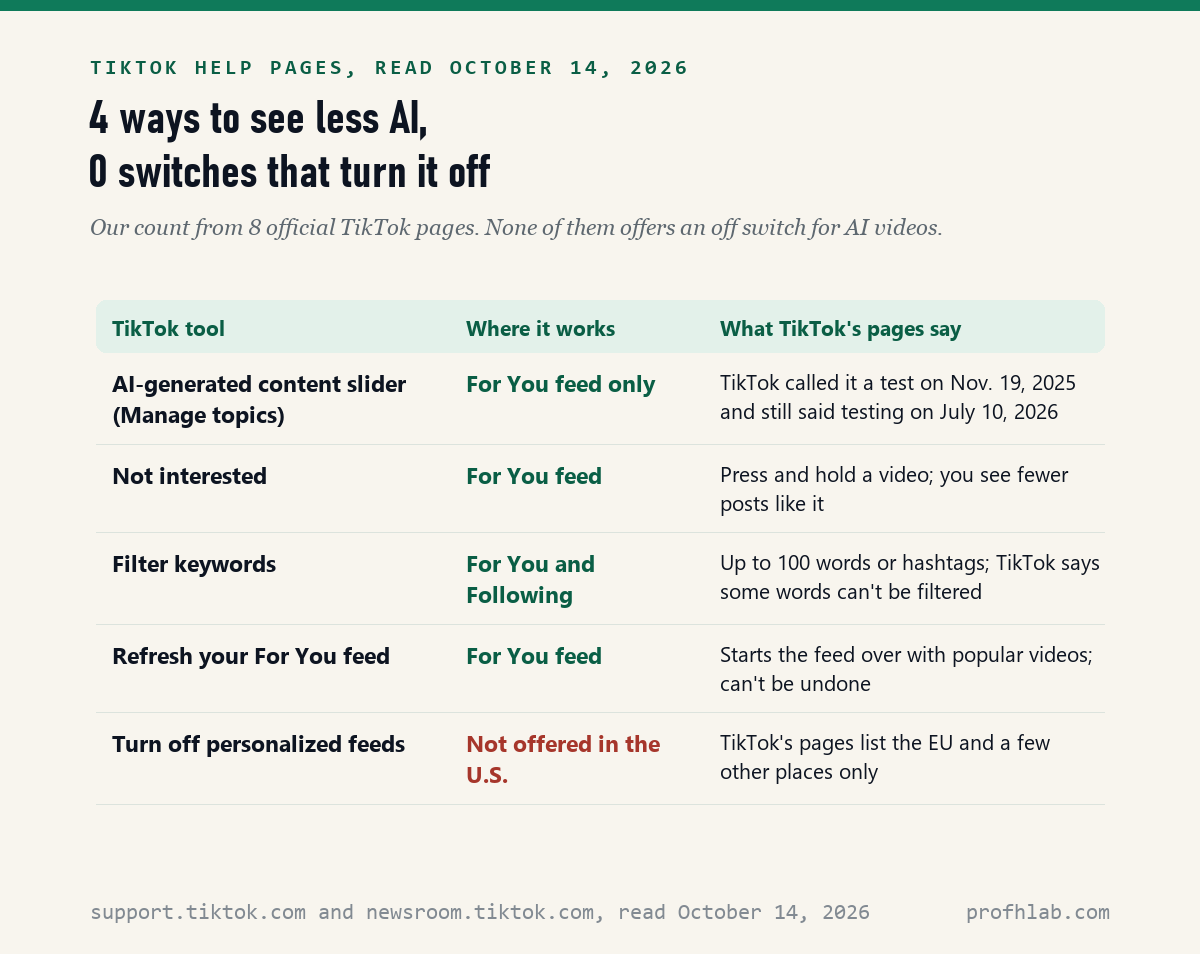
You cannot turn off AI on TikTok with one switch: on October 14, 2026 we read 8 official TikTok pages and found 0 off switches for AI videos, but 4 ways to see fewer of them in your For You feed. The strongest one is a slider for AI-generated content inside Manage topics, which TikTok still described as a test in July 2026.
Below is each of the 4 tools, the taps to reach them, how to tell an AI video from a real one, and what to do about your own videos. Nothing here needs a new app or a paid plan. You are not alone in asking: Pew Research Center’s 2025 survey found 30% of U.S. adults ages 50 to 64 use TikTok.
What we checked on October 14, 2026
We read 8 official TikTok pages: 6 help pages (Manage topics, For You, safety tools and keyword filters, refreshing your feed, how recommendations work, and the AI-generated content page) and 2 TikTok newsroom posts dated November 19, 2025 and July 10, 2026. A ninth TikTok help page, about the AI Self and AI Cast features, showed only “Something went wrong” when we opened it, so we quote nothing from it.
We did not open the TikTok app and tap through these menus for this article. Menu names are quoted from TikTok’s pages. The count of 4 tools and 0 off switches is our own tally from those pages.
Written and checked by Prof. H. An AI assistant helped draft this article and ran the page reads; every quote was read on the source’s own page on the date shown.
Can you turn off AI on TikTok completely?
No: none of the 8 TikTok pages we read on October 14, 2026 offers a switch that removes AI-generated videos, and TikTok’s November 19, 2025 newsroom post says its AI setting is meant to tailor your feed “rather than removing or replacing content in feeds entirely.”
Think of it like a radio with a volume knob but no off button. You can turn AI videos down. You cannot make them disappear. That is not something you missed in the settings; TikTok built it that way.
There is a second kind of AI on TikTok you cannot switch off either: the system that picks your videos. TikTok’s page on how recommendations work says it uses “recommender systems” that learn from what you like, follow and watch. That is why your feed feels personal.
How do I see less AI-generated content on TikTok?
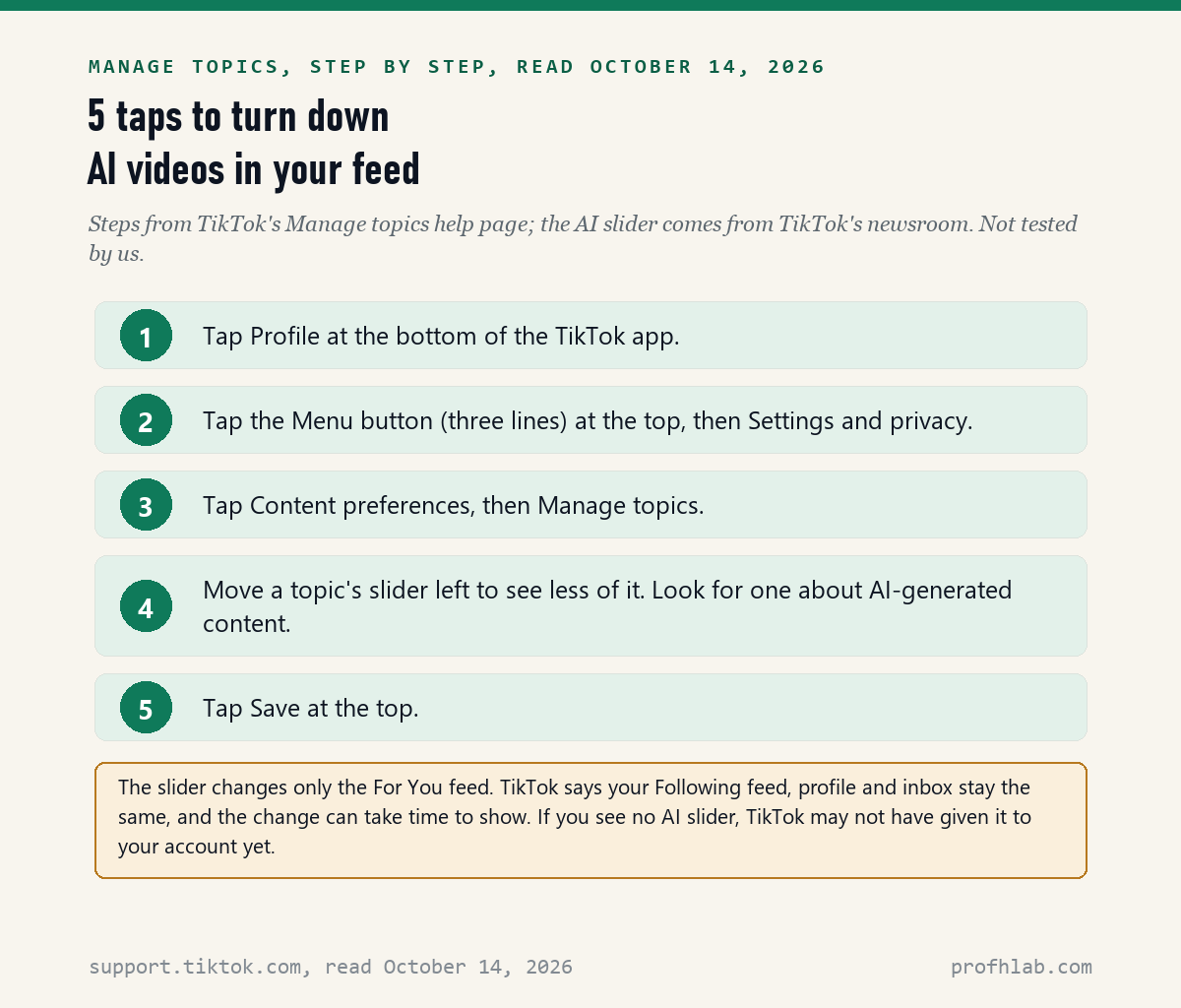
TikTok’s Manage topics help page gives 5 steps: tap Profile, tap the Menu button, choose Settings and privacy, tap Content preferences, then Manage topics, and move a topic’s slider before tapping Save.
- Tap Profile at the bottom of the TikTok app.
- Tap the Menu button, the three short lines at the top. Then tap Settings and privacy.
- Tap Content preferences, then tap Manage topics.
- Move the slider for a topic to the left to see less of it. TikTok’s newsroom says the AI control sits here, next to topics like Dance, Sports, and Food & Drinks.
- Tap Save at the top.
There is a shortcut from any video, also on the same help page. Tap the Share button on the side of a post, then Why this video, then Adjust your For You, then Manage topics.
Two limits come from TikTok itself. The setting “only applies to content in your For You feed,” not your Following feed, profile or inbox. And TikTok says “it might take some time for us to personalize your feed.” Give it a few days before you judge it.
Why is there no AI slider in my Manage topics list?
TikTok’s July 10, 2026 newsroom post still lists Manage topics among features it is “testing” so users can choose how much AI-generated content they see, so the slider may not be on every account yet.
The first announcement, on November 19, 2025, said TikTok would “start testing” the control “in the coming weeks.” Eight months later, the word was still testing. TikTok’s Manage topics help page, read the same day, does not mention AI at all. It names only examples like sports, food and drinks, and lifestyle.
So if you do not see it, you did nothing wrong. Our inference, not a tested fact: updating the app is the only step in your control. Then check Manage topics again, and use the other 3 tools below in the meantime.

Can I block AI videos with “Not interested” or a keyword filter?
Partly: TikTok’s safety page says you can filter up to 100 words or hashtags from the For You and Following feeds, and its For You page says marking a post “Not interested” means you will see fewer posts like it.
To use Not interested: press and hold a video, then tap Not interested. TikTok’s page adds a step most people miss. Tap Details at the bottom, and you can pick hashtags from that post to filter out for good.
To add a keyword filter: tap Profile, then Menu, then Settings and privacy, then Content preferences, then Filter keywords. Tap Add keyword, type a word or hashtag, pick the feeds, and tap Save. A Smart filter option also catches “similar keywords and variations.”
Here is the catch. TikTok says “certain keywords can’t be filtered,” and it does not list which ones. An AI video with no AI word in its caption or hashtags would slip past. Our estimate is that filters catch only AI videos whose makers say so in words.
What does “Refresh your For You feed” do to AI videos?
It starts your For You feed over with popular videos, according to TikTok’s help page read October 14, 2026, and TikTok warns that once you refresh, “it can’t be undone.”
The path is Profile, then Menu, then Settings and privacy, then Content Preferences, then Refresh your For You feed. Only the For You feed changes. Your Following list, profile and inbox stay as they are.
Use this one if your feed is so full of AI clips that the slider feels hopeless. It wipes what TikTok learned about you, good and bad. After a refresh, tap Not interested on the first AI videos you see, so the new feed learns faster.
Can I turn off TikTok’s personalized feed in the United States?
No: TikTok’s recommendations page says turning off personalized feeds is “only available in the EU and Kazahkstan” [sic], while its For You page lists the European Economic Area, the UK and Switzerland; neither page includes the United States.
The two TikTok pages disagree with each other on where the setting exists. We read both on October 14, 2026. Neither one offers it to U.S. users, so for American readers the answer is the same.
Where it exists, TikTok says the For You feed “will become a Popular feed” of popular videos from your region and abroad. That would not remove AI videos either. It would only stop TikTok from choosing them based on you.

How can I tell if a TikTok video is made with AI?
Look under the caption for one of two labels TikTok describes on its AI-generated content page: “Creator labeled as AI-generated,” which the poster added, or “AI-generated,” which TikTok may apply itself.
TikTok requires a label on realistic AI images, audio and video. It says it has labeled “over 3 billion videos” as AI-generated, in its July 10, 2026 post. That was up from “over 1.3 billion” in its November 19, 2025 post.
A missing label does not prove a video is real. TikTok itself wrote that labels “may be removed when content is reuploaded or edited elsewhere.” That is why it added hidden watermarks. For the warning signs in the picture itself, see our guides on telling if a video is AI and telling if a picture is AI-generated.
If a fake video pretends to be real news or a real person, report it. TikTok’s steps: long press the video, tap Report, tap Misinformation, then Deepfakes, synthetic media, and manipulated media, and tap Submit. Never send money because of a video, however real it looks. Read AI scams aimed at seniors first.
How do I stop AI from remixing the videos I post?
We found no TikTok help page about an “Allow AI to remix content” setting; the only description we read was an April 21, 2026 news report from PEDESTRIAN.TV, which says it is a per-video switch that was on by default.
That report gives the path as: open your posted video, tap the three dots, go to Privacy settings, and turn off Allow AI to remix content. It says there was no single switch for every video at once. It also says TikTok did not answer its request for comment.
Treat those steps as one outlet’s report, not TikTok’s word. If you only watch TikTok and never post, this setting does not affect you. If you post videos of your family, check the Privacy settings on each one, and see our family safe word guide.
A 70-second walkthrough and a TODAY segment on spotting AI

What else do people ask about AI on TikTok?
Can you turn off AI videos on TikTok?
Not fully. On October 14, 2026 we found no off switch on 8 TikTok pages. You can turn AI videos down with the AI-generated content slider in Manage topics, where TikTok has offered it, plus Not interested, keyword filters and a feed refresh.
How do I turn off AI on TikTok on an iPhone?
TikTok’s help pages give one set of taps for the app, with no separate iPhone steps: Profile, Menu, Settings and privacy, Content preferences, Manage topics. Move the AI slider left if your account has it, then tap Save.
Is TikTok AI-generated?
Some of it is. TikTok said on July 10, 2026 that it had labeled over 3 billion videos as AI-generated; it did not say what share of all videos that is. TikTok also uses AI to choose which videos you see, through what it calls recommender systems.
Can you turn off the AI summary or AI search on TikTok?
We found no TikTok help page about AI summaries or AI answers in search on October 14, 2026, so we cannot give official steps. Advice about them online comes from non-TikTok sites, and we did not verify it.
Does the AI slider work on my Following feed?
No. TikTok’s Manage topics page says your topic settings apply only to the For You feed, not to your Following feed, profile or inbox. Keyword filters are the one tool TikTok says can reach the Following feed too.
Other apps where you can turn the AI down
TikTok is one of several apps that added AI. For Meta’s apps, see turning off Meta AI on Instagram and turning off AI on Facebook. For video, read turning off auto-dubbing on YouTube. Pinterest and LinkedIn have their own switches.
On the phone itself, see turning off AI on a Samsung phone and turning off AI summaries on an iPhone. If a grandchild uses AI apps, read setting up parental controls on ChatGPT.
New here? Start at Start Here, try ChatGPT for the first time after 50, see the AI tools we rate for seniors, or browse the Generative AI library. Our AI Jobs Tracker counts real openings. Questions go to the Ask page; our counting rules are at How We Count.
Eight TikTok pages, a Pew survey and one Australian news report
- TikTok Help Center, Manage topics. No update date shown; read October 14, 2026.
- TikTok Help Center, For You and Refreshing your For You feed. No update dates shown; read October 14, 2026.
- TikTok Help Center, Safety on TikTok (keyword filters) and How TikTok recommends content. No update dates shown; read October 14, 2026.
- TikTok, AI-generated content (labels and reporting). No update date shown; read October 14, 2026.
- TikTok Newsroom, More ways to spot, shape and understand AI-generated content, November 19, 2025. Read October 14, 2026.
- TikTok Newsroom (Europe edition), Helping people spot and understand AI generated content on TikTok, July 10, 2026. Read October 14, 2026.
- PEDESTRIAN.TV, report on the AI remix setting, April 21, 2026 (news report, not TikTok guidance). Read October 14, 2026.
- Pew Research Center, Social Media Fact Sheet, survey of U.S. adults February 5 to June 18, 2025: 37% of adults use TikTok, including 30% of ages 50 to 64 and 12% of ages 65 and older. Read October 14, 2026.
- Could not read: TikTok’s AI Self and AI Cast help page returned an error on October 14, 2026. Not found: any TikTok help page on the AI remix setting or on AI summaries in search.
TikTok changes its menus often, and some features reach accounts at different times. This page reports what the pages above said on the date shown; we are not paid by TikTok or any company named here, and this page has no affiliate links. Corrections and questions go to the Ask page.
Prof.’s H Newsletter
One short email a month, with the numbers in it
What actually moved in AI hiring, AI prices, and the scams aimed at older Americans. Counted here, dated, and linked to the source. One email a month, and your address goes nowhere else.