How to Turn Off AI in Google Maps: 7 AI Features, No Off Switch, and the 4 Settings That Help
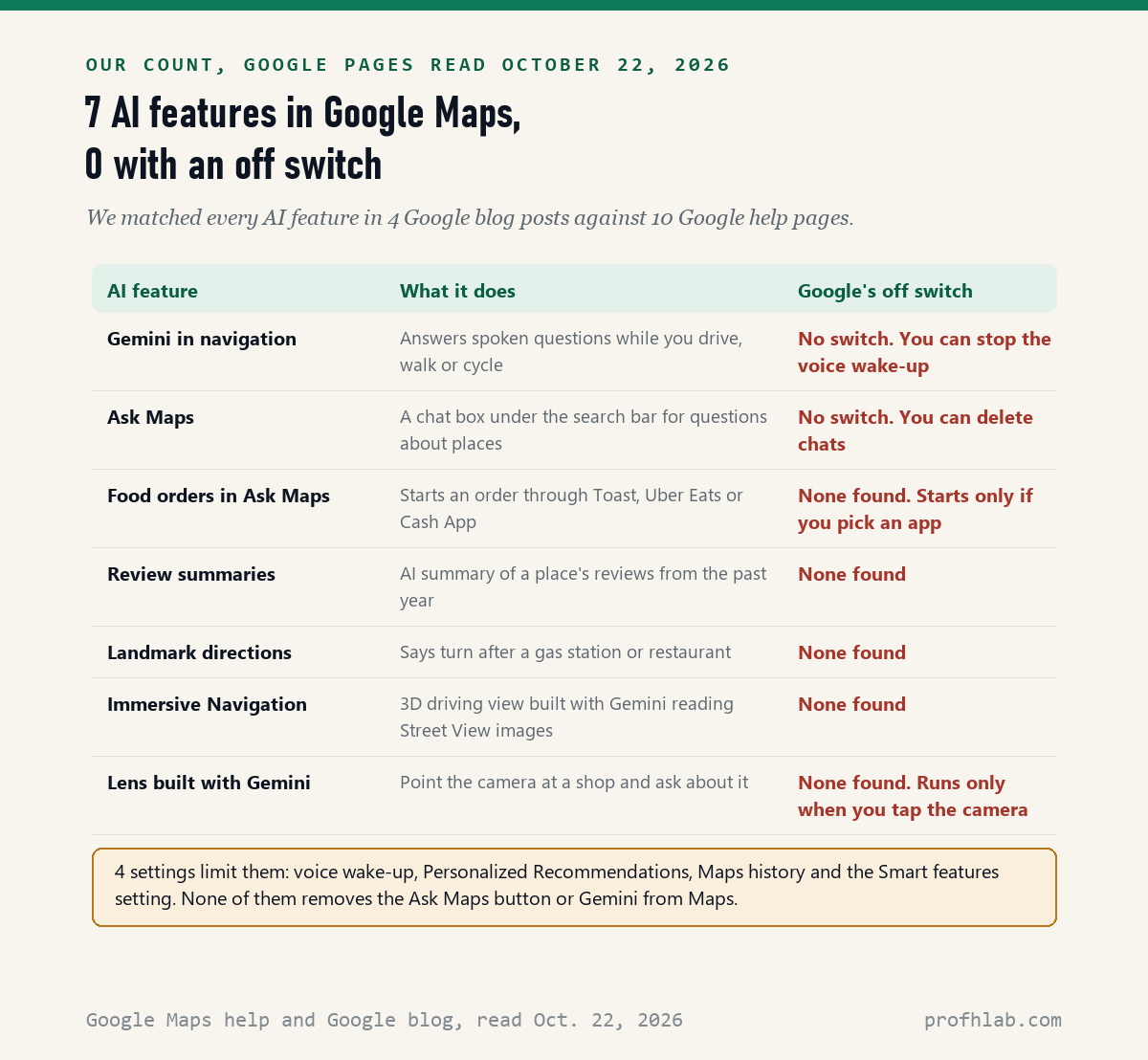
You cannot fully turn off AI in Google Maps: on October 22, 2026, we matched 7 AI features in Maps against 10 Google help pages and found an off switch for 0 of them. What you can do is use 4 settings that stop Gemini from listening for your voice, stop answers built from your history, and erase what Maps saved. Each one takes about a minute, and the steps are below.
If a new “Ask Maps” button or a talking Gemini showed up in your Maps this year, you did not turn it on by accident. Google added these in updates. Nothing here deletes your saved places, your home address or your directions.
What we checked on October 22, 2026
We read 10 Google help articles: Use Gemini while you navigate (Android and iPhone versions), Ask questions in Google Maps (Android, iPhone and computer), How AI-powered features use your data in Google Maps, Taking actions within Ask Maps with third-parties, Manage your Maps history, Manage or delete the Gemini app on your Android device, the Gmail smart features page, the local listings page on review summaries, the Voice Match page and the precise location page. We also read 4 Google blog posts dated November 5, 2025 through March 12, 2026.
Our own count: the blog posts name 7 AI features in Maps. The help pages give an off switch for none of them. We read these pages; we did not test every phone model ourselves, and one setting path comes from a news report, which we label where it appears.
Written and checked by Prof. H. An AI assistant helped draft this article and ran the page reads; every quote was read on the source’s own page on the date shown.
Can you turn off Gemini in Google Maps?
Not completely: Google’s help page “Use Gemini while you navigate,” read on October 22, 2026, explains how to start Gemini in Maps but gives no steps to remove it. You can stop it from waking up when it hears your voice, which is what upsets most people.
Here is how Gemini starts in Maps, according to that page. While you are navigating, you either say “Hey Google” or tap the Gemini button. Google announced this on November 5, 2025, and added walking and cycling on January 29, 2026.
The voice part is the one to switch off. In an article published August 10, 2026, Android Authority reported that some Pixel owners heard Gemini answer a private conversation in the car. Its reporter, Aamir Siddiqui, wrote that users said a recent update seemed to turn hands-free access on. Google had not answered the outlet when it published.
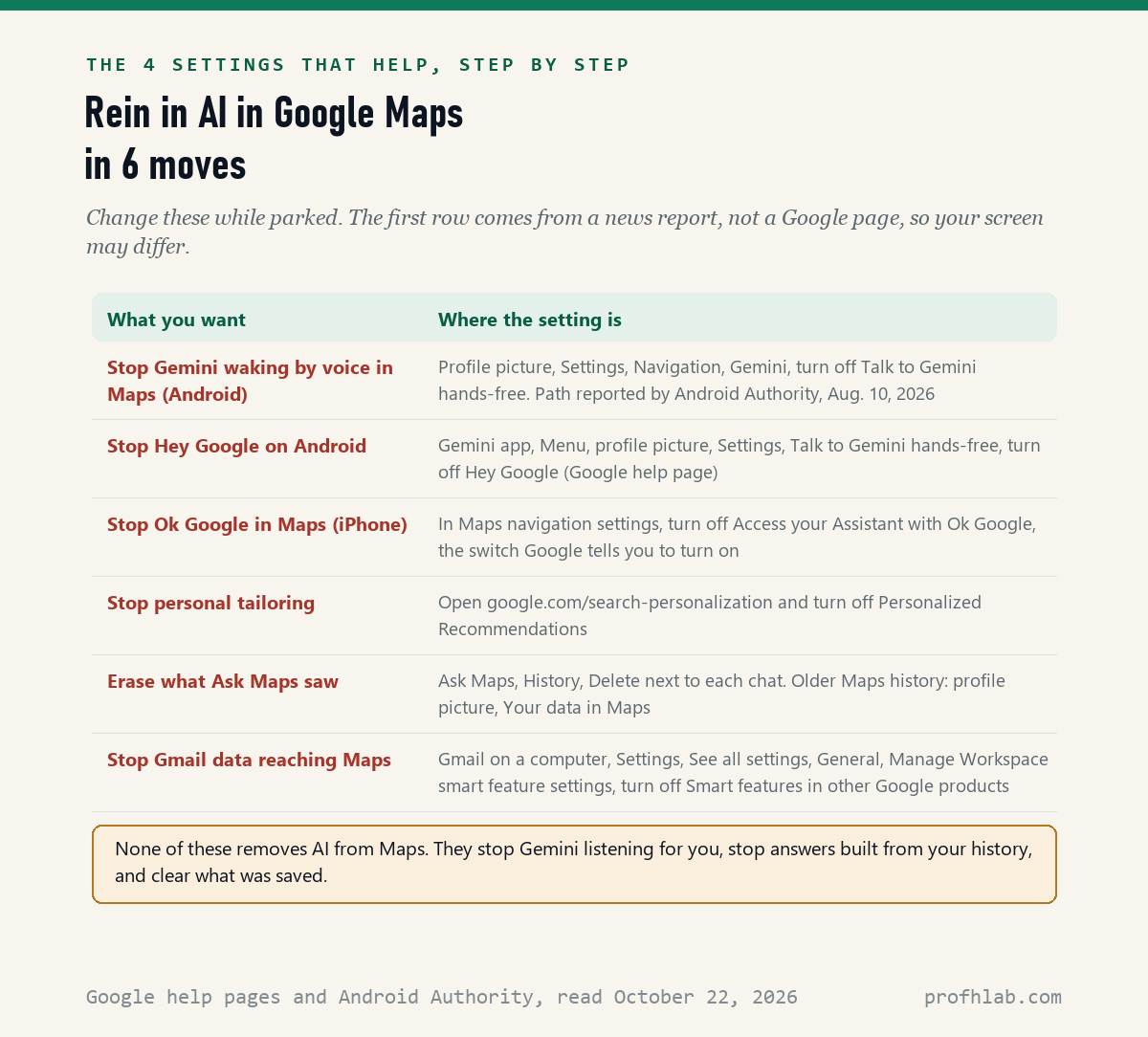
On an Android phone, the article gives this path inside Google Maps. It is not on Google’s help page, so your menu names may differ:
- Tap your profile picture in the top right corner of Maps.
- Tap Settings, then Navigation, then Gemini.
- Turn off Talk to Gemini hands-free.
Google does document a second switch for Android, in the Gemini app itself. Open the Gemini app, tap the menu, tap your profile picture, then Settings, then Talk to Gemini hands-free, and turn off Hey Google. Google says this stops Gemini opening when it hears those words.
How do I turn off Gemini in Google Maps on iPhone?
On iPhone, Google’s help page names one voice switch inside Maps navigation settings, “Access your Assistant with ‘Ok Google’,” and tells you to turn it on to go hands-free. Turning that same switch off stops Maps listening for “Ok Google” while you navigate.
That is our reading of Google’s page, not a step Google spells out. The page also says Gemini “isn’t currently available for CarPlay,” so if you use Maps through your car’s screen with CarPlay, you will not meet Gemini there at all.
Think of Gemini in Maps like a helpful passenger who rides along on every trip. You cannot leave the passenger at home. You can ask them to stay quiet until you tap their shoulder, and that is what the voice switch does.

How do I turn off Ask Maps in Google Maps?
You cannot: Google’s “Ask questions in Google Maps” page, read on October 22, 2026 in its Android, iPhone and computer versions, explains how to ask, find and delete Ask Maps chats, and none of the 3 versions mentions hiding the button. Ask Maps only answers when you tap it.
Ask Maps is the chat box under the search bar. Google launched it on March 12, 2026 in the United States and India. On a computer, Google’s page now puts it under the Menu button. You type or speak a question, like where to charge a phone, and it answers with a map.
Other people have looked for the switch too. An AOL article from March 24, 2026 quoted a Reddit user who wrote, “I can’t find a toggle.” Seven months later, Google’s help pages still describe none.
Here is the honest workaround. Keep using the regular search bar above the button. Searches typed there are ordinary searches, not Ask Maps chats. If you never tap Ask Maps, it has nothing of yours to answer.
What does Ask Maps know about me, and how do I erase it?
Google’s page “How AI-powered features use your data in Google Maps,” read on October 22, 2026, says that with Personalized Recommendations on, Maps AI can use 6 kinds of your data, including your past searches, saved lists, your own reviews and your Search history.
The same page says Google may use your chats with Maps AI to improve its products, and that “in certain circumstances” trained human reviewers look at some of that data. Google says the data reviewers see is disconnected from your account. Do not type medical details or account numbers into Ask Maps.
Three steps cover it:
- Stop the tailoring. Go to google.com/search-personalization while signed in and turn off Personalized Recommendations. Google’s page links there.
- Delete old chats. Tap Ask Maps, then History, then Delete next to each chat. Google says you can only delete a whole chat, not part of one.
- Clear Maps history. Tap your profile picture, then Your data in Maps, then Search Services History, and delete by day or all time.
Google’s history page warns that these settings are being updated, so your labels may not match. If they differ, your Web & App Activity setting still controls the history, the page says.
How do I get rid of the AI review summary on Google Maps?
You cannot hide it: Google’s local listings help page, read on October 22, 2026, says Google uses AI to summarize a place’s reviews from the past year, and we found no setting for it in the 10 pages we read. You can scroll past it to the reviews written by people.
Google adds that summaries “aren’t available for all places,” for example when a place has few reviews. So a missing summary does not mean a place is bad, and a glowing one is still a machine’s shortcut. Read three or four real reviews before you drive across town.
The same caution applies to Ask Maps. Google’s own help page says AI answers “can sometimes be incorrect” and tells you to check important information in more than one place. Call ahead before a long drive to a place Ask Maps says is open.
Does Google Maps use AI for directions?
Yes: Google’s March 12, 2026 blog post says Immersive Navigation, its 3D driving view, was built with Gemini models reading Street View and aerial photos, and its November 5, 2025 post says landmark directions use Gemini too. We found no switch for either one.
Landmark directions mean Maps may say “turn right after” a named restaurant instead of only giving feet. Google says Gemini picks landmarks that can be seen from the street, using information on 250 million places. Many drivers find this easier, not harder.
Immersive Navigation also changed the voice. Google’s example is “Go past this exit and take the next one,” said the way a friend might say it. Google said on March 12 that it started rolling out across the U.S. that day and would expand to eligible phones, CarPlay and Android Auto over the following months.

Google’s 67-second Ask Maps demo and CNET’s hands-free road test
These two videos show what the features look like before you decide what to switch off. One is Google’s own launch clip, so it shows Google’s best case. The other is a news outlet trying Gemini while driving.
Six minutes in the driveway: a Maps AI checklist
- Park first. None of this should be done while driving.
- Silence the voice. Android: Maps Settings, Navigation, Gemini, Talk to Gemini hands-free off, or Hey Google off in the Gemini app. iPhone: the Ok Google switch in navigation settings.
- Stop the tailoring. Personalized Recommendations off at google.com/search-personalization.
- Delete Ask Maps chats you no longer want.
- Check Gmail. Google’s smart features page says the setting “Smart features in other Google products” covers restaurant reservations and to-go orders in Maps. Turn it off in Gmail’s settings if you do not want your email used there.
- Ignore fake help. Nobody from Google will call to switch off Maps AI for you. Our guide to AI scams targeting seniors shows the usual scripts.
Ask Maps can also start a food order through Toast, Uber Eats or Cash App. Google’s page says this is only for adults 18 and over in the U.S., in English, and the other company handles the payment. It starts only if you choose an app, so there is nothing to switch off.
Chrome, Gmail and your phone have their own AI settings
Maps is one app. Google search, Gmail and your phone each have separate AI switches. These guides walk through them the same way, one step per line:
- How to get the old Google search back, without the AI summary on top.
- How to stop AI from reading your Gmail, which covers the smart features settings in more depth.
- What Gemini is on your Android phone and how to get rid of AI on your phone.
- Turning off AI on a Samsung phone and AI summaries on iPhone.
- Turning off AI in Google Photos and Gemini on Google Home speakers.
- Browsers: Chrome and Firefox.
- Worried about the car itself? Is my car spying on me? covers what your car collects, apart from your phone.
- Rather use AI for travel on your own terms? Try planning a trip with ChatGPT, and read what is safe to tell a chatbot first.
New to all of this? Our Start Here page and beginner’s guide to ChatGPT for people over 50 are the gentlest place to begin. Short answers to common questions are on our FAQ page.
Google Maps AI, in five quick answers
Can you turn off AI in Google Maps app?
No. On October 22, 2026, none of the 10 Google help pages we read gives an off switch for any of the 7 AI features in Maps. You can turn off hands-free voice, Personalized Recommendations and Maps history, and delete Ask Maps chats.
How do I turn off Ask Maps on Android?
Google’s Android help page for Ask Maps, read on October 22, 2026, gives no way to hide the button. It only answers when you tap it. You can delete past chats: tap Ask Maps, then History, then Delete.
Will turning off Hey Google stop Gemini in Google Maps?
It stops Gemini waking up by voice. Google’s help page says you can still start Gemini in navigation by tapping its button, so Gemini stays in Maps, but it will not answer unless you tap it.
Does Gemini in Google Maps work with CarPlay?
Not yet. Google’s iPhone help page for Gemini in navigation, read on October 22, 2026, says Gemini “isn’t currently available for CarPlay.” Google said in November 2025 that Android Auto support was on the way.
How do I get Google Maps back to normal?
There is no Google setting that brings back Maps without AI. The closest you can get: never tap Ask Maps, turn off hands-free voice, turn off Personalized Recommendations and scroll past the review summaries to the reviews people wrote.
Google pages and reports quoted in this Maps guide
- Google Maps Help, Use Gemini while you navigate, Android and iPhone versions, read on October 22, 2026.
- Google Maps Help, Ask questions in Google Maps, Android, iPhone and computer versions, read on October 22, 2026.
- Google Maps Help, How AI-powered features use your data in Google Maps, read on October 22, 2026.
- Google Maps Help, Taking actions within Ask Maps with third-parties, read on October 22, 2026.
- Google Maps Help, Manage your Maps history, read on October 22, 2026.
- Gemini Apps Help, Manage or delete the Gemini app on your Android device, read on October 22, 2026.
- Gmail Help, Learn about smart features and controls for Google Workspace and other Google products, read on October 22, 2026.
- Local Listings Help, How Google sources and uses information in local listings, read on October 22, 2026.
- Google, Google Maps navigation gets a powerful boost with Gemini, November 5, 2025; navigation with Gemini rolling out everywhere Gemini is available, November 5, 2025; Gemini in navigation for walking and cycling, January 29, 2026; How we’re reimagining Maps with Gemini, March 12, 2026. All read on October 22, 2026.
- Android Authority, Aamir Siddiqui, Gemini is spooking Google Maps’ users by chiming in on chats uninvited, August 10, 2026, read on October 22, 2026.
- AOL, Niti Majethia, Google Maps users groan over new update saying they ‘didn’t ask for it’, March 24, 2026, read on October 22, 2026.
Featured image: Johannes Vermeer, The Geographer, 1669, Städel Museum, public domain, via Wikimedia Commons (Google Art Project), cropped.
About the author. Prof. H writes profhlab’s AI for Beginners guides for readers who are new to AI or over 50. Each guide is built from the pages it quotes, read on the date shown. Did Google add an off switch, or does your phone show different menu names? Tell us on the Ask page and we will update this guide with a dated correction. More about Prof. H on the About page.
Prof.’s H Newsletter
One short email a month, with the numbers in it
What actually moved in AI hiring, AI prices, and the scams aimed at older Americans. Counted here, dated, and linked to the source. One email a month, and your address goes nowhere else.