How to Turn Off AI on Fitbit: 4 Google Health Coach Switches, and Why None Deletes Your Chats
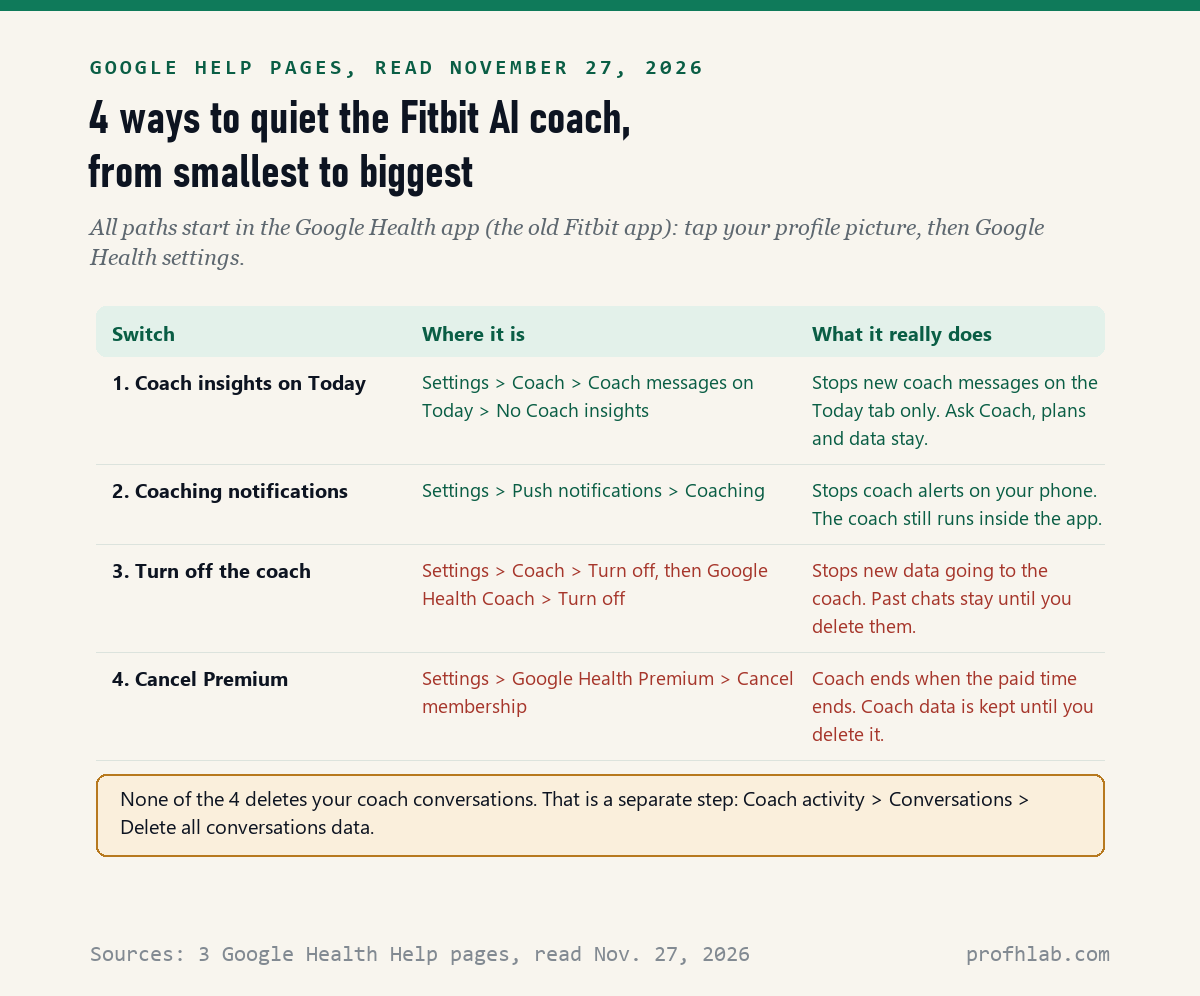
You can turn off the AI on a Fitbit in 4 steps of different size: on November 27, 2026, we read Google’s three help pages for the Google Health Coach, the Gemini-built AI coach in the Google Health app (the app that used to be called Fitbit), and counted 4 switches. None of the 4 deletes the chats you already had with the coach; that takes one more step, shown below.
The AI part of a Fitbit lives in the phone app, not on your wrist. The band or watch keeps counting steps, sleep and heart rate either way. So turning off the AI means telling the app to stop coaching, stop messaging you, or stop billing you for the coach.
What we checked on November 27, 2026
We read three Google Health Help pages in full: “Get started with the Google Health Coach,” “Manage your Google Health Coach data & personalization” and “Cancel your Google Health Premium subscription.” We also read Google’s “Sign up or manage your Google Health Premium subscription” page and Google’s blog post of May 7, 2026, for prices and trial terms. We counted every off switch and every sentence about what happens to your data.
We did not tap through the app on a paired Fitbit for this guide. Every menu name below is Google’s own wording on those pages, and Google says features change. The first-year cost table is our own math from Google’s published prices.
Written and checked by Prof. H. An AI assistant helped draft this article and ran the page reads; every quote was read on the source’s own page on the date shown.
Can you turn off the AI coach on a Fitbit completely?
Yes: Google’s “Get started with the Google Health Coach” page, read on November 27, 2026, gives a full “Turn off” for the coach, and the data page says that once it is off, “your data stops being collected or processed for these features moving forward.”
Think of the coach as a personal trainer who reads your fitness diary. Turning it off sends the trainer home. Your diary, meaning your steps, sleep and heart rate, stays in the app.
Here are the steps from that page, one at a time:
- Open the Google Health app on your phone.
- At the top right, tap your profile picture or initial.
- Tap Google Health settings, then Coach.
- Scroll down, then tap Turn off, and tap Turn off again to confirm.
- On the “Feature privacy controls” page, tap Google Health Coach, then Turn off, then Turn off.
One honest note. Google’s second page, the data page, describes the same switch in shorter words: Google Health settings, then “Coach/Coaching,” then On, then Turn off. The two pages differ a little, so if your screen says Coaching instead of Coach, you are in the right place.
How do I stop the coach messages but keep the Premium sleep features?
Pick “No Coach insights”: Google’s help page, read on November 27, 2026, says this setting hides new coach messages on the Today tab but does not “disable Ask Coach” or turn off the coach’s work in the Sleep and Fitness tabs.
- Open the Google Health app and tap your profile picture.
- Tap Google Health settings, then Coach.
- Under “Coach messages on Today,” choose No Coach insights.
- Tap the Back arrow to save.
This is the right switch if the morning sleep report and evening recap feel like nagging, but you still want a plan when you ask for one. Google’s page also says it only affects messages “moving forward.” Old messages stay where they are.
For phone alerts, there is a separate switch. The data page says to go to your profile picture, Settings, Push notifications, then Coaching, and turn it off. Google notes that some coach notifications “may include health and wellness data,” which matters if other people can see your lock screen.
Does turning off Google Health Coach delete my data?
No: Google’s data page, read on November 27, 2026, says revoking consent “does not automatically remove that information from the conversation history,” and instead tells you to delete conversations in your chat history yourself.
This is the step most guides skip. To erase everything you typed or said to the coach:
- In the Google Health app, tap your profile picture, then Google Health settings.
- Tap Manage data and privacy, then Manage your data, then Coach activity.
- Tap Conversations, then Delete all conversations data.
To delete one chat instead, tap Ask Coach, then History, find the chat, and tap More, then Delete. The cancel page adds one more fact: after Premium expires, “the data in the Google Health Coach is still retained” until you delete it by hand.
The two-minute version for a parent’s phone
Open Google Health, tap the profile picture, then Google Health settings. Turn the coach off under Coach. Then go back to Google Health settings, open Manage data and privacy, Manage your data, Coach activity, and delete all conversations. If the gift came with a free trial, open Google Health Premium in the same settings and cancel it, so no $9.99 charge shows up later.
What does the Fitbit AI coach see about me?
Almost everything in your account: Google’s data page, read on November 27, 2026, says enabling the coach gives it “access to all health and activity data associated with your account,” including sleep, heart rate, weight and cycle tracking.
The same page lists more sources. It names your name, age, height, weight and sex from your profile, chat and voice conversations with the coach, medical records you choose to sync, data from linked apps, and anything you log by hand.
Location is its own case. Google says the app may collect a coarse location, such as city and state, “even when you aren’t actively using” the coach, and deletes it after 30 days. To stop it, set the Google Health app’s location permission to “Don’t allow” on Android or “Never” on an iPhone.
On people reading your chats, Google says human review happens in two cases only: when you send feedback on a conversation, or when you give separate consent to research use. So the simple rule is: do not tap the feedback button on a chat you want kept private.
On ads, Google’s May 7, 2026 blog post says Google “committed to not use Fitbit users’ health and wellness data for Google Ads,” and that it will keep that commitment under the new Google Health name.
“How to use the personal health coach in the Google Health app” from Google’s own Google Help channel (2.9 million subscribers), posted May 19, 2026; 33,309 views when we checked on November 27, 2026. It runs about 2 minutes and shows the coach’s screens, so you can recognize what you are turning off.
Will a gift Fitbit start charging $9.99 after the free trial?
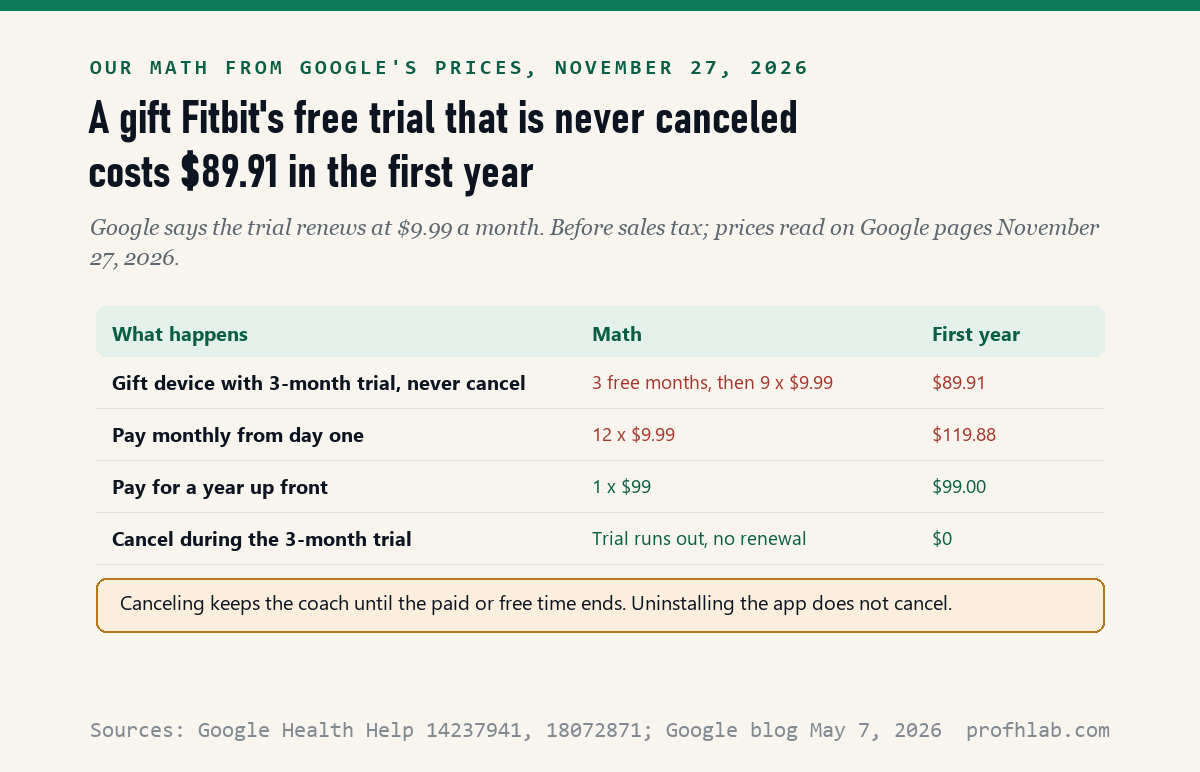
Yes, unless someone cancels: Google’s Premium help page, read on November 27, 2026, says the 3-month trial needs a valid payment method and “will automatically renew at $9.99/mo, but you can cancel at any time.”
The coach is part of Google Health Premium. Google’s help page says the coach “requires a Google Health Premium subscription,” and Google’s May 7, 2026 blog post prices Premium at $9.99 a month or $99 a year. Our math, before tax: a trial that is never canceled costs 9 months at $9.99, or $89.91, in the first year.
Canceling during the trial does not cut it short. Google’s cancel page says you keep “the remaining trial or subscription until it expires.” So the safe move is to cancel on day one and enjoy the 3 months anyway.
Two traps are worth knowing. Google says a 1-month trial, once started, “cannot be cancelled,” but it simply ends with no renewal. And starting a 1-month trial cancels the person’s eligibility for the 3-month one.
How do I cancel Google Health Premium on Android, iPhone or the Google Store?
Start where you paid: Google’s cancel page, read on November 27, 2026, says to check your email receipt to see which store bills you, because “Uninstalling the Google Health app will not cancel your subscription.”
- Bought in the app (Android or iPhone): open Google Health, tap your profile picture, then Google Health settings, then Google Health Premium, and tap Cancel membership at the bottom. Google sends you to the Play Store or App Store to confirm.
- Bought on the Google Store: go to store.google.com/subscriptions, choose Google Health Premium, and click Cancel subscription, then Confirm.
- Paid with PayPal: if the subscription does not show in the store, cancel the recurring payment in your PayPal account.
- Got it with Google AI Pro or Ultra: Google includes Premium at no extra cost there, so you cannot cancel it alone. You would cancel or downgrade the Google One plan instead.
On refunds, Google’s cancel page says Google “doesn’t give refunds for most Google Play purchases.” Plan to cancel before the renewal date rather than count on money back.
“Meet Google Health Coach” from the Made by Google channel (1.94 million subscribers), posted May 7, 2026; 88,221 views when we checked on November 27, 2026. It is Google’s one-minute introduction, the same day as the blog post that set the $9.99 price.
Who gets the coach at all, and who never sees it?
Only adults with a device and a subscription: Google’s help pages, read on November 27, 2026, say the coach is for people over 18 who have a Fitbit or Pixel Watch, live in one of 37 listed countries including the United States, and pay for Premium.
That means a Fitbit owner on the free tier has no AI coach to turn off. If you never started a trial and never see an Ask Coach button, you can stop here. Your tracker works as it always did.
Google’s getting-started page also says the coach “is AI and can make mistakes” and gives “informational guidance, not medical advice.” If a coach tip conflicts with what your doctor said, the doctor wins.
Six short answers about the Fitbit coach, Gemini and the old Fitbit app
How do I turn off AI on my Fitbit?
Open the Google Health app, tap your profile picture, then Google Health settings, then Coach, and tap Turn off. Google says this stops new data going to the coach. Delete past chats separately under Manage data and privacy, Manage your data, Coach activity.
Can I turn off the Fitbit AI coach and keep Premium?
Yes. Choose No Coach insights under Google Health settings, Coach, Coach messages on Today. Google says that hides coach messages on the Today tab while Premium sleep and fitness features keep working.
How do I turn off Gemini in Google Health on a Fitbit?
The Gemini part of a Fitbit is the Google Health Coach. Google says the coach uses Gemini models but works differently from the Gemini app, so the off switch is the Coach setting in Google Health settings, not a Gemini setting.
How do I cancel Google Health Premium?
In the app, go to Google Health settings, Google Health Premium, and tap Cancel membership. If you bought on the Google Store, use store.google.com/subscriptions. Google says uninstalling the app does not cancel.
Is the Fitbit AI coach free?
No. Google says the coach needs Google Health Premium, priced at 9.99 dollars a month or 99 dollars a year. Some new devices include a free trial, and Google AI Pro and Ultra plans include Premium at no extra cost.
Does the Fitbit app still exist?
Not under that name. Google’s May 7, 2026 blog post says the Fitbit app is now the Google Health app. Your Fitbit band or watch pairs with the Google Health app, and Google’s help pages now call every Fitbit setting by that name.
Other devices in the house with an AI switch
New to all of this? Our Start Here page explains the basics. If a Fitbit came with a new phone or watch this season, these guides use the same “read the official page, count the switches” method:
- How to turn off AI on a Pixel phone and on a Samsung phone
- How to turn off AI on an Apple Watch and on an iPad
- How to turn off Gemini in Google Messages and on the Google keyboard
- How to turn off Gemini on Google Home and how to turn off Alexa+
- How to turn off AI on a Kindle, another common holiday gift
On money: if Premium came bundled with a Google AI plan, read whether Google AI Pro is free with Verizon. Canceling another AI plan works much the same way as in our ChatGPT Plus cancel and refund guide. On privacy, see what is safe to tell an AI chatbot; the same care applies to health chats.
On safety this shopping season, our AI scams guide for seniors, how to tell if a shopping website is fake and whether USPS texts you about a package cover the common traps. If you want to use AI on purpose, start with our ChatGPT guide for beginners over 50.
The Google pages behind every Fitbit step above
- Google Health Help, Get started with the Google Health Coach; read November 27, 2026.
- Google Health Help, Manage your Google Health Coach data & personalization; read November 27, 2026.
- Google Health Help, Cancel your Google Health Premium subscription; read November 27, 2026.
- Google Health Help, Sign up or manage your Google Health Premium subscription; read November 27, 2026.
- Google blog, Google Health Coach is becoming globally available, May 7, 2026; read November 27, 2026.
Prof.’s H Newsletter
One short email a month, with the numbers in it
What actually moved in AI hiring, AI prices, and the scams aimed at older Americans. Counted here, dated, and linked to the source. One email a month, and your address goes nowhere else.