How to Turn Off Copilot in Word: The Switch Exists in 2 of 5 Versions, and Each App Needs Its Own
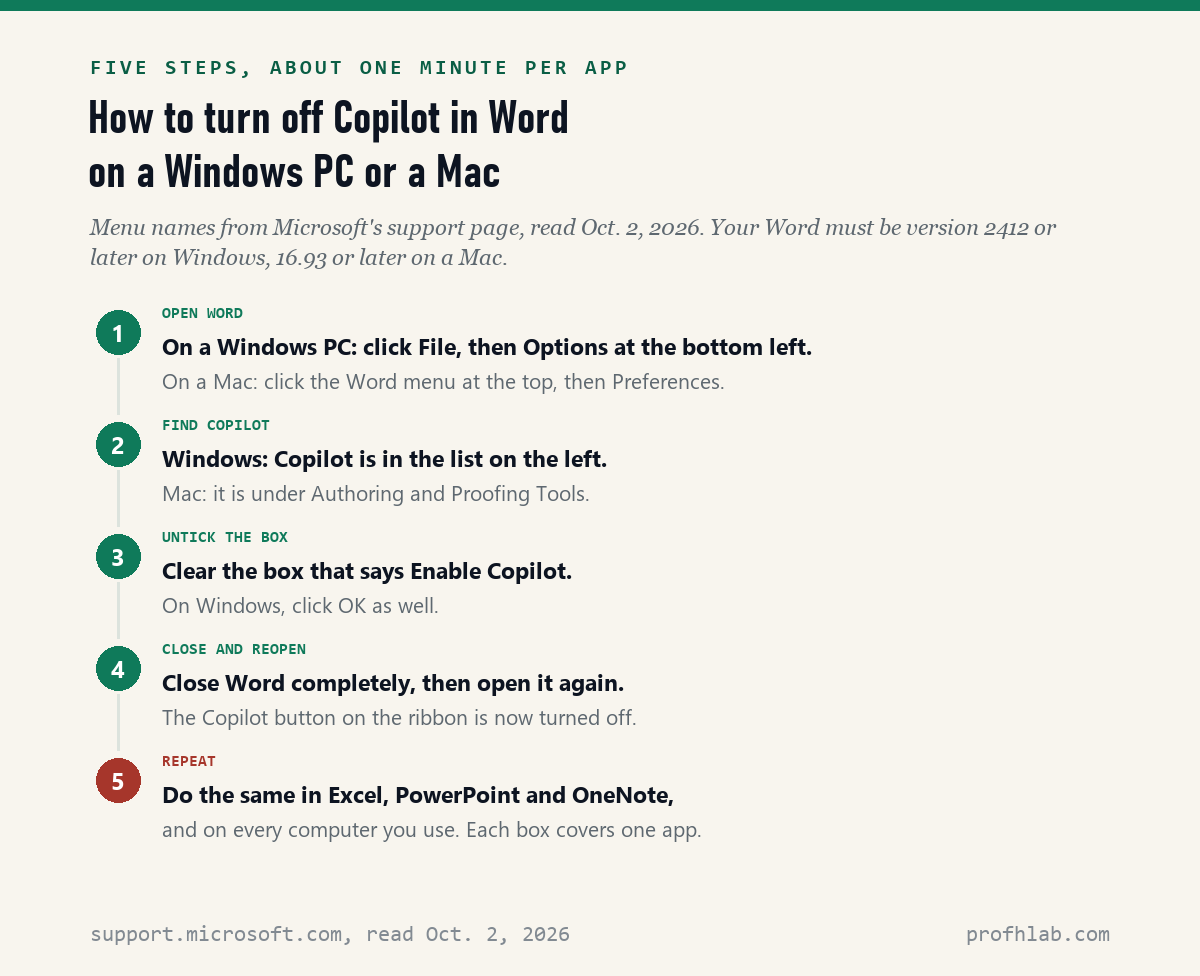
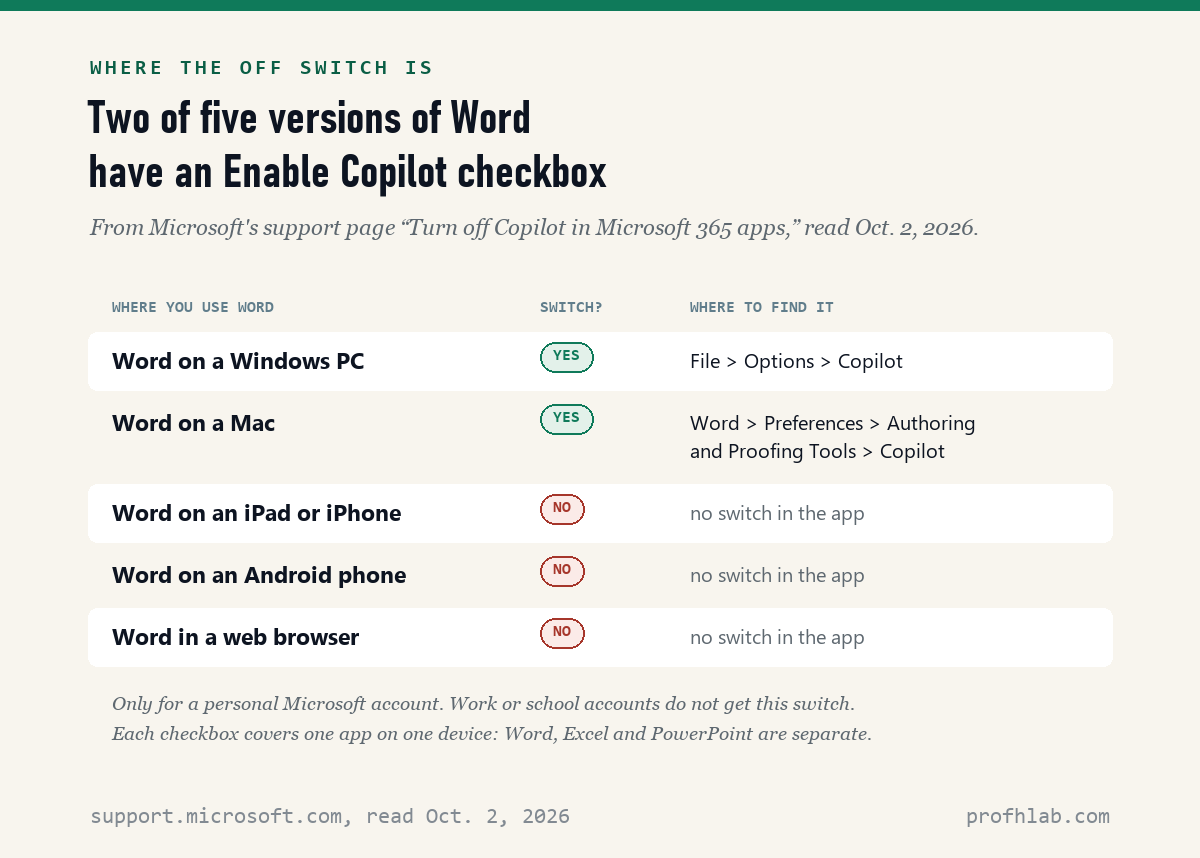
Yes, you can turn off Copilot in Word, but only in 2 of the 5 places Word runs: on October 2, 2026 we read Microsoft’s own support page, and its Enable Copilot checkbox exists only in Word for Windows and Word for Mac. On a Windows PC, go to File, then Options, then Copilot, and clear the box. On a Mac, go to Word, then Preferences, then Authoring and Proofing Tools, then Copilot.
There is a catch that most guides skip. The box turns Copilot off in one app on one computer. Excel, PowerPoint and OneNote each have their own box, and so does every other computer you use.
How we checked this
We read Microsoft’s support page “Turn off Copilot in Microsoft 365 apps” line by line. Then we searched Google for “how to turn off copilot in word” and opened all ten first-page results. Eight opened. Two JustAnswer pages refused our reader, so we count them as unread and quote nothing from them.
For each of the eight, we asked six questions, such as: does it say each app needs its own switch, and does it suggest going back to an older Word? Everything was read on October 2, 2026. We did not test the steps on a Mac or an iPad.
An AI assistant helped draft this article and ran the page reads. Every quotation below was read on the source’s own page on the date shown.
How do I turn off Copilot in Word on a Windows PC?
On a Windows PC, you turn off Copilot in Word with one checkbox under File, then Options, then Copilot, according to Microsoft’s support page read on October 2, 2026. It takes about a minute. Here are the steps in plain words.
- Open Word. Click File at the top left.
- Click Options. It is near the bottom of the list on the left. On some screens you click More first.
- In the window that opens, click Copilot in the list on the left.
- Click the box next to Enable Copilot so the check mark disappears.
- Click OK. Close Word completely, then open it again.
Microsoft says that when you do this, “the Copilot icon on the ribbon is disabled and you won’t be able to use any Copilot capabilities in that app.” The ribbon is the strip of buttons across the top of Word. To turn Copilot back on later, repeat the steps and tick the box again.
How do I turn off Copilot in Word on a Mac?
On a Mac, the same Enable Copilot checkbox sits under Word, then Preferences, then Authoring and Proofing Tools, then Copilot, according to Microsoft’s page read on October 2, 2026. Microsoft calls the Word menu “the app menu.” It is the word “Word” at the top left of your screen, next to the Apple logo.
- Open Word. Click Word in the menu bar at the very top of the screen.
- Click Preferences.
- Under Authoring and Proofing Tools, click Copilot.
- Clear the Enable Copilot box.
- Quit Word completely, then open it again.
Only one of the eight page-one results we read gave this exact Mac path apart from Microsoft: the Transparency Coalition’s guide, published March 6, 2025. Two others said only “Preferences, then Copilot,” which can leave you hunting.
Why can’t I turn off Copilot in Word on my iPad, phone or web browser?
You can’t, because Microsoft has not built a switch there: its support page, read October 2, 2026, says “You can’t turn off Copilot in the iOS, Android, or web versions of Word, Excel, or PowerPoint.” iOS means iPhone and iPad. The web version is Word you open inside Chrome, Edge or Safari.
Microsoft’s page then says that “in the meantime” you can change your privacy settings instead. But the privacy steps it gives are only for Windows and Mac. We did not test whether the privacy setting in the iPad app removes Copilot, so we cannot tell you that it does.
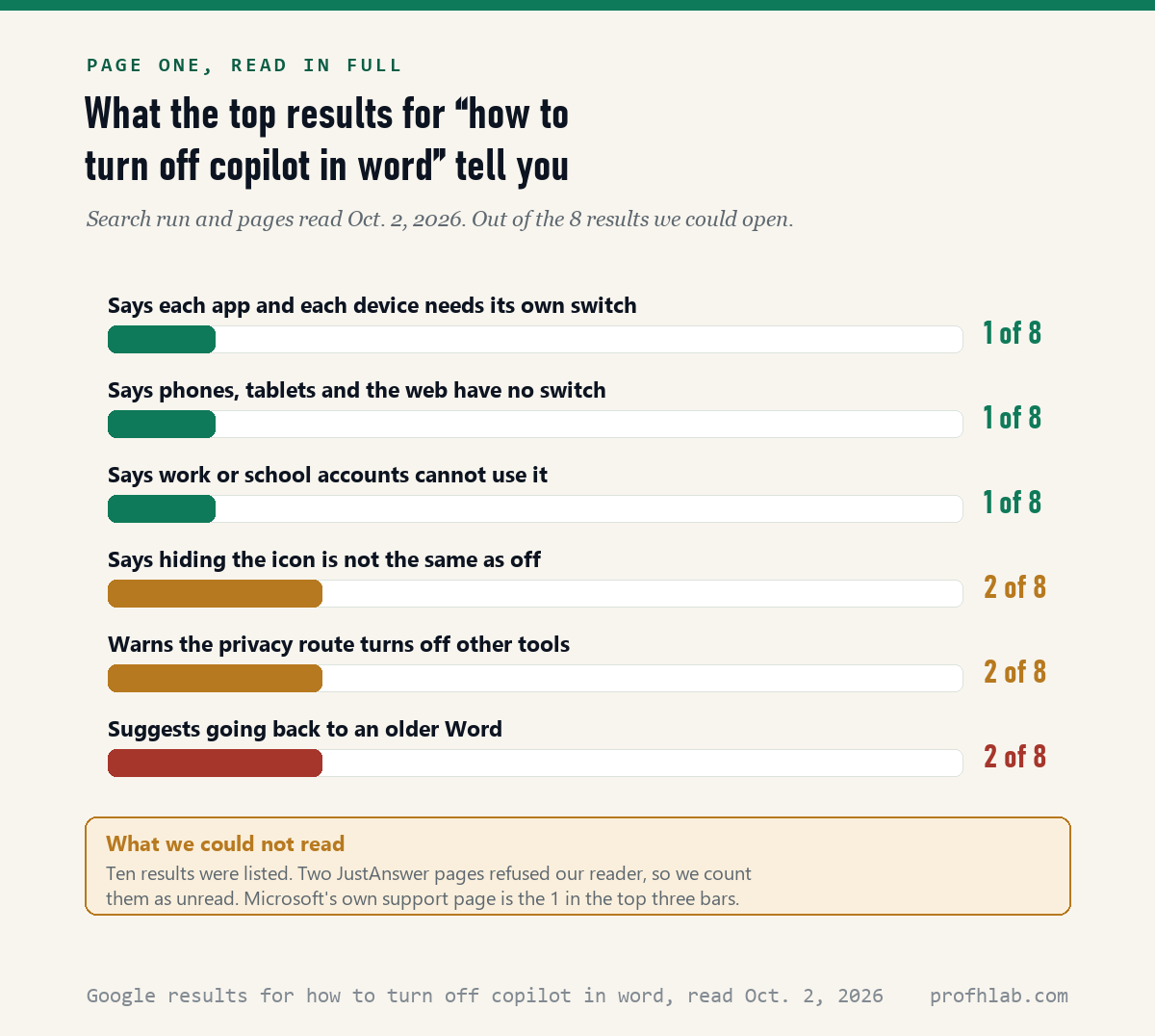
Only one of the eight page-one results says plainly that phones, tablets and the web have no switch, and that one is Microsoft’s page. A second, Edward Mendelson’s personal page, asks readers to tell him if they know a way to disable Copilot in Word in a browser.
Does turning off Copilot in Word also turn it off in Excel and PowerPoint?
No: Microsoft’s page, read October 2, 2026, says the checkbox “only applies to that app on that device,” so Word, Excel, PowerPoint and OneNote each need their own. If you have two computers, you do it on both. Microsoft adds that turning it off on a device turns it off “for anybody using that device.”
Here is our own count for a common household. A Windows PC with Word, Excel, PowerPoint and OneNote has 4 boxes to clear. Add a Mac laptop with Word, Excel and PowerPoint, and that is 3 more. That is 7 checkboxes in total, and none of them affects the others.
Outlook works differently. It has a “Turn on Copilot” toggle, and Microsoft says that choice follows your account to all your devices. Our guide to turning off AI in Outlook walks through it.
Our count, October 2, 2026: only 1 of the 8 page-one results we read says that each app and each device needs its own switch. It is Microsoft’s page. One more, the Transparency Coalition’s guide, says each app needs its own switch, but not each computer.
What if there is no Enable Copilot checkbox in my Word?
If the box is missing, the most likely reason is an older copy of Word or a work account: Microsoft’s page, read October 2, 2026, lists Word version 2412 on Windows and 16.93 on a Mac as the first versions with the box, as of March 13, 2025. Older copies need an update first.
To see your version on Windows, go to File, then Account, and look under Product Information. To update, choose Update Options, then Update Now, as Microsoft’s update page describes. On a Mac, click Word, then About Word, to see the version, and Help, then Check for Updates, to update.
The second reason is your account. Microsoft says the settings “aren’t available if you’re signed in with a work or school account.” If Word came from your job or a school, the decision belongs to its IT staff. Only 1 of the 8 results we read mentions this, and again it is Microsoft’s page.
Some people report the box vanishing after an update. A Microsoft Q&A post dated March 18, 2026 says “the check box in Options is no longer there.” Edward Mendelson’s page tells Mac users to wait for a version of Word “that allows you to disable Copilot.” We could not test either report. Microsoft’s page, read October 2, 2026, still lists the box.

Is there another way to turn off Copilot if the checkbox is not there?
Yes, Microsoft gives a second route through privacy settings, but its page, read October 2, 2026, warns it also switches off other tools, such as “text predictions in Word, PowerPoint Designer, and automatic alt text for images.” Use it only if the checkbox is missing.
On Windows: File, then Account, then Account Privacy, then Manage Settings. Under Connected experiences, clear “Turn on experiences that analyze your content.” On a Mac: Word, then Preferences, then Privacy, then Manage Connected Experiences, and clear the same box. Microsoft says you only need to do this in one app.
Only 2 of the 8 results we read mention what you lose this way. One guide tells readers to clear this box as an extra step after the checkbox, with no warning about text predictions or Designer.
Is hiding the Copilot button the same as turning it off?
No: Microsoft’s page, read October 2, 2026, says removing the Copilot icon from the ribbon “doesn’t turn off Copilot; you can still access Copilot through other methods, such as the shortcut menu.” The shortcut menu is what pops up when you right-click. Hiding the button only hides the button.
Only 2 of the 8 results we read make this point. If you just want a cleaner screen and do not mind Copilot being there, hiding the button is fine. If you do not want Copilot to work at all in Word, use the Enable Copilot checkbox.
Should I go back to an older version of Word to get rid of Copilot?
We would not: 2 of the 8 page-one results we read on October 2, 2026 suggest installing an older Word and turning off automatic updates, but that also stops security fixes. Since Word version 2412 on Windows and 16.93 on a Mac, the checkbox does the job.
The older-version advice began in late 2024, when Word for Windows had no switch. A Microsoft Q&A thread from November 1, 2024 shows the anger: the page counted “100+” people with the same question and 347 answers when we read it. The person who asked later edited the post to say the switch had arrived.
This is our opinion, not Microsoft’s. An out-of-date Word is a bigger risk for most people than a button they can switch off. If you have already turned off updates, turn them back on.
What do the top Google results for this question leave out?
Most of them leave out the limits: of the 8 first-page results we could read on October 2, 2026, only Microsoft’s own page gives all three warnings, that each app and device needs its own switch, that phones, tablets and the web have none, and that work accounts cannot use it.
The other seven were four Microsoft forum threads, a personal web page, a newsletter post and an advocacy group’s guide. All four threads have answers from late 2024 or early 2025. They give the Windows steps well. None of the seven explains what happens on an iPad or a second computer.
Does turning off Copilot in Word lower my Microsoft 365 bill?
No, because the checkbox is a setting, not a plan change: a Microsoft moderator’s answer on Microsoft Q&A, dated January 21, 2025, says that if you want a plan without Copilot, there is Microsoft 365 Basic, Office Home 2024, or the Personal Classic and Family Classic plans.
We did not check today’s prices for this article. Our guide on how to get Microsoft 365 without Copilot walks through those plans and what each keeps.
Hiding the Copilot button from Word’s ribbon, shown step by step
Where the Enable Copilot box is, and where it is missing
How do I turn off Copilot in Word?
On Windows: File, Options, Copilot, then clear Enable Copilot and restart Word. On a Mac: Word, Preferences, Authoring and Proofing Tools, Copilot, then clear Enable Copilot and restart.
How do I turn off Copilot in Word on a Mac?
Click Word in the top menu bar, then Preferences, then Copilot under Authoring and Proofing Tools. Clear Enable Copilot and quit Word. You need Word version 16.93 or later.
Can I turn off Copilot in Word on my iPad?
Not with a switch. Microsoft says you can’t turn off Copilot in the iOS, Android or web versions of Word, Excel or PowerPoint.
Can I turn off Copilot in Word and Excel at the same time?
Not with the checkbox. Each app has its own box, and each box covers only that app on that computer. The privacy-settings route covers all the apps at once, but it also turns off other tools.
Why is there no Copilot option in my Word settings?
Usually your Word is older than version 2412 on Windows or 16.93 on a Mac, or you are signed in with a work or school account. Update Word first. If it is a work account, ask your IT staff.
Copilot lives in more than Word: Outlook, Windows 11 and phones
Copilot lives in more than Word. To switch it off elsewhere, see how to turn off AI in Outlook and how to remove Copilot from Windows 11. Still on an older PC? Read how to keep using Windows 10 safely.
Other apps added AI too. We have guides for Chrome, Gmail, Zoom, LinkedIn and Google Photos. On a phone, start with how to get rid of AI on your phone or turning off iPhone summaries.
If you would rather use AI on your own terms, try writing a letter with ChatGPT or getting help with Excel formulas. Before you paste anything private, read whether it is safe to upload medical records.
New to all of this? Begin at Start Here, try ChatGPT for the first time after 50, or see the AI tools we rate for seniors. Send a question on the Ask page. Our method is at How We Count.
Microsoft’s version list and the Q&A threads we checked
- Microsoft Support, Turn off Copilot in Microsoft 365 apps (version list dated “as of March 13, 2025”; Outlook section “as of June 3, 2025”). Read October 2, 2026.
- Microsoft Support, Install Office updates and What version of Office am I using? Read October 2, 2026.
- Microsoft Q&A, uninstall copilot, moderator answer dated January 21, 2025. Read October 2, 2026.
- Microsoft Q&A, How to disable or remove Copilot from Word, question dated November 1, 2024. Read October 2, 2026.
- Microsoft Q&A, How do I turn off Copilot in MS Word on Mac? Read October 2, 2026.
- Microsoft Q&A, CoPilot keeps coming back in Word, question dated March 18, 2026. Read October 2, 2026.
- Microsoft Tech Community, How do I turn off Copilot in Word documents? Read October 2, 2026.
- Transparency Coalition, How to disable AI Copilot in Microsoft Word, published March 6, 2025. Read October 2, 2026.
- Edward Mendelson, How to disable Copilot in Microsoft Word (no date shown). Read October 2, 2026.
- That White Paper Guy (Substack), Turn off Copilot + cover what people already tried, March 13, 2025. Read October 2, 2026.
- Google first-page results for “how to turn off copilot in word,” ten listed October 2, 2026: eight opened and read; two JustAnswer pages refused our reader and are counted as unread.
This page describes what Microsoft’s pages and public forum posts say; menu names can change after an update. If Word came from your job or school, follow your IT team’s rules. Corrections and questions go to the Ask page.
Prof.’s H Newsletter
One short email a month, with the numbers in it
What actually moved in AI hiring, AI prices, and the scams aimed at older Americans. Counted here, dated, and linked to the source. One email a month, and your address goes nowhere else.