How to Turn Off Gemini in Google Messages: 1 Switch Hides It, and the 1 AI Feature to Keep On
You can hide Gemini in Google Messages with 1 switch: on October 23, 2026, Google’s help page told us to tap your profile picture, then Messages settings, then Gemini in Messages, and turn off Show Gemini button. That hides the chat button. It does not erase your old Gemini chat, which is a separate step, and it leaves 8 other AI features in the app.
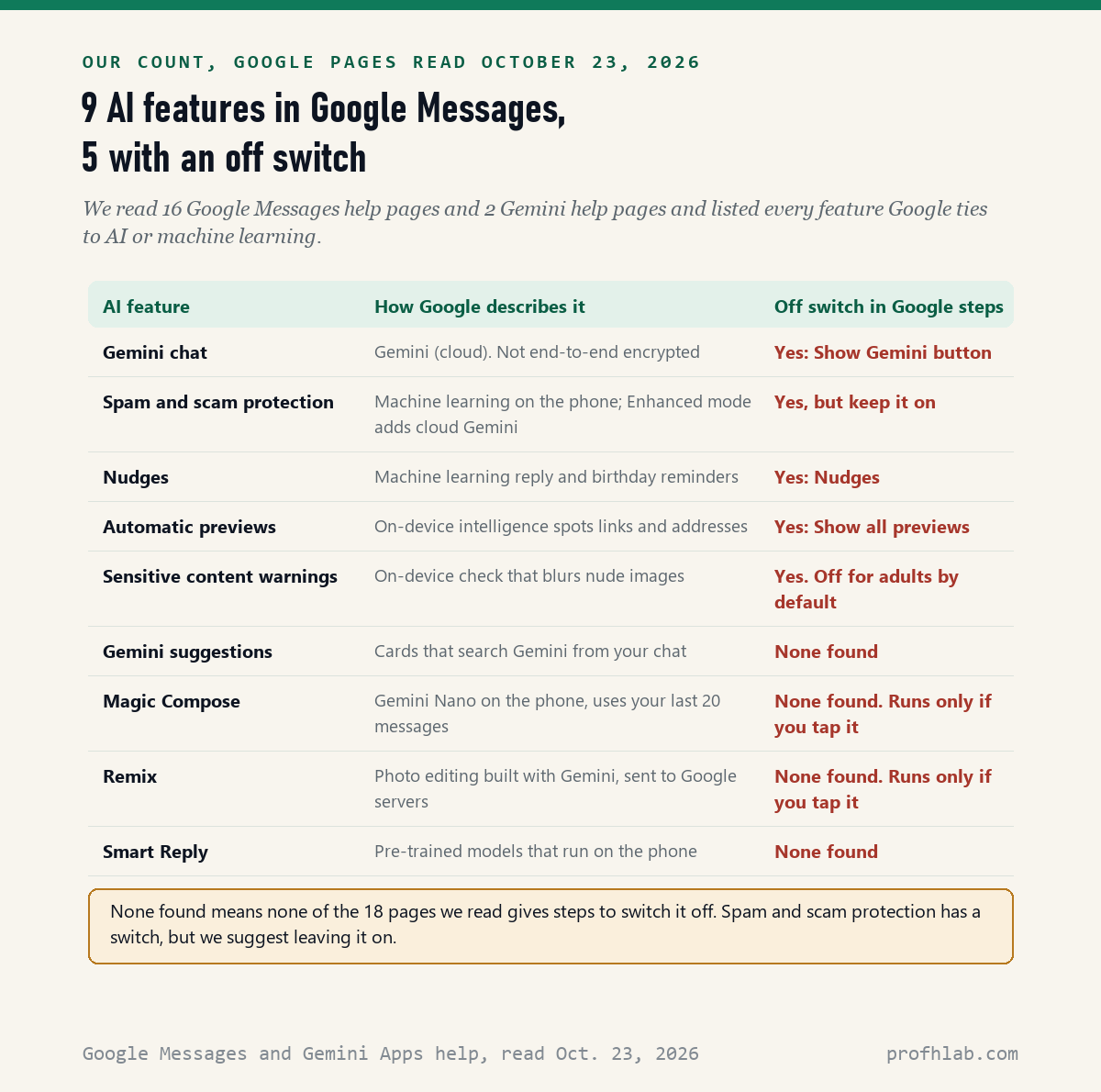
We counted those features ourselves from Google’s pages. Most are harmless and some you can switch off too. One of them, spam and scam protection, is the AI feature we suggest you keep, because it is the one that hides scam texts before you read them.
What we checked on October 23, 2026
We read 18 Google help pages: 16 from the Google Messages Help Center (including Use Gemini in Google Messages, Draft messages with Magic Compose, Generate images with Remix, the spam and scam protection privacy page, Nudges, automatic previews, sensitive content warnings and the privacy basics page) and 2 from the Gemini Apps Help Center (Connected Apps, and Manage or delete the Gemini app on your Android device).
Our own count: Google ties 9 features in Messages to AI or machine learning. The pages give off-switch steps for 5 of them and none for 4. We read the pages; we did not test every Android phone, and Samsung menus can use different names.
Written and checked by Prof. H. An AI assistant helped draft this article and ran the page reads; every quote was read on the source’s own page on the date shown.
Where is the switch that hides Gemini in Google Messages?
The switch is called Show Gemini button, and Google’s page “Use Gemini in Google Messages,” read on October 23, 2026, lists it under a heading that says Disable Gemini in Google Messages. These are Google’s 3 steps:
- Open Google Messages.
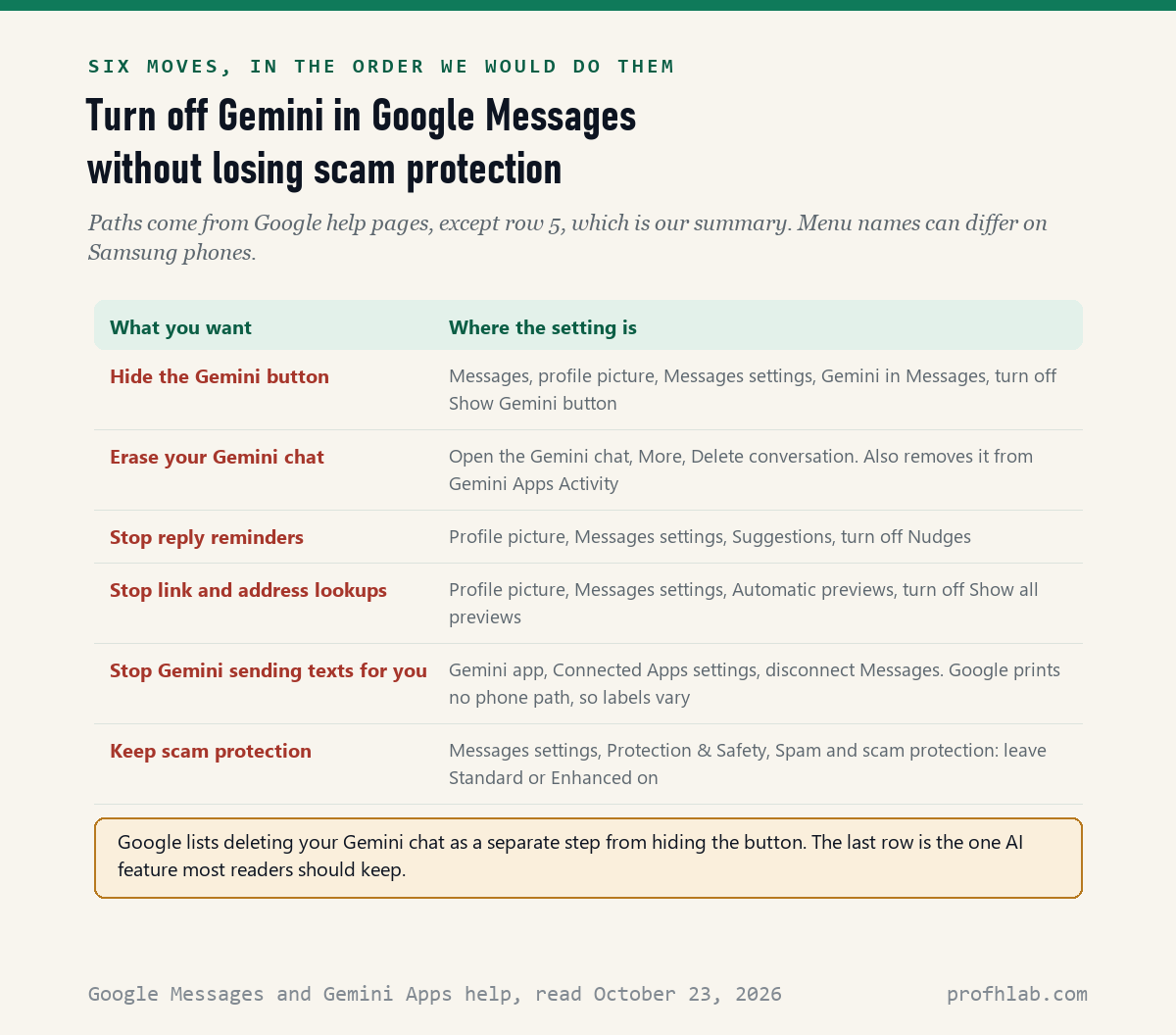
- At the top, tap your profile picture or initials, then Messages settings, then Gemini in Messages.
- Turn off Show Gemini button.
Think of the Gemini button like a doorbell someone installed on your front door. The switch takes the doorbell down. It does not clear out the notes the last visitor left, so do the next step too if you ever chatted with Gemini.
If you do not see Gemini in Messages in your settings, you may never have had Gemini in the app. The same page says Gemini in Messages needs an Android phone, a personal Google Account, RCS chats turned on, and an age of 18 or over.
How do I delete my old chat with Gemini?
Open your chat with Gemini, tap More at the top, then tap Delete conversation; Google’s help page, read on October 23, 2026, says this deletes the chat from both Google Messages and your Gemini Apps Activity. Google lists it as a separate step from hiding the button.
Google’s page explains a trap that goes the other way. If you delete the chat only from Gemini Apps Activity on the web, it stays in Google Messages and in any Android backup of your messages. Deleting inside Messages is the one move that clears both places.
Two more facts from that page are worth knowing before you decide. Google says plainly that “Chats with Gemini aren’t end-to-end encrypted,” unlike your regular chats with other Google Messages users. And in Messages you can only delete the whole Gemini chat at once.
The practical rule: do not type medical details, account numbers or passwords into the Gemini chat. Your texts with family are a different conversation and are not affected by any of these steps.
Is Gemini reading my text messages?
Not your regular texts by default, according to Google: its Gemini suggestions page, read on October 23, 2026, says suggestions are made “by technology that’s built into your device” and that your conversations are not sent to Gemini or Google servers. Only a search term goes to Gemini if you tap a suggestion.
There are 3 exceptions where your words do leave the phone, and all 3 start with something you do:
- The Gemini chat itself. Whatever you type there goes to Gemini.
- Remix. Google’s Remix page says your prompt and photos are “temporarily stored and processed by Google servers.”
- Screen context. The suggestions page notes that Gemini can read what is on your screen if you use an option called “Use screen context.”
Magic Compose, the button that writes a reply for you, works differently. Google’s Magic Compose page says it runs on a model called Gemini Nano on the phone, uses your 20 previous messages for context, and that no messages are sent to Google. It only runs when you tap it in the plus menu.
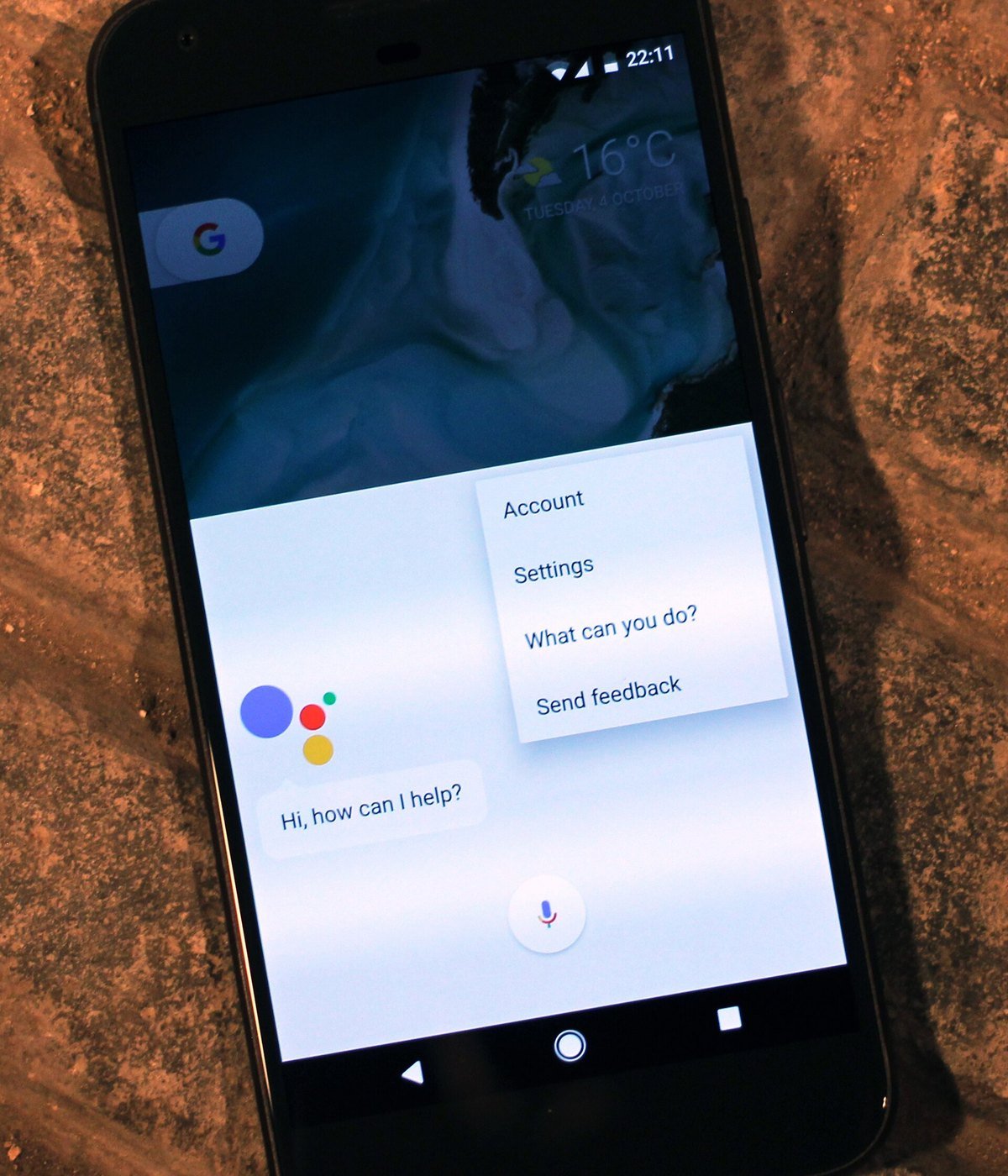
Gemini can also send texts from outside the Messages app
The Gemini app on your phone can send texts through your messaging app, and Google’s Connected Apps page, read on October 23, 2026, says this works “even when Keep Activity is off.” Nothing on Google’s Messages page says hiding the button changes this, so treat it as a separate setting.
If you never want Gemini to text anyone for you, open the Gemini app, find its Connected Apps settings, and disconnect Messages. Google’s page says you can connect or disconnect apps at any time. It prints the steps for a computer, not for a phone, so your labels may differ.
If you want Gemini out of the way on the whole phone, Google’s page “Manage or delete the Gemini app on your Android device” gives the bigger switch. Open the phone’s Settings, tap Apps, then Default apps, then Digital assistant app, and pick a different assistant or None.
The same page warns that deleting the Gemini app does not by itself remove Gemini as your default assistant. Change the default first. Our guide to what Gemini is on an Android phone walks through the power button and “Hey Google” settings.
The one AI feature in Messages we would leave on
Spam and scam protection is AI, and Google’s privacy page for it, read on October 23, 2026, says it is on by default in standard mode and can move suspected scams into a “Spam & blocked” folder before you read them. Turning it off removes that filter.
Google describes 3 choices: Enhanced protection, Standard protection, or No protection. Standard uses machine learning on your phone. Enhanced can also send message data to what Google calls Private AI Compute, where cloud Gemini models check it. Google says that data stays “not available to anyone else, including Google.”
We cannot check that last claim from the outside, and we say so plainly. Our suggestion is Standard if you want the checks done mostly on the phone (Google says links in messages are still checked with Google), and Enhanced if you or a parent gets many scam texts. Either beats No protection. To find it: profile picture, Messages settings, Protection & Safety, Spam and scam protection.
Scam texts are the reason. If a text says your package is held, your toll is unpaid or your grandson needs bail money, read our guide to AI scams that target older adults and set up a family safe word before you need it.
A note for families. Google’s page says Gemini in Messages does not work with a Google Account managed by Family Link, or for anyone under 18. By Google’s own rules, then, a grandchild whose phone is set up with Family Link should not get the Gemini chat in Messages. Sensitive content warnings, which blur nude images, are on by default for supervised children and teens, and off by default for adults.
Smaller AI helpers in Messages, and how to quiet them
Four of the 9 features are small helpers, and Google gives off steps for 2 of them on pages read October 23, 2026. Nudges are machine-learning reminders to reply or to say happy birthday; turn them off under Messages settings, then Suggestions, then Nudges.
Automatic previews use what Google calls on-device intelligence to spot links and street addresses, then look them up with Google to draw a preview card. Turn them off under Messages settings, then Automatic previews, then Show all previews. Google’s page says those lookups are not linked to your name or number.
The other 2 have no switch on the pages we read. Smart Reply, the short suggested answers, uses “pre-trained models that run entirely on your device,” Google says. Remix only runs when you touch and hold a photo and tap Remix, so if you never tap it, it never runs.
One more tool is helpful rather than nosy. Google Messages can show a “How this was made” section for some photos, which can say “Edited with AI tools.” Touch and hold the photo, tap Info, then scroll to Details. Our guide on how to tell if a picture is AI-generated covers what that label can and cannot prove.
Doug Lynch’s 3-minute button demo and a CBS News report on scam detection
The first video walks through hiding the Gemini button on screen. It is from August 2024, so your menus may look newer. The second is a news report on the scam detection we suggest you keep.
Your checklist for tonight, about 5 minutes
- Messages, profile picture, Messages settings, Gemini in Messages: turn off Show Gemini button.
- If a Gemini chat is in your list, open it, tap More, then Delete conversation.
- Optional: turn off Nudges and Show all previews if they bother you.
- In the Gemini app, disconnect Messages from Connected Apps if you never want Gemini to text for you.
- Check that Spam and scam protection is on Standard or Enhanced, not No protection.
Doing this for a parent? Do it together on their phone, and tell them which feature you left on and why. If your family also uses Gmail or Google Home, our guides to stopping AI in Gmail and turning off Gemini on Google Home follow the same approach.
Other phones and apps where AI showed up this year
- How to turn off AI on a Samsung phone, Galaxy AI and Google’s switches side by side.
- How to turn off AI in Google Maps, where we found no off switch at all.
- Is Meta AI reading my WhatsApp messages? for families who text on WhatsApp.
- How to turn off AI summaries on iPhone, for relatives on Apple phones.
- How to turn off AI in Chrome, the browser on most Android phones.
- Why am I getting so many Medicare calls? and how to stop AI calls on a landline.
- What happens if you say yes on a scam call, for the phone side of the same scams.
- Is it safe to give ChatGPT my personal information? The same caution applies to the Gemini chat.
- How to set up parental controls on ChatGPT, for grandparents helping with a teen’s phone.
New here? Our Start Here page lists every AI for Beginners guide, and the AI Jobs Tracker shows the data we collect ourselves each day. Short answers to common questions are on our FAQ page.
What else do people ask about Gemini in Google Messages?
Can I turn off Gemini in Google Messages?
Yes. On October 23, 2026, Google’s help page gave the steps: profile picture, Messages settings, Gemini in Messages, then turn off Show Gemini button. That hides the button. Delete your old Gemini chat separately.
How do I remove Gemini from my text messages?
Hide the button with Show Gemini button, then open the Gemini chat, tap More and tap Delete conversation. Google says that removes the chat from Messages and from your Gemini Apps Activity.
Does turning off Gemini in Messages turn off scam detection?
No. Spam and scam protection is a separate setting under Protection and Safety. Google says it is on by default in standard mode. We suggest leaving it on.
Why is Gemini missing from my Google Messages?
Google’s page lists the requirements: an Android phone, a personal Google Account, RCS chats on, age 18 or over, and not a Family Link or Workspace account. Gemini in Messages is also released gradually.
Are my chats with Gemini private?
Less than your regular texts. Google’s page says chats with Gemini are not end-to-end encrypted. Do not type medical details, passwords or account numbers into the Gemini chat.
The 18 Google help pages this Messages guide quotes
- Google Messages Help, Use Gemini in Google Messages, read on October 23, 2026.
- Google Messages Help, Your chats stay private with Gemini in Google Messages, read on October 23, 2026.
- Google Messages Help, Draft messages with Magic Compose, read on October 23, 2026.
- Google Messages Help, Generate images with Remix, read on October 23, 2026.
- Google Messages Help, How Google protects your privacy with spam and scam protection, read on October 23, 2026.
- Google Messages Help, Get reminders with Nudges, read on October 23, 2026.
- Google Messages Help, Your chats stay private with automatic previews, read on October 23, 2026.
- Google Messages Help, Understand sensitive content warnings in Google Messages, read on October 23, 2026.
- Google Messages Help, How Google Messages helps you identify how media was made, read on October 23, 2026.
- Google Messages Help, Understand the basics of privacy in Google Messages, read on October 23, 2026.
- Google Messages Help, also read on October 23, 2026: Use Suggested actions, More features in Google Messages, Change Messages notifications and settings, Report spam in Google Messages, Understanding Google Messages Data Safety and Use the + Drawer.
- Gemini Apps Help, Use and manage Connected Apps in Gemini, read on October 23, 2026.
- Gemini Apps Help, Manage or delete the Gemini app on your Android device, read on October 23, 2026.
Featured image: Gabriel Metsu, Man Writing a Letter and Woman Reading a Letter, about 1664 to 1666, public domain, via Wikimedia Commons, cropped.
About the author. Prof. H writes profhlab’s AI for Beginners guides for readers who are new to AI or over 50. Each guide is built from the pages it quotes, read on the date shown. Does your phone show different menu names, or did Google move the switch? Tell us on the Ask page and we will update this guide with a dated correction. More about Prof. H on the About page.
Prof.’s H Newsletter
One short email a month, with the numbers in it
What actually moved in AI hiring, AI prices, and the scams aimed at older Americans. Counted here, dated, and linked to the source. One email a month, and your address goes nowhere else.