How to Turn Off AI on Bing: No Switch in Settings, but 2 Ways Worked in Our 20-Search Test
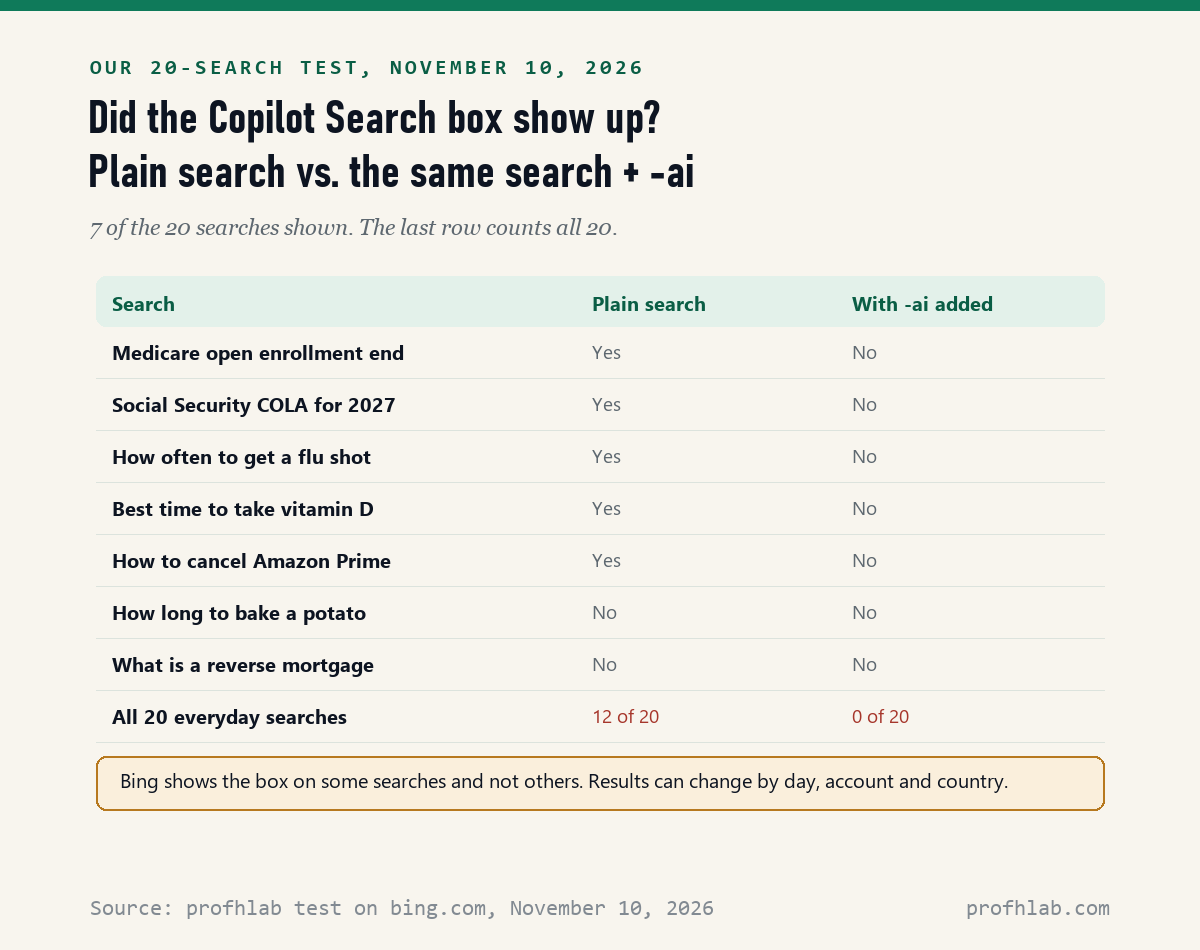
On November 10, 2026, Bing’s settings had no switch for its AI answers, but 2 other ways removed them: typing -ai after a search, or Microsoft’s free Bing AI Search Choice extension. In our test of 20 everyday searches, the Copilot Search box showed up on 12 plain searches and on 0 of the same searches with -ai added.
If Bing keeps putting a long AI answer above the links you wanted, you did nothing wrong. Microsoft added that box, and the off switch older guides describe was gone when we looked. Below is what still works, what each way costs you, and a five-minute setup that makes it stick.
How we tested Bing on November 10, 2026
We opened bing.com in a browser that was not signed in to a Microsoft account, with U.S. English settings. We ran 20 everyday searches twice, once plain and once with -ai at the end, and counted when the Copilot Search box appeared. We also opened every menu and the full Settings page.
We did not test a signed-in Microsoft account, a phone or the Bing app, so those may look different. We read Microsoft’s own store listings for the extension and 10 guides that rank for this question. Two of those 10 blocked our reader.
Written and checked by Prof. H. An AI assistant helped draft this article and ran the page reads; every quote was read on the source’s own page on the date shown.

Can you turn off AI in Bing settings?
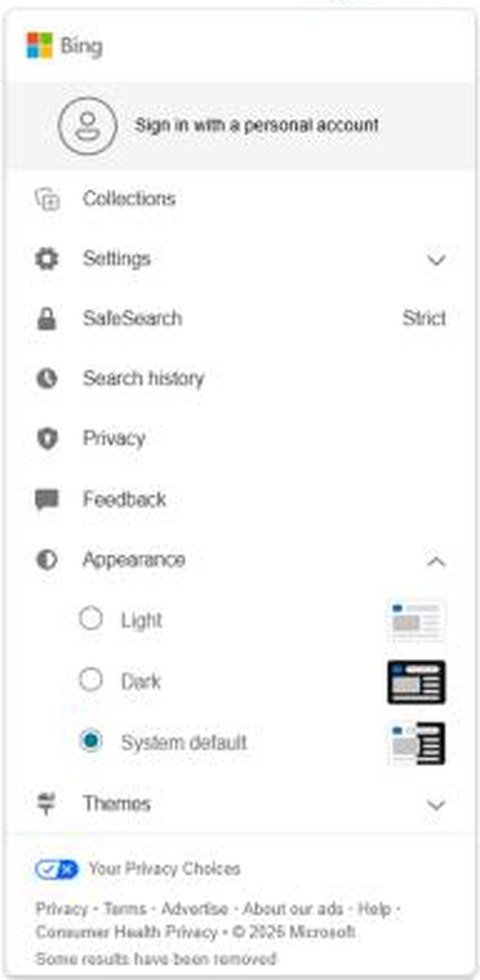
Not in our test: on November 10, 2026, Bing’s full Settings page had 6 sections (Search, Country/Region, Language, Voice, Homepage and Personalization), and none of them had a switch for Copilot or AI answers.
The menu behind the person icon at the top right was the same story. It listed Collections, Settings, SafeSearch, Search history, Privacy, Feedback, Appearance and Themes. We found no Copilot Settings item there.
That matters because 5 of the 8 ranking guides we could read still send you to a switch called “Copilot response on result page.” Search Engine Roundtable reported that switch on May 20, 2024. The Eleven Forum tutorial, last updated November 1, 2026, now says that setting “is no longer available.”
On Microsoft’s own Q&A site, a volunteer Independent Advisor wrote on June 10, 2026 that Bing “does not provide an option to turn off Copilot answers.” That is a volunteer, not a Microsoft employee. Still, it matches what we saw.
Does adding -ai really turn off Copilot Search on Bing?
Yes, in our test: of 20 everyday searches run on bing.com on November 10, 2026, 12 showed the Copilot Search box, and the same 20 with -ai typed at the end showed it 0 times.

Think of -ai as a note to Bing that says “just the list, please.” Type your question, add a space, then type a minus sign and the letters ai. Search Engine Roundtable reported this trick on June 8, 2026, in its story on Microsoft’s new extension.

There is one catch. Microsoft’s Advanced search options page says the minus sign “excludes webpages that contain a term or phrase.” So -ai can also drop pages that mention AI.
In our 12 searches that had the box, the top site stayed the same in 9. Of the 52 sites in the plain top results, 38 were still in the top five with -ai. For a question about AI itself, skip this trick.
What does Microsoft’s Bing AI Search Choice extension do?
It adds one switch for Bing’s AI answers: Microsoft’s Edge Add-ons listing, read November 10, 2026, says it lets you choose “whether to see AI-generated answers on Bing,” and it also “sets Bing as your default search engine.”
An extension is a small add-on for your web browser. This one is made by Microsoft Corporation, is free, and was marked as a preview when it launched. On November 10, 2026, Microsoft’s Edge listing counted 1,021 users and the Chrome Web Store counted 183.
- Open the store page. In Edge, search the Edge Add-ons site for Microsoft Bing AI Search Choice. In Chrome, use the Chrome Web Store.
- Check the publisher. It should say Microsoft Corporation. Skip look-alikes from anyone else.
- Click Get or Add to Chrome. Then confirm Add extension.
- Find the switch. Microsoft’s store pictures show a small Bing panel with one switch, labeled Enable AI Features.
- Turn that switch off. Then run a search that showed the box before, to check.
Before you click, know the trade. The Chrome listing says it also “opens Bing on every new tab.” If you like Google as your search engine, this extension is the wrong tool. Only 1 of the 8 ranking guides we read named this extension, and none mentioned the default-search change.
Where did the old Copilot switch in Bing go?
We could not find it on November 10, 2026, and Microsoft has not explained the change in any page we read; the switch that Search Engine Roundtable showed on May 20, 2024 was missing from both the menu and the Settings page.
Microsoft’s Michael Schechter gave one clue in June. Search Engine Roundtable quoted him on June 8, 2026 saying the extension “lets the most interested users show us the right path forward.” Our reading of that is an inference: Microsoft may be testing demand before adding a setting.
Here is why so many guides still show the old switch. The 8 guides we could read were dated from May 2024 to November 2026. The oldest ones were written when the switch existed, and some newer ones repeat them. That is nobody’s fault, but it wastes your time.
How do you make every Bing search skip the AI box?
Save a custom search engine whose address ends in -ai: Google’s Chrome help page, read November 10, 2026, says you can add a site search with “%s” where your words go and then choose Make default.
This is our own idea, built from two facts we confirmed. Adding -ai removed the box in all 12 of our searches that had one, and Chrome lets you save a search address. We did not test the same steps in Edge, where the menu wording differs.
- Open Chrome Settings. Click the three dots at the top right, then Settings.
- Open Search engine. Choose Manage search engines and site search.
- Next to Site search, click Add. Name it Bing no AI. Use bnai as the shortcut.
- Paste this address: https://www.bing.com/search?q=%s+-ai
- Click Add. Then find Bing no AI, click its three dots and choose Make default.
Now every search from the address bar ends in -ai without your typing it. The page-dropping catch from the last section still applies. To undo it, pick your old search engine on the same screen.
Is turning off AI on Bing the same as turning off Copilot in Edge?
No: the AI box on Bing’s results page and the Copilot button in Edge or Windows are separate, and on June 10, 2026 the Independent Advisor on Microsoft’s Q&A site pointed Edge users to a different place, Settings, then Copilot and AI.
Think of it as three doors in one house. Bing is the search page. Edge is the browser around it. Windows is the computer under both. Closing one door leaves the others open.
- Edge: our guide to turning off AI in Edge covers the browser’s own Copilot button.
- Windows 11: see removing Copilot from Windows 11.
- Older PCs: read keeping Windows 10 safe after support ends.
A guide from May 2024 and a February 2026 Edge walk-through
We checked both videos on November 10, 2026. The first shows the old Bing switch that we could not find this week, so watch it to recognize outdated advice. The second covers Edge, the browser around Bing.
Our pick for a Bing user who just wants the links
- Today, for one search: type -ai at the end. It costs nothing and changes nothing else.
- If you use Bing every day: set up the Bing no AI address in Chrome, or install Microsoft’s extension if you are happy with Bing as your default.
- For health, money or Medicare questions: click through to the official site, like Medicare.gov or SSA.gov, whatever the box says.
- Every few months: run one test search. Microsoft can change Bing at any time.
Our verdict: -ai is the easiest fix for most readers, and Microsoft’s extension is the cleanest for people already happy with Bing. Do not spend time hunting for the old menu switch.
More help with search engines and the AI inside them
- Other search engines: getting the old Google search back and turning off AI on DuckDuckGo.
- Other browsers: AI in Chrome, AI in Firefox and AI on Safari.
- Microsoft apps: Copilot in Word and AI in Outlook.
- On your phone: getting rid of AI on your phone.
- Staying safe: AI scams that target seniors, spotting a fake shopping site and what is safe to tell a chatbot.
- New to AI? Begin at Start Here, then try our ChatGPT guide for beginners over 50. Curious about jobs in this field? Our AI jobs tracker counts openings every week.
Can you turn off the AI overview on Bing for good?
Can you turn off AI overview on Bing?
Not with a setting, in our November 10, 2026 test. Bing calls its AI overview Copilot Search. Adding -ai cut it from 12 of 20 searches to 0 of 20, and Microsoft’s Bing AI Search Choice extension adds a switch for it.
How do I turn off AI search on Bing?
Type -ai at the end of your search, or install Microsoft’s free Bing AI Search Choice extension and turn off Enable AI Features. Bing’s own Settings page had no AI switch when we checked.
How do I turn off Copilot in Bing search?
The Copilot response on result page switch that older guides describe was missing from Bing on November 10, 2026. Use -ai or the Microsoft extension instead. To turn off the Copilot button in Edge, use Edge’s own settings.
Does the Bing AI Search Choice extension change my search engine?
Yes. Microsoft’s store listings say it sets Bing as your default search engine, and the Chrome listing says it opens Bing on every new tab. If you prefer Google, use -ai on Bing instead.
Is there a Bing without AI?
Not as a separate site. You get Bing without the AI box by adding -ai to a search, by saving a search address that ends in -ai, or by using Microsoft’s extension with its switch turned off.
Does -ai hide pages about AI?
It can. Microsoft says the minus sign excludes pages that contain the word. In our 12 test searches that had an AI box, the top site stayed the same in 9, so most everyday searches change only a little.
Microsoft pages, store listings and the 10 guides we read
- Microsoft, Microsoft Bing AI Search Choice on Edge Add-ons, version 1.0.0.2, 1,021 users, read November 10, 2026.
- Microsoft, Microsoft Bing AI Search Choice on the Chrome Web Store, version 1.0.0.3, updated June 6, 2026, 183 users, read November 10, 2026.
- Microsoft Support, Advanced search options (Bing), read November 10, 2026.
- Microsoft Q&A, Deactivate Copilot on Microsoft Edge/Bing, answer by an Independent Advisor dated June 10, 2026, read November 10, 2026.
- Google, Set your default search engine (Chrome Help), read November 10, 2026.
- Search Engine Roundtable, report on the Bing extension and -ai, June 8, 2026, and report on the 2024 switch, May 20, 2024, both read November 10, 2026.
- Guides read November 10, 2026, with the date each page lists: Pureinfotech (May 20, 2024), Windows Report (September 16, 2025), GeekChamp (May 16, 2026), Eleven Forum (November 1, 2026), TheWindowsClub (July 13, 2026), MacMyths (August 16, 2026) and Geek Rewind (October 14, 2026). WebNots and AllThings.how blocked our reader, so we counted them as unread.
Prof.’s H Newsletter
One short email a month, with the numbers in it
What actually moved in AI hiring, AI prices, and the scams aimed at older Americans. Counted here, dated, and linked to the source. One email a month, and your address goes nowhere else.