How to Keep Using Windows 10 Safely After Support Ends (You Just Got Another Year)
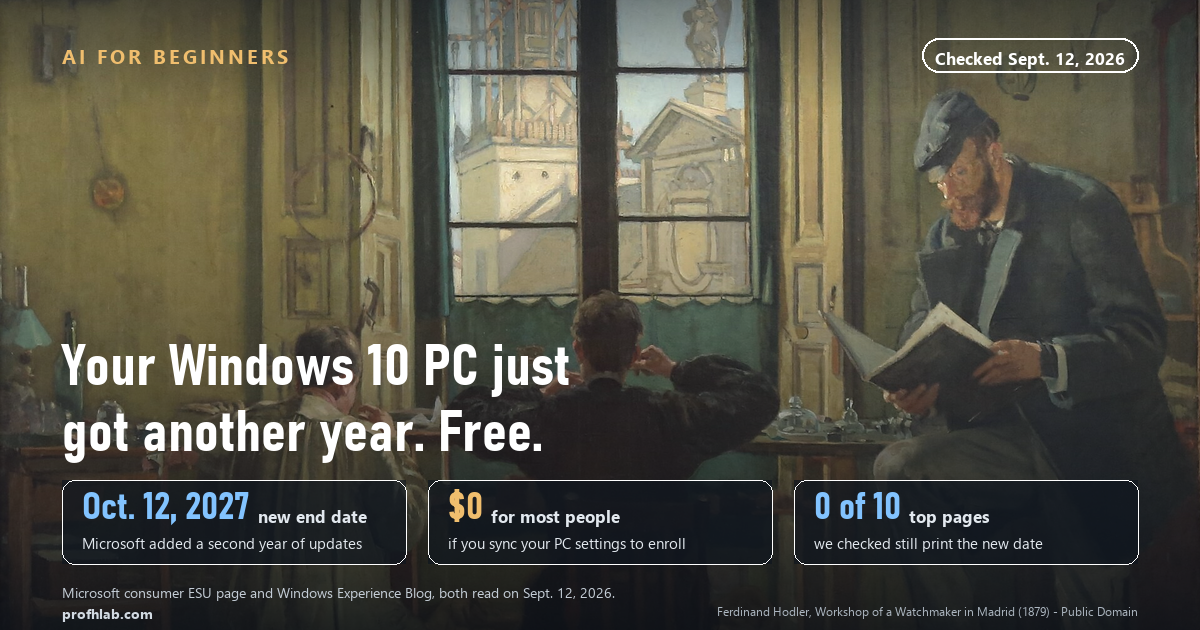
You can keep your Windows 10 computer and keep getting security updates until October 12, 2027 — and for most people it costs nothing. Microsoft added a second free year on June 25, 2026, and the enrollment button is already sitting in your Windows Update screen. You do not need a new computer to be safe this year.
What we checked on September 12, 2026
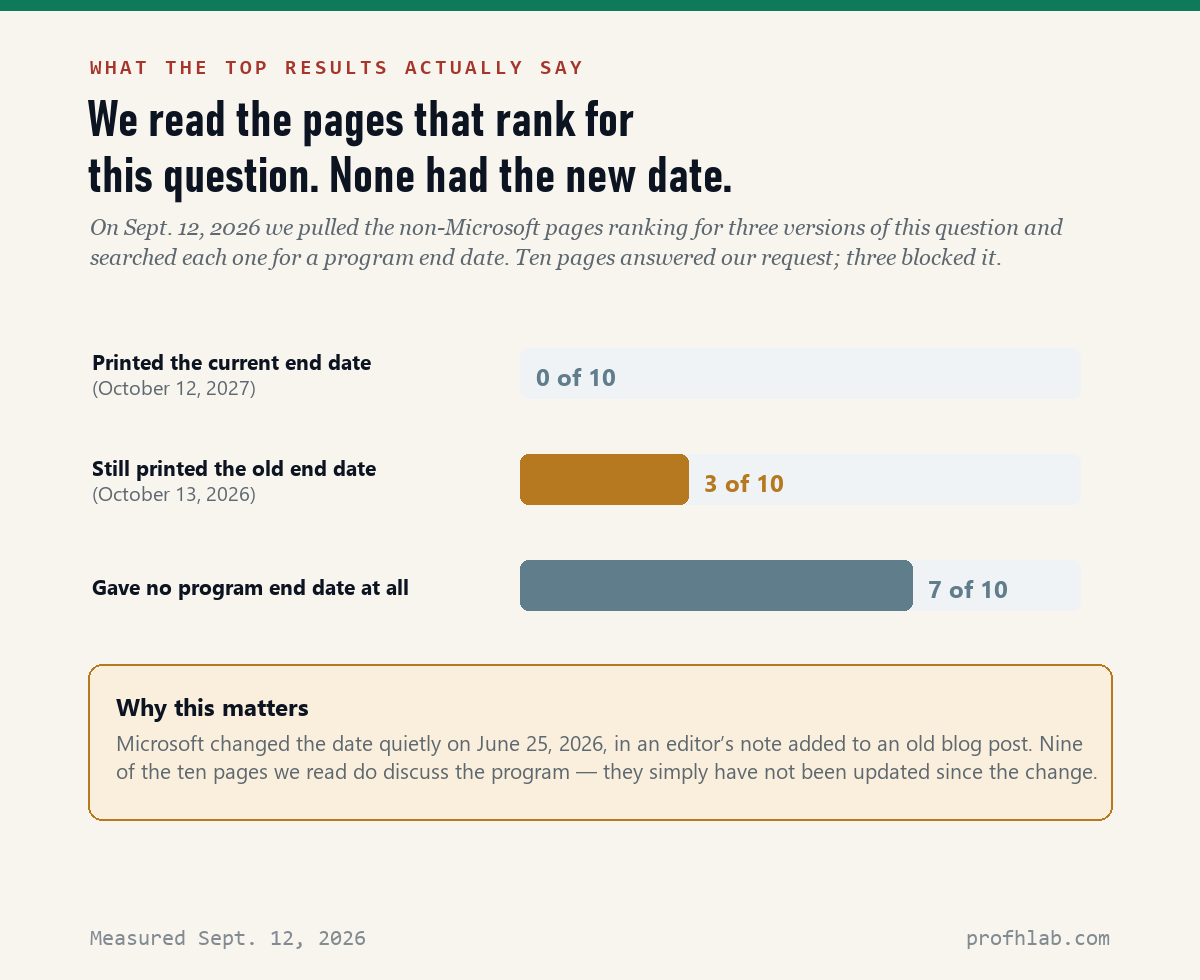
We pulled the non-Microsoft pages that rank for three versions of this question, then searched each page for the program’s end date.
- 0 of 10 pages printed the current end date, October 12, 2027.
- 3 of 10 still printed the old one, October 13, 2026.
- 7 of 10 gave no end date at all, though 9 of 10 discussed the program.
So if you have been reading up on this and came away confused, that is not your fault. The internet has not caught up yet.
First, the thing that scared you is real — and incomplete
If a full-screen message told you your PC “cannot be upgraded to Windows 11” and that you should buy a new one, you did not imagine it. Microsoft really does show that screen.
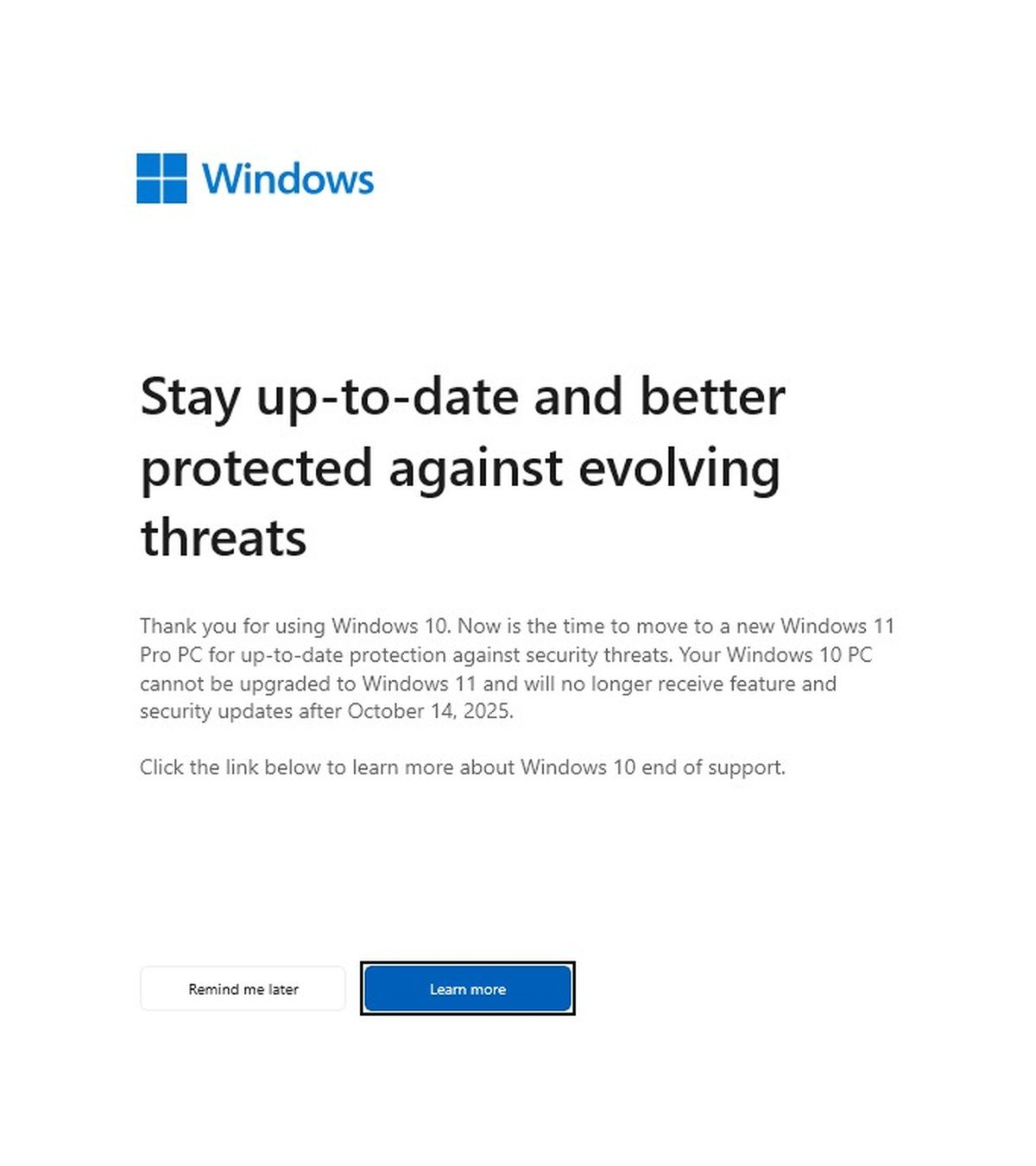
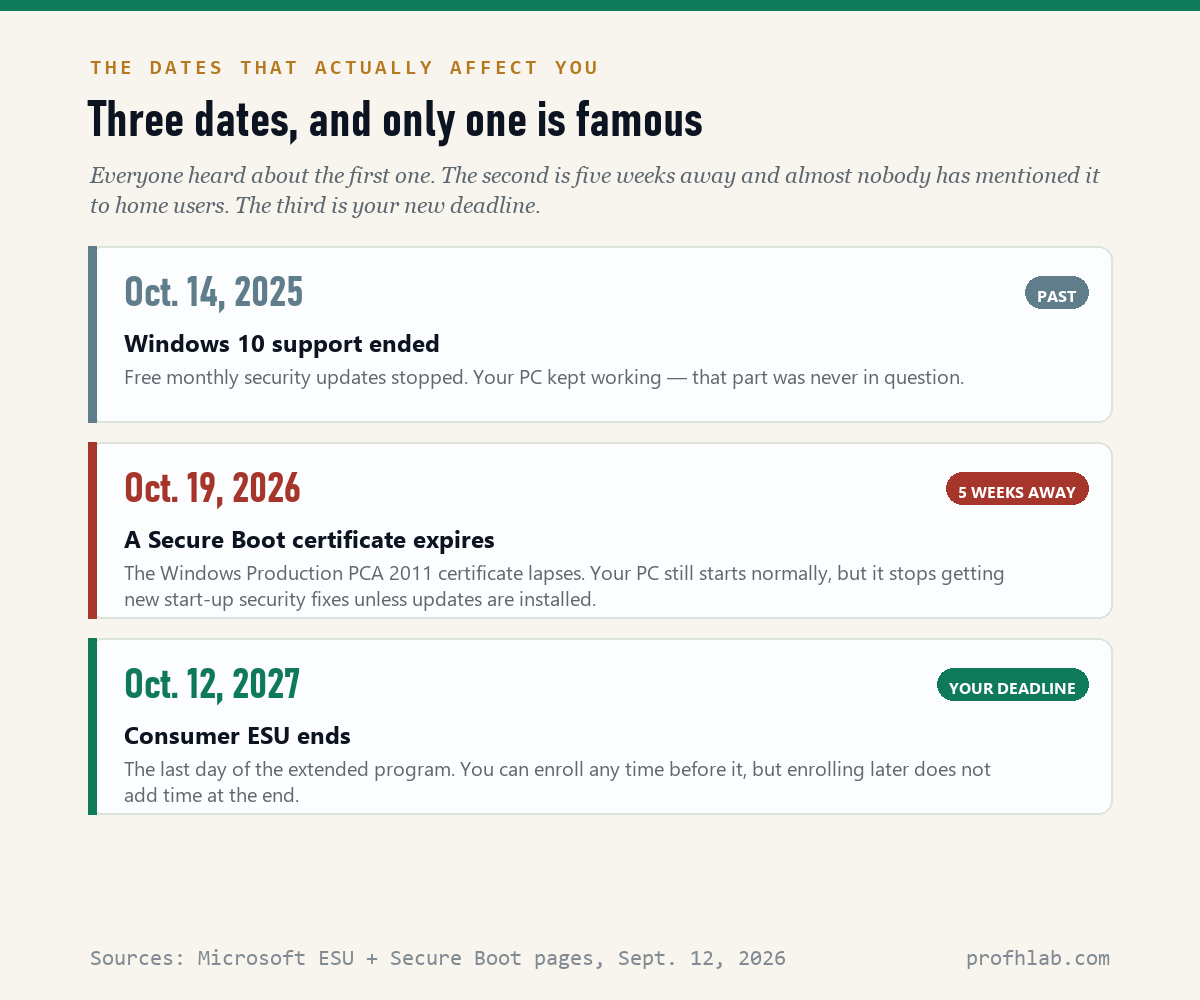
Here is what that screen leaves out. Windows 10 did stop getting free monthly updates on October 14, 2025. But on the same day, Microsoft opened a program called Extended Security Updates, or ESU, for ordinary home users. It keeps the critical security patches coming on the computer you already own.
And in June 2026, Microsoft doubled it.
The change Microsoft made quietly in June
The original consumer program was supposed to end on October 13, 2026 — about a month from now. That is the date most articles still carry. It is no longer correct.
On June 25, 2026, Microsoft added an editor’s note to an old blog post. That note is the whole announcement:
“Editor’s note — June 25, 2026 — This post has been updated to reflect that the Windows 10 Extended Security Updates (ESU) program for personal use devices is being provided for an additional year, with coverage now available through Oct. 12, 2027. This extension provides customers with more time to transition to a new Windows 11 PC while continuing to receive critical security updates.”
There was no press conference and no notification on your screen. Microsoft’s own consumer page now states it plainly: “You can enroll in ESU any time until the program ends on October 12, 2027. If you’re already enrolled, your coverage will automatically continue through that date — no action needed.”
That last clause matters. If you enrolled last year, you do not have to do anything. Your extra year was granted automatically.
How to enroll, step by step
This takes about five minutes and happens entirely inside Windows. There is nothing to download.
- Click Start, then the gear icon for Settings.
- Go to Update & Security, then Windows Update.
- Install anything waiting there first. The enrollment link will not appear on a PC that is behind on updates.
- Look for a link to enroll in ESU and click Enroll now.
- Choose one of the three options below. If you sign in to Windows with a local account, you will be asked to sign in with a Microsoft account at this point.
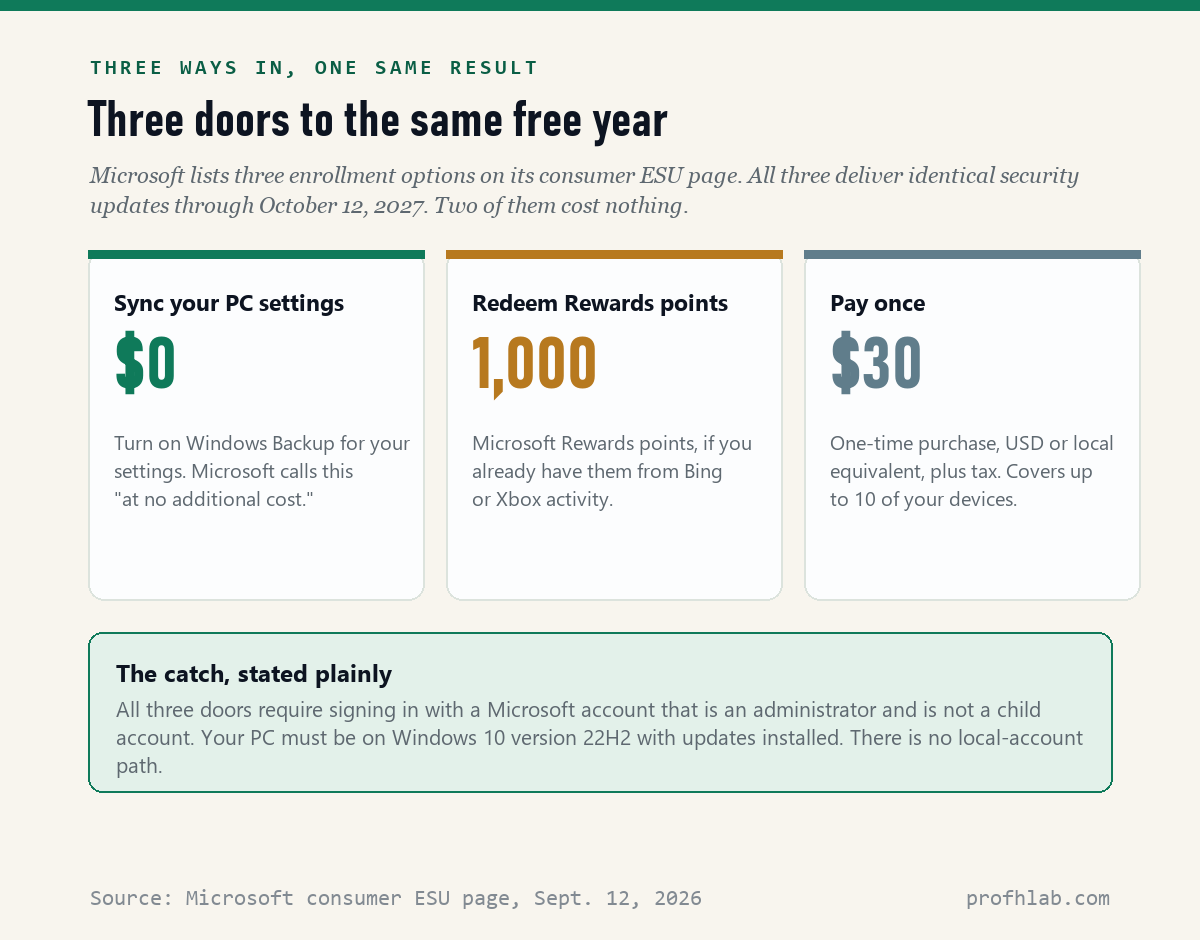
The free route is the first one: turn on Windows Backup for your PC settings, and Microsoft enrolls you “at no additional cost.” That syncs your settings — not your files — to your Microsoft account. If you would rather not, the $30 one-time purchase gets you to the identical place.
One detail worth knowing: a single ESU license covers up to 10 of your devices. If there are two or three Windows 10 machines in the house, you are covered once you enroll with the same account.
Who cannot use this
Microsoft lists the requirements. Your PC needs to be on Windows 10 version 22H2 (Home, Pro, Pro Education, or Workstations) with the latest updates installed. The Microsoft account you use must be an administrator account and cannot be a child account. Consumer ESU is also not offered for machines in kiosk mode, or joined to a workplace domain or device-management system.
There is no local-account path. If keeping a local sign-in matters more to you than the updates, that is a real trade-off, and it is worth deciding on purpose rather than by accident.
Microsoft also notes that enrollment options and timing may vary by region, including in the European Economic Area. If you are reading this outside the United States, check your own Windows Update screen rather than trusting the American terms.
What this actually buys you, and what it does not
ESU is narrower than people assume, and being clear about it now saves disappointment later.
| You do get | You do not get |
|---|---|
| Security updates that Microsoft rates critical and important, on the normal monthly schedule | Any other bug fixes, in Microsoft’s words “other types of fixes, feature improvements, or product enhancements” |
| Coverage through October 12, 2027, on up to 10 of your devices | Technical support. Microsoft states ESU “does not come with technical support” |
| The same computer, the same programs, the same way of working | A path past October 2027. This is extra time, not a permanent answer |
So the honest framing is this: ESU buys you a year of safety and a year to decide. It does not make Windows 10 permanent.
The second date almost nobody has told home users about
There is another deadline this autumn, and it has nothing to do with ESU. The certificates that Windows uses to check that nothing tampered with your computer while it was starting up are expiring. Microsoft’s own list gives three dates: June 24, 2026 and June 27, 2026 for two of them, and October 19, 2026 for the Windows Production PCA 2011 certificate.
Before you worry: your computer will still turn on. Microsoft is explicit that affected devices “will continue to start and operate normally.” What a PC loses is new protection for the start-up process — updates to the boot manager and fixes for newly found start-up vulnerabilities.
For a home user, the fix is ordinary maintenance, not surgery:
- Install your Windows updates. Most personal devices receive the new certificates automatically this way. This is the same screen you used to enroll in ESU.
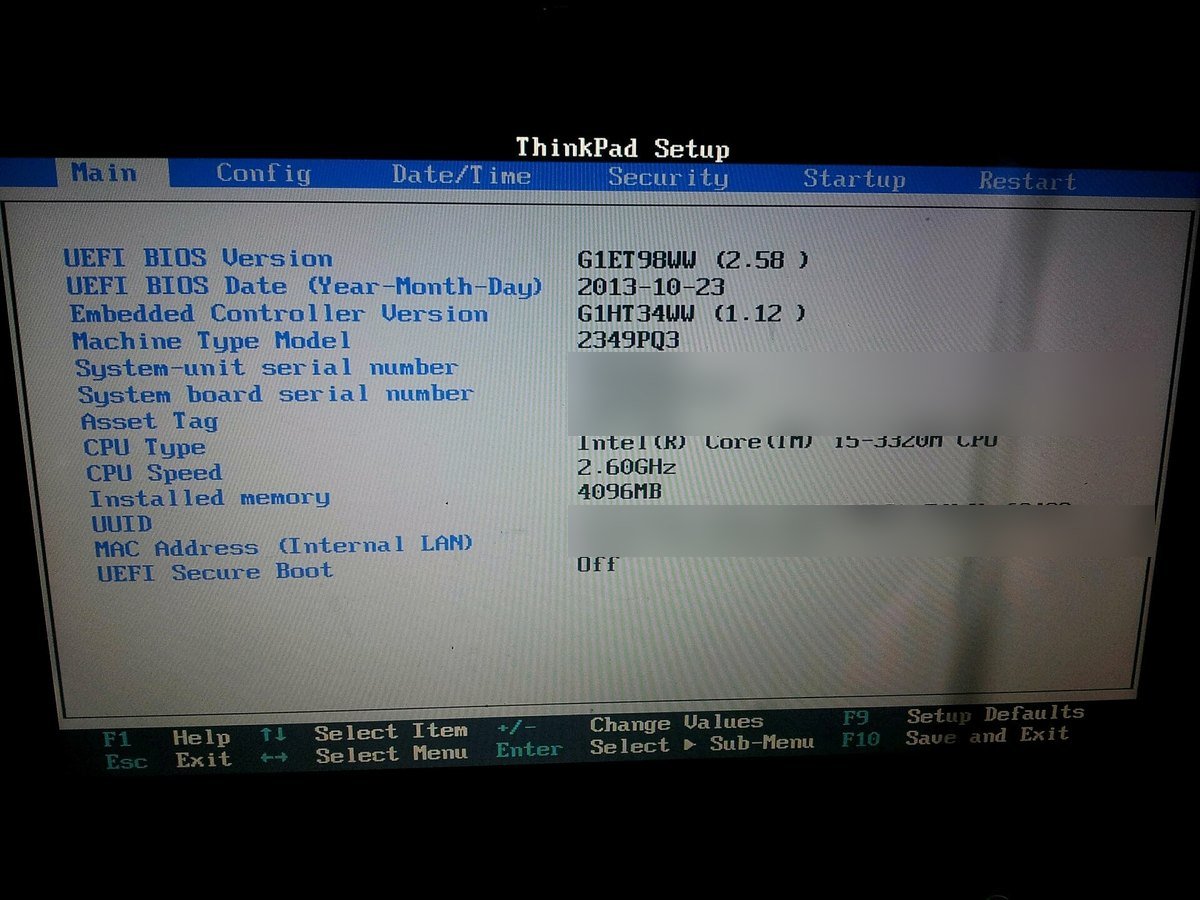
- Check your PC maker’s support page for a firmware or BIOS update for your exact model. Some machines need one before the new certificates apply properly.
- If Secure Boot is already on, leave it on. Toggling it off and on again can wipe the updated certificates.
That is genuinely all a home user is asked to do. If your computer came out after 2024, it very likely already has the newer certificates.
One step deeper: why did Microsoft give the year away?
Microsoft did not say. The editor’s note offers only that the extension “provides customers with more time to transition to a new Windows 11 PC.”
What can be measured is how many people had not transitioned. According to StatCounter’s figures for desktop computers in the United States, Windows 10 accounted for 23.49% of Windows desktops in August 2026 — roughly one in four, ten months after support ended. Across the six months from March to August 2026 that share moved between 19.28% and 23.49%, drifting rather than collapsing.
We should be careful here: a share of measured web traffic is not a headcount, and one number does not prove why a company acted. But it does describe the situation the decision was made in. A very large number of working computers were still running an operating system with no free updates, and a good share of them physically cannot install Windows 11.
Do you actually need a new computer?
Eventually, yes. Not this month. It is worth knowing why your PC was refused, because the reason is usually one specific part.
Microsoft’s published minimum requirements for Windows 11 are a 1 GHz processor with 2 or more cores on a compatible 64-bit chip, 4 GB of memory, 64 GB of storage, TPM version 2.0, and UEFI with Secure Boot capability. Most home PCs that fail do so on the TPM requirement or the compatible-processor list, not on memory or disk space. Microsoft’s own wording is blunt: if your device does not meet the requirements, you “may not be able to install Windows 11” and “might want to consider purchasing a new PC.”
You can check your own machine with Microsoft’s PC Health Check app, which names the specific part that failed.

When you do replace it, you will be sold an “AI PC” or a Copilot+ machine, and Windows 11 arrives with Microsoft’s assistant built in. That is a separate decision from this one, and you can turn a good deal of it down: we walk through it in how to remove Copilot from Windows 11 and how to get Microsoft 365 without Copilot. If you are wondering what the assistant can see, does Copilot have access to my emails? answers that one directly.
The same question — am I about to be charged for this? — comes up on every platform now, and the answers differ more than you would expect. We have worked through it for Apple Intelligence and for the Google AI Pro charge people keep finding on their statements. Current prices for the major subscriptions sit in our AI price tracker, which we update rather than guess at.
The scam that rides along with this news
Any deadline with the word “security” in it draws criminals, and this one is aimed squarely at older computer owners. The pattern is a pop-up that fills the screen, warns your Windows is unprotected or out of support, and gives a phone number.
The Federal Trade Commission’s guidance is worth memorizing in one line: “Real security pop-up warnings and messages will never ask you to call a phone number.” The FTC also says plainly, of any such message, “Do not use the number included in the message,” and notes that legitimate tech companies will not contact you by phone, email or text to say something is wrong with your computer.
Two rules that cover nearly all of it
1. Enrollment in ESU happens in Settings → Update & Security → Windows Update and nowhere else. Not by phone, not from an email link, not from a pop-up. If you did not start it yourself from that screen, it is not real.
2. Nobody legitimate is paid in gift cards, wire transfers, cryptocurrency or a payment app. The FTC lists those as the giveaway, because they are hard to reverse. Report anything you see to ReportFraud.ftc.gov.
If you want the longer version of this, AI scams targeting seniors covers the voice-cloning calls, and what happens if you say yes on a scam call takes apart one specific fear that gets repeated a lot.
Two people worth five minutes on this
The first video is the current one — recorded after the June extension, in plain language, by a writer who has been explaining computers to non-technical readers for decades. The second is for the Secure Boot section above, if you would like to watch someone check a real machine.
What to do with this
- Today, on the Windows 10 PC itself: Start → Settings → Update & Security → Windows Update. Install what is waiting. Then look for the ESU enrollment link and click Enroll now.
- If you enrolled last year, open the same screen and confirm updates are still arriving. Your coverage extended automatically to October 12, 2027 — there is nothing to buy again.
- Check your PC maker’s support page for a firmware update for your model, for the Secure Boot certificates. Dell, HP, Lenovo, Acer and Asus all list these by serial or model number.
- Do the other three Windows 10 machines in the family — one license covers up to 10 devices on the same Microsoft account.
- Write the date on something. October 12, 2027 is the real deadline now. That is when to plan a replacement, not this month.
- Tell the person who was about to buy a new computer this week because a pop-up frightened them. That is the most useful thing on this page.
If you want to go deeper
“Is my antivirus enough on its own?” No. Security software and operating-system patches fix different things: one watches for bad files and behavior, the other closes the holes in Windows itself. Keep both. ESU is the second kind.
“Should I just switch to something else?” Some people move an old laptop to Linux or a Chromebook-style system and are perfectly happy. It is a real option and it is free, but it is a bigger change than this article’s five minutes, and your familiar programs may not come with you. Try it on a spare machine first, not on the computer your life runs on.
“Does any of this affect my Microsoft Office or my browser?” They are on their own schedules, separate from Windows itself. Whatever you use for email and the web still needs its own updates, and a modern browser is one of the strongest protections you have.
“I am not sure what the AI parts of my computer even are.” Start with Start Here, our plain-language guide for beginners and readers over 50, or the best AI tools for seniors if you would rather see what is worth using before you worry about what to switch off. Our resources page collects the official pages — Microsoft, the FTC, Medicare — worth bookmarking, and the FAQ answers the shorter questions.
Questions people type when the Windows 10 warnings start
How do I keep using Windows 10 safely after support ends?
Enroll the PC in Microsoft’s consumer Extended Security Updates program, which now runs through October 12, 2027. Open Settings → Update & Security → Windows Update, install any pending updates, then click the ESU enrollment link and choose one of three options: sync your PC settings at no cost, redeem 1,000 Microsoft Rewards points, or pay $30 once. Then keep installing updates as they arrive, and treat any pop-up with a phone number as a scam.
Is Windows 10 still safe to use in 2026?
With ESU enrolled, yes — you are receiving the critical and important security updates Microsoft issues each month. Without it, no: your PC works, but newly discovered holes in Windows are not being closed on your machine. The difference between those two situations is one five-minute enrollment, and for most people it is free.
Are Windows 10 extended security updates free?
Two of the three enrollment options cost nothing. Syncing your PC settings to your Microsoft account enrolls you at no additional cost, and 1,000 Microsoft Rewards points also enrolls you at no cash cost. The third option is a one-time $30 purchase, USD or local equivalent plus tax. All three deliver identical updates through October 12, 2027.
When do Windows 10 extended security updates end?
October 12, 2027 for consumers. This changed on June 25, 2026, when Microsoft added a second year to a program that was originally due to finish on October 13, 2026. Many articles still carry the old date. You can enroll at any point before the end date, but enrolling later does not add time at the end — it only leaves your PC unpatched in the meantime.
Can I get Windows 10 extended security updates without a Microsoft account?
No. Microsoft requires a Microsoft account to enroll, it must be an administrator account, and it cannot be a child account. If you normally sign in to Windows with a local account, you will be prompted to sign in with a Microsoft account during enrollment. There is no paid option that avoids this; the $30 purchase uses an account too.
What happens if I keep using Windows 10 without enrolling?
Nothing dramatic and nothing good. The computer keeps starting and your programs keep running — Microsoft does not switch anything off. But no new security fixes reach that machine, so every vulnerability found in Windows from now on stays open on it. Risk accumulates quietly rather than arriving on a particular day, which is exactly what makes it easy to ignore.
Do I have to buy a new computer for Windows 11?
Only if your current one fails the hardware requirements, and then not until October 2027. Windows 11 needs TPM 2.0, UEFI with Secure Boot capability, a compatible 64-bit processor with 2 or more cores, 4 GB of memory and 64 GB of storage. Microsoft’s PC Health Check app tells you which requirement your machine misses. Most home PCs that are refused fail on TPM or the processor list, which are not things you can usually add.
Sources
- Microsoft, “Windows 10 Consumer Extended Security Updates (ESU)” — end date, three enrollment options, 10-device license, prerequisites, what ESU excludes. Read September 12, 2026.
- Microsoft, Windows Experience Blog, “Stay secure with Windows 11, Copilot+ PCs and Windows 365…” — editor’s note of June 25, 2026 announcing the additional year. Read September 12, 2026.
- Microsoft Support, “Windows Secure Boot certificate expiration and CA updates” — certificate expiry dates and the statement that devices continue to start and operate normally.
- Microsoft, Windows 11 specifications — minimum system requirements including TPM 2.0.
- StatCounter Global Stats, Windows version market share, United States, desktop — monthly figures March to August 2026, retrieved September 12, 2026.
- Federal Trade Commission, “How to spot, avoid, and report tech support scams” — pop-up guidance and payment red flags.
- Our own check of ranking pages, September 12, 2026 — method described in the chart above.
Keep reading
- How to remove Copilot from Windows 11 — for after you do move.
- How do I get rid of AI on my phone? — twelve places it shows up, and the one real off switch.
- How to get the old Google search back — one click, no download.
- AI scams targeting seniors — the calls that use a familiar voice.
- How to use ChatGPT: a beginner’s guide for readers over 50.
- How do I talk to a real person? — when the chatbot will not let go.
- What is Gemini on my Android phone? — the assistant that replaced the old one.
- How to stop AI from reading my Gmail.
- How to turn off AI on my TV — the same problem, one room over.
- How to turn off call screening on iPhone.
About the author. Prof. H writes profhlab.com for people who did not grow up with this stuff and would like a straight answer. We read the primary sources so you do not have to. Every number above was read or measured on September 12, 2026, and every source is linked. Found an error? Tell us — we correct in public.
Prof.’s H Newsletter
One short email a month, with the numbers in it
What actually moved in AI hiring, AI prices, and the scams aimed at older Americans. Counted here, dated, and linked to the source. One email a month, and your address goes nowhere else.