What Is Gemini on My Android Phone? We Read All 89 of Google’s Help Pages
Two days ago, on Thursday, something on your phone changed its name. You held the power button the way you have held it for years, or you said “Hey Google” across the kitchen, and a different thing answered. It had a new look. It talked more. It may have called itself Gemini.
You did not agree to that. You were not asked. And when you went looking for an explanation, the search results told you what Gemini is and never once told you what happened.
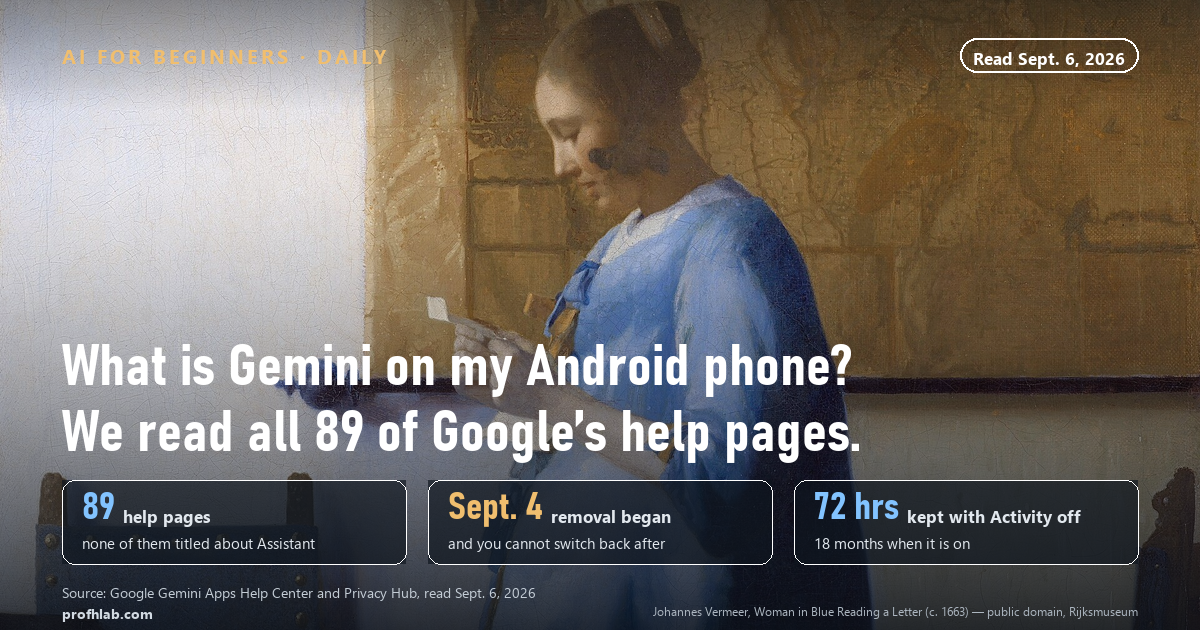
Gemini is the app that replaced Google Assistant as the assistant on your Android phone. Google began removing Assistant on September 4, 2026, and told users by email that once the removal reaches your phone you “will no longer be able to use or switch back to Google Assistant.”
On September 6, 2026 we read all 89 help pages in Google’s Gemini Apps Help Center and fetched the 12 pages that rank for this question. Not one of them mentions the shutdown. Two of them are Google’s own help pages, which use the word “Assistant” 46 and 44 times without ever saying it is going away.
The short answer, in one paragraph
Gemini is Google’s AI assistant. It is an app, and it is also the thing that now answers when you hold your power button, say “Hey Google,” or tap the microphone. It does what Assistant did — timers, alarms, calls, texts, directions, smart lights — and it also writes, summarizes, reads your screen when you ask it to, and holds a conversation instead of taking one command at a time.
The base version costs nothing. You need a Google Account to sign in. And unlike Assistant, it sends what you say to Google’s servers and keeps it, on a schedule we will lay out below in Google’s own numbers.
That is the whole answer. The rest of this page is the part nobody printed.
Why your phone changed on Thursday
Google announced the plan a year and a half ago and then went quiet about the date. On March 14, 2025, in a post on its own blog, Google wrote that it was “upgrading more users on mobile devices from Google Assistant to Gemini” and that “later this year, the classic Google Assistant will no longer be accessible on most mobile devices.”
“Later this year” turned into 2026. On August 4, 2026, Google emailed existing Assistant users. The email said Assistant “is going away on mobile devices,” that it is “being discontinued,” and that “Gemini — our next-generation AI-powered assistant — is now the assistant experience on Android.”
The removal started September 4. Google said the process “may take a few weeks to reach everyone.” That single sentence explains why your neighbor’s phone still has the old Assistant and yours does not, and why the advice you find online works for some people and not others.
It covers more than phones. The same notice applies to tablets, Wear OS watches, headphones, and vehicles running Android Auto projected from a phone. Cars with Google built into the dashboard keep Assistant for now.
We read Google’s own 89 help pages. None of them says Assistant is gone.
Here is the measurement, and anyone can repeat it in ten minutes.
The Gemini Apps Help Center home page links to 89 separate help articles. We pulled every link on September 6, 2026 and read the titles. Zero of the 89 titles contain the word “Assistant.” There is no article called “Google Assistant is going away,” no article called “What changed on your phone,” nothing.
Then we went to the Google Assistant Help Center. It still has a page called “Changes we’re making to Google Assistant.” That page lists small feature removals — interpreter mode, Family Bell announcements, media alarms. It does not contain the word “Gemini.” It does not contain the word “September.” It does not contain the year 2026 anywhere except the copyright line at the bottom.
Then we fetched the twelve pages that Google’s own search returns for “what is gemini on my android phone.” One of them rendered in Korean from our location, so we dropped it and scored the remaining eleven for ten facts. Here is what page one told an American reader on September 6.
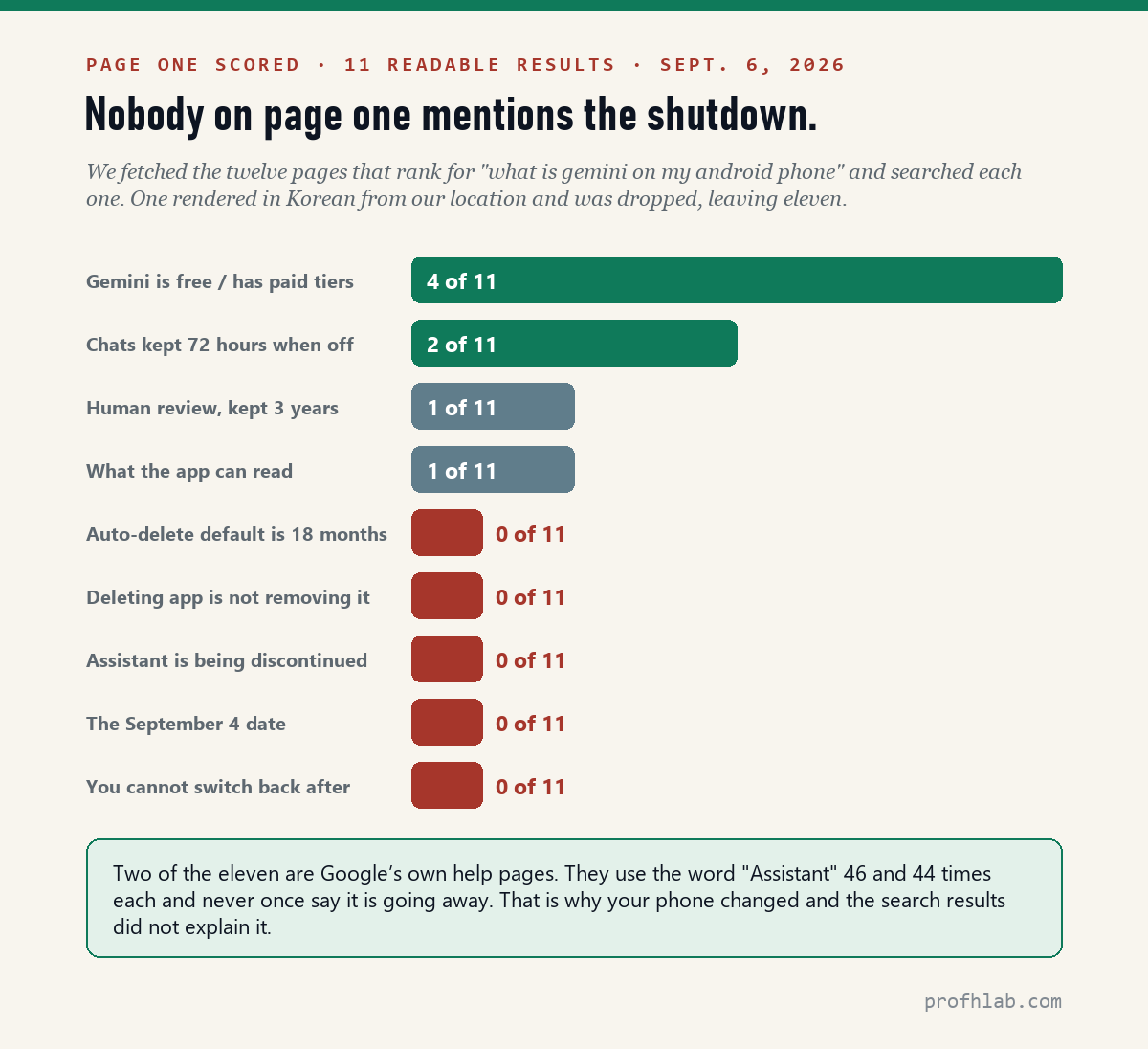
Four of eleven say something about price. Two mention the 72-hour rule. One mentions human reviewers. Zero mention that Assistant is being discontinued, zero give the September 4 date, and zero warn that the switch-back option disappears.
This is not a conspiracy. It is what happens when a company ships a change through email and product notifications while its help center — the thing search engines index — keeps describing the world as it was. The result is a gap you fell into, and it is not your fault that you fell into it.
What Gemini can reach, in Google’s own words
“Can Gemini read my texts” is one of the most common searches attached to this question, and it deserves a precise answer rather than a reassuring one.
Google’s Gemini Apps Privacy Hub lists what the mobile app collects. The list is not vague. It names “system permissions and device data when you use Gemini mobile apps, such as call and message logs, contacts (to help you keep in touch), installed apps (like Clock), language preferences, screen content (to help you act on it), and other app info like page context and URL.”
Separately, Google’s help page on using Gemini while your phone is locked lists thirteen things it can do before you unlock, including “make calls or answer text messages (with user opt-in)” and “read and reply to your messages in notifications.”
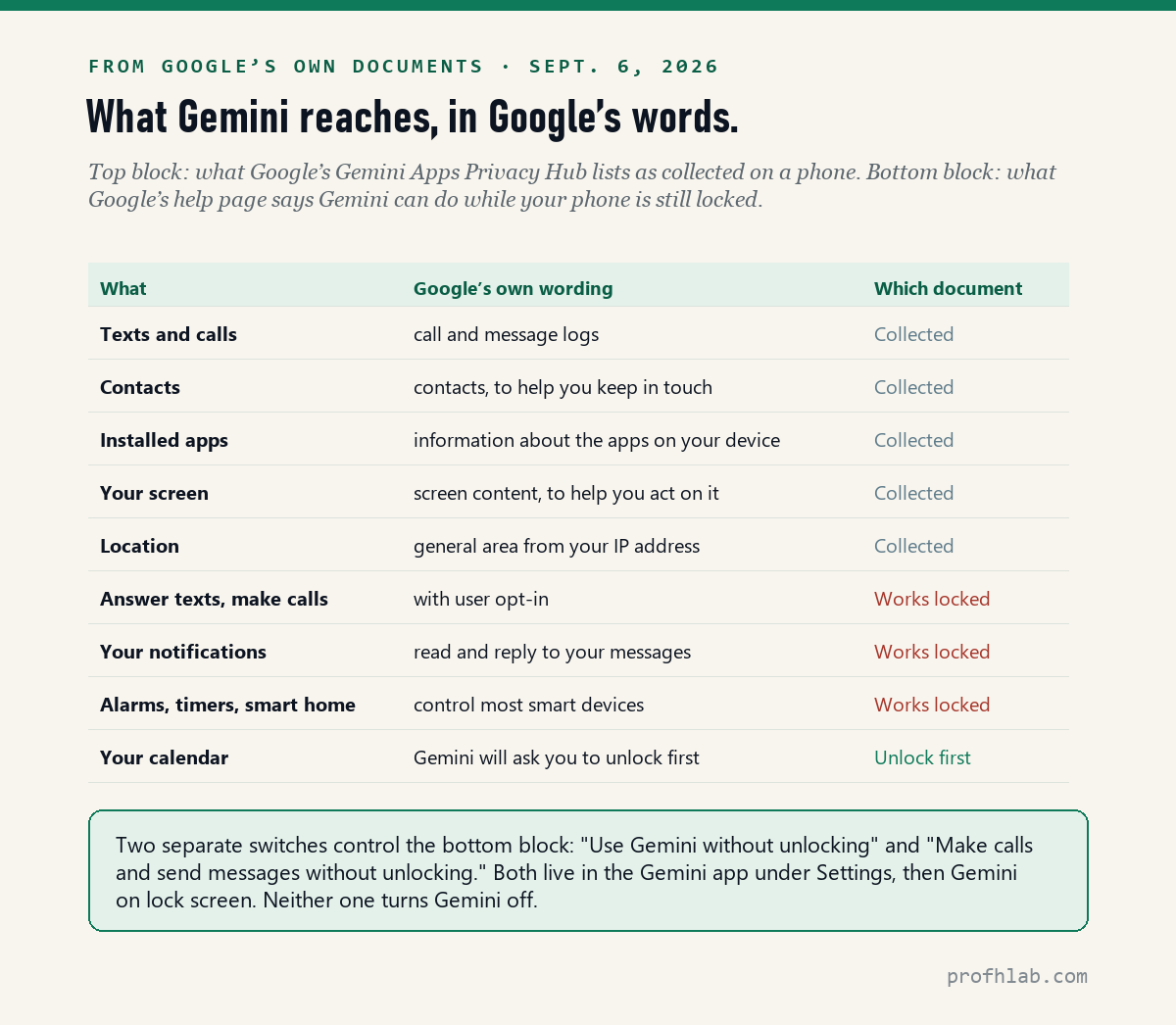
So the honest answer to “can Gemini read my texts” is: it has access to your message logs as a matter of documented design, and with one setting turned on it can read and answer messages while your phone is sitting locked on the counter. Whether that is fine or alarming depends entirely on who else picks up your phone.
If this is the part that worries you, our walk-through of every place AI now sits on a phone covers the same territory across Apple, Samsung, and Meta, and the five switches on Gmail is the email version of this question.
How long Google keeps what you say to it
Assistant kept voice recordings under a setting most people never opened. Gemini keeps text conversations under a different one, and the clocks are worth knowing because they are longer than almost anyone assumes.
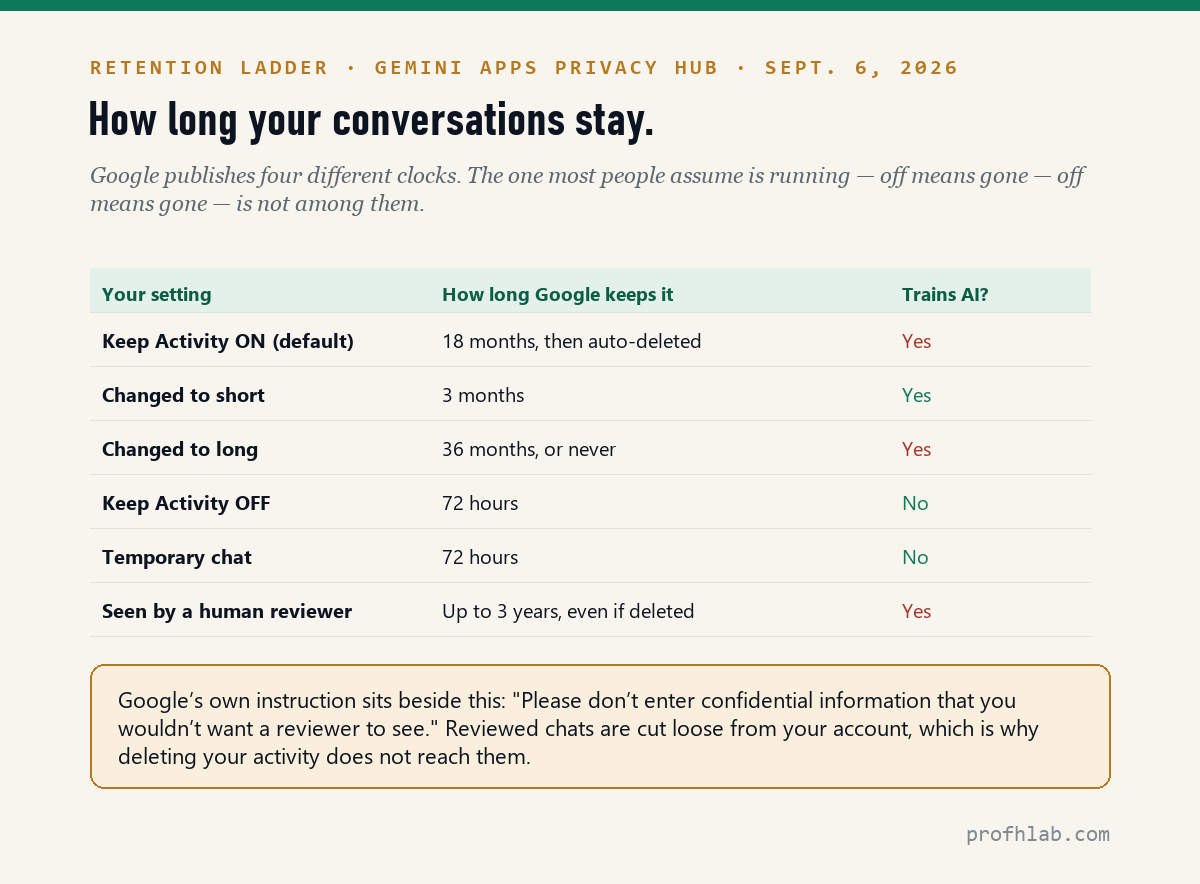
The default setting, called Keep Activity, is on. With it on, your conversations sit in your account for 18 months before auto-deleting, and they are used to improve Google’s AI models. You can shorten that to 3 months, lengthen it to 36, or turn auto-delete off entirely.
Turn Keep Activity off and future chats are still stored for 72 hours. Google’s stated reason is plain enough: to answer you, to process feedback, and “in case of a potential system failure.”
The row that surprises people is the last one. A subset of conversations is sent to human reviewers, and Google says those “are retained for up to three years,” disconnected from your account. Because they are cut loose from your account, deleting your activity does not reach them. Google puts the practical instruction right next to it: “Please don’t enter confidential information that you wouldn’t want a reviewer to see.”
Treat that sentence as the rule. It is the same rule we applied to uploading medical records to a chatbot, and the same reason deleted chats are not always deleted.
One more line from the same document, for the people who ask whether it is listening all the time: “Gemini Apps are designed to wait in standby mode until they’re activated, for example when they detect ‘Hey Google.’ Audio recordings may begin a few seconds before activation.” That is Google describing a few seconds of buffer, not a live feed — and also admitting the microphone can trip on a noise that sounds like the wake word.
Is Gemini free on Android?
Yes, at the level almost everyone uses. We read Google’s US subscription page on September 6, 2026. Here is the ladder as printed.
| Plan | Price | What you get |
|---|---|---|
| Free | $0 | The Gemini app, the assistant on your phone, everyday questions |
| Google AI Plus | $4.99 / month | 2x higher usage limits than Free |
| Google AI Pro | $19.99 / month | 4x higher usage limits than Free |
| Google AI Ultra | from $99.99 / month | 5x at $99.99, 20x at $199.99 |
Two cautions. First, this is a fast-moving ladder — the $4.99 tier launched in the United States at $7.99 in January and is now $4.99. We keep the running record on our AI price tracker. Second, a great many people are already paying for Google AI Pro without knowing it, through a phone plan or a device promotion; that is the subject of why am I being charged for Google AI Pro and is Google AI Pro free with Verizon. If you want the whole household picture, what AI really costs you per month adds it up.
How do I get Google Assistant back instead of Gemini?
This is the question with the most misleading answers online, so here is the exact state of play on September 6, 2026.
Google’s own help page, “Manage or delete the Gemini app on your Android device,” still gives step-by-step instructions to switch back. It reads: open the Gemini app, tap Menu, tap your profile picture, tap “Switch to Google Assistant,” then tap Switch. That page was live and unchanged when we read it today.
Google’s own email says that once removal reaches your device, that option is gone for good.
Both are true at the same time, which is the whole confusion in one sentence. The instructions still exist; the option is being deleted out from under them, in waves, over a few weeks. Whether it works on your phone today is a matter of when your turn comes. If you want Assistant back, try it today rather than next month, and do not be surprised if the menu item is simply not there.
Two things worth knowing either way. Switching to Assistant does not delete what Gemini already saved — Google says that data “will not automatically be deleted.” And deleting the Gemini app does not remove it as your default assistant; those are two separate settings, which is the single most common mistake in this whole area.
The setting most people are actually looking for. If what you want is not “Assistant back” but “stop this from opening when I press the button,” go to Settings → Apps → Default apps → Digital assistant app, and choose a different app or None. Google documents None as a valid choice. Your phone keeps working; nothing answers when you hold the button.
One step deeper: why the help pages lag the shutdown
It is tempting to read all this as Google hiding something. The more useful reading is duller and more instructive.
The Gemini Apps Help Center is organized around a product that is being added to, not a product that is replacing something. Its 89 articles are about features: Gems, Canvas, Deep Research, Live, notebooks, watches, headphones. The Assistant Help Center is organized around a product nobody is assigned to update any more. A retirement notice belongs to neither team, so it went out by email — the one channel search engines cannot index.
This is why the pattern repeats. We found the same shape at Microsoft, where only 2 of 20 switches actually remove Copilot, at Amazon, where seven switches exist and none of them is the one people want, and at Apple, whose own page never prints a price. When a feature arrives by default, the documentation describes what it does. Almost nobody writes the page that says what you lost.
What to do with this: a ten-minute pass
Sit down with the phone once, in this order. Every step below is from Google’s own documentation, read September 6, 2026.
- Decide about Assistant first, because this one expires. Open the Gemini app, tap Menu, tap your profile picture. If “Switch to Google Assistant” is there and you want it, use it today. If it is not there, your phone has already been migrated and no article can bring it back.
- Set the retention clock. In the Gemini app, open Settings and find Gemini Apps Activity. Change auto-delete from 18 months to 3 months, or turn Keep Activity off entirely. Off still means 72 hours, not zero.
- Check the two lock-screen switches. Gemini app → Settings → Gemini on lock screen. Turn off “Use Gemini without unlocking” if you do not want it answering to anyone holding your phone, and turn off “Make calls and send messages without unlocking” separately — they are two switches, not one.
- Take back the power button if you want it. Settings → System → Gestures → Press & hold power button, then pick something else. Can’t find it? Search your Settings for “power,” “side button,” or “gesture.”
- Turn off “Hey Google” if the voice trigger is the problem. Gemini app → Settings → Talk to Gemini hands-free → turn off “Hey Google.”
- Check whether you are already paying. Open the Play Store, tap your profile, then Payments & subscriptions. A Google AI Pro line here is a real $19.99 charge, and a great many arrived as a “free trial” attached to a phone or a carrier plan.
- Tell one other person in your house. Every one of these settings is per-account. Yours does not fix theirs.
A forced change is a gift to ‘re-verify your account’ scammers
“Is this the same thing that showed up on my TV and my speakers?” Related but separate. Google has said Gemini is coming to Google TV, Google Home speakers, and smart displays, and those are not part of the September 4 mobile notice. Our guide to the AI on your television covers what is actually running there today.
“Should I worry about scams using this?” Yes, and specifically about the transition. A forced change is a gift to anyone sending “your Google account needs re-verification” messages. Google will not ask you to confirm this change by phone or text. See the scams aimed at people over 60, how to tell if a phone call is AI, and this month’s AI scam watch.
“I have never used any of this. Where do I start?” Start with the version written for people who are new to it: how to use an AI assistant if you are over 50, then which tools are actually worth your time. Everything in this series lives on our Start Here page.
“What if I just want a human?” Fair. How to reach a real person is the shortest useful page we have written.
What Gemini does on Android, and how to switch back to Assistant
Getting Google Assistant back, and what Gemini can read
What is Gemini on my Android phone?
It is Google’s AI assistant, and as of September 2026 it is the assistant on Android. It answers when you hold the power button or say “Hey Google,” and it also exists as its own app. It does everything Assistant did — timers, calls, texts, directions, smart home — plus writing, summarizing, and reading your screen when you ask. The basic version is free with a Google Account.
Is Gemini replacing Google Assistant on Android?
It already has. Google emailed users on August 4, 2026 to say Assistant “is going away on mobile devices” and is “being discontinued,” and began removing it on September 4, 2026. Google said the rollout “may take a few weeks to reach everyone,” which is why some phones still have Assistant today. Wear OS watches, headphones, tablets, and phone-projected Android Auto are included. Cars with Google built in keep Assistant for now.
How do I get Google Assistant back instead of Gemini?
If your phone has not been migrated yet, Google’s own help page still lists the steps: open the Gemini app, tap Menu, tap your profile picture, tap “Switch to Google Assistant,” then tap Switch. Once the removal reaches your device, Google’s email says you “will no longer be able to use or switch back.” If the menu item is missing, it is gone. If you only want the button to stop launching an assistant, set Settings → Apps → Default apps → Digital assistant app to None.
What happens if I disable Gemini on my Android phone?
Less than people expect. Disabling or deleting the Gemini app does not automatically remove it as your device’s default digital assistant — that is a separate setting. Google documents four narrower controls instead: remove Gemini from the power button, turn off “Hey Google,” turn off Gemini on the lock screen, or set your default digital assistant to None. Your saved conversations stay in your account either way until you delete them.
Can Gemini read my texts?
Google’s own privacy notice lists “call and message logs” among the system permissions and device data the Gemini mobile app collects. Its help page also lists “read and reply to your messages in notifications” and “make calls or answer text messages (with user opt-in)” as things Gemini can do while your phone is locked. The lock-screen behavior is controlled by two switches in the Gemini app under Settings, Gemini on lock screen.
Does Gemini listen to my conversations?
Google’s description is specific: “Gemini Apps are designed to wait in standby mode until they’re activated, for example when they detect ‘Hey Google.’ Audio recordings may begin a few seconds before activation.” Google also acknowledges that Gemini “can activate accidentally, like if it detects a noise like ‘Hey Google,'” and that transcripts of those accidental activations are used to reduce future ones. If that is the concern, turning off “Hey Google” removes the trigger entirely.
Is Gemini free on Android phones?
Yes. The Gemini app and the assistant on your phone cost nothing beyond a Google Account. Paid tiers raise usage limits: Google AI Plus at $4.99 a month, Google AI Pro at $19.99, and Google AI Ultra starting at $99.99, as printed on Google’s US subscription page on September 6, 2026. Nothing about the Assistant shutdown requires you to start paying.
What does Gemini do on my phone if I have a Samsung?
The same things, through the same Google app, with Samsung’s own AI features sitting alongside rather than instead. The September 4 change is a Google change, not a Samsung one, so it reaches Galaxy phones on Google’s schedule. The settings paths in this article are the Android ones; on a Samsung, if a menu is not where we say, use the search box at the top of Settings and search for “digital assistant” or “power.”
Sources
- Google, “Manage or delete the Gemini app on your Android device,” Gemini Apps Help — read September 6, 2026
- Google, Gemini Apps Privacy Hub — retention, human review, collected data; read September 6, 2026
- Google, “How your Gemini mobile app can help when your phone is locked” — read September 6, 2026
- Google, “Changes we’re making to Google Assistant,” Google Assistant Help — read September 6, 2026; contains no mention of Gemini or the shutdown
- Google, “The Assistant experience on mobile is upgrading to Gemini,” March 14, 2025
- Google, Google AI plans and pricing (US) — read September 6, 2026
- Google, “What you need to sign in to Gemini Apps” — read September 6, 2026
- Abner Li, “Google Assistant shutting down on Android and Wear OS in September,” 9to5Google, August 4, 2026 — quotes Google’s email to users verbatim
Charged for Google AI Pro, or want AI off the phone entirely?
- How Do I Get Rid of AI on My Phone? Twelve Places, One Real Off Switch
- Why Am I Being Charged for Google AI Pro? Nine Doors, and Only Five Are Google’s
- How to Stop AI From Reading Your Gmail: All 5 Switches
- How to Turn Off Call Screening on iPhone: Eight Switches
- How to Stop Meta AI From Using My Photos on Facebook
- Is YouTube Premium Free With Google AI Pro?
- How to Cancel a Subscription and Actually Get the Refund
- The full FAQ library · Current AI deals
About this page. Written by Prof. H for profhlab.com. Every setting path, quotation, and number above was read from Google’s own documentation on September 6, 2026, and the page-one scoring is our own count, repeatable by anyone. If a menu has moved since publication, tell us and we will correct it. We do not take money from any company named here.
Prof.’s H Newsletter
One short email a month, with the numbers in it
What actually moved in AI hiring, AI prices, and the scams aimed at older Americans. Counted here, dated, and linked to the source. One email a month, and your address goes nowhere else.