How to Tell if an Email Is Written by AI: 4 Tells, and 1 Better Check
Short answer: in September 2026 you usually cannot tell, and that is no longer the question worth asking. The style clues everyone repeats — bad grammar, stiff greetings, that suspiciously tidy paragraph — were beaten by ordinary chatbots two years ago. There is one check that still works every time, it takes about 60 seconds, and on September 14, 2026 we could not find it in a single one of the seven guides Google put at the top of this exact question.
The 60-second version
- Stop grading the writing. Ask what the message wants you to do.
- Open Show original (Gmail) or All Headers (Apple Mail) and read three lines: SPF, DKIM, DMARC.
- Three PASS means the sender is who the From line says. A FAIL on a bank, the IRS, or a delivery service means stop and call the number on your card.
- AI detectors do not settle this. The best-studied ones flagged plain human writing as machine-written 61% of the time.
What we found in the guides Google recommends
On September 14, 2026 we ran a US search for this exact question and read the seven pages that came back at the top. Six of the seven are blogs run by software companies. Here is what we counted in them:
- 7 of 7 tell you to judge the writing — tone, greetings, paragraph length, word choice.
- 0 of 7 mention SPF, DKIM, DMARC, “Show original,” or the message source — the parts of an email that actually prove who sent it.
- 5 of 7 never use the word “phishing” at all.
That last number explains the first two. Those guides were written for marketing managers wondering whether a vendor’s newsletter was ghostwritten by a chatbot. They were not written for a 72-year-old holding a message that says her Amazon account is locked. If that is you, almost everything you have read about this is answering a different person’s question.
Why “look for bad grammar” stopped working
For twenty years the advice was the same: real companies hire proofreaders, scammers do not. Broken English was the tell.
The FBI retired that advice in writing. In its December 3, 2024 public service announcement on generative AI and financial fraud (alert I-120324-PSA), the Bureau says criminals use AI-generated text to appear believable “in furtherance of social engineering, spear phishing, and financial fraud schemes” — and, in the line that matters most here, to overcome common indicators of fraud schemes.
Read that again slowly. The “common indicators” are the typos. A federal law enforcement agency is telling you that the thing you were trained to look for is the thing the tool was used to remove.
It gets worse for the style test. The same grammar that now clears a scammer also convicts your neighbor. Careful writers, people writing in a second language, and anyone who was taught to open a letter formally all produce exactly the prose the checklists call suspicious.
The four tells that still work
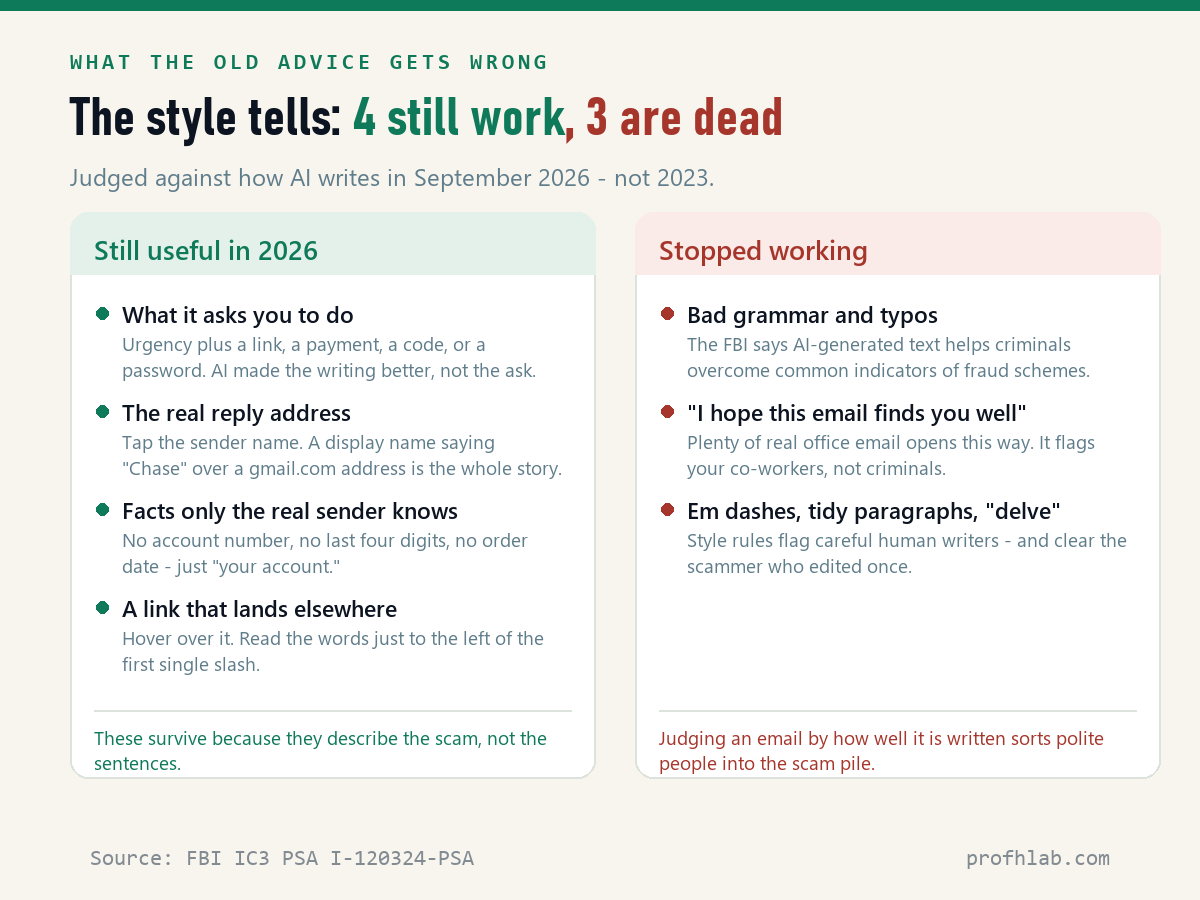
These survive because none of them is about sentences.
1. What it asks you to do. Urgency plus a link, a payment, a gift card, a code read aloud, or a password. A chatbot can polish the request. It cannot make the request normal. Real banks do not ask you to move money to “a safe account.”
2. The address underneath the name. The name you see is a label the sender typed. Tap or click it and read the actual address. “Chase Fraud Department” sitting on top of a gmail.com address is the entire investigation.
3. Facts only the real sender would know. Your bank knows the last four digits of your account. Your pharmacy knows what you picked up. A stranger writes “your account” and “your recent order,” because that is all they have.
4. Where the link actually goes. Rest the mouse on it without clicking; on a phone, press and hold. Read the words immediately to the left of the first single slash. In chase.com.secure-login.info/verify, the real destination is secure-login.info. The word “chase” is decoration.
The one check that beats every style test
Here is the part the marketing blogs left out.
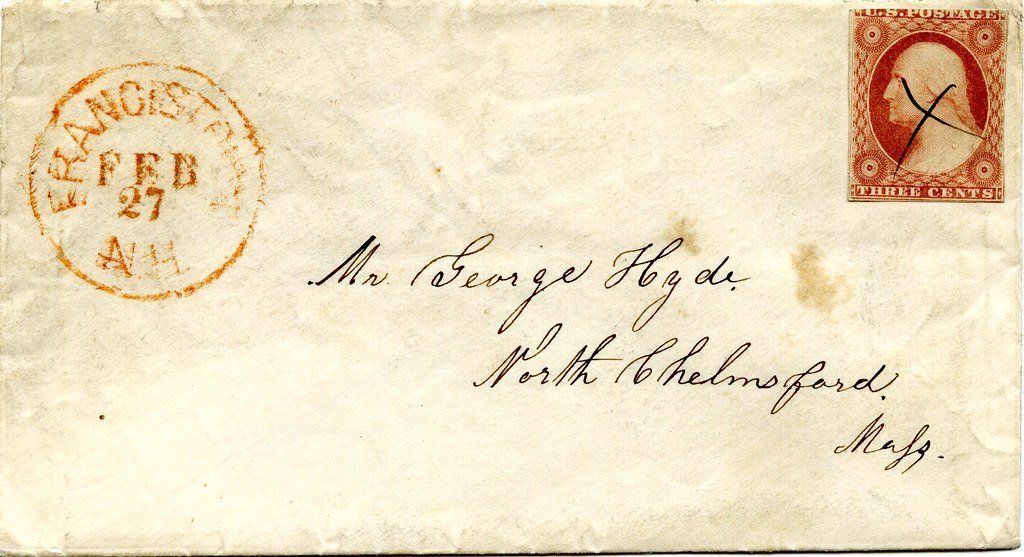
Every email that arrives in your mailbox carries a record of how it got there, written by the mail systems that handled it — not by the person who sent it. It is the digital version of a postmark. The sender chooses what the letter says; the post office decides what gets stamped on the envelope.
Three lines do the work:
- SPF — was the computer that sent this allowed to send mail for that company?
- DKIM — is the company’s own cryptographic signature on the message, and is it unbroken?
- DMARC — does the name you actually see in the From line match that signature?
A scammer can copy a logo, clone the wording and buy a lookalike web address. Making all three of those say PASS for a real bank would mean breaking into the bank’s mail system.
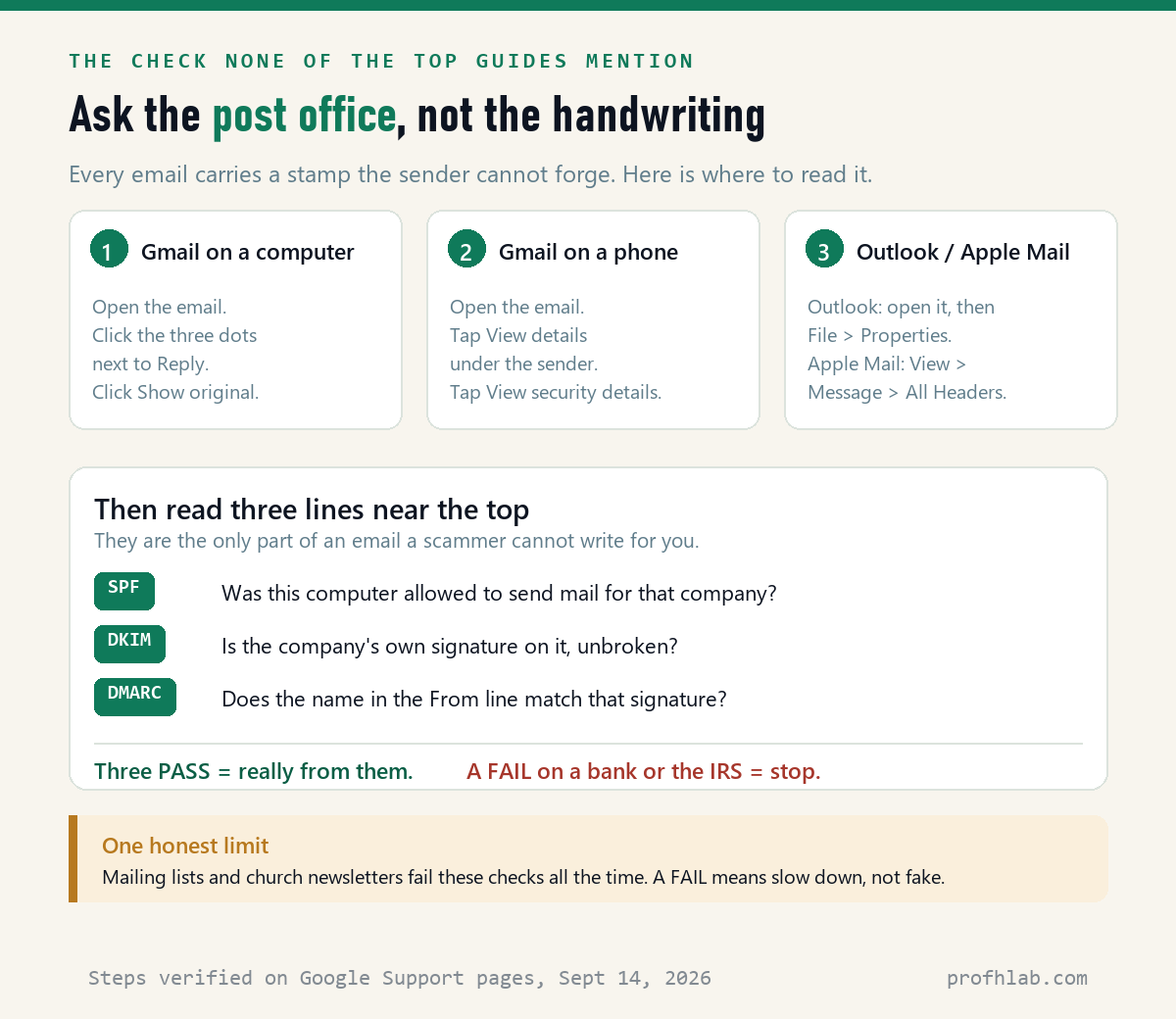
Gmail on a computer: open the email, click the three dots next to Reply, then click Show original. Google’s support page lists exactly this path.
Gmail on a phone: open the email, tap View details under the sender’s name, then tap View security details.
Outlook: open the message, then File > Properties. Apple Mail: View > Message > All Headers.
The shortcut, if the headers look like too much. Google puts a plain-English version right in the message. On an authenticated email you will see mailed-by and signed-by lines with the sender’s domain. On one that failed, Gmail shows a question mark next to the sender’s name and warns you to be careful about replying or opening attachments. One question mark on a message claiming to be your bank is enough. You are done.
And one honest limit, which Google states itself: messages that are not authenticated are not necessarily spam. Church newsletters, club mailing lists and small-town committees break these checks constantly, because forwarding a message can break a signature. A FAIL means slow down. It does not by itself mean fake. A PASS on a message claiming to be Chase, though, is close to proof — and a FAIL on one is all the reason you need to stop and dial the number printed on your card.
Do AI detectors work on email?
No, and the failure is worse than random — it is biased in a direction that will hurt the people you care about.
Researchers at Stanford tested seven widely used AI detectors against real human writing (Liang and colleagues, published in Patterns; preprint arXiv:2304.02819, revised July 10, 2023). Against essays by US eighth graders, the detectors were nearly perfect. Against 91 essays written by people whose first language was not English, they fell apart: an average false-positive rate of 61.22%. Some 97.8% of those essays were flagged as machine-written by at least one detector.
Then the researchers ran the experiment backwards. They asked ChatGPT to simplify the word choices in the American students’ essays, the way a non-native speaker might write. The false-positive rate jumped from 5.19% to 56.65%.
The detectors are not finding robots. They are finding plain vocabulary. Paste a letter from a grandchild, an immigrant neighbor, or anyone who simply writes simply into one of these tools, and there is a real chance it comes back “AI-generated.” That is not evidence of anything.
What the fraud numbers actually say about email
This part should lower your blood pressure a little.
The FTC’s Consumer Sentinel Network Data Book 2024 logged 2.6 million fraud reports, and 1,509,002 of them named how the scammer made contact. Email led every other route: 371,651 reports, 25% of the total — more than phone calls, texts, social media or websites.
But look at the second column. Of those email reports, only 11% involved any money lost — tied with text messages for the lowest rate of the eight contact methods, against 70% for social media and 68% for websites and apps. When money did go, the median loss was $600, and email-contact fraud accounted for $502 million.
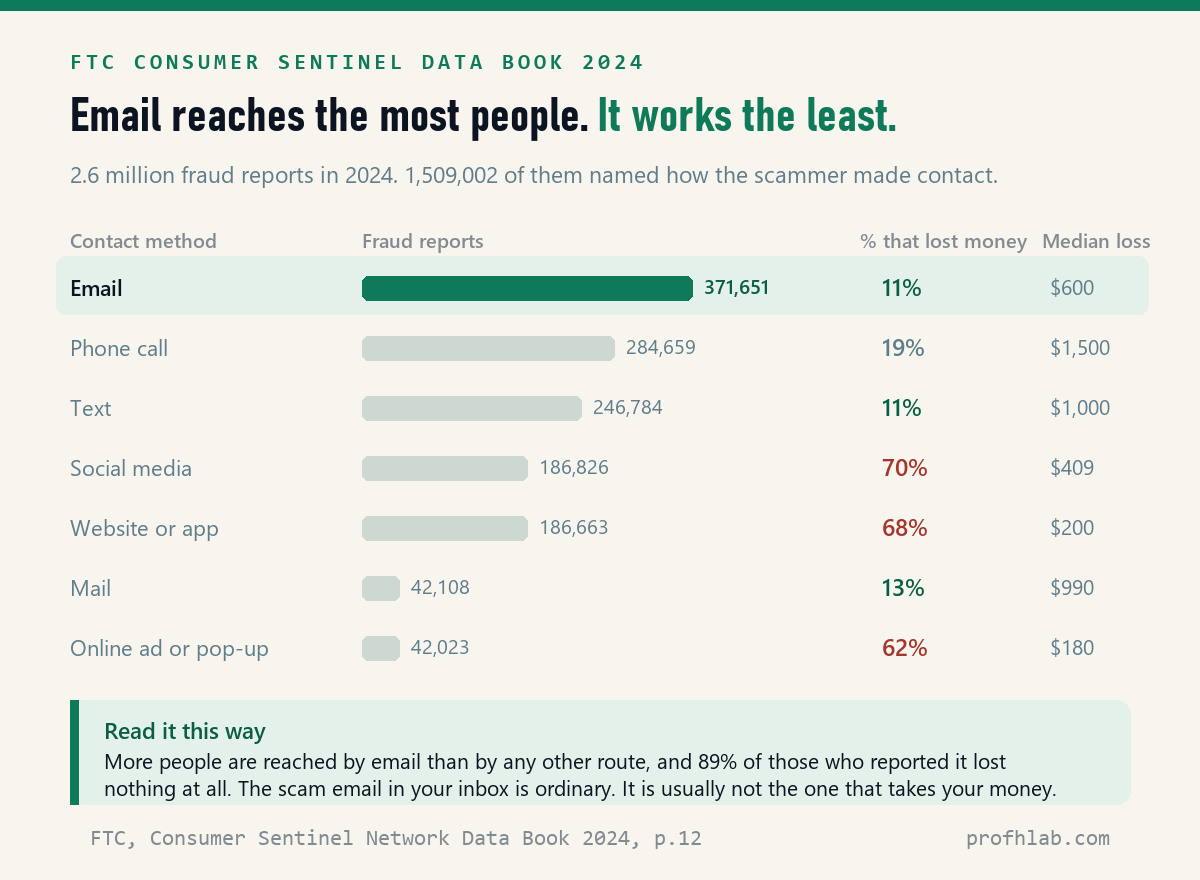
Read together: email is the most common way a scam reaches an American, and 89% of the people who reported one walked away with nothing lost. The suspicious message in your inbox this morning is ordinary. Deleting it is a normal Tuesday, not an emergency.
The emergencies are elsewhere, and they are growing. The FBI’s Internet Crime Complaint Center logged 201,266 complaints from people aged 60 and over in 2025 — up 37% in a year — with $7.748 billion in losses and an average loss of $38,500. The FTC, in its December 1, 2025 report to Congress, found total reported fraud losses for that age group rose about fourfold between 2020 and 2024, from roughly $600 million to $2.4 billion. IC3 also opened its first-ever section on artificial intelligence, counting more than 22,000 AI-related complaints and over $893 million in losses in 2025.
Two short videos worth your time on this
Both are from groups with no product to sell you.
What to do with this
- Practice on a real one today. Open a message you already trust — from your bank, or a store you shop at — and walk the Show original path. Find the PASS lines while nothing is at stake. Five minutes now means you will recognize the screen when it matters.
- Adopt one rule: never use the contact details in the message. The FTC’s guidance is blunt about this — contact the company using a phone number or website you know is real, not the information in the email. The number on the back of your card always wins.
- Agree on a family code word. The FBI’s first listed protection tip is to “create a secret word or phrase with your family to verify their identity.” It costs one phone call and defeats a cloned voice as well as a written plea. Our guide to AI scams targeting seniors has a card you can print.
- Report it — it is three addresses, not a form. Forward phishing emails to reportphishing@apwg.org. Forward scam texts to SPAM (7726). File anything you lost money on at ReportFraud.ftc.gov, and for fraud against someone 60 or over, ic3.gov.
- Do not pay for an AI detector. On the evidence above, for email it is worse than nothing.
If you want to go deeper
- “What if it is a phone call instead?” Voice cloning needs seconds of audio, and the tells are different. See how to tell if a phone call is AI and what actually happens if you say yes on a scam call.
- “What about the pictures in the email?” Image forensics is a separate skill with its own shortcuts — how to tell if a picture is AI-generated. For ads, see how to tell if a Facebook ad is fake.
- “Is AI reading my email already?” Probably some of it. How to stop AI from reading my Gmail and does Copilot have access to my emails cover the settings.
- “What is circulating this month?” We keep a running list in AI Scam Watch, September 2026.
Questions people actually ask about AI-written email
How can you tell if an email was written by ChatGPT?
Honestly, usually you cannot, and in 2026 nobody reliable claims otherwise. There is no watermark in ordinary chatbot text, detectors are unreliable, and one round of human editing erases whatever pattern was left. If your reason for asking is safety rather than curiosity, switch questions: instead of “was a machine involved,” ask “does the sender pass SPF, DKIM and DMARC, and is the request itself reasonable.” Those two have answers.
How do I know if an email is a scam?
Check the request, then check the postmark. A scam almost always wants urgency plus one of five things: a click, a payment, a gift card, a code read aloud, or a password. Then open Show original and look at the authentication lines. The FTC’s own signs are worth memorizing too: claims of suspicious activity you did not see, a problem with your account or payment, a demand to confirm personal information, an invoice you do not recognize, or a link to make a payment.
What does “mailed by” mean in Gmail, and what does “signed by” mean?
They are Gmail’s plain-English summary of the authentication check. “Mailed-by” shows the domain that actually sent the message; “signed-by” shows the domain whose cryptographic signature is attached. When both show the company you expect, the message really came from them. When Gmail cannot verify a message, it shows a question mark beside the sender’s name instead — Google’s own advice there is to be careful about replying or downloading attachments.
How do I see email headers in Gmail, Outlook and on an iPhone?
Gmail on a computer: open the message, click the three dots next to Reply, click Show original. Gmail on a phone: open the message, tap View details, tap View security details. Outlook: open the message, File > Properties. Apple Mail on a Mac: View > Message > All Headers. The iPhone Mail app does not show full headers — tap the sender’s name to see the real address, and do the full check later on a computer.
Are AI detectors accurate?
Not on anything you would stake a decision on. The most-cited study of seven detectors found they misclassified human-written essays by non-native English speakers as AI-generated 61.22% of the time on average, while scoring near-perfectly on US eighth graders. Simplifying the vocabulary in those American essays pushed their false-positive rate from 5.19% to 56.65%. A detector that punishes plain language will punish a lot of honest people.
Does it matter whether a scam email was written by AI or by a person?
Not to you. The loss is the same either way, and every protective step in this article is identical. It matters to investigators, because AI lets one criminal run the volume that used to take a room full of them — which is why IC3 opened its first artificial-intelligence section in 2025 and counted over $893 million in related losses. For your inbox, the only question is whether you act on the message.
If an email passes SPF, DKIM and DMARC, is it definitely safe?
It is definitely from who it says — which is not the same as safe. A real, fully authenticated message can still come from a company whose account was broken into, or from a legitimate service a scammer signed up for using a lookalike domain that passes its own checks. That is why the request test comes first and the postmark test second. Authentication answers “who,” never “should I.”
Sources
- Federal Trade Commission, Consumer Sentinel Network Data Book 2024 (March 2025), p.12 — fraud reports and losses by contact method.
- Federal Trade Commission, How to Recognize and Avoid Phishing Scams — signs and reporting addresses.
- Federal Trade Commission, Annual Report to Congress on Protecting Older Adults, December 1, 2025.
- FBI Internet Crime Complaint Center, Criminals Use Generative Artificial Intelligence to Facilitate Financial Fraud, alert I-120324-PSA, December 3, 2024.
- FBI Internet Crime Complaint Center, 2025 Internet Crime Report — AI section (p.39) and Elder Fraud section (p.44).
- Google, Trace an email with its full headers and Check if your Gmail message is authenticated.
- Liang, Yuksekgonul, Mao, Wu and Zou, GPT detectors are biased against non-native English writers, Patterns; arXiv:2304.02819v3, revised July 10, 2023.
Keep reading
- How to use ChatGPT: a beginner’s guide for readers over 50.
- The best AI tools for seniors — what is actually worth your time.
- Using AI to write a letter or email — the other side of this coin.
- How to turn off AI summaries on iPhone.
- How do I get rid of AI on my phone?
- Is Meta AI reading my WhatsApp messages?
- How to stop Meta AI from using my photos on Facebook.
- Is it safe to upload medical records to ChatGPT?
- How to tell if Meta glasses are recording.
- How to get the old Google search back.
- The AI Jobs Tracker — our own count, updated daily, if you want to see what we mean by primary data.
- Start here — the whole beginners’ library in one place.
About the author. Prof. H writes profhlab.com for people who did not grow up with this stuff and would like a straight answer. We read the primary sources so you do not have to. The seven competing guides were read and counted on September 14, 2026, every menu path above was checked against Google’s own support pages the same day, and every figure is linked to the agency or paper it came from. Found an error? Tell us — we correct in public.
Prof.’s H Newsletter
One short email a month, with the numbers in it
What actually moved in AI hiring, AI prices, and the scams aimed at older Americans. Counted here, dated, and linked to the source. One email a month, and your address goes nowhere else.