Why Do I Keep Getting Scam Ads on YouTube? The FTC Just Asked 132 Questions About It
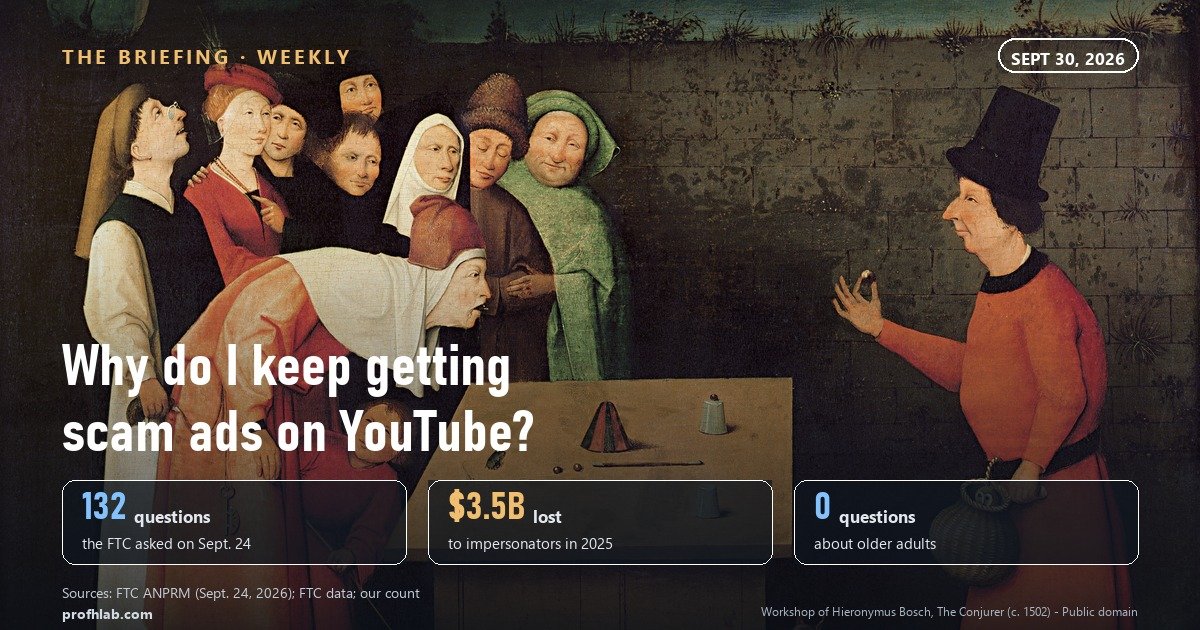
You keep getting scam ads on YouTube because the ad tools that find buyers for honest advertisers find them for scammers too, and on September 24, 2026 the Federal Trade Commission voted 2-0 to ask whether platforms should be forced to stop that. The notice is 43 pages long. We counted 132 questions in it.
You have seen the ads. A news anchor who never said those words. A “Medicare benefit” with a phone number. A famous investor offering a stock tip in a voice that is almost right. The question people now type into Google, word for word, is why do I keep getting scam ads on YouTube. This week, for the first time, a federal agency asked the same thing out loud.
The short answer. YouTube ads are sold and aimed by automated systems that look for the people most likely to click. Those systems do not know a scam from a sale until the ad is caught. Google says it caught more than 99% of the 8.3 billion bad ads it removed in 2025 before anyone saw them. Our arithmetic: that still leaves up to about 83 million that played first.
Turning off personalized ads does not stop them. Block ad hides one ad for at least six months. Report ad sends it to review. Only a rule, which the FTC started asking about on September 24, would change what reaches you in the first place.
How we did this: we read the FTC notice (PDF, published September 24, 2026), Google’s 2025 Ads Safety Report (published April 16, 2026) and four Google help pages, all read on September 30, 2026, and counted the notice’s questions ourselves. An AI assistant helped draft and run the document reads; every quote was read on the source’s own page on the date shown.
Why does YouTube keep showing me scam ads?
Because the machine that picks ads is built to find people who respond, and it works the same way for a scammer until someone stops the scammer. The FTC’s notice quotes the platforms’ own sales copy to make that point.
Meta, it notes, sells Advantage+, which uses AI “to optimize campaigns in real-time and match ads to the people most likely to take action.” For Google, the notice quotes the advertiser page: “Google’s AI will then find the best performing ad combinations.” Nothing in either sentence asks who the advertiser is.

YouTube’s help page on why you see ads (read on September 30, 2026) lists the inputs: the video you are watching, your age range and gender in your Google Account, your activity on Google services, the sites and apps you use, and “info we get about you from partners.” A scam campaign aimed at, say, retirement savings will keep landing on you if you watch retirement videos.
That is also why the ads feel personal. They are. Not because anyone chose you, but because a system was paid to find people like you, and the scammer paid the same price as everyone else.
What did the FTC actually ask on September 24, 2026?
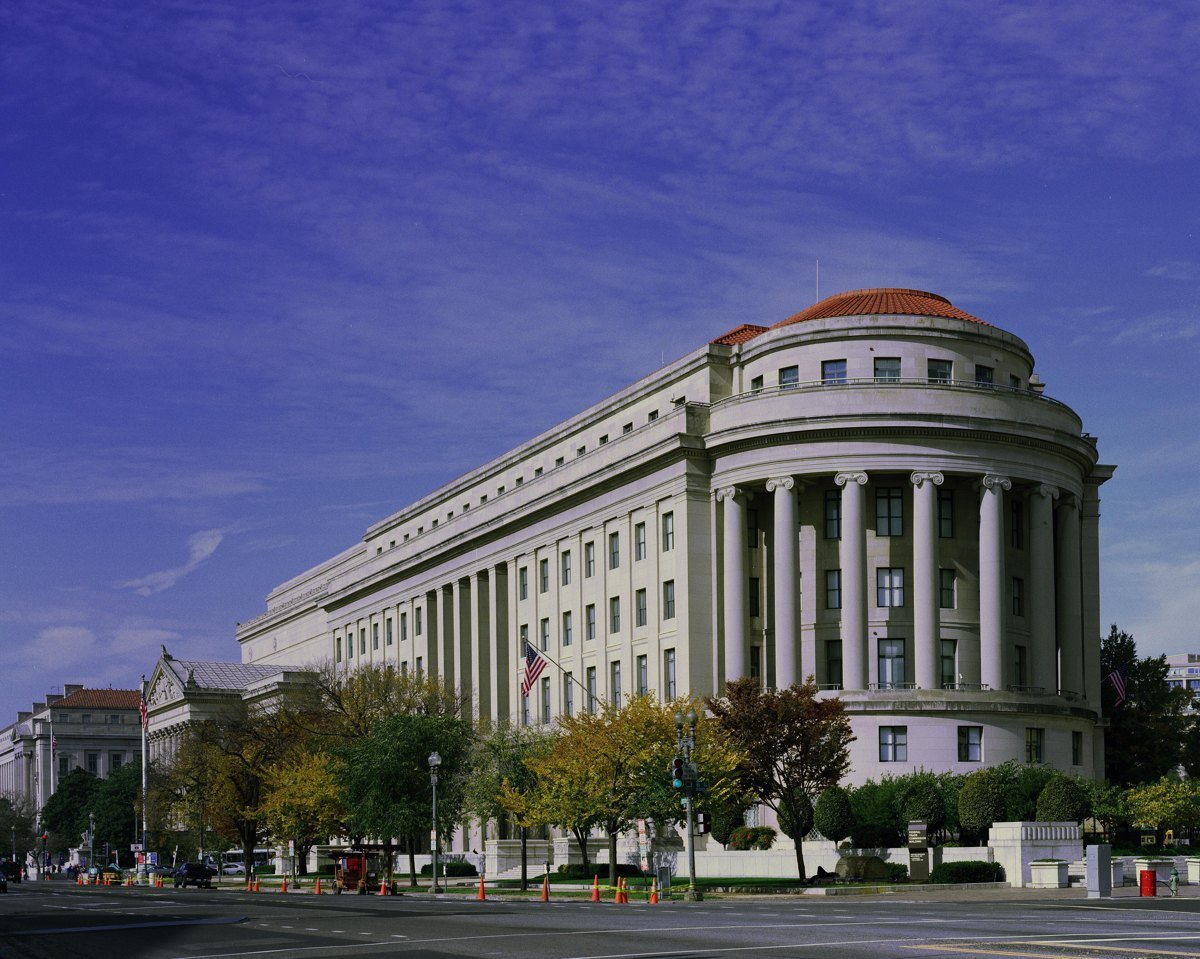
It asked whether it should update its Rule on Impersonation of Government and Businesses to cover platforms whose ad tools help impersonation scams. The FTC press release (published September 24, 2026) calls this an Advance Notice of Proposed Rulemaking. That is the step before a proposed rule, not a rule.
Its numbers are the reason to pay attention. Americans filed more than 1 million imposter reports in 2025 and reported losing nearly $3.5 billion to them. Nearly 30% of people who lost money to any scam said it started on social media, with $2.1 billion lost that way.
“Platforms internalize the revenue but externalize the risk.”
— FTC, Advance Notice of Proposed Rulemaking, Rule on Impersonation of Government and Businesses, Matter R207000 (PDF)
Then we did what the news segments did not: we counted what the notice asks. The questions run in six lettered sections, A through F. Here is what they cover, by our count of sentences that end in a question mark.
| What the questions ask about | How many |
|---|---|
| All questions in sections A to F | 132 |
| Whether platforms verify who the advertiser is | 5 |
| Artificial intelligence | 1 — whether new rules would discourage AI innovation |
| Refunds | 1 — as one of the harms to measure |
| Older adults | 0 |
Our count of the FTC’s 43-page PDF, read on September 30, 2026. Counting method: sentences ending in “?” between “A. Questions” and the end of section F.
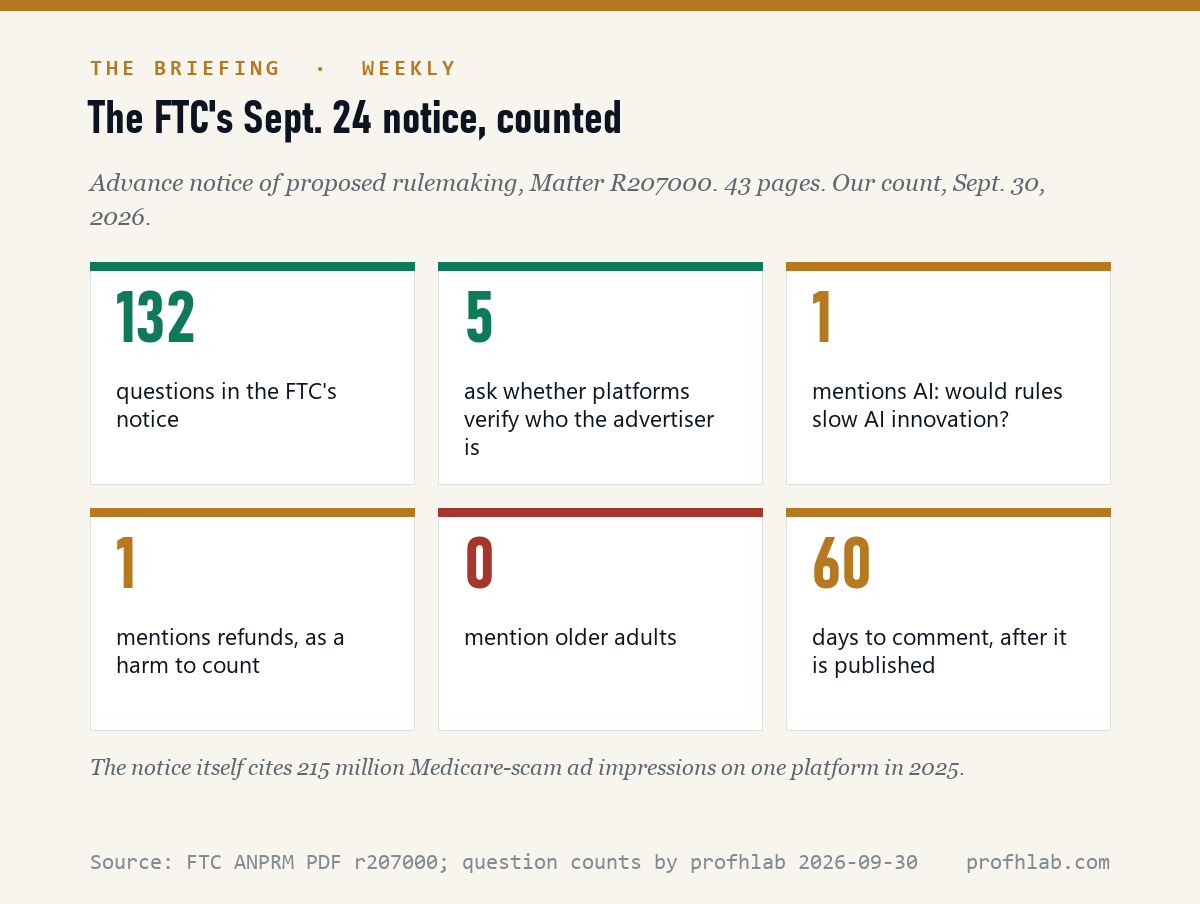
Two numbers in that table are worth a second look. The only question that mentions artificial intelligence asks whether rules would discourage platforms from innovating with it. Not whether AI makes the fakes. And the notice’s own background section cites a watchdog count of 215 million Medicare-scam impressions on one platform in 2025, while none of the 132 questions mentions older adults.
That is not a scandal. Questions are phrased to collect evidence, and the harm to seniors is already in the record. But it tells you where your comment would matter most. If you or a parent has seen a fake Medicare ad, the FTC is asking, in section E, what volume of complaints should force a platform to investigate.
Google says it stops 99% of bad ads. Why do I still see them?
Because 99% of a very large number is not all of it. Google’s 2025 Ads Safety Report, published April 16, 2026, says it blocked or removed more than 8.3 billion ads and suspended 24.9 million advertiser accounts. Of those ads, it says, it stopped “over 99% before they were ever seen by anyone.”
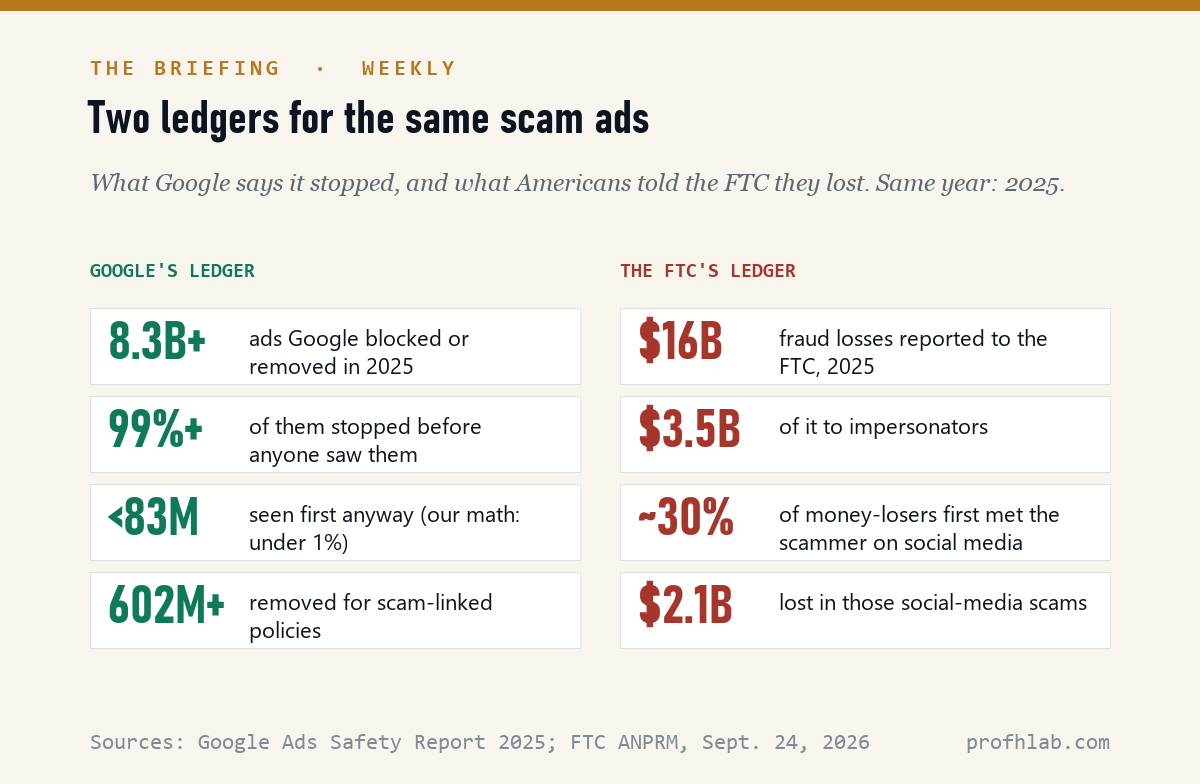
Do the subtraction. Less than 1% of 8.3 billion is fewer than 83 million ads that someone saw before they came down. And that counts only the ads Google eventually caught. Ads that were never caught are, by definition, not in the report.
The report also lists 602 million ads removed and 4 million accounts suspended for the policies it most closely ties to scams. It credits Gemini, Google’s AI, with acting on four times as many user reports as the year before. So reporting is not pointless. It is just slower than the ad.
The FTC notice, citing press reports, sums up the two companies it names most. Google, it says, “attempts to use AI to screen potential scam ads before they run, while Meta attempts to identify and remove scam ads after they are posted.” Either way, the first viewers of a new scam campaign are the test.
Does turning off personalized ads stop scam ads on YouTube?
No, and it can take away the one button that helps. With personalization off, Google still shows ads; they are chosen from things like the video you are watching. Google’s My Ad Center help page (read on September 30, 2026) warns that “some features of My Ad Center may not be available” if you have turned off personalized ads. YouTube’s report page is blunter: Block ad “is only available if you choose to customize the ads you see in My Ads Center.”
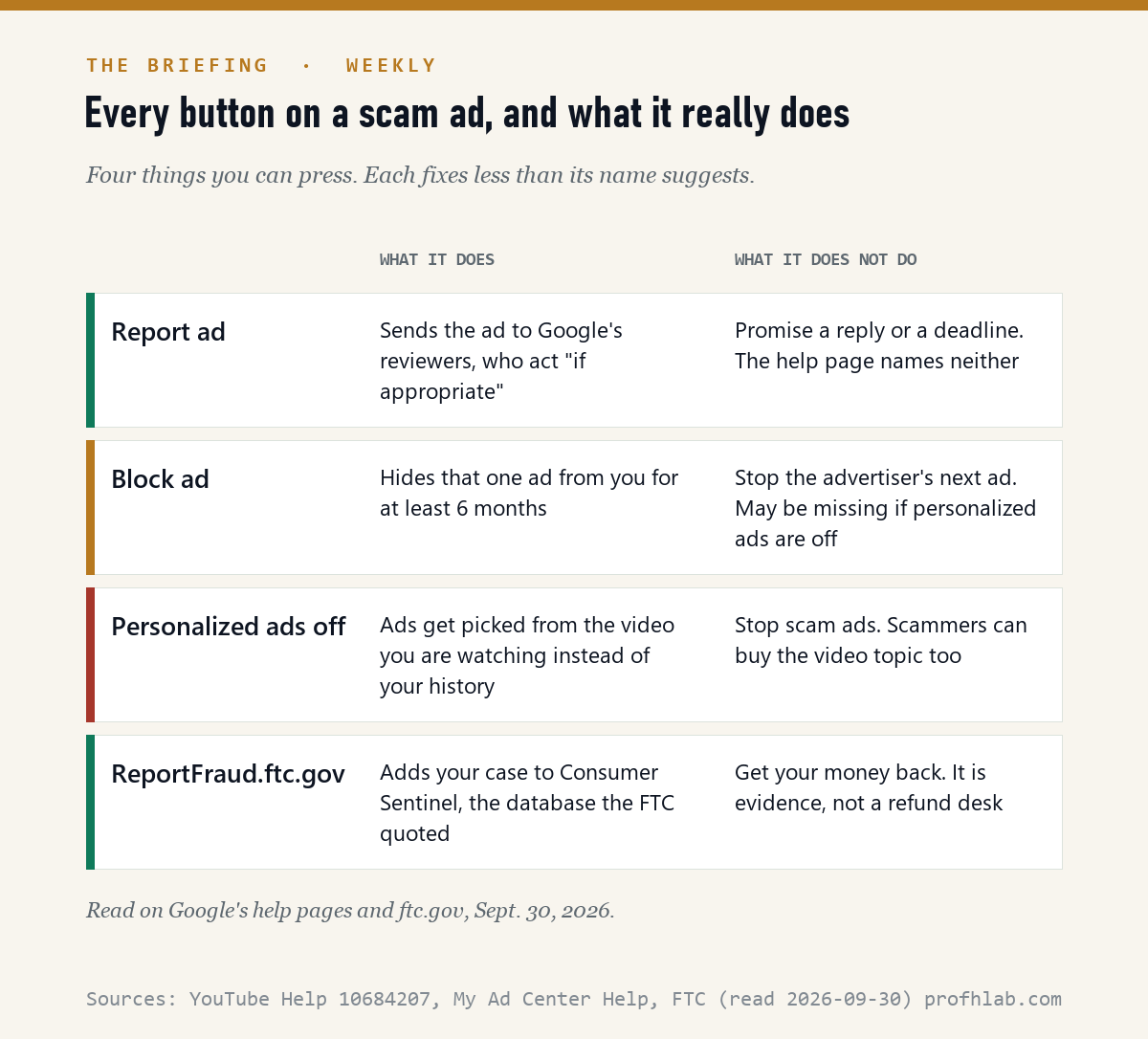
Here is what each option really does, from the pages themselves. Block ad: Google says it will “do our best” to keep that ad away from you “for at least 6 months.” One ad. The same scammer’s next ad is a new ad. Report ad: YouTube’s report page says its team will review the report and “take action if appropriate.” It names no deadline and no reply.
ReportFraud.ftc.gov does something different. It adds your case to Consumer Sentinel, the complaint database behind the numbers in the FTC’s own notice. It is evidence for the rule, not a refund desk.
How can you tell who paid for a YouTube ad before you click?
Tap the small Info or More button on the ad. That opens My Ad Center, which is also where Google says you can “learn who paid for an ad.” Google’s advertiser verification policy (read on September 30, 2026) says verified advertisers’ name and location appear in ad disclosures and in the Ads Transparency Center.
The test is a mismatch. If the ad shows a bank, Medicare, a TV network or a celebrity, but the name under “paid for by” is a company you have never heard of in another country, close it. The same policy page says all advertisers “will eventually be required” to verify. Eventually is doing a lot of work in that sentence.
The fastest check. Never use the phone number or link in an ad for a bank, a government program or tech support. Type the organization’s name into a new browser tab yourself, or use the number on the back of your card. For Medicare, that number is 1-800-MEDICARE (1-800-633-4227). Our guide to reaching a real person lists the official numbers.
Put the phone down, then report and block the ad

- Do not call, scan or click anything in it. Real agencies and banks do not recruit you through a video ad with a phone number.
- Report it from the ad: Info or More, then Report ad. If it has already disappeared, use the form linked on YouTube’s report page.
- Then block it so it stops following you for six months. Leave personalized ads on if you want this button to keep working.
- If you lost money, call your bank the same day, then file at ReportFraud.ftc.gov. Card payments can be disputed; gift cards, wire transfers and crypto usually cannot. See why a credit card caps your loss at $50.
- Tell one person. Scam ads repeat by topic. A parent who watches the same channels as you will see the same ad next week. Our safe-word guide for families takes five minutes.
What happens next, and when to check. The comment clock has not started. The notice says comments are due 60 days after it appears in the Federal Register; when we checked federalregister.gov on September 30, 2026, it had not appeared yet. Once it does, look for docket R207000 on regulations.gov and file a short comment with what you saw: the date, the product it impersonated and whether you reported it. We will add the deadline here the day it is published.
The FTC’s own explainer, and the money behind YouTube’s ads
What we left out: several of the most-viewed clips for this search use all-capital “you’re being TARGETED” style titles. We chose calm ones. A scam-ad video that works by alarming you is using the scammer’s method.
Why the top search results could not tell you this
We tried to read the top 10 results for “why do I keep getting scam ads on YouTube” on September 30, 2026. Two are Reddit threads and four blocked our reader, so we could read four: YouTube’s own help page, Laptop Mag, How-To Geek and Lifehacker.
None of the four mentions the FTC notice, which is six days old, or advertiser verification. Two are about ad blockers. The How-To Geek page is dated December 27, 2017. That is not their fault; the notice did not exist when they were written. It is why we checked the date on every page we used.
Called the number, saw a famous face, or got a Medicare offer?
- You called the number in the ad. What happens if you say yes on a scam call walks through what they can and cannot do with your voice.
- The ad used a famous face. How to tell if a YouTube video is AI-generated and how to tell if a picture is.
- You saw it on Facebook, not YouTube. How to tell if a Facebook ad is fake.
- It was a Medicare or insurance offer. What Original Medicare actually requires and how insurers use AI on claims.
- It was a job offer. Are AI training jobs legit?
What reporting, Premium or a verified name does about scam ads
Why do I keep getting scam ads on YouTube?
Because YouTube ads are placed by automated tools that look for the people most likely to respond, and those tools work for a scammer’s ad the same way they work for an honest one until the ad is caught. Google says it stopped more than 99% of the 8.3 billion bad ads it removed in 2025 before anyone saw them; that still leaves up to about 83 million that ran first, plus whatever was never caught. On September 24, 2026 the FTC asked whether platforms should be required to stop this.
Why am I getting scam ads on YouTube all of a sudden?
YouTube’s own help page says the ads you see depend on the video you are watching, your Google Account details such as age range, your activity on Google services, and the sites and apps you use. A sudden run of similar scam ads usually means one campaign has found an audience it thinks matches you, often by topic: money, health, Medicare, crypto or a celebrity. Blocking the ad and reporting it is the fastest fix for that one campaign.
How do I report a scam ad on YouTube?
On the ad itself, select More or Info, then Report ad. If the ad is gone, YouTube’s help page links a report form instead. Reporting from the ad works on the YouTube app and on a computer. If you lost money, also file at ReportFraud.ftc.gov and call your bank or card issuer the same day.
Does turning off personalized ads stop scam ads?
No. With personalized ads off, Google still shows ads, chosen from things like the video you are watching instead of your history. A scammer can buy the topic of the video too. Turning personalization off can also remove some My Ad Center features, which is where the Block ad option lives.
Can YouTube be sued for scam ads?
Platforms usually argue that federal law, Section 230, protects them from liability for ads other people create. The FTC’s September 24, 2026 notice names section 230 26 times and argues it "does not deprive the Commission of this authority over Platform conduct" such as optimizing ads. No rule exists yet, and courts have not tested that argument against one. This is general information, not legal advice.
Is an ad safe if it has a verified advertiser name?
Safer, not safe. Google’s advertiser verification policy says verified advertisers’ name and location appear in ad disclosures and in the Ads Transparency Center, and that all advertisers will eventually be required to verify. The useful test is a mismatch: if an ad shows a famous brand or a government agency but the verified name is someone else, skip it.
Does YouTube Premium get rid of scam ads?
It removes the ads that play in and around videos. YouTube’s help page says Premium members can watch without those ads. It does not stop scam links inside video descriptions, comments or the videos themselves.
The FTC notice, Google’s ad report and YouTube’s help pages
- FTC press release, “FTC Seeks Public Comment on Whether to Update Rule on Impersonation of Government and Businesses…,” September 24, 2026
- FTC, Advance Notice of Proposed Rulemaking, 16 CFR Part 461, Matter R207000 (PDF, 43 pages)
- Google, 2025 Ads Safety Report (PDF)
- Google, “Google’s 2025 Ads Safety Report,” April 16, 2026
- YouTube Help, “Manage what types of ads you see on YouTube videos”
- YouTube Help, “Report policy-violative ads”
- My Ad Center Help, “Control your ad experience”
- Google Advertising Policies Help, “About advertiser verification”
- Federal Register search for the notice, checked September 30, 2026 (not yet published)
- All documents fetched and read September 30, 2026. Question counts and the 83 million arithmetic are ours.
September’s Scam Watch and other reads from this desk
- AI Scam Watch: September 2026
- How to tell if a phone call is AI
- How to tell if an email is written by AI
- Is YouTube Premium free with Google AI Pro?
- How to turn off auto-dubbing on YouTube
- Can you turn off ads in ChatGPT?
- How to get the old Google Search back
- How do I get rid of AI on my phone?
- The Briefing · AI Price Tracker · FAQ · Ask a question
About the author. Prof. H teaches robotics and AI and writes The Briefing, a weekly read on what AI is doing to ordinary bills, benefits and rights. Every document in this piece was fetched and read on the date shown. This is general information, not legal or financial advice. Corrections and questions: ask here.
Prof.’s H Newsletter
One short email a month, with the numbers in it
What actually moved in AI hiring, AI prices, and the scams aimed at older Americans. Counted here, dated, and linked to the source. One email a month, and your address goes nowhere else.