How to Use ChatGPT to Shop Before Black Friday: OpenAI’s Own Help Page Lists 6 Warnings, So Compare There and Pay at the Store
To use ChatGPT to shop, type what you need, who it is for and your top price, then ask it to compare 2 or 3 choices; on November 22, 2026, OpenAI’s own shopping help page listed 6 warnings about those results and 3 things to confirm with the store before you pay. Use ChatGPT to narrow the list, then buy on the store’s own website.
That is the whole method. The rest of this guide shows what to type, what the price and label on each product card really mean, and which shopping features from the past year are no longer on OpenAI’s help pages. Black Friday falls on November 27 this year, so this is a good weekend to practice on something small.
What we checked on November 22, 2026
We read OpenAI’s help article Shopping with ChatGPT Search (marked “Updated: 6 days ago”), the Ads in ChatGPT article, the Making purchases with ChatGPT Wallet article, OpenAI’s November 24, 2025 post Introducing shopping research in ChatGPT, and every shopping entry in the ChatGPT release notes. We also opened the two older help addresses for shopping research and Instant Checkout to see what they show today.
We did not sign in and place an order for this guide. Where we say what the ChatGPT app shows, we are quoting OpenAI’s pages, not our own screen.
Written and checked by Prof. H. An AI assistant helped draft this article and ran the page reads; every quote was read on the source’s own page on the date shown.
How do you use ChatGPT to shop, step by step?
Start with one plain sentence that names the item, the person and the budget, because OpenAI’s help page, read November 22, 2026, says to “include your budget, preferences, and any requirements.” ChatGPT then shows product cards with pictures, prices and ways to buy.
Here is the order we suggest for a first try:
- Describe the need. For example: “I need a lightweight cordless vacuum for a small apartment. I am 72 and have a sore wrist. My limit is $150.”
- Ask for a short list. “Give me 3 choices and one sentence on the main trade-off for each.”
- Ask for the weak spots. “What do owners complain about most for each one?”
- Ask it to adjust. If the list is wrong, say so. The help page says, “If the results don’t match what you need, ask ChatGPT to adjust them.”
- Leave the chat to pay. Open the store’s own website in a new tab, type the address yourself, and check the final price there.
Think of ChatGPT as a helpful clerk who has read a lot of product pages but does not work for any one store. A clerk can be wrong about today’s price. The cash register cannot.

Is the first price ChatGPT shows the lowest one?
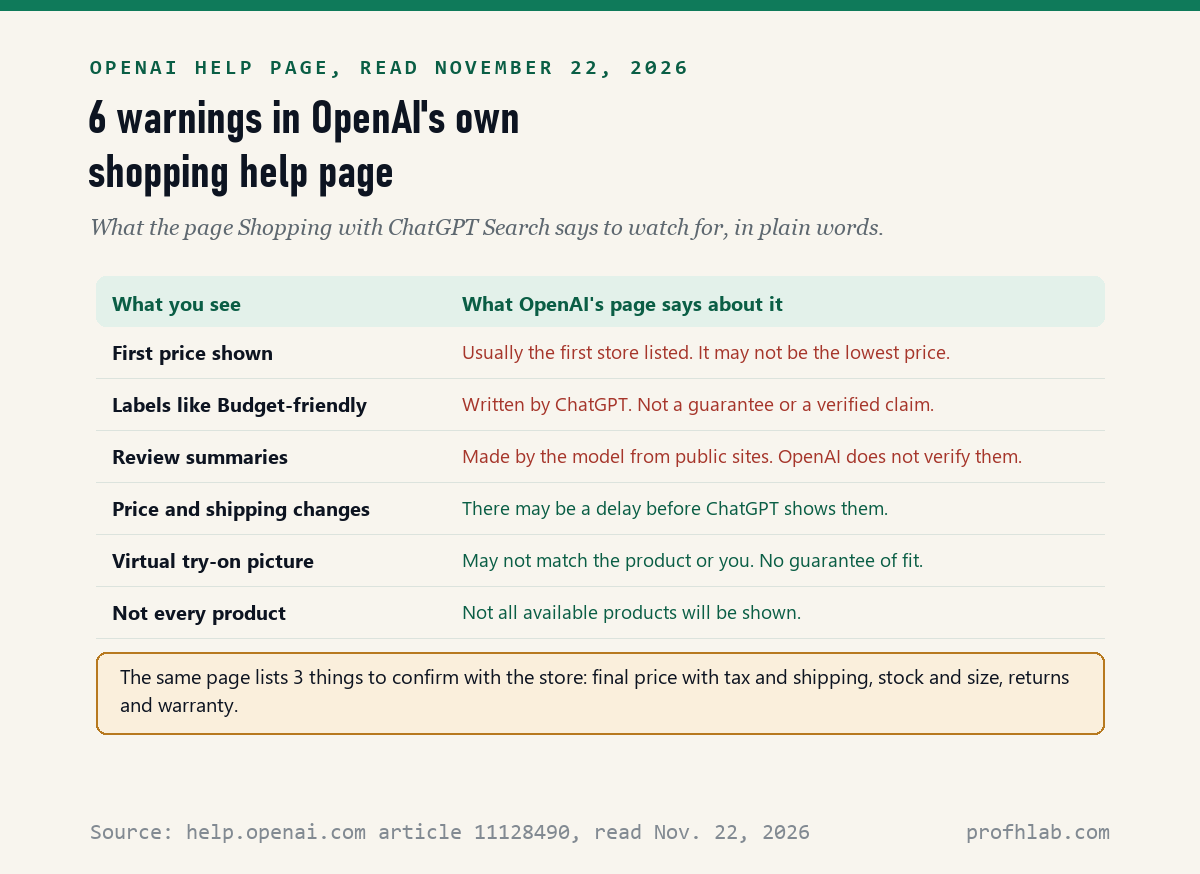
Not necessarily: OpenAI’s help page, read November 22, 2026, says the price in ChatGPT’s first answer “typically” comes from the first store listed, “which may not be the lowest available price.” Tap the product to see other stores. OpenAI says the cheapest one it knows about may carry a “Best price” label.
Two more lines on the same page matter on a sale weekend. Labels such as “Budget-friendly” are written by ChatGPT and are “not guarantees or verified statements.” And when stores change prices or shipping, “there may be some delay” before ChatGPT shows it. Black Friday prices can change within hours, so the chat may be behind.
Before you pay, OpenAI lists 3 things to confirm with the store: the final price with taxes, fees and shipping; stock, size and color; and the return and warranty rules. Our guide to different prices for the same product explains why two shoppers can see two prices, and our surveillance pricing check of 8 store privacy notices shows what stores say they track.
Are the products ChatGPT shows me ads?
OpenAI says no for the product cards: its shopping help page, read November 22, 2026, states that “product results are not ads” and that ads are separate. Ads do exist in ChatGPT, though. OpenAI’s ads help page says testing began in the United States on February 9, 2026, for the Free and Go plans.
The same ads page says Plus, Pro, Business, Enterprise and Edu accounts will not have ads, and that an ad appears below a response and is “clearly labeled.” If you use the free plan, look for that label before you click. OpenAI also says advertisers do not see your chats.
You can limit how personal those ads are. OpenAI’s page points Free and Go users to Settings, then Ad Controls, where you can turn off ad personalization, hide an ad, or clear the data used for ads. Our guide to what to keep out of ChatGPT covers the memory side.
A safety habit for sale week
Scammers copy store names in texts and fake websites at this time of year. Do not pay through a link that arrives by text or email, even if it matches what you asked ChatGPT about. Type the store’s address yourself. Our fake shopping website checklist, the USPS package text guide and AI scams that target seniors show the signs.
Where did ChatGPT shopping research go?
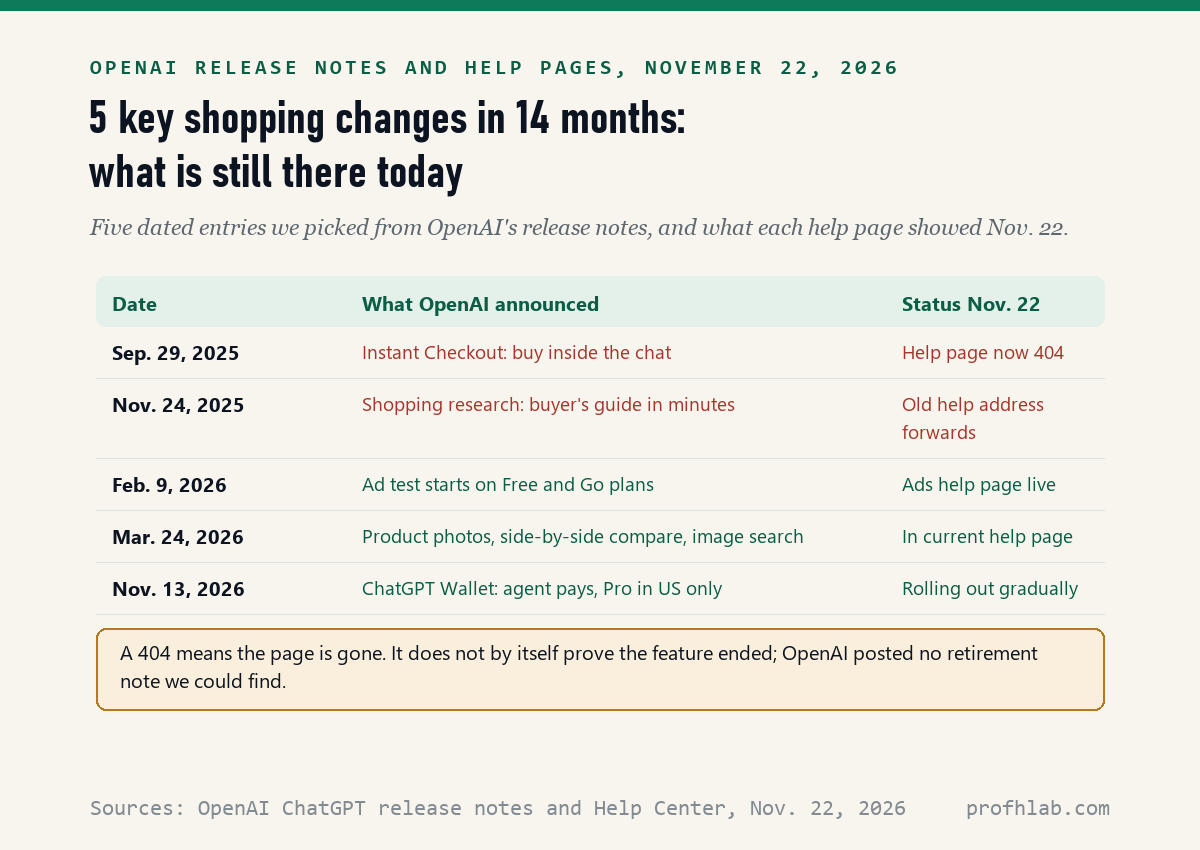
We could not find it on OpenAI’s help pages: on November 22, 2026, the old shopping research help address forwarded to the general article Shopping with ChatGPT Search, and that article used the words “shopping research” 0 times. OpenAI’s release notes show no entry that says the feature was retired.
When OpenAI launched it on November 24, 2025, its post said you could pick “shopping research” from the (+) menu and get a “personalized buyer’s guide in minutes.” On March 24, 2026, the release notes described a shopping update with product photos, side-by-side comparisons and searching with a photo. Those features are what today’s help page describes.
So our reading, and it is an inference, is that the separate mode was folded into normal ChatGPT answers. We did not check a signed-in app, so if you still see a shopping research button, it works the way OpenAI’s 2025 post describes.
Can ChatGPT pay for things on my behalf yet?
Only for a small group: OpenAI’s release notes say ChatGPT Wallet arrived on November 13, 2026, and its help page, read November 22, says it is rolling out to eligible ChatGPT Pro users in the United States, aged 18 or older, with an eligible US-issued card.
Wallet works inside what OpenAI calls a “dot,” and you approve each purchase with Face ID or a similar check. The page also says Wallet “isn’t available in Chat.” For most readers on the free plan or Plus, the answer today is no.
An older way to buy inside the chat, Instant Checkout, was announced on September 29, 2025. Its help address returned “That page doesn’t exist” when we opened it on November 22, 2026, and today’s shopping help page mentions it 0 times. Some news sites report it ended in March 2026; we found no OpenAI note confirming that. Our credit card safety guide covers what the banks said about AI agents paying.
What should you type to find a gift or a deal?
Give ChatGPT the facts a good store clerk would ask for: who the gift is for, what they already own, your top price and the date you need it, since OpenAI’s page, read November 22, 2026, says a $30 budget makes ChatGPT “focus more on price.” Three examples a beginner can copy:
- “My granddaughter is 9 and loves drawing. Suggest 3 art gifts under $40 that arrive before December 20. Say which store sells each one.”
- “Compare these two space heaters for a 12 by 14 foot bedroom. Which has an automatic shut-off if it tips over?”
- “Here is a photo of my old coffee maker. Find the closest model sold today under $60.”
Then ask one more question: “What would make you change this pick?” It brings out the trade-offs a short answer hides. If you would rather talk than type, our voice chat guide shows how, and our room decorating guide uses the same photo trick.
What does ChatGPT remember about my shopping?
It can use your Memory: OpenAI’s help page, read November 22, 2026, says ChatGPT considers “your query and context (such as Memory or Custom instructions)” when it picks products. If you once told it you dislike a brand, it may leave that brand out.
That is handy, but you may not want a gift search saved. A Temporary Chat does not create or update memories while it stays temporary, according to OpenAI’s ads page. Our shared account guide explains why a gift search on a family login can spoil a surprise.
Saved products go to your ChatGPT Library when you tap the bookmark icon, and try-on selfies are kept under Settings, Personalization, Reference photos, where you can delete them. Want more first steps? Our ChatGPT guide for beginners over 50 and the Start Here page are the next reads.
What else do people ask before shopping with ChatGPT?
How to use ChatGPT to shop?
Describe the item, the person and your top price, ask for 3 choices with trade-offs, then buy on the store’s own site. On November 22, 2026, OpenAI’s help page listed 3 things to confirm with the store first: final price, stock and returns.
How to use ChatGPT shopping research?
OpenAI’s 2025 post said to pick shopping research from the (+) menu. On November 22, 2026, its old help address forwarded to a general shopping page that never names it, so ask your shopping question in a normal chat.
Can ChatGPT find deals?
It can point to stores and show a Best price label, but OpenAI says its first price may not be the lowest and price changes can show up late. Check the price on the store’s site. Our check of 6 AI plans on Black Friday covers ChatGPT’s own price.
Can ChatGPT find coupons?
OpenAI’s 2025 launch post showed a sample request about Black Friday discount codes. We found no promise in OpenAI’s current help pages that a code will work, so test any code at the store’s checkout and never pay a site that sells codes.
Can ChatGPT buy things for me?
Only through ChatGPT Wallet, which OpenAI says is rolling out to some Pro users in the United States since November 13, 2026. On other plans, ChatGPT shows links and you pay on the store’s site.
How to turn off shopping research ChatGPT?
We found no shopping switch in OpenAI’s help pages on November 22, 2026. Product cards appear when a question sounds like shopping. You can turn off Memory, use a Temporary Chat, and on Free or Go turn off ad personalization in Ad Controls.
OpenAI pages and two videos we used, with the day each was opened
- OpenAI Help Center, Shopping with ChatGPT Search, read November 22, 2026 (the older address help.openai.com/en/articles/12911370 forwards here).
- OpenAI Help Center, Ads in ChatGPT, read November 22, 2026.
- OpenAI Help Center, Making purchases with ChatGPT Wallet, read November 22, 2026.
- OpenAI, Introducing shopping research in ChatGPT, published November 24, 2025, read November 22, 2026.
- OpenAI Help Center, ChatGPT release notes, entries dated September 29, 2025 through November 13, 2026, read November 22, 2026.
- OpenAI Help Center, Instant Checkout article (help.openai.com/en/articles/12440090), returned a not-found page on November 22, 2026.
- OpenAI on YouTube, videos qF4QRh2u7FE and WGvsk0LIveU, view counts checked November 22, 2026.
More from our beginners desk: AI tools for seniors, turning off AI on Etsy, turning off AI on eBay, making a Christmas card with ChatGPT, spotting AI product photos, our AI price tracker and the AI deals page.
Prof.’s H Newsletter
One short email a month, with the numbers in it
What actually moved in AI hiring, AI prices, and the scams aimed at older Americans. Counted here, dated, and linked to the source. One email a month, and your address goes nowhere else.