How to Turn Off My AI on Snapchat: 9 Controls, and Only a Parent Can Fully Switch It Off
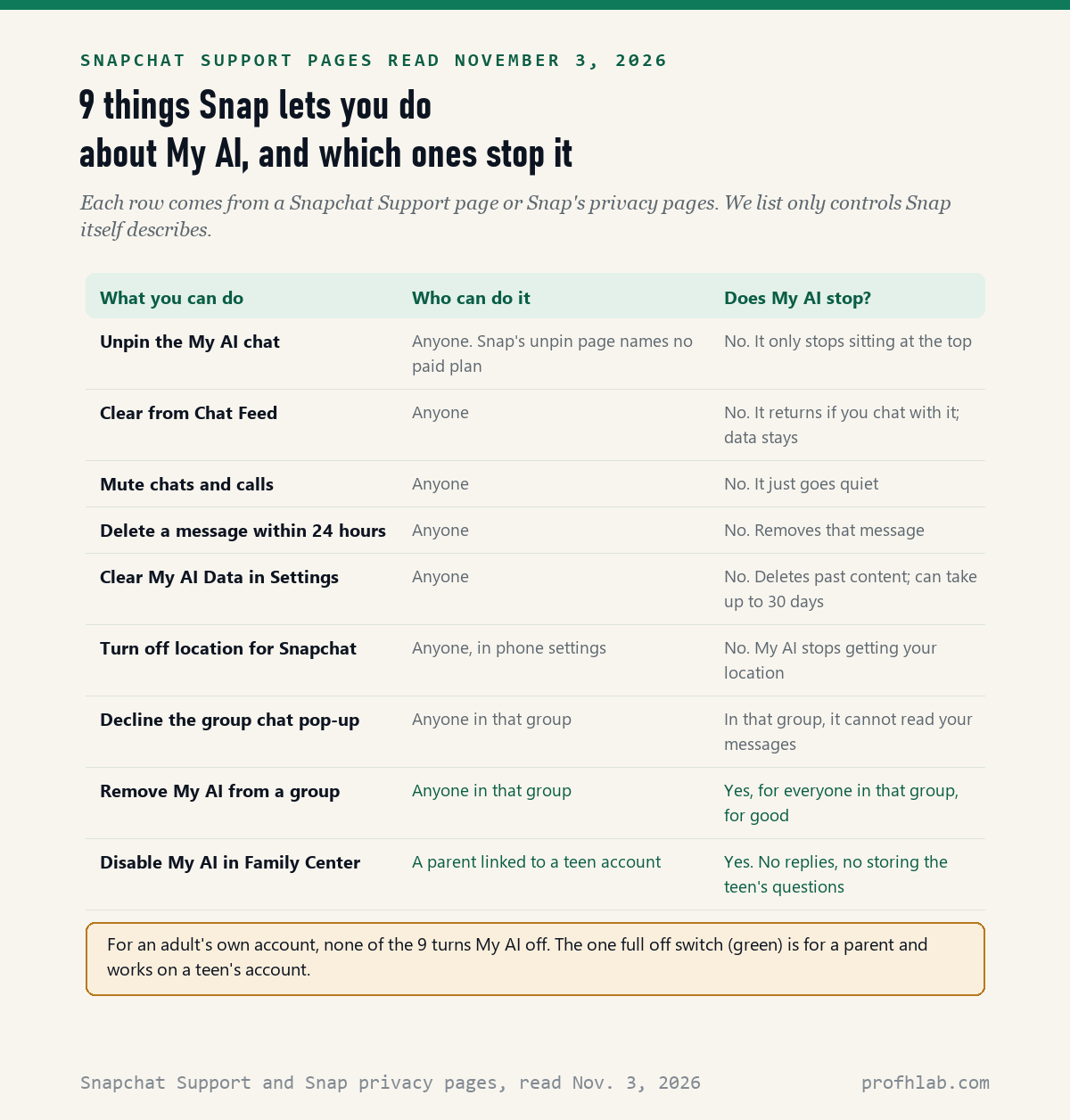
There is no switch that turns off My AI on your own Snapchat account: on November 3, 2026, we read 14 Snapchat Support and Snap privacy pages and counted 9 controls Snap describes for its chatbot. Only 1 of the 9, Disable My AI in Family Center, stops it completely, and only a parent can use it, on a teen’s account.
An adult can still push My AI out of sight, mute it, erase what it stored and keep it out of group chats. That covers what most people want. This guide shows each step in Snap’s own menu words, and where Snap’s pages disagree with each other.
What we checked on November 3, 2026
We read 14 pages from Snap itself: 12 Snapchat Support pages (11 articles plus the Managing My AI section list) and 2 pages on Snap’s privacy and safety site, one of them Snap’s January 11, 2024 announcement of parental controls for My AI. We did not use third-party guides as sources.
Our own count: 9 controls Snap describes for My AI. 7 change where it shows up, what it keeps or what it can see. 1 removes it from a single group chat for everyone. 1, in Family Center, switches it off for a teen. We did not test these on a phone, so we have not seen every screen, and we did not test a free account against a Snapchat+ account.
Written and checked by Prof. H. An AI assistant helped draft this article and ran the page reads; every quote was read on the source’s own page on the date shown.
Can you turn off My AI on Snapchat?
Not for yourself: none of the 14 Snap pages we read on November 3, 2026 describes an off switch for an adult’s own account. The single switch that stops My AI, called Disable My AI, sits in Family Center, the parent tool, and applies to a teen.
Think of My AI as a chatty houseguest Snap seated at the head of your table. You can move its chair to the far end, ask it to stop calling, and throw out its notes about you. You cannot send it home, unless you are a parent setting rules for a teenager.
Snap describes My AI as a chatbot “powered by Large Language Models like GPT models from OpenAI and Gemini models from Google,” in its Support article on what My AI is, read November 3, 2026. The same page warns its answers “may include biased, incorrect, harmful, or misleading content.”
How do I get My AI off the top of my chats?
Unpin it or clear it from your Chat feed: Snap’s Support page “How do I unpin or remove My AI?”, read November 3, 2026, gives 4 taps for each, both starting from a press and hold on My AI in your Chat screen.
- Open Snapchat. It opens on the camera.
- Swipe right to reach the Chat screen.
- Press and hold on My AI.
- Tap Chat and Notification Settings.
- Tap Unpin Conversation, or tap Clear from Chat Feed and confirm.
Unpinning lets My AI slide down the list like any other chat. Clearing takes the thread off your feed. Snap adds a warning on the same page: clearing “does not delete data you’ve previously shared with My AI.” Erasing that is a separate step, covered below.
To stop the alerts too, use the same menu. Snap’s page on muting My AI says to tap Notification Settings, then turn on Mute Chats and Mute Calls and pick how long. If you change your mind, Snap’s re-pin page says searching for My AI and sending it a chat brings it back.
Do you need Snapchat+ to remove My AI?
Snap’s own pages disagree: the unpin and clear article we read on November 3, 2026 lists no paid plan, but Snap’s overview article on My AI still describes how to “unpin/remove it with Snapchat+.” Snapchat+ is Snap’s paid subscription.
We could not settle this from the pages alone, and we did not test it on a free account. Our suggestion is simple. Try the 4 taps above first. If Chat and Notification Settings does not show Unpin Conversation or Clear from Chat Feed, your account or app version may not offer it yet.
Paying does not buy a true off switch either. Neither page says Snapchat+ deletes My AI or stops it from answering. Both describe moving or clearing the chat.
How can a parent turn off My AI for a teen?
Turn on Disable My AI in Family Center: Snap’s Support page “How do I limit my teen’s access to My AI?”, read November 3, 2026, says that once it is on, “My AI will not store or process your teen’s queries, nor reply to your teen’s messages.”
- On the parent’s own Snapchat, open Family Center.
- Scroll to Settings at the bottom of the page and tap to expand it.
- Turn on the toggle named Disable My AI.
This only works for a teen already linked to you in Family Center. Snap’s page “What is Family Center?” lists the tool as a way to “stop My AI from replying to your teen,” next to seeing who your teen chats with, without reading messages.
Snap announced the control on January 11, 2024, saying parents “will now be able to restrict the ability for My AI” to respond to their teen. Snap’s privacy page on My AI adds that a trusted adult can see whether a teen has chatted with My AI, but “cannot see the content” of those chats.


What does Snapchat keep from My AI chats, and how do I erase it?
Everything until you delete it: Snap’s Support page “Does Snap save content shared with My AI?”, read November 3, 2026, answers “Yes” and says content “is retained until you delete it.” Deleting from Snap’s servers can take up to 30 days.
Snap’s overview page also says your data “may also be used by Snap to improve Snap’s products and personalize your experience, including ads.” If that bothers you, erasing old chats is the step that matters, not hiding the chat.
- Tap your Profile icon, then the gear icon for Settings.
- On an iPhone, scroll to Privacy Controls and tap Clear Data. On Android, scroll to Account Actions.
- Tap Clear My AI Data and confirm.
One Snap page calls the same buttons Delete Data and Delete My AI Data, so look for either name. For a message from the last 24 hours, Snap says to long-press it in the My AI chat and tap Delete. Clearing does not touch messages in group chats that include My AI.
Can My AI see my location or my group chats?
It can see your general location if you share it with Snapchat, “even in Ghost Mode,” according to Snap’s location page read November 3, 2026. Ghost Mode hides you from friends on the map, not from the app.
To stop that, turn off location for Snapchat in your phone’s settings. On an iPhone, Snap says to go to Privacy and Security, Location Services, Snapchat, and choose Never. On Android, long-press the Snapchat icon, tap App info, Permissions, Location, and choose Deny. Then clear My AI data, because recent locations may be cached.
Group chats work differently. Snap’s group chat page says My AI “will reply without anyone @mentioning it” in groups that include it. If you do not accept the pop-up when you enter such a group, My AI will not access your messages there.
Anyone in the group can remove it: press and hold My AI in the Group Profile and tap Remove from Group. Snap warns this removes it for everyone, and you cannot add it back to that group.

Snap’s Family Center video and an NBC News report from 2023
We picked 2 videos on November 3, 2026. The first is Snap’s own walk-through of newer Family Center features; it was published before some of the Support pages we read, so trust the written steps above if a screen differs. The second explains why parents worried when My AI arrived.
Ten minutes on the phone, for you or for a grandchild’s account
Our estimate is about a minute for each step. None of them deletes your friends, your snaps or your account.
- Move it. Chat screen, press and hold My AI, Chat and Notification Settings, Unpin Conversation.
- Quiet it. Same menu, Notification Settings, turn on Mute Chats and Mute Calls.
- Erase it. Profile, gear icon, Clear My AI Data (or Delete My AI Data). Allow up to 30 days.
- Hide your location. Phone settings, Snapchat, location set to Never or Deny.
- Parents of teens. Family Center, Settings, turn on Disable My AI.
Talk about it before you flip the switch on a teen’s account; Family Center is built to be visible to them. If a menu does not match, Snapchat Support at help.snapchat.com has the current wording. None of this is your fault. Snap moves these menus often.
More family phone settings, from TikTok to ChatGPT
- Other apps teens use: how to turn off AI on TikTok, Meta AI on Instagram, AI on YouTube and AI on Pinterest.
- Chat apps grown-ups use: Facebook and Messenger, Meta AI in WhatsApp and Gemini in Google Messages.
- Your phone itself: getting rid of AI on your phone, Samsung phones and iPhone AI summaries.
- Chatbots and kids: parental controls on ChatGPT, sharing one ChatGPT account and what to keep out of chatbots.
- Staying safe as a family: family safe word examples, AI scams that target seniors and how to tell if a video is AI.
- Email privacy: how to stop AI from reading your Gmail.
- New to all of this? Start from the Start Here page, our ChatGPT guide for beginners over 50 or our AI tools for seniors.
- Curious where AI work is hiring? Our AI jobs tracker counts openings every week.
What else do families ask about Snapchat’s chatbot?
How to turn off My AI on Snapchat?
For your own account, you cannot fully turn it off. You can unpin it, clear it from your Chat feed, mute it and clear its data. On November 3, 2026 we counted 9 controls on Snap pages, and the only full off switch is Disable My AI in Family Center, for a teen.
How to remove My AI on Snapchat?
Press and hold My AI on the Chat screen, tap Chat and Notification Settings, then Clear from Chat Feed and confirm. Snap says this removes the thread from your feed but does not delete what you shared with My AI.
How to delete My AI on Snapchat?
You can delete its data, not the chatbot. Go to Profile, the gear icon, then Privacy Controls on iPhone or Account Actions on Android, and tap Clear My AI Data. Snap says removal from its servers can take up to 30 days.
How to stop My AI on Snapchat?
To stop alerts, open Chat and Notification Settings for My AI and turn on Mute Chats and Mute Calls. To stop it reading a group chat, decline its pop-up or remove it from the group, which removes it for everyone.
Can parents turn off My AI on Snapchat?
Yes, for a teen linked in Family Center. Open Family Center, expand Settings at the bottom and turn on Disable My AI. Snap says My AI then will not store or process the teen’s queries or reply to their messages.
Does Snapchat My AI save my chats?
Yes. Snap says content shared with My AI is retained until you delete it, and may be used to improve its products and personalize ads. Clearing the chat from your feed does not delete it; Clear My AI Data does.
The 14 Snap pages and 2 videos behind each step
- Snapchat Support, How do I unpin or remove My AI?, read November 3, 2026.
- Snapchat Support, How do I limit my teen’s access to My AI?, read November 3, 2026.
- Snapchat Support, What is My AI on Snapchat and how do I use it?, read November 3, 2026.
- Snapchat Support, How do I delete my data with My AI?, read November 3, 2026.
- Snapchat Support, Does Snap save content shared with My AI?, read November 3, 2026.
- Snapchat Support, How can I manage how my location data is shared with My AI?, read November 3, 2026.
- Snapchat Support, How does My AI work in group chats?, read November 3, 2026.
- Snapchat Support, How do I mute notifications from My AI?, read November 3, 2026.
- Snapchat Support, How do I re-pin or add My AI back to my Chat feed?, read November 3, 2026.
- Snapchat Support, Managing My AI (section list of 6 articles), read November 3, 2026.
- Snapchat Support, What is Family Center?, read November 3, 2026.
- Snapchat Support, Staying Safe with My AI, read November 3, 2026.
- Snap Privacy and Safety, My AI privacy page, read November 3, 2026.
- Snap Inc., Expanding Our In-App Parental Tools, January 11, 2024, last updated August 15, 2024, read November 3, 2026.
- YouTube, Snapchat, New Family Center Features, March 30, 2026, and NBC News, AI’s growing presence on apps like Snapchat raises concerns for parents, April 4, 2023, both checked November 3, 2026.
Prof.’s H Newsletter
One short email a month, with the numbers in it
What actually moved in AI hiring, AI prices, and the scams aimed at older Americans. Counted here, dated, and linked to the source. One email a month, and your address goes nowhere else.