How to Turn Off AI on Libby: 1 Filter Hides AI Narrators, and Inspire Me Has No Switch
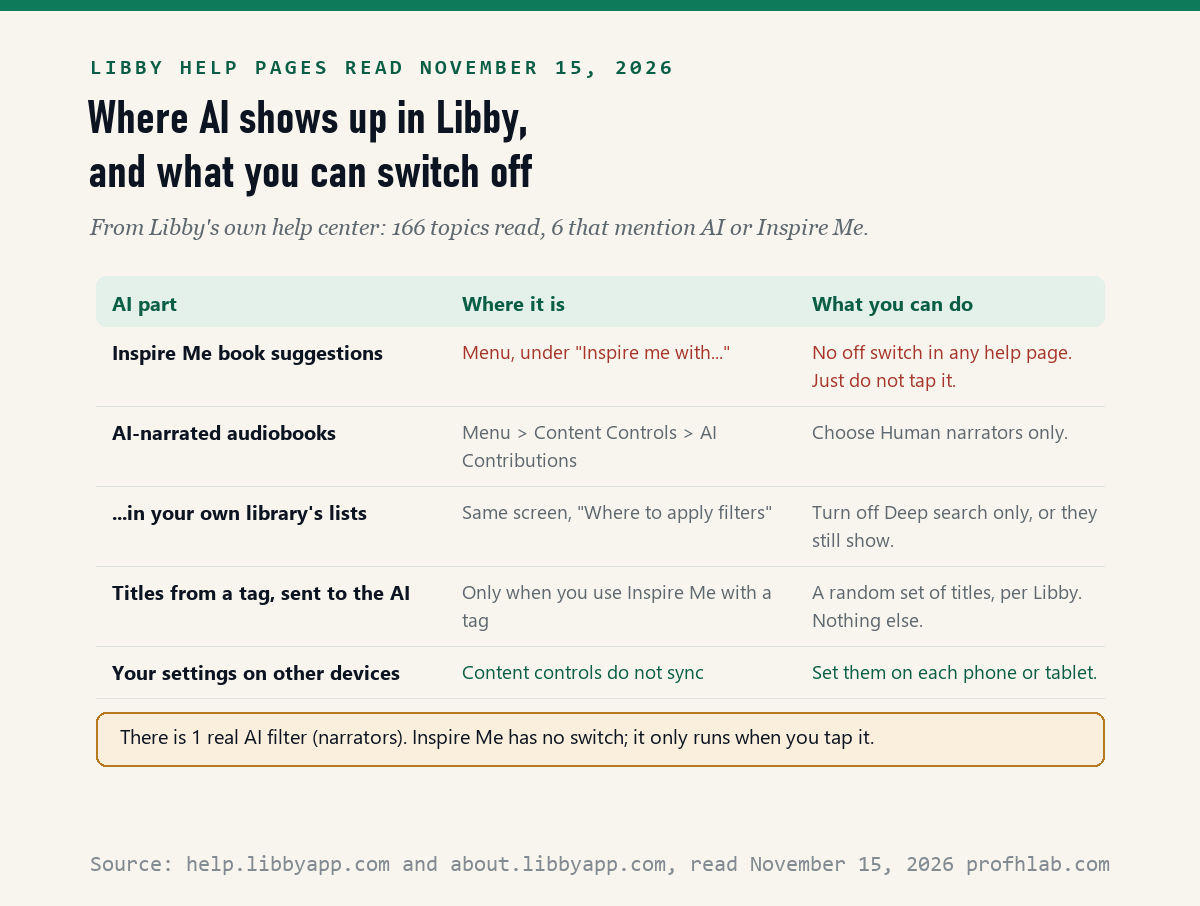
Partly: on November 15, 2026, we read all 166 Libby Help topics and found 1 AI filter, Human narrators only, under Menu > Content Controls > AI Contributions, and no switch at all for Inspire Me, Libby’s AI book-suggestion button. Inspire Me only runs when you tap it, so leaving it alone keeps that AI out of your reading.
Libby is the free library app run by OverDrive. In August 2025 it added an AI feature, and TechCrunch reported on August 26, 2025 that “not everyone is thrilled.” By October 2026, Libby’s help pages described a way to hide audiobooks read by computer voices. This guide shows both, using Libby’s own help pages, in plain steps.
What we checked on November 15, 2026
We read all 166 topic pages listed in the table of contents of help.libbyapp.com. 6 of them mention AI or Inspire Me. We also read Libby’s AI policy page (dated May 6, 2026), section 2.3.5 of the Libby privacy statement, and OverDrive’s responsible AI page (last updated January 9, 2025).
Then we counted. Using the same public catalog search the Libby website uses, we looked for audiobooks whose narrator is listed as a synthesized or digital voice at 4 big public libraries. We did not add a library card or flip the switches ourselves, so the menu steps are Libby’s words.
Written and checked by Prof. H. An AI assistant helped draft this article and ran the page reads; every quote was read on the source’s own page on the date shown.
Can you turn off AI in the Libby app at all?
Only one part of it: Libby’s help page “Getting started with content controls,” last updated October 14, 2026, says you can filter titles by audience or by “whether they contain contributions from AI,” and nothing in the 166 topics we read turns Inspire Me off.
So there are two different kinds of AI in Libby, and they work in different ways. Think of a library building. One is a new robot greeter at the door who suggests books. The other is a shelf of audiobooks read by computer voices.
You cannot send the greeter home, but you can walk past it. You can, however, ask the library to keep the computer-voice shelf out of your sight. The rest of this guide shows how to do each.
How do I hide AI-narrated audiobooks in Libby?
Turn on Human narrators only: Libby’s page “Setting up content controls in Libby,” last updated October 15, 2026, puts it under Menu, then Content Controls, then AI Contributions, in the “Audio” section.
- Open Libby and tap Menu.
- Under “Settings,” tap Content Controls.
- Choose AI Contributions.
- Under “Audio,” choose Human narrators only.
- Read the next section before you close the screen. One more toggle decides where the filter works.
Libby’s help center describes only this one AI preference step by step. Tech newsletter Lowpass reported on June 30, 2026 that Libby planned AI controls for authorship, narration, machine translation and AI-made art. We could not confirm the other three from Libby’s own pages, so we do not give steps for them.

Why do AI-voice audiobooks still show up after I picked human narrators?
Because of one default: Libby’s October 15, 2026 help page says Human narrators only “only hides titles when using deep search,” meaning titles your own library does not own, until you turn off the Deep search only toggle.
Deep search is the part of Libby that shows books from beyond your library’s collection. With the default setting, the filter cleans up that outer area but leaves your own library’s lists alone.
To hide computer-voiced audiobooks everywhere, stay on the AI Contributions screen. Under “Where to apply filters,” turn Deep search only off. Libby says this hides AI narrators “from all library lists and searches.”
This step matters more than it sounds. In our count below, every AI-voice title we found was already in a library’s own catalog, not out in deep search.
How many library audiobooks actually use an AI voice?
Very few, so far: on November 15, 2026 we counted 770 of 190,672 audiobooks at the Los Angeles Public Library (0.40%) and 159 of 120,532 at the New York Public Library (0.13%) with a narrator credit naming a synthesized or digital voice.
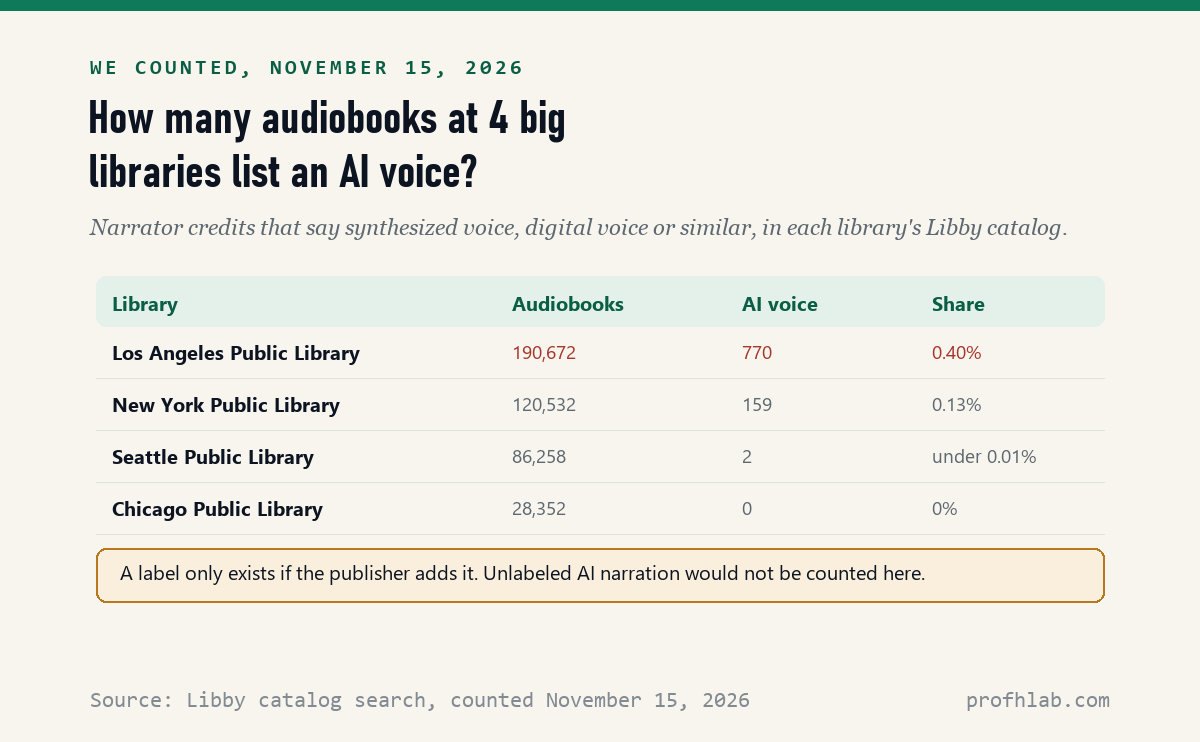
The labels look like “Synthesized voice – unspecified” or “Digital Voice” followed by a first name. Many of the titles we saw were old public-domain books, such as Thucydides’ The Peloponnesian War, and foreign-language editions.
Two limits. First, a label exists only if the publisher adds one; a computer-read book without a label would not show up in our count. Second, the totals are what each catalog search returned for audiobook formats on that day. They change as libraries buy and drop titles.
You can run the same check on your own library. In Libby’s search box, type synthesized voice, then digital voice, and look at the narrator line on each result.
What is Inspire Me, and does it read my borrowing history?
Inspire Me is Libby’s AI suggestion tool, and its suggestions are “produced by large-language-model generative artificial intelligence,” says Libby’s AI policy page dated May 6, 2026; it sends your saved titles to the AI only when you choose to use it with a tag.
There are two ways to use it, according to Libby’s help page “Discovering titles with Inspire Me,” last updated September 3, 2026:
- Fiction or nonfiction. You pick adults, teens or kids, a characteristic and an “inspiration,” and Libby shows 5 titles. The AI policy page says “none of your details or activity are provided to the AI model” in this mode.
- With a tag. A tag is a list you saved in Libby. It needs at least 20 titles, and you can use one tag per day. Libby says “a random selection of titles” from that tag goes to the AI, and the AI “does not know the name or the description of your tag.”
One point surprises people. Libby’s help suggests using Inspire Me with your Borrowed tag to get ideas “based on your reading history.” If you would rather keep your borrowing history away from any AI, simply do not pick that tag.
Libby’s privacy statement, section 2.3.5, adds: “We do not share identifying data about you or your Libby usage with these models.” We could not test this from outside; it is Libby’s statement.

Can I remove the Inspire Me button from the Libby menu?
No: none of the 166 Libby Help topics we read on November 15, 2026 describes a way to hide or turn off Inspire Me, and OverDrive’s responsible AI page calls it “an optional feature.”
“Optional” here means you choose whether to tap it. The button stays in the Menu, under “Inspire me with…”. Libby’s help page “Navigating the app” lists it as one of the things the Menu holds, next to library cards and settings.
If you never tap it, it never runs for you. Libby’s AI policy also says the AI never gets the chapters of ebooks or the recordings of audiobooks, and does not “generate or alter” the books it receives from publishers.
How do I lock these settings on a grandchild’s tablet or a shared iPad?
Use a passkey: Libby’s page “Locking content controls in Libby,” last updated October 14, 2026, says to tap Menu, then Content Controls, then Lock With A Passkey, and confirm with your device’s PIN, fingerprint or face.
A passkey is a digital key stored on your phone or tablet, opened with the same PIN or face scan you already use. Libby says passkeys work on Android 9 or newer and iOS 17 or newer.
Remember two things. Content controls “don’t sync between devices,” Libby says, so set them on every phone and tablet you use. And for a child’s tablet, Libby suggests a passkey saved on a different device, so the child cannot unlock it alone.
On a public library computer, Libby recommends Menu > Reset Everything when you finish. That clears all Libby data from that machine.
Milton Keynes Libraries and CCPL show these Libby screens on video
Ten minutes with Libby this weekend, in this order
- Turn on Human narrators only (Menu > Content Controls > AI Contributions).
- Turn off Deep search only on the same screen, so the filter covers your own library too.
- Repeat on every device. Phone, tablet and computer each keep their own settings.
- Lock it with a passkey if a child or grandchild uses the tablet.
- Skip the Borrowed tag in Inspire Me if you want your reading history kept away from the AI.
- Check a book before borrowing. Look at the narrator line. “Synthesized voice” or “Digital Voice” means a computer reads it.
- Ask your librarian if something looks wrong. Libby works on behalf of your library, and the staff can help in person.
If you read Libby books on a Kindle, Libby says most of its books can go to a Kindle ereader in the U.S. Kindle has its own AI settings, covered in our guide to turning off AI on Kindle.

Kindle, Spotify and YouTube put AI voices and suggestions in Libby-like places
Other apps that read to you or suggest what to read next have added similar AI, and each has its own switch:
- Audiobooks and podcasts: turning off AI on Spotify and stopping YouTube’s AI dubbing.
- Videos: YouTube’s AI switches and how to tell if a video is AI.
- Shopping and speakers: AI on Amazon and turning off Alexa+.
- Typing and phones: Grammarly, Google’s keyboard and iPhone AI summaries.
- Your living room: AI on your TV.
If you want to try AI on your own terms instead, start with ChatGPT for beginners over 50, talking to ChatGPT out loud or writing a memoir with ChatGPT. Before you type anything private, read what is safe to tell ChatGPT. For family tablets, see ChatGPT parental controls, and watch for AI scams aimed at seniors. All our beginner guides are on the Start Here page; we also track AI hiring on the AI jobs tracker, and you can send us a question on Ask Prof. H.
Libby readers keep asking about narrators, tags and sync
How do I turn off AI on Libby?
Go to Menu, Content Controls, AI Contributions and choose Human narrators only, then turn off Deep search only. Inspire Me has no off switch; it only runs if you tap it.
Does Libby use AI to read audiobooks?
Libby itself does not; some publishers sell audiobooks read by computer voices. On November 15, 2026 we found 770 such titles at the Los Angeles Public Library and 159 at the New York Public Library.
Can you turn off Inspire Me on Libby?
No. None of the 166 Libby Help topics we read describes a way to hide it. It stays in the Menu, but it does nothing unless you tap it.
Does Libby share my reading history with AI?
Only if you use Inspire Me with a tag, such as Borrowed. Then Libby says a random selection of titles from that tag goes to the AI, and nothing else about you.
Do Libby content controls sync to my other devices?
No. Libby says content controls do not sync between devices, so set them on each phone, tablet and computer.
How can I tell if a Libby audiobook has an AI narrator?
Look at the narrator line on the book’s page. Labels such as Synthesized voice or Digital Voice mean a computer reads it. Books without a label could still be computer-read.
Libby help topics, policies and catalog counts behind this guide
- Libby Help, Setting up content controls in Libby, last updated October 15, 2026; read November 15, 2026.
- Libby Help, Getting started with content controls, last updated October 14, 2026; read November 15, 2026.
- Libby Help, Locking content controls in Libby, last updated October 14, 2026, and locking with a passkey on another device, last updated September 3, 2026; read November 15, 2026.
- Libby Help, Discovering titles with Inspire Me, last updated September 3, 2026, and Using tags with Inspire Me, last updated October 14, 2026; read November 15, 2026.
- Libby Help, When should I sign out of Libby? and Reading Kindle Books on a Kindle ereader, both last updated September 3, 2026; read November 15, 2026.
- Libby, Libby & Artificial Intelligence, dated May 6, 2026; read November 15, 2026.
- Libby, Privacy Statement, section 2.3.5; read November 15, 2026.
- OverDrive, Responsible AI, last updated January 9, 2025; read November 15, 2026.
- Lowpass (Janko Roettgers), report on OverDrive’s AI plans, June 30, 2026; read November 15, 2026 (partly paywalled).
- Our count: audiobook narrator credits in the Libby catalogs of the Los Angeles, New York, Seattle and Chicago public libraries, through the public catalog search at thunder.api.overdrive.com, run November 15, 2026.
Prof.’s H Newsletter
One short email a month, with the numbers in it
What actually moved in AI hiring, AI prices, and the scams aimed at older Americans. Counted here, dated, and linked to the source. One email a month, and your address goes nowhere else.