How to Turn Off AI on LinkedIn: 12 Features, 3 Switches, and No Way Back to the Old Job Search
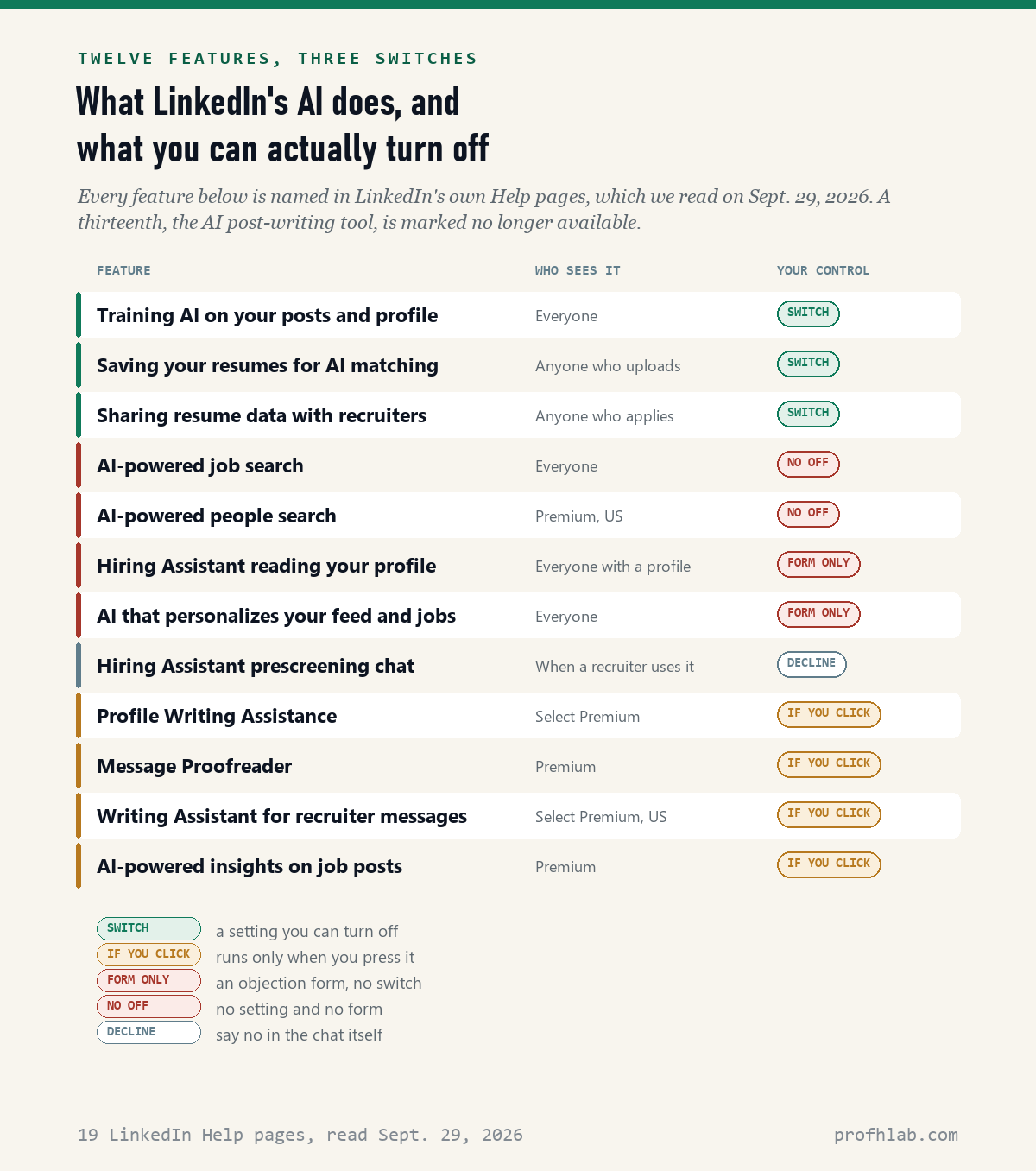
You can turn off some of the AI on LinkedIn, but not the part most people notice first. On September 29, 2026 we read 19 of LinkedIn’s own Help pages and found 12 AI features that reach an ordinary member, 3 settings you can switch off, and no setting that keeps the old, non-AI job search.
The switch almost everyone means is called Data for Generative AI Improvement. It takes about a minute to turn off. This page shows you where it is, what it really stops, and the two resume settings that sit on a different screen.
How we checked this
We read 19 pages in LinkedIn’s Help Center, including its generative AI questions page, its AI training settings page, its AI job search page and its pages on resumes and recruiter AI. We sorted every AI feature they name by what a member can do about it. We also read the nine results on the first page of a Google search for “how to turn off ai on linkedin.” Everything was read on Sept. 29, 2026.
An AI assistant helped draft this article and ran the page reads. Every quotation below was read on the source’s own page, on the date shown beside it.
So how do you turn off AI on LinkedIn?
Turn off one setting for training and look at two settings for your resume. That is the whole job for most people, and it takes three minutes.
The training setting is at Me > Settings & Privacy > Data privacy > Data for Generative AI Improvement. Switch off “Use my data for training content creation AI models.” On the phone app, tap your photo, then Settings, then Data privacy. You can also go straight to linkedin.com/mypreferences/d/settings/data-for-ai-improvement while signed in.
The resume settings are on the jobs side, at linkedin.com/jobs/application-settings/. One decides whether LinkedIn keeps copies of your resumes. The other decides whether recruiters can find you through them.
What you cannot do is switch the AI job search back to the old one. LinkedIn’s own page says it is “gradually retiring classic job search starting in September.”
Twelve AI features, and only three of them have an off switch
Most guides on the first page of Google stop at the training switch. That leaves out nine other things LinkedIn’s AI does with your account.
Three have a real switch. Training AI on your data. Saving your uploaded resumes, which LinkedIn uses for AI job matching. And sharing your resume data with recruiters.
Four only run when you press them. Profile Writing Assistance, Message Proofreader, the Writing Assistant for recruiter messages, and AI insights on job posts. All four are Premium features. If you never click them, they never write anything for you.
Two have no switch, only a form. The AI that personalizes your feed and job picks, and the recruiter tool called Hiring Assistant that reads your profile. Two have neither: AI job search and AI people search. The last one, a prescreening chat, you can simply decline.
What does the LinkedIn AI training setting actually stop?
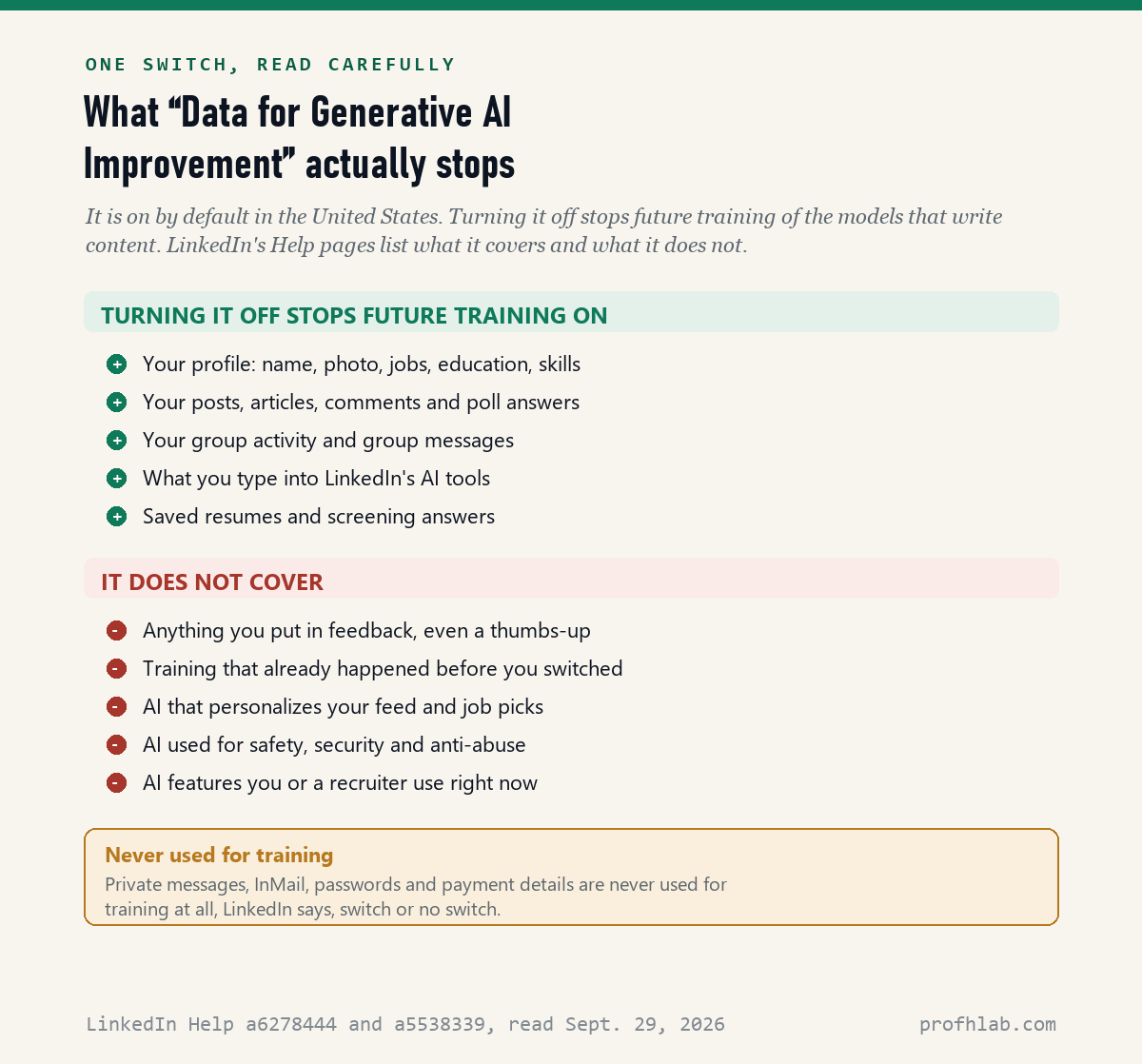
It stops LinkedIn and its affiliates from using your data to train the AI models that write content, from now on. LinkedIn’s page says it is “set to ‘on’ by default, unless you opt-out.”
The list of what it covers is longer than most people expect. LinkedIn’s questions page names your profile, including your name and photo. It names your posts, articles, comments and poll answers. It names group messages, what you type into its AI tools, and resumes and screening answers saved for future use.
Turning it off costs you nothing. LinkedIn says you “may still use our generative AI features” after opting out. Nothing on your account stops working.
What the training switch leaves out, in LinkedIn’s own words
This is the part worth reading twice, because four things carry on after you switch off.
Feedback. LinkedIn says that even if you opt out, anything you put in feedback, including “thumbs up or down,” may still be used to train its models. Its advice is to “be thoughtful about the information that you share in your feedback.” The simplest rule: do not press the thumbs on AI suggestions.
The past. “Opting out does not affect training that has already taken place.” If your account is older than September 2024, your data may already be in a model.
Other kinds of AI. The switch covers models that write. It does not cover models that personalize your feed or fight spam. For those, the only route is LinkedIn’s Data Processing Objection form.
Features in use right now. The setting “does not control the use of your data while you or others are using generative AI features.” A recruiter’s AI can still read your profile.
There is one piece of good news. LinkedIn says private messages, InMail, passwords and payment details are not used for training at all.
Is the LinkedIn AI training setting on by default in the United States?
Yes. LinkedIn’s own page says so, and it has been that way for two years.
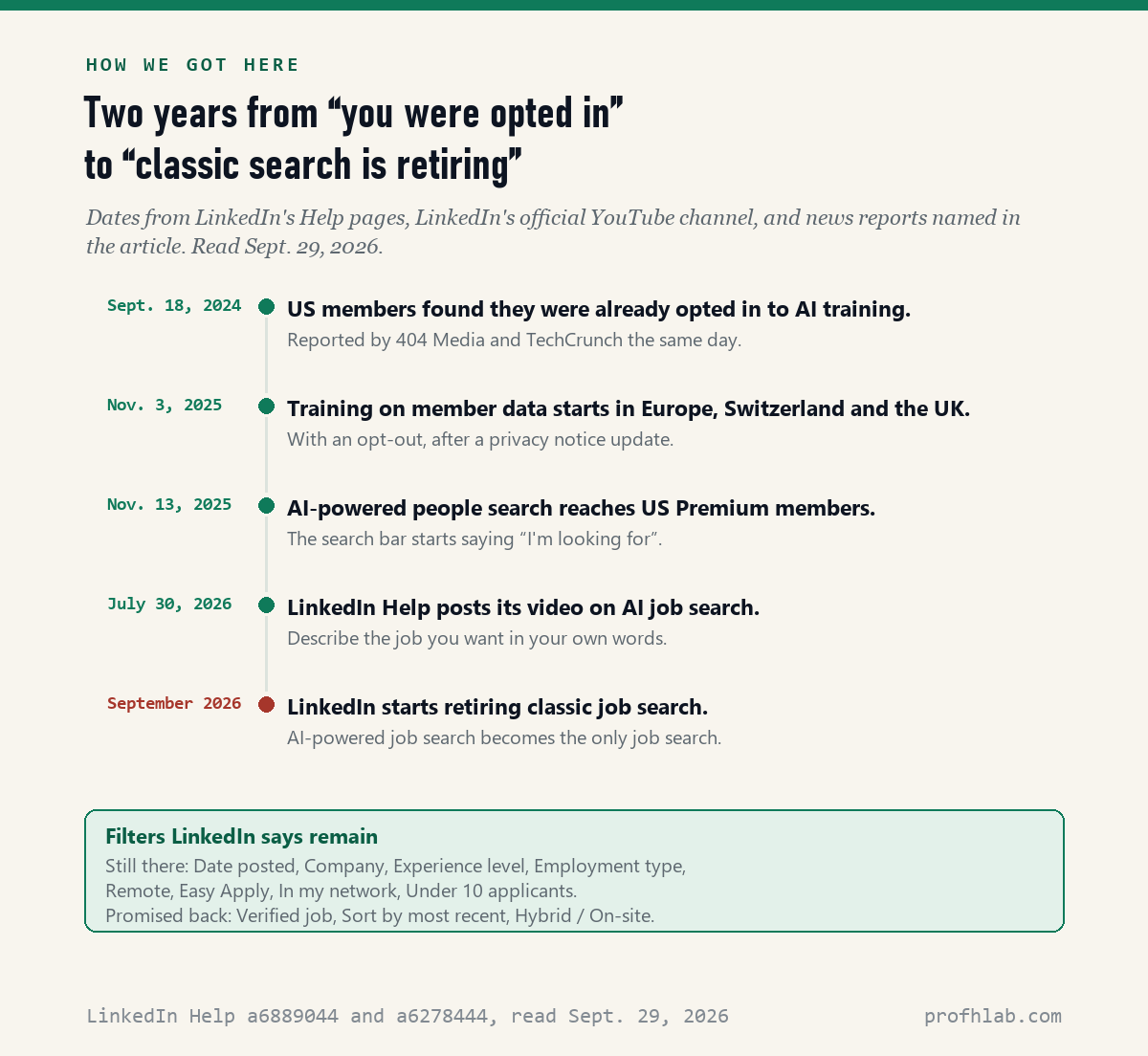
On September 18, 2024, 404 Media reported that LinkedIn was training on members’ data before it had updated its terms of service. Members outside Europe found the new setting already switched on. In Europe, Switzerland and the United Kingdom, training started later, on November 3, 2025, after a privacy notice update.
There is one more difference worth knowing. For members in Europe, LinkedIn says their data will not be made available to affiliates such as Microsoft for training “without further notice.” The page makes no such promise for members in the United States.
Can I turn off the AI job search on LinkedIn?
No. There is no setting for it, and the old search is being taken away. LinkedIn’s Help page says AI-powered job search “is available to all LinkedIn members worldwide” and that it is retiring classic job search starting in September.
You may still see a toggle between the two for a while, because the change is gradual. Older guides that tell you to “switch back to classic search” describe that toggle. LinkedIn’s own page does not name any way to keep it.
What you keep are the filters. LinkedIn lists eight that remain: Date posted, Company, Experience level, Employment type, Remote, Easy Apply, In my network and Under 10 applicants. It says three are coming back: Verified job, Sort by most recent, and Hybrid or On-site.
How to make the AI job search behave like the old one
The AI search reads plain English, so you can type the filters you used to click. LinkedIn’s own examples include “Entry-level sales jobs in healthcare posted in the last week.”
Three habits help. Put the job title in quotation marks if you only want that title. Name the city and the words “posted in the last week.” Then apply the Date posted filter on the results page as well, because the filter is exact and the sentence is not.
LinkedIn also says it may use “data from your profile and search activity to personalize your results.” Two people typing the same words can see different jobs. If you want a list that is the same for everyone, set up job alerts on the employers’ own career pages.

Should I turn off resume sharing on LinkedIn if I am job hunting?
Probably not while you are actively looking. This is the one place where turning something off can cost you.
LinkedIn keeps your four most recent uploaded resumes. It uses them for AI job matching and, unless you switch off the training setting, for training. You can stop it saving them at the application settings page.
The sharing switch is different. When it is on, recruiters can find you through what is in your saved resumes. LinkedIn says that after you apply for a job, “the Share resume data with recruiters toggle will be turned on.” Many people have it on without having chosen it.
If you are looking for work, leave sharing on and turn training off. If you are not looking, turn both off. LinkedIn also says it hides your shared resume from recruiters at your current company, but adds “we can’t guarantee complete privacy.”
Can I stop LinkedIn’s recruiter AI from reading my profile?
Only by filing a form, and LinkedIn warns it may make you harder to find. Hiring Assistant is the tool recruiters use to search, sort and message candidates. It reads your work history, education, skills, Open to Work settings and shared resumes.
LinkedIn’s page says that where you have a legal right to object, you can use the objection form and ask that your data not power its AI hiring agents. It then says you “may not appear as highly in hirer searches.”
For most job seekers that is a bad trade. A better way to stay in control is to decide what is on your profile, since the AI can only read what is there.
If a recruiter’s Hiring Assistant messages you, LinkedIn says the message “will be clearly labeled.” It may ask to send you a few questions. You can decline and wait for the recruiter, and LinkedIn says the tool “does not make any autonomous or automatic decisions.”

What nine top search results say, and what they miss
We read the nine results on the first page of Google for “how to turn off ai on linkedin” on Sept. 29, 2026. Three were too short to count: two LinkedIn posts and one newsletter page came back with fewer than 400 words.
Of the six we could read in full, none mentioned that classic job search is being retired, none mentioned the resume sharing switch, and none mentioned Hiring Assistant. The newest was dated Nov. 4, 2025. The longest, at more than 2,300 words, never named the training setting at all.
That is not a criticism of their writers. LinkedIn moved faster than their pages were updated. It is a reason to check the date on any guide before you follow it.
We did not sign in: menu names come from LinkedIn’s Help pages
We did not sign in to a LinkedIn account for this article. The menu names above come from LinkedIn’s Help pages and settings addresses, not from our own screen. LinkedIn changes menu wording often, so yours may differ slightly.
LinkedIn’s AI job search page does not give the year next to “starting in September.” We read it on Sept. 29, 2026, and LinkedIn’s official video on the new search was posted July 30, 2026.
We also did not test the objection form. LinkedIn says it will act “in accordance with applicable law,” which can mean different things in different states.
Your three-minute LinkedIn checklist
- Turn off training. Settings & Privacy > Data privacy > Data for Generative AI Improvement > off.
- Check resume saving. At linkedin.com/jobs/application-settings/, delete old resumes you no longer want kept.
- Decide on resume sharing. On if you are job hunting, off if you are not.
- Stop pressing the thumbs on AI suggestions. That feedback can still be used for training.
- Download your data once, from Settings & Privacy > Data privacy, to see what LinkedIn holds. LinkedIn says your AI conversations are kept “until you delete it.”

Opting out, private messages and the app-versus-website split
Does turning off AI training on LinkedIn delete my data?
No. It only stops future training of the models that write content. LinkedIn says opting out “does not affect training that has already taken place.” To delete data, use the Manage your personal data tools or close the account.
Will LinkedIn still work normally if I opt out?
Yes. LinkedIn says you may still use its generative AI features after opting out. Your profile, messages, job search and connections keep working exactly as before.
Why did the LinkedIn job search change?
LinkedIn replaced keyword search with AI-powered search that reads what you type in plain words. Its Help page says it is gradually retiring classic job search starting in September, to focus on “a single search experience.”
How do I turn off AI messages on LinkedIn?
For ordinary members, the AI writing tools in messages only appear when you click them, such as Message Proofreader for Premium. The auto-draft setting people search for belongs to LinkedIn Recruiter, a paid tool for hiring staff, not to member accounts.
Does LinkedIn use my private messages to train AI?
LinkedIn says no. Its list of data it will not use for training includes private messages, InMail and inbox messages, passwords and payment details. Group messages are on the list of data it does use.
Do I have to do this on the app and the website separately?
No. These are account settings, not device settings. Change them once, on either one, and they apply everywhere you sign in.
Brenda Meller clicks through the training switch
What employers do with your application after LinkedIn
This article is about what LinkedIn does. If you are applying for work, the next question is what employers do. We read 19 employers’ own pages to see whether you can opt out of AI resume screening, and counted how many application forms still ask for a cover letter. There is also whether to put ChatGPT on your resume and a list of AI jobs for people over 50.
Our own count of open roles is on the AI Jobs Tracker, with every posting on the jobs board. For one employer in depth, see whether Anthropic is hiring right now.
The same “where is the off switch” question has come up in Outlook, in Gmail, in Chrome, on Instagram, on Pinterest and on your phone. If you pay for Microsoft 365, see how to get it without Copilot.
Beware of fake recruiters as well; our guide to AI scams that target older adults covers the pattern. New to all of this? Begin at Start Here or using ChatGPT for the first time after 50. Send a question on the Ask page. Our method is at How We Count.
LinkedIn’s own help pages on generative AI and training data
- LinkedIn Help, LinkedIn and generative AI (GAI) FAQs – data used and not used for training, feedback, Microsoft Azure OpenAI, Europe, retention. Read Sept. 29, 2026.
- LinkedIn Help, Control whether LinkedIn uses your data to improve generative AI models – default on, not retroactive, what the setting does not cover. Read Sept. 29, 2026.
- LinkedIn Help, Discover new opportunities with AI-powered job search – retirement of classic job search, remaining and returning filters. Read Sept. 29, 2026.
- LinkedIn Help, How LinkedIn uses AI Agents to connect job seekers and hirers and Prescreening questions with Hiring Assistant. Read Sept. 29, 2026.
- LinkedIn Help, Visibility and usage of your uploaded resume and Share and manage your resumes with recruiters – four saved resumes, sharing turned on after applying. Read Sept. 29, 2026.
- LinkedIn Help pages a1444194, a1453665, a1487434, a7173927, a1728404 and a1517763 – the Premium writing and insight features, and the retired post-writing tool. Read Sept. 29, 2026.
- 404 Media, LinkedIn Is Training AI on User Data Before Updating Its Terms of Service, Sept. 18, 2024.
- TechCrunch, LinkedIn adds AI-powered search to help users find people, Nov. 13, 2025 – Premium members in the United States first.
- Google first-page results for “how to turn off ai on linkedin,” nine pages read Sept. 29, 2026; three returned fewer than 400 words and were not scored.
Corrections and questions go to the Ask page. If LinkedIn renames these settings or adds a way to keep classic job search, we will update this page and say what changed.
Prof.’s H Newsletter
One short email a month, with the numbers in it
What actually moved in AI hiring, AI prices, and the scams aimed at older Americans. Counted here, dated, and linked to the source. One email a month, and your address goes nowhere else.