How to Turn Off AI on Spotify: Only 1 of 7 AI Features Has a Real Switch
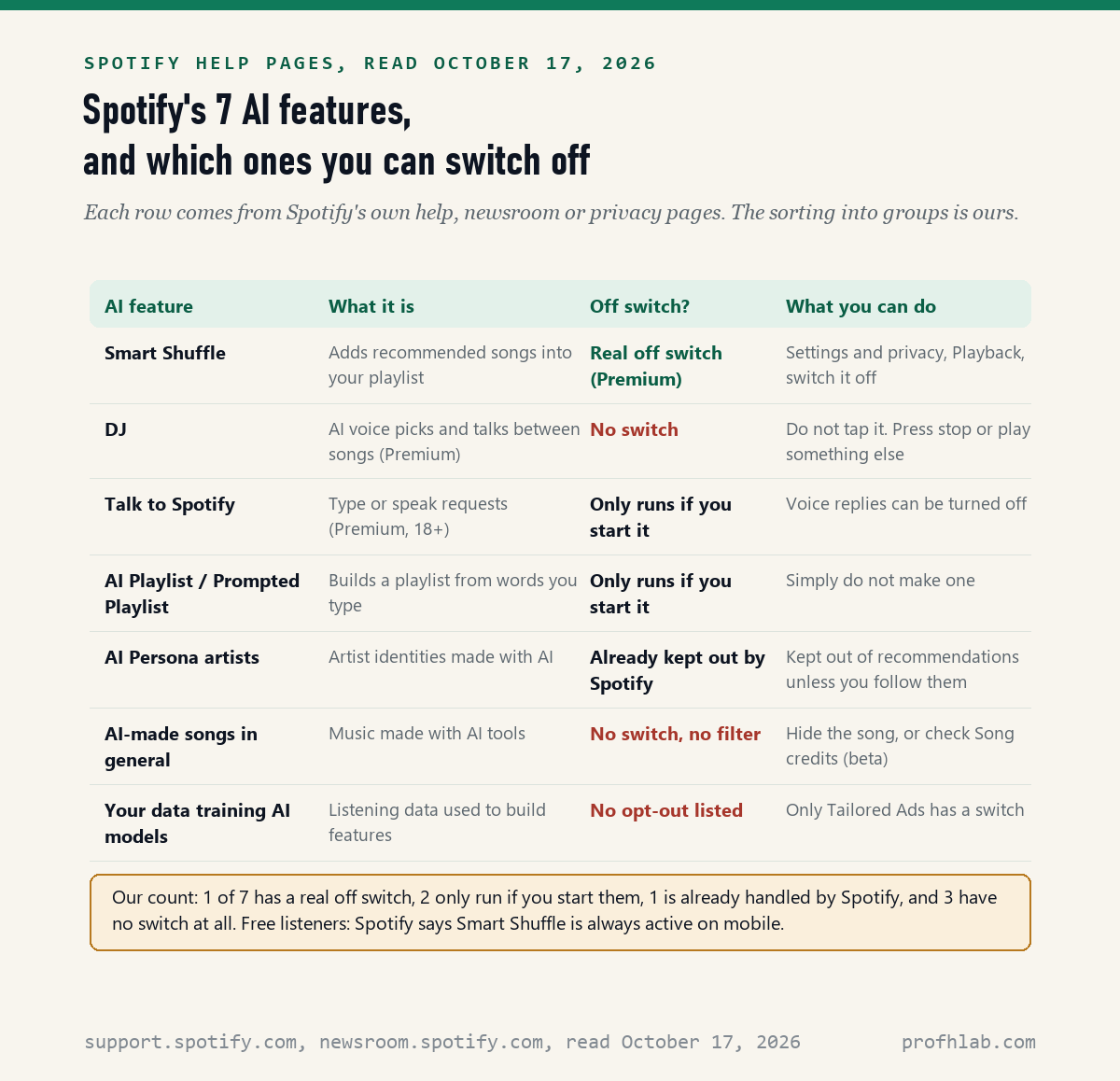
You can switch off only one of Spotify’s AI features with a real setting: on October 17, 2026 we read 23 Spotify help pages, sorted 7 AI features, and found that only Smart Shuffle has an off switch. The DJ, AI-made songs and the use of your listening data have no switch at all. Two more only run if you start them, and Spotify already handles the seventh, AI-invented artists, for you.
That sounds bleak, but it is not. Five taps remove most of the AI you will actually hear, and since mid-September 2026 Spotify itself keeps artists it labels as AI out of your recommendations. Below are the exact menu names, what each AI feature is, and what to do about the ones with no switch. If the DJ voice startled you, you did nothing wrong. It is new to everyone.
What we checked on October 17, 2026
We read 23 Spotify support pages, 6 Spotify newsroom posts (February 2023 to August 2026) and Spotify’s privacy policy effective July 1, 2026. We also opened 4 Spotify Community threads where listeners ask how to switch AI off, and copied the vote, view and reply counts shown on each.
Our own count: 1 of 7 AI features has a real off switch. The DJ help page gives 0 instructions for stopping or removing the DJ. The listener idea “Mark / Disable AI Generated Songs” has 14,535 votes and is still marked Live Idea. We did not sign in to a Spotify account, so menu names are copied from Spotify’s pages, not tested by us.
Written and checked by Prof. H. An AI assistant helped draft this article and ran the page reads; every quote was read on the source’s own page on the date shown.
How do I turn off Smart Shuffle on Spotify?
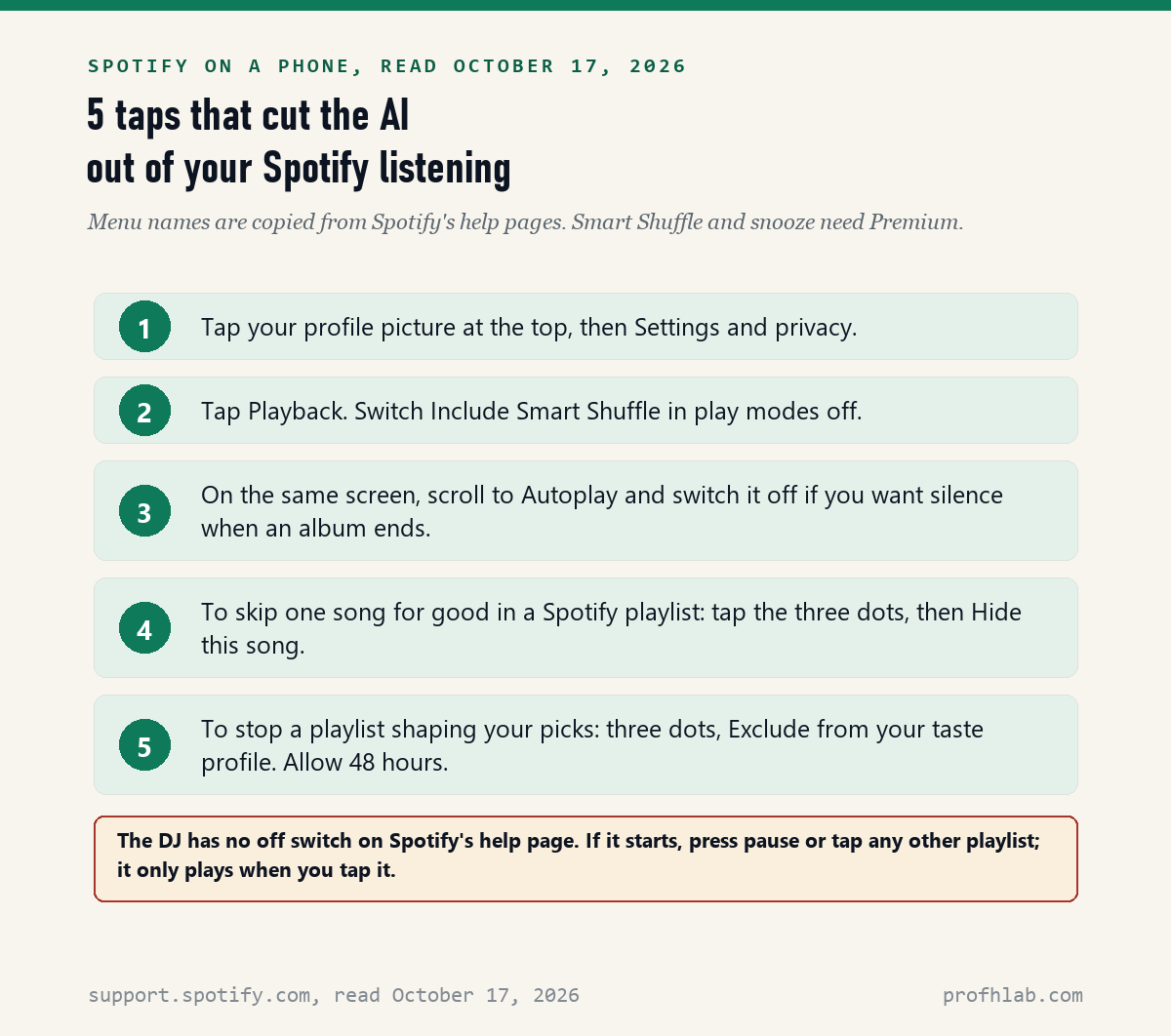
Spotify’s Smart Shuffle help page, last updated May 13, 2026, gives four steps: tap your profile picture, tap Settings and privacy, select Playback, and switch “Include Smart Shuffle in play modes” off. This is the only Spotify AI feature with a true off switch that we found.
Smart Shuffle is the feature that slips recommended songs into your own playlist. Spotify’s page says each added song carries a small mark next to the artist name. When people say “Spotify keeps adding songs I never picked,” this is usually why.
- Open Spotify on your phone.
- Tap your profile picture at the top.
- Tap Settings and privacy.
- Tap Playback.
- Find Include Smart Shuffle in play modes and switch it off.
There is a catch for free listeners. The same page says plainly: “Smart Shuffle is always active on mobile” for the free plan. So on a free phone account, the switch above is not offered. Only Premium can turn it off.
How do I turn off the AI DJ on Spotify?
You cannot switch the DJ off: Spotify’s DJ help page, last updated July 14, 2026, explains how to find and talk to the DJ but gives 0 instructions for stopping, hiding or removing it. The DJ only plays when you tap it, so the practical answer is to leave it alone.
A Spotify Community moderator said the same thing in the most-read DJ thread, opened March 1, 2023: press stop, exit, or play another track, playlist, podcast or audiobook. That thread had 160,476 views and 332 replies on October 17, 2026. Many replies ask for a hide button. None has appeared on the help page.
The DJ is a Premium feature. Spotify’s help page marks it “For: Premium,” and the May 7, 2026 newsroom post says it now reaches “over 75 markets worldwide.” Spotify’s page tells Premium listeners to find the DJ on Home, in Search, and in the Now Playing view.
Some listeners write that pressing and holding the DJ in Your Library offers a Remove option. We could not confirm that on any Spotify help page, so treat it as something to try, not a promise.
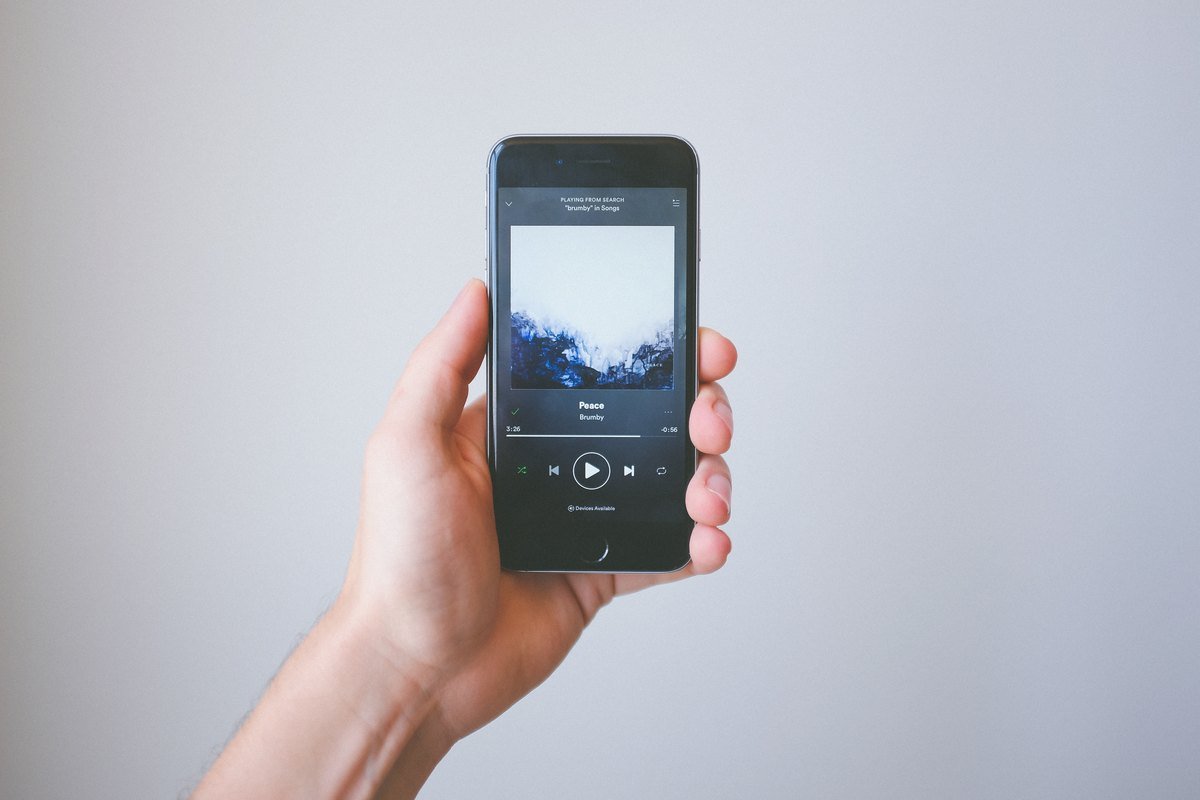
Is the Spotify DJ a real person or AI?
The DJ’s voice is AI, built from a real person: Spotify’s launch post of February 22, 2023 says “To create the voice model for the DJ, we partnered with our own Head of Cultural Partnerships, Xavier ‘X’ Jernigan.” The words are generated; X does not record each break.
The song picks come from Spotify’s recommendation system. The 2023 post says the DJ was rolling out “for Spotify Premium users in the U.S. and Canada.” Spanish speakers have their own voice, called Livi, announced July 17, 2024. In 2026 the DJ also answers typed or spoken requests.
Think of it like a radio host reading a script someone else wrote, except the script and the voice are both made by software. If you never tap the DJ card, it stays silent.
Can I block AI music on Spotify?
No: as of October 17, 2026, none of the 23 Spotify help pages we read offers a listener switch to hide or block AI-made songs. What changed is that Spotify now keeps artists it labels as “AI Persona” out of your recommendations by default, under a policy announced August 11, 2026.
Spotify’s newsroom post that day says: “By default, Spotify will not include AI Personas in any editorial or algorithmic recommendations.” It adds that you still hear them if you choose to, “unless you follow AI Personas, for example.” The labels began appearing in mid-September 2026.
There is a gap, though. The same post says: “This badge is about the artist’s public identity, not about how the music was made.” A human artist can release AI-made songs without the badge. So the default keeps out AI-invented artists, not every AI-made track.
Listeners have asked for more for a long time. The Spotify Community idea “Mark / Disable AI Generated Songs,” posted January 10, 2025, had 14,535 votes, 444,379 views and 2,140 comments on October 17, 2026. Its status was still Live Idea, which on that forum means open, not promised.
What does the AI Persona badge mean, and where will I see it?
Spotify’s AI Persona help page, updated September 23, 2026, says the badge marks an artist whose visual identity was made with AI, and it shows on the artist profile, in the expanded artist details and on artist cards in Search. Badges on song rows inside playlists are listed as “Coming soon.”
That last point matters. Inside a playlist, you may not yet see which song comes from a badged artist. Tap the artist name to open the profile and look for the badge near the top.
The help page also answers a fair worry. “Can I still listen to AI Persona artists? Yes.” Nothing is banned. The badge is a label, and the recommendation rule is a default, not a filter you control.
There is a second, opposite badge. On April 30, 2026, Spotify introduced Verified by Spotify, and said that “profiles that appear to primarily represent AI-generated or AI-persona artists are not eligible for verification.” A verified mark on an artist is a reasonable sign of a real person or band.

How do I hide one song, or stop it from coming back?
Spotify’s Hide songs help page, updated September 11, 2025, says to tap the three dots next to a song and tap “Hide this song,” which grays it out and skips it. It works in playlists made by Spotify or by other people, not in your own playlists.
Premium listeners get a softer option on the same menu. Choose Hide in this playlist, then “Don’t suggest this song anywhere for 30 days.” Use it when one AI-sounding track keeps turning up in Discover Weekly or Release Radar.
Two other settings help. Autoplay, found under Playback in Settings and privacy, plays similar songs when your album ends; switch it off if you want silence instead. And the taste-profile option keeps one playlist from steering your picks. Spotify says it “will take effect within 48 hours.”
For the taste profile, open a playlist, tap the three dots near the top, and choose “Exclude from your taste profile.” This is handy for a grandchild’s party playlist on your account. Spotify’s page notes you “can only exclude playlists or tracks” this way, not whole artists.
How do I report AI music on Spotify?
There is no listener button yet for reporting a suspected AI artist: Spotify’s August 11, 2026 post says that “in the coming months” listeners will be able to report profiles they believe are AI Personas. On October 17, 2026, that tool was not described on any help page we read.
For content that breaks Spotify’s Platform Rules in other ways, Spotify’s safety pages say to “report it through our secure reporting form.” We could not load that form without signing in, so we cannot tell you what it asks.
Voice clones are a separate case. Spotify’s September 25, 2025 post says vocal impersonation is “only allowed in music on Spotify when the impersonated artist has authorized the usage.” But its claim page says Spotify “must receive a claim from the artist or someone acting on their behalf,” so a fan cannot file it.
Does Spotify use my listening to train its AI?
Yes, and there is no opt-out listed: Spotify’s privacy policy effective July 1, 2026 says it uses listening data for the “development and training of algorithmic and machine learning models,” including “so we can build AI features such as AI DJ and AI playlist.” We found no setting that stops this.
The one privacy switch the policy does name is for advertising: “You can control tailored advertising through the ‘Tailored Ads’ setting.” That setting is about ads. The policy lists no matching switch for how Spotify trains its own features.
If this worries you, the same habits we suggest for chatbots apply here too. Keep sensitive details out of anything you type or say to Spotify’s DJ or Talk to Spotify. We explain why in our guide on whether it is safe to give ChatGPT your personal information.
How much AI music is on Spotify right now?
Nobody outside Spotify can count it, and Spotify has not published a total: the closest figure is in its September 25, 2025 post, which says that in the past 12 months it had “removed over 75 million spammy tracks.” That figure covers spam of all kinds, not only AI songs.
The same post, now updated, says artists submit “tens of thousands of AI credits” every day. AI credits are a voluntary note on how AI was used. Spotify’s AI credits page says they are mobile-only while in beta and “don’t appear on artist profiles or as track-level labels.”
To see them, play a song, scroll down the Now Playing screen to Credits, or tap the three dots and choose View song credits. An empty AI line does not prove a human made the song. It only means nobody disclosed AI use.
Spotify’s 34-second DJ advert, and CBS News on the new AI label
The first video is Spotify’s own short advert for the DJ, so you can recognize the feature. The second is a CBS News segment from August 11, 2026, in which CNET’s Kourtnee Jackson explains the AI label and the recommendation rule.

Free accounts, Premium, and the AI songs in Release Radar
Does Spotify have AI music?
Yes. Spotify allows AI-made music, and since mid-September 2026 it labels artists whose identity was made with AI as AI Persona. Those artists are left out of recommendations by default, but you can still search for them and play them.
Is the Spotify AI DJ only for Premium?
Yes. Spotify’s DJ help page, read October 17, 2026, marks the DJ “For: Premium.” Spotify lists no DJ for the free plan, so on a free account there is no DJ to turn off.
Does Spotify have rules against AI music?
It has rules against AI misuse, not against AI music. Spotify’s September 25, 2025 post bans unauthorized voice impersonation and describes a spam filter, and its August 11, 2026 post keeps AI Persona artists out of recommendations by default.
How do I stop Spotify from recommending AI songs?
Spotify already keeps AI Persona artists out of recommendations unless you follow them. For other songs, tap the three dots and use Hide this song, or, on Premium, snooze the song for 30 days. Unfollow any AI Persona artist you followed by accident.
Can I turn off Smart Shuffle without Premium?
No. Spotify’s Smart Shuffle page says that for the free plan, Smart Shuffle is always active on mobile. Premium listeners can switch it off under Settings and privacy, then Playback.
More apps where we counted the AI switches for you
We have done this same count for the other apps on most phones. Each guide gives the exact menu names and the date we checked them.
- How to get rid of AI on your phone, place by place
- How to turn off AI on TikTok
- How to turn off auto dubbing on YouTube
- How to tell if a video is AI on YouTube
- How to turn off AI on Amazon and how to turn off Alexa Plus
- How to turn off Meta AI on Instagram and on Facebook
- How to turn off AI on a Samsung TV and on other TVs
- How to turn off AI on Kindle
- How to turn off AI on Pinterest
- How to turn off AI in Google Photos
- How to set up parental controls on ChatGPT, if a grandchild shares your devices
A safety note. AI voices are also used by scammers, and a song app is not where they call from. If a voice on the phone sounds like a relative asking for money, hang up and call back. Our family safe word guide and AI scams targeting seniors show how. New to AI? Start at Start Here or our ChatGPT guide for beginners over 50.
Spotify help pages, newsroom posts and forum threads, each linked
- Spotify Support, Shuffle play and Smart Shuffle, updated May 13, 2026, read October 17, 2026.
- Spotify Support, DJ, updated July 14, 2026, read October 17, 2026.
- Spotify Support, AI Persona Badging, updated September 23, 2026, read October 17, 2026.
- Spotify Support, AI credits, updated April 16, 2026, read October 17, 2026.
- Spotify Support, Hide songs, updated September 11, 2025, read October 17, 2026.
- Spotify Support, Autoplay tracks, updated September 25, 2025, read October 17, 2026.
- Spotify Support, Exclude playlists or tracks from your taste profile, updated April 13, 2026, read October 17, 2026.
- Spotify Support, Talk to Spotify, updated October 15, 2026, read October 17, 2026.
- Spotify Support for Artists, Music that impersonates another artist’s voice, updated September 25, 2025, read October 17, 2026.
- Spotify Newsroom, Introducing a New Label for AI-Generated Artist Identities on Spotify, August 11, 2026, read October 17, 2026.
- Spotify Newsroom, Introducing Verified by Spotify, April 30, 2026, read October 17, 2026.
- Spotify Newsroom, Spotify Strengthens AI Protections for Artists, Songwriters, and Producers, September 25, 2025, read October 17, 2026.
- Spotify Newsroom, Your Personalized DJ Experience Is Expanding With 4 New Languages and More Markets, May 7, 2026, read October 17, 2026.
- Spotify Newsroom, Spotify Debuts a New AI DJ, Right in Your Pocket, February 22, 2023, read October 17, 2026.
- Spotify Newsroom, Spotify Brings AI DJ to Spanish-Speaking Music Fans Around the World, July 17, 2024, read October 17, 2026.
- Spotify, Privacy Policy, effective July 1, 2026, read October 17, 2026.
- Spotify, Reporting content (no date shown), read October 17, 2026.
- Spotify Community, Mark / Disable AI Generated Songs, posted January 10, 2025; votes, views and comments counted October 17, 2026.
- Spotify Community, How do I turn off the ai dj, opened March 1, 2023; views and replies counted October 17, 2026.
Featured image: Pierre-Auguste Renoir, Two Young Girls at the Piano, 1892, public domain, The Metropolitan Museum of Art (CC0), via Wikimedia Commons, cropped.
About the author. Prof. H writes profhlab’s AI for Beginners guides for readers who are new to AI or over 50. Each guide is built from the pages it quotes, read on the date shown. Spot an error, or did Spotify move a menu? Use the Ask page and we will fix it with a dated correction.
Prof.’s H Newsletter
One short email a month, with the numbers in it
What actually moved in AI hiring, AI prices, and the scams aimed at older Americans. Counted here, dated, and linked to the source. One email a month, and your address goes nowhere else.